Advanced Search

Search Results (Searched for: raspberry)

  • atrex77
  • atrex77's Avatar
13 Mar 2025 11:10

Developing a Raspberry Pi Pico-based I/O Board for LinuxCNC

Category: General LinuxCNC Questions

Hi everyone,I've started developing an I/O board using the Raspberry Pi Pico. The prototype will feature 8x 24V outputs and 16x 24V inputs, communicating over Ethernet UDP with a real-time HAL driver. If everything works well, I plan to develop additional boards with step generation, analog outputs, and encoder inputs.At the moment, things are still evolving—I'm currently having the first batch of 5 PCBs manufactured and have already ordered the necessary components. Communication between the Pico and the real-time HAL is already working. :)I'll keep you updated as the project progresses!
  • unknown
  • unknown
11 Mar 2025 19:42 - 11 Mar 2025 19:45

Linuxcnc & the Raspberry Pi (4 & 5) Official Images Only!!!

Category: Installing LinuxCNC

Wifi setup is by running
sudo menu-config

Be sure to edit to choose option 5 "Edit wpa_supplicant" with your country code, ssid & password.

To setup network for a mesa fpga Ethernet card, choose option 6 "Edit interface" and modify eth0 to match post above if you have jumpered the board for "FIXED FROM EEPROM"
If you have jumpered for "FIXED 192.168.1.121" replace 10.10.10.100 with 192.168.1.100.

If your home wifi network is on the 192.168.1 network, use the 10.10.10 network for your Mesa card, refer to you card's manual for jumpers to change.

After config reboot
To check the network type in a terminal
ip a

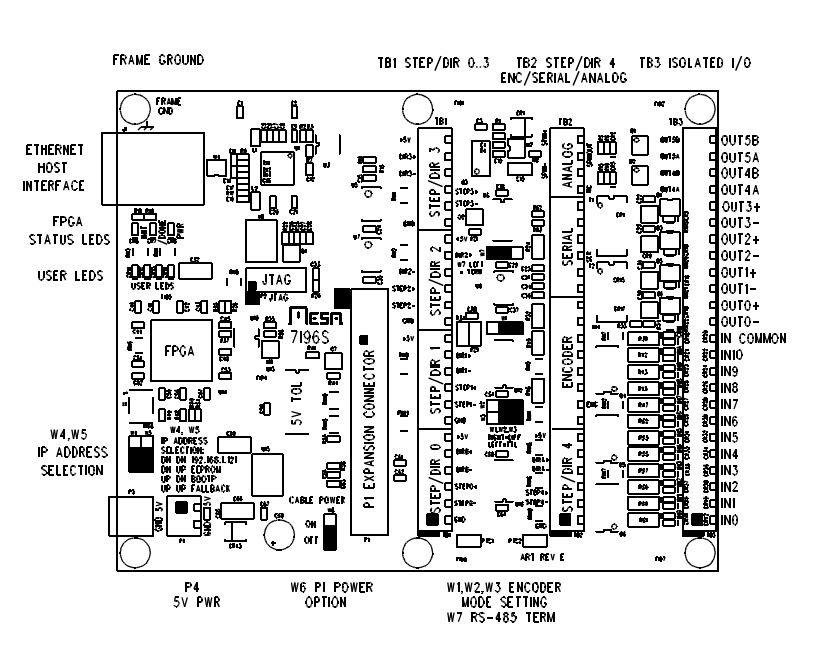
Taken from 7i92 Manual
IP ADDRESS SELECTION
The 7I92 has three options for selecting its IP address. These options are selected
by Jumpers W5 and W6.
W5   W6    IP ADDRESS
DOWN DOWN  FIXED 192.168.1.121 (DEFAULT)
DOWN UP    FIXED FROM EEPROM
UP   DOWN  BOOTP
UP   UP    INVALID
Note: that the initial EEPROM IP address is set to 10.10.10.10 at Mesa, but can be
changed to any address with the mesaflash utility.

A final note, there is no network notification applet for the desktop, so you will not get any notifications when the network connects, disconnects or reconnects.
  • n_ne
  • n_ne
11 Mar 2025 06:44
network issues was created by n_ne

network issues

Category: General LinuxCNC Questions

I am new to linuxcnc and I cannot get my Raspberry pi running linuxcnc to connect to wifi or to my mesa 7I92TM board. I tried ip a but the mesa board is not showing have looked everywhere online and read multiple forums but can't seem to find a proper solution to my problem. Please help.
  • unknown
  • unknown
10 Mar 2025 00:54

Custom "MESA 7c81 Clone" PCB featuring a Raspberry Pi Compute Module 5

Category: Driver Boards

Funny thing is, the Mesa 7c81 and a stacked RPi look like a more compact solution.

NVME would be nice, the RPi5 with a NVME drive is blazingly fast.


Did you stick with the Mesa fpga pin to 7c81 layout ? Or did you change it to make routing easier ?

If you change things around, especially the clock signal, the SPI_CLK for comms is a little tricky to work out to begin with.

Sorry don't mean to add feature creep, man I wish I could design a simple board for the KSZ8851 Ethernet chip for my mesa clone thingy. So hats off to you Old Chap.
  • unknown
  • unknown
10 Mar 2025 00:42

Raspi 5 touchscreen experience - recommendation

Category: Computers and Hardware

I have this one, used on my mill with a PC platform: Expensive
Planar Pct 2235 22" 1920X1080 Full HD Touch Screen VGA HDMI DISPLAY PORT USB

For the RPi5: Cheap
www.ebay.com.au/itm/225953008741

I would assume if the touchscreen interface is USB you should be fine. Tho the raspberry pi forums maybe a better resource, just look\ask for usb hid compatible touchscreen, stipulate USB HID is the only option.
  • cakeslob
  • cakeslob
09 Mar 2025 15:59

Custom "MESA 7c81 Clone" PCB featuring a Raspberry Pi Compute Module 5

Category: Driver Boards

The serial steppers are nice because they are easy to setup and they are also very quiet. I dont know if there is an fpga firmware for it thought. The SPI ones, someone has done a custom firmware to work with those.

What is W13 doing? Is it just for swapping between the usb or the green connector?
Consider adding a jumper that can disconnect power to the FPGA or separate the 5v rail between FPGA and RPi5. I found it convenient having a separate jumper for that, incase you needed to either separate the power between the 2, or if you need to reset the MCU/FPGA, you dont need to turn off the RPi

When you are done will you post the design on that easyeda website so I can clone it to modify it? Im also hesitant about a 1 board thing, but I wanted to make something with a swappable MCU/FPGA , and the formfactor looks pretty decent sized.
Displaying 466 - 471 out of 471 results.
Time to create page: 0.711 seconds
Powered by Kunena Forum