

- Posts: 19306
- Thank you received: 0
Mesa Card Basics
7 years 2 months ago #141789
by andypugh
Mesa Card Basics was created by andypugh
Mesa cards are add-on cards that offload the high-speed tasks to an FPGA.
The FPGA runs a firmware known as " Hostmot2 "
The interface between LinuxCNC and the card is in HAL, but at one level above that which you configure with the parallel port.
So, with a parallel port you connect motion to a stepgen, and then choose which physical pin to use for the step output, with a Mesa card you connect motion to a stepgen input pin on the FPGA interface, and the firmware on the card determines which physical pin is step and which direction.
A parallel port configuration which contained:
Would look like the following with a Mesa card:
Some cards load the firmware at every startup from the /lib/firmware directory. (5i20, 5i21, 7i43) whereas some have it permanently loaded and require it to be changed using the
mesaflash tool
Mesaflash can tell you the physical pin allocation of the installed firmware, but finding a firmware with a specific pin allocation is more difficult. One way is to download the Hostmot2 source file from Mesa and to look through the .vhd files (which are just about human-readable)
Mesa FPGA cards can connect to LinuxCNC through PCI, PCIe , EPP parallel port ( 7i43 , 7i90 ), Ethernet and SPI ( Pi version ) interfaces.
Many FPGA cards can additionally connect to expansion cards using the Mesa "smart serial" interface via CAT5 cables.
The FPGA runs a firmware known as " Hostmot2 "
The interface between LinuxCNC and the card is in HAL, but at one level above that which you configure with the parallel port.
So, with a parallel port you connect motion to a stepgen, and then choose which physical pin to use for the step output, with a Mesa card you connect motion to a stepgen input pin on the FPGA interface, and the firmware on the card determines which physical pin is step and which direction.
A parallel port configuration which contained:
Code:
net x-pos joint.0.motor-pos-cmd => stepgen.0.position-cmd
net x-step stepgen.0.step => parport.0.pin-01-out
Code:
net net x-pos joint.0.motor-pos-cmd => hm2_5i25.0.stepgen.00.position-cmd
Mesaflash can tell you the physical pin allocation of the installed firmware, but finding a firmware with a specific pin allocation is more difficult. One way is to download the Hostmot2 source file from Mesa and to look through the .vhd files (which are just about human-readable)
Mesa FPGA cards can connect to LinuxCNC through PCI, PCIe , EPP parallel port ( 7i43 , 7i90 ), Ethernet and SPI ( Pi version ) interfaces.
Many FPGA cards can additionally connect to expansion cards using the Mesa "smart serial" interface via CAT5 cables.
Please Log in to join the conversation.
7 years 2 months ago #141803
by pl7i92
Replied by pl7i92 on topic Mesa Card Basics
and on a ethernet upgrade like 7i92 to china mach 5axis bob
Code:
loadrt hm2_eth board_ip=192.168.1.121 config="num_stepgens=3, num_encoders=0, num_pwmgens=1"
setp hm2_7i92.0.stepgen.00.dirsetup [JOINT_0]DIRSETUP
setp hm2_7i92.0.stepgen.00.dirhold [JOINT_0]DIRHOLD
setp hm2_7i92.0.stepgen.00.steplen [JOINT_0]STEPLEN
setp hm2_7i92.0.stepgen.00.stepspace [JOINT_0]STEPSPACE
setp hm2_7i92.0.stepgen.00.position-scale [JOINT_0]STEP_SCALE
setp hm2_7i92.0.stepgen.00.step_type 0
setp hm2_7i92.0.stepgen.00.control-type 0
setp hm2_7i92.0.stepgen.00.maxaccel [JOINT_0]MAX_ACCELERATION
setp hm2_7i92.0.stepgen.00.maxvel [JOINT_0]MAX_VELOCITY
net x-pos-fb joint.0.motor-pos-fb <= hm2_7i92.0.stepgen.00.position-fb
net x-pos-cmd joint.0.motor-pos-cmd => hm2_7i92.0.stepgen.00.position-cmd
net x-enable joint.0.amp-enable-out => hm2_7i92.0.stepgen.00.enable
Attachment not found
Please Log in to join the conversation.

5 years 6 months ago #205447
by KcChris
Replied by KcChris on topic Mesa Card Basics
I'm wanting to switch to a mesa setup. Can help me understand a few things?
I'm a newbie and still trying to get my head wrapped around this.
(looking at 7i85 - 5i25 plug-n-go kit)
The 5i25 mesa board takes over control of stepgen? So now the latency of the pc doesn't matter?
Then the 7i85 for take care of sending signals to the stepper drives?
Also a side question, if running dual Y-axis motors, do I need a stepper driver for each or can I just wire the 2 motors together (step and direction)?
I'm a newbie and still trying to get my head wrapped around this.
(looking at 7i85 - 5i25 plug-n-go kit)
The 5i25 mesa board takes over control of stepgen? So now the latency of the pc doesn't matter?
Then the 7i85 for take care of sending signals to the stepper drives?
Also a side question, if running dual Y-axis motors, do I need a stepper driver for each or can I just wire the 2 motors together (step and direction)?
Please Log in to join the conversation.
5 years 6 months ago #205450
by andypugh
Yes, that's correct. There is an FPGA on the 5i25 that makes steps at very regular rate up to 10Mhz.
The rate is changed by the LinuxCNC serv-thread once every millisecond or so. A great deal of jitter in the millisecond timing can be tolerated as the actual position and step rate runs closed-loop inside LinuxCNC using a PID.
If your stepper drivers accept a differential signal then the 7i85S version is a better bet as that has differential line-drivers on board (much more noise tolerant)
But, it is probably better to use two stepper drivers. Then LinuxCNC can auto-square the gantry to separate home switches and overall control is likely to be better.
Replied by andypugh on topic Mesa Card Basics
KcChris wrote: The 5i25 mesa board takes over control of stepgen? So now the latency of the pc doesn't matter?
Yes, that's correct. There is an FPGA on the 5i25 that makes steps at very regular rate up to 10Mhz.
The rate is changed by the LinuxCNC serv-thread once every millisecond or so. A great deal of jitter in the millisecond timing can be tolerated as the actual position and step rate runs closed-loop inside LinuxCNC using a PID.
The 7i85 is basically just IO pin protection and voltage conversion. The pins on the 5i25 are only safe to +5V (and something like -0.7) whereas the pins on the 7i85 are protected from -7 to +12V. It also adds handy screw terminals.Then the 7i85 for take care of sending signals to the stepper drives?
If your stepper drivers accept a differential signal then the 7i85S version is a better bet as that has differential line-drivers on board (much more noise tolerant)
You can wire two motors in series, or in parallel. Series guarantees the same current through both, and it probably the safer idea, but back-emf is doubled so for a given supply voltage the top speed will be lower.Also a side question, if running dual Y-axis motors, do I need a stepper driver for each or can I just wire the 2 motors together (step and direction)?
But, it is probably better to use two stepper drivers. Then LinuxCNC can auto-square the gantry to separate home switches and overall control is likely to be better.
Please Log in to join the conversation.

4 years 1 month ago #251690
by clunc
Replied by clunc on topic Mesa Card Basics
Andy,
Thank you for this. As I read it, I find myself wishing it had comparisons for the spindle PWM and enable signals and home/limit switches and probe i/o as well.
Thank you for this. As I read it, I find myself wishing it had comparisons for the spindle PWM and enable signals and home/limit switches and probe i/o as well.
Please Log in to join the conversation.
3 years 4 months ago #273744
by MarcosK
Replied by MarcosK on topic Mesa Card Basics
Hi All,
I have already asked this (newbie question) to Mesa's tech support, but I repeat it here in case someone could drop me some lines on this:
I own a 7i96s card and have read the manual head to tail without being able to find this piece of input: I understand P4 will accept only 5v of DC but I fear that if I do not back up those 5v with enough amperage/current, it might end up drawing too much current and have a possibly lousy PSU collapse.
How much should a PSU (at 5V) be able to provide in terms of current? 2 Amps?, more?
Cheers and thanks again for any help,
Marcos
I have already asked this (newbie question) to Mesa's tech support, but I repeat it here in case someone could drop me some lines on this:
I own a 7i96s card and have read the manual head to tail without being able to find this piece of input: I understand P4 will accept only 5v of DC but I fear that if I do not back up those 5v with enough amperage/current, it might end up drawing too much current and have a possibly lousy PSU collapse.
How much should a PSU (at 5V) be able to provide in terms of current? 2 Amps?, more?
Cheers and thanks again for any help,
Marcos
Please Log in to join the conversation.
3 years 4 months ago #273745
by PCW
Replied by PCW on topic Mesa Card Basics
1A is more than enough
( Ignoring added Encoder or Expansion board load, the 7I96S only draws about 200 mA)
( Ignoring added Encoder or Expansion board load, the 7I96S only draws about 200 mA)
Please Log in to join the conversation.
2 years 11 months ago #286315
by Robbin
Replied by Robbin on topic Mesa Card Basics
Hello there,
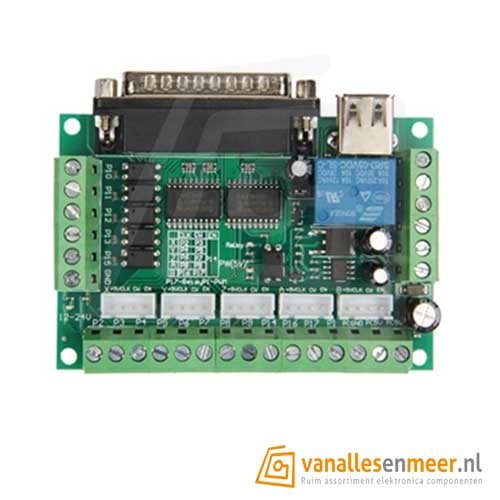
i am a new user of linuxcnc, recently i purchased a Mesa 7i92T card to go with the two 5 Axis Chinese bobs i already had for the plasma machine that it needs to control.
i am bit confused and can't find my answer anywhere.
are the step/dir outputs also capable of being an input? or do i need a different bob for all the end stop/switches etc.?
cheers, Robbin
i am a new user of linuxcnc, recently i purchased a Mesa 7i92T card to go with the two 5 Axis Chinese bobs i already had for the plasma machine that it needs to control.
i am bit confused and can't find my answer anywhere.
are the step/dir outputs also capable of being an input? or do i need a different bob for all the end stop/switches etc.?
cheers, Robbin
Please Log in to join the conversation.
- Cant do this anymore bye all
- Offline
- Platinum Member
-

Less
More
- Posts: 1199
- Thank you received: 0
2 years 11 months ago #286318
by Cant do this anymore bye all
Replied by Cant do this anymore bye all on topic Mesa Card Basics
Any IO pins that aren't used for a specific purpose revert to IO pins.
Just be sure that the second BoB you get supports changing the 8 pit port to either input or output, other wise you'll be stuck with 12 outputs & 5 inputs per card.
Something such as this is a example:
cnc4pc.com/bi-directional-parallel-port-card.html
This is one I have, unfortunately out os stock:
www.homanndesigns.com/index.php?main_pag...nqrjh2mun1b5lp4aubc2
Just be sure that the second BoB you get supports changing the 8 pit port to either input or output, other wise you'll be stuck with 12 outputs & 5 inputs per card.
Something such as this is a example:
cnc4pc.com/bi-directional-parallel-port-card.html
This is one I have, unfortunately out os stock:
www.homanndesigns.com/index.php?main_pag...nqrjh2mun1b5lp4aubc2
Please Log in to join the conversation.
Time to create page: 0.064 seconds