

- Posts: 106
- Thank you received: 0
Label for timers
10 years 5 months ago #74337
by tommy
Label for timers was created by tommy
I'm trying to implement timers found in following topic to my gladeVCP:
TIMER in pyVCP
I'm not sure how to properly format Hal_label so it would have colons between hours, minutes, seconds, as .ui file does not exist in my configuration, so all formatting is done trough glade editor.
PS.: my base gladeVCP is taken from manulatoolchange configuration.
TIMER in pyVCP
I'm not sure how to properly format Hal_label so it would have colons between hours, minutes, seconds, as .ui file does not exist in my configuration, so all formatting is done trough glade editor.
PS.: my base gladeVCP is taken from manulatoolchange configuration.
Please Log in to join the conversation.
- Todd Zuercher
- Offline
- Platinum Member
-

Less
More
- Posts: 4739
- Thank you received: 2
10 years 5 months ago #74339
by Todd Zuercher
Replied by Todd Zuercher on topic Label for timers
I have a timer set up with a gladevcp in a config, but I"ll have to hunt down the config files, (they are at work.)
Please Log in to join the conversation.
10 years 5 months ago #74344
by tommy
would be nice to see an example yes
Replied by tommy on topic Label for timers
Todd Zuercher wrote: I have a timer set up with a gladevcp in a config, but I"ll have to hunt down the config files, (they are at work.)
would be nice to see an example yes
Please Log in to join the conversation.
- Todd Zuercher
- Offline
- Platinum Member
-
Less
More
- Posts: 4739
- Thank you received: 2
10 years 5 months ago #74351
by Todd Zuercher
Replied by Todd Zuercher on topic Label for timers
Here I think this one should work.
Attachment not found
Please Log in to join the conversation.
- Todd Zuercher
- Offline
- Platinum Member
-
Less
More
- Posts: 4739
- Thank you received: 2
10 years 5 months ago #74352
by Todd Zuercher
Basically the trick to making the hours, minutes, seconds display look like H:M:S is to set it up as 3 separate hal lables seperated by 2 ordinary lables for the colons. So you will have a hal lable for Hours, then an ordinary label for a colon, then a hal label for the minutes, then lable colon, then hal label for the seconds. Maybe there is a better way but that is how I did it.
Replied by Todd Zuercher on topic Label for timers
tommy wrote: I'm trying to implement timers found in following topic to my gladeVCP:
TIMER in pyVCP
I'm not sure how to properly format Hal_label so it would have colons between hours, minutes, seconds, as .ui file does not exist in my configuration, so all formatting is done trough glade editor.
PS.: my base gladeVCP is taken from manulatoolchange configuration.
Basically the trick to making the hours, minutes, seconds display look like H:M:S is to set it up as 3 separate hal lables seperated by 2 ordinary lables for the colons. So you will have a hal lable for Hours, then an ordinary label for a colon, then a hal label for the minutes, then lable colon, then hal label for the seconds. Maybe there is a better way but that is how I did it.
Please Log in to join the conversation.
10 years 5 months ago #74503
by tommy
Replied by tommy on topic Label for timers
It works nice, I managed to implement those two timers (cycle and cumulative).
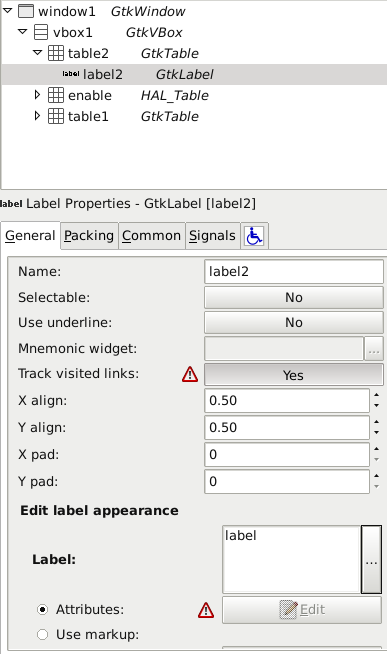
Now I wanted to do some visual refinements on my gladeVCP contents but I have grayed out Edit button and that triangle sign saying: "This property is not supported in libglade format".
Is there any other way to format my contents (increase font, bold, etc...)?
Now I wanted to do some visual refinements on my gladeVCP contents but I have grayed out Edit button and that triangle sign saying: "This property is not supported in libglade format".
Is there any other way to format my contents (increase font, bold, etc...)?
Please Log in to join the conversation.
- Todd Zuercher
- Offline
- Platinum Member
-
Less
More
- Posts: 4739
- Thank you received: 2
10 years 5 months ago #74506
by Todd Zuercher
Replied by Todd Zuercher on topic Label for timers
I'm not sure what "Edit button and that triangle sign" your reffering to.
Normally to change the font properties of a label, scroll down and click the Attributes radio button under Edit Label Appearance, then click Edit. This will open a window with a bunch of options for controlling the appearance of the text in the label.
Alternatively there are ways of controlling a labels appearance dynamically from the python file.
Normally to change the font properties of a label, scroll down and click the Attributes radio button under Edit Label Appearance, then click Edit. This will open a window with a bunch of options for controlling the appearance of the text in the label.
Alternatively there are ways of controlling a labels appearance dynamically from the python file.
Please Log in to join the conversation.
10 years 5 months ago #74507
by tommy
Replied by tommy on topic Label for timers
For better understanding:
Please Log in to join the conversation.
- Todd Zuercher
- Offline
- Platinum Member
-
Less
More
- Posts: 4739
- Thank you received: 2
10 years 5 months ago #74508
by Todd Zuercher
Replied by Todd Zuercher on topic Label for timers
What versions of Linux and Glade are you running?
Please Log in to join the conversation.
10 years 5 months ago #74511
by tommy
LinuxCNC 2.7.3
Glade: 3.8.0
Debian wheezy
PS.: If I open your dig5.glade file in glade, Edit button is not grayed out.
Replied by tommy on topic Label for timers
Todd Zuercher wrote: What versions of Linux and Glade are you running?
LinuxCNC 2.7.3
Glade: 3.8.0
Debian wheezy
PS.: If I open your dig5.glade file in glade, Edit button is not grayed out.
Please Log in to join the conversation.
Time to create page: 0.121 seconds