

- Posts: 1916
- Thank you received: 0
gmoccapy 2.1.0 has been released
10 years 2 months ago #78335
by newbynobi
gmoccapy 2.1.0 has been released was created by newbynobi
Hallo,
I released gmoccapy 2.1.0

What is new?
You may take a look on YouTube
Norbert waiting for your comments
I released gmoccapy 2.1.0
Attachment not found
What is new?
- gmoccapy does support the new master branch, supporting Joint Axis mode
- It does support 5 axis
- it supports 8 joints
- The program name moved to the preview, leaving more space in the info tab
- New touchscreen controls, replacing the previous used sliders
- Unfortunately renaming of hal pin to group them, so be aware that you will have to change hal files
You may take a look on YouTube
Norbert waiting for your comments
Please Log in to join the conversation.
- tommylight
-

- Offline
- Administrator
-

Less
More
- Posts: 22010
- Thank you received: 3
10 years 2 months ago #78338
by tommylight
Replied by tommylight on topic gmoccapy 2.1.0 has been released
From a glimpse .......much better !!! :laugh: :laugh: :laugh:
I use mostly FHD monitors, so using Gmoccapy was not on the list, but i do like it very much on low resolution screens.
I never had the time to fiddle with it to make things i need bigger, as i use a lot of plasma cutters, and that was for me unusable.
Will give it a try for sure ( i always do ), and report back.
Danke schon, Norbert
MFG
Tom
I use mostly FHD monitors, so using Gmoccapy was not on the list, but i do like it very much on low resolution screens.
I never had the time to fiddle with it to make things i need bigger, as i use a lot of plasma cutters, and that was for me unusable.
Will give it a try for sure ( i always do ), and report back.
Danke schon, Norbert
MFG
Tom
Please Log in to join the conversation.
10 years 2 months ago #78344
by newbynobi
Replied by newbynobi on topic gmoccapy 2.1.0 has been released
Thanks Tom,
gmoccapy runs fine on Full HD, (1920 x 1080), at least here
I unfortunately do not have a TouchScreen with that resolution, my touch has SXGA (1280 x 1024) and I made all controls to be used with the finger on that resolution. Most users seem to use still a mouse What Gui do you use at the moment?
Do you know gmoccapy_plasma? A screen supported from Marius special made for plasma cutter. It is original gmoccapy with Emmbeded Tabs on nearly all posible places!
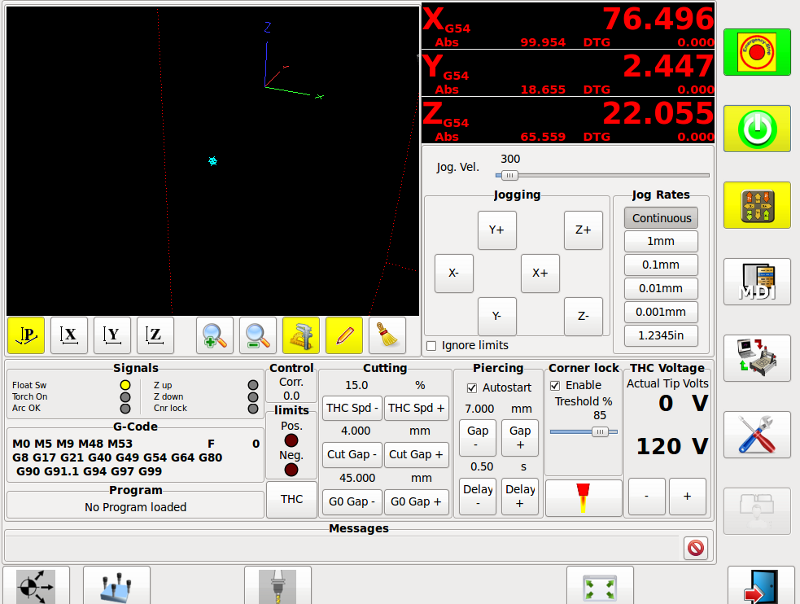
If you make a draft of the screen you need, I could look if it possible to realize. Just changing the size of the controls is easy and can be done in very short time. It is just editing the glade file and replace the existing one.
So waiting for your screen design sketch
Norbert
gmoccapy runs fine on Full HD, (1920 x 1080), at least here
I unfortunately do not have a TouchScreen with that resolution, my touch has SXGA (1280 x 1024) and I made all controls to be used with the finger on that resolution. Most users seem to use still a mouse
What Gui do you use at the moment?Do you know gmoccapy_plasma? A screen supported from Marius special made for plasma cutter. It is original gmoccapy with Emmbeded Tabs on nearly all posible places!
If you make a draft of the screen you need, I could look if it possible to realize. Just changing the size of the controls is easy and can be done in very short time. It is just editing the glade file and replace the existing one.
So waiting for your screen design sketch
Norbert
Please Log in to join the conversation.
- tommylight
-
- Offline
- Administrator
-
Less
More
- Posts: 22010
- Thank you received: 3
10 years 2 months ago #78347
by tommylight
Replied by tommylight on topic gmoccapy 2.1.0 has been released
Thank you very much, Norbert,
I do know of a plasma gmoccapy and i was referring to it for having way to small buttons and stuff under the main screen when used with a FHD screen.
I can use anything for my needs, and i use AXIS mostly as it is very elegant and without clutter, and it is easy to get used to from the customers point of view, but gmoccapy looks more industrial so i would like to use it with touch screens.
Thank you for offering to modify it to my needs, i really appreciate it, but i realy like the way it looks and feels with the new sliders, so we are all good.
With utmost respect,
Tom
I do know of a plasma gmoccapy and i was referring to it for having way to small buttons and stuff under the main screen when used with a FHD screen.
I can use anything for my needs, and i use AXIS mostly as it is very elegant and without clutter, and it is easy to get used to from the customers point of view, but gmoccapy looks more industrial so i would like to use it with touch screens.
Thank you for offering to modify it to my needs, i really appreciate it, but i realy like the way it looks and feels with the new sliders, so we are all good.
With utmost respect,
Tom
Please Log in to join the conversation.
- tommylight
-
- Offline
- Administrator
-
Less
More
- Posts: 22010
- Thank you received: 3
10 years 2 months ago #78371
by tommylight
Replied by tommylight on topic gmoccapy 2.1.0 has been released
Well, this is how it looks on 2 of my laptops and 2 monitors attached to plasma and a micro mill.
Regards,
Tom
Regards,
Tom
Please Log in to join the conversation.

10 years 2 months ago #78514
by Rubenv
Replied by Rubenv on topic gmoccapy 2.1.0 has been released
Norbert
Maybe a stupid question, but how do I get it?
Ruben
Maybe a stupid question, but how do I get it?
Ruben
Please Log in to join the conversation.
10 years 2 months ago #78540
by newbynobi
Replied by newbynobi on topic gmoccapy 2.1.0 has been released
Hallo Ruben,
A question is neve rstupid, only persons not willing to answer :laugh:
It is included in master, so get it through git or buildbot.
If you need help, we are here!
Norbert
A question is neve rstupid, only persons not willing to answer :laugh:
It is included in master, so get it through git or buildbot.
If you need help, we are here!
Norbert
Please Log in to join the conversation.
10 years 2 months ago #79604
by Rubenv
Replied by Rubenv on topic gmoccapy 2.1.0 has been released
Thanks Norbert!
Do you know when it will be released with the normal build cycle?
R
Do you know when it will be released with the normal build cycle?
R
Please Log in to join the conversation.
10 years 2 months ago #79611
by newbynobi
Replied by newbynobi on topic gmoccapy 2.1.0 has been released
No, sorry.
Norbert
Norbert
Please Log in to join the conversation.

10 years 2 months ago #79731
by tarasko
Replied by tarasko on topic gmoccapy 2.1.0 has been released
Hi. First of all thanks for a new release of this cute interface.
I want to report a few bugs.
1. Spindle speed is reporting 0 when I'm running a g-code program with command 's12000 m3'
2. Transition from AUTO -> MDI doesn't work when I'm pressing F3 key after program finish.
Thanks.
I want to report a few bugs.
1. Spindle speed is reporting 0 when I'm running a g-code program with command 's12000 m3'
2. Transition from AUTO -> MDI doesn't work when I'm pressing F3 key after program finish.
Thanks.
Please Log in to join the conversation.
Time to create page: 0.063 seconds