
- Posts: 1018
- Thank you received: 0
Tool Probe not reacting
- Mike_Eitel
- Topic Author
- Offline
- Platinum Member
-

Less
More
7 years 9 months ago #123338
by Mike_Eitel
Tool Probe not reacting was created by Mike_Eitel
Happy new year
I have newest master with gmoccappy
And versers probe screen in a tab.
If I probe it reacts on my probe as expected.
But in gmoccappy when I try to use m6 with tool length it does not recognize the prob signal. Only stops with error that max length is reached.
What have I done wrong / forgotten to connect?
Thx in advance
Mike
I have newest master with gmoccappy
And versers probe screen in a tab.
If I probe it reacts on my probe as expected.
But in gmoccappy when I try to use m6 with tool length it does not recognize the prob signal. Only stops with error that max length is reached.
What have I done wrong / forgotten to connect?
Thx in advance
Mike
Please Log in to join the conversation.
7 years 9 months ago #123342
by newbynobi
Replied by newbynobi on topic Tool Probe not reacting
What have you connected to what?
May even be, that the probe screen does disable the touch, if the page is not active.
We will need to see your config to go on.
Norbert
May even be, that the probe screen does disable the touch, if the page is not active.
We will need to see your config to go on.
Norbert
Please Log in to join the conversation.
- Mike_Eitel
- Topic Author
- Offline
- Platinum Member
-
Less
More
- Posts: 1018
- Thank you received: 0
7 years 9 months ago #123346
by Mike_Eitel
Replied by Mike_Eitel on topic Tool Probe not reacting
In the meantime I see some reactions but I'm struggling eventually with basics:
My z runs from top +0 to -119 down
The values in ini and settings that you describe are always positive.
Do I have to give the values positive, means you calculate them from min position
or do I have to give them absolute negative "positions".
Same question for probe in settings.
And one more in the change.ngc is a comment that the following is commented out because of sim. Do I have to delete the comma in the next two lines?
Thx in advance
Mike
My z runs from top +0 to -119 down
The values in ini and settings that you describe are always positive.
Do I have to give the values positive, means you calculate them from min position
or do I have to give them absolute negative "positions".
Same question for probe in settings.
And one more in the change.ngc is a comment that the following is commented out because of sim. Do I have to delete the comma in the next two lines?
Thx in advance
Mike
Please Log in to join the conversation.
- Mike_Eitel
- Topic Author
- Offline
- Platinum Member
-
Less
More
- Posts: 1018
- Thank you received: 0
7 years 9 months ago #123349
by Mike_Eitel
Replied by Mike_Eitel on topic Tool Probe not reacting
Here my config.
And I have the impression that the Z goes near to the tool-probe ( into minus), but them starts probing in the wrong direction ( values count up towards plus)
How can i invert that.
THX Mike
And I have the impression that the Z goes near to the tool-probe ( into minus), but them starts probing in the wrong direction ( values count up towards plus)
How can i invert that.
THX Mike
Attachment not found
Please Log in to join the conversation.
7 years 9 months ago #123355
by newbynobi
Replied by newbynobi on topic Tool Probe not reacting
Did you read this?
linuxcnc.org/docs/html/gui/gmoccapy.html...apy:tool-measurement
To go down use negative value!
Norbert
linuxcnc.org/docs/html/gui/gmoccapy.html...apy:tool-measurement
To go down use negative value!
Norbert
Please Log in to join the conversation.
- Mike_Eitel
- Topic Author
- Offline
- Platinum Member
-
Less
More
- Posts: 1018
- Thank you received: 0
7 years 9 months ago #123360
by Mike_Eitel
Replied by Mike_Eitel on topic Tool Probe not reacting
Hi Norbert
Yes, and start to understand more and more what I read.
I'm already close what I see in your YouTube.
In the moment I set probe hight to z=0 as I see the block hight measured from the probe tripping point, as I can not set a negative value in setting...
Mike
Yes, and start to understand more and more what I read.
I'm already close what I see in your YouTube.
In the moment I set probe hight to z=0 as I see the block hight measured from the probe tripping point, as I can not set a negative value in setting...
Mike
Please Log in to join the conversation.
- Mike_Eitel
- Topic Author
- Offline
- Platinum Member
-
Less
More
- Posts: 1018
- Thank you received: 0
7 years 9 months ago #123466
by Mike_Eitel
Replied by Mike_Eitel on topic Tool Probe not reacting
Hi Norbert
Sorry if I coming back, think I did not clearly expressed my question.
Up Z is 0, down is - 130
My tool probe is - 90
My block should be -50
But I can not insert negative value in settings.
Or do I think wrong?
Thx in advance
Mike
Sorry if I coming back, think I did not clearly expressed my question.
Up Z is 0, down is - 130
My tool probe is - 90
My block should be -50
But I can not insert negative value in settings.
Or do I think wrong?
Thx in advance
Mike
Please Log in to join the conversation.
7 years 9 months ago #123468
by newbynobi
Replied by newbynobi on topic Tool Probe not reacting
Hallo Mike,
yes you are thinking the wrong way!
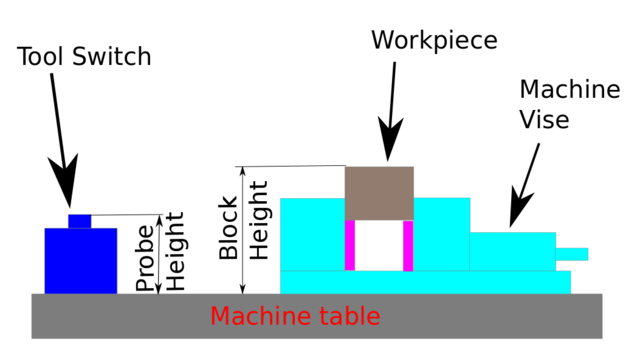
Probe hight is measured from the table to the top
Block height is also measured from the table and possitiv.
Are your tool probe lower than the table?
Norbert
yes you are thinking the wrong way!
Probe hight is measured from the table to the top
Block height is also measured from the table and possitiv.
Are your tool probe lower than the table?
Norbert
Please Log in to join the conversation.
- Mike_Eitel
- Topic Author
- Offline
- Platinum Member
-
Less
More
- Posts: 1018
- Thank you received: 0
7 years 9 months ago #123478
by Mike_Eitel
Replied by Mike_Eitel on topic Tool Probe not reacting
No but
My zero is 130 mm higher than tool table.
If I set a positive value for tool switch z wants to go higher then my max 0.
Mike
My zero is 130 mm higher than tool table.
If I set a positive value for tool switch z wants to go higher then my max 0.
Mike
Please Log in to join the conversation.
7 years 9 months ago #123536
by newbynobi
Replied by newbynobi on topic Tool Probe not reacting
Hallo Mike,
I checked your posted INI File, You did enter a positive MAXPROBE value, but that need to be negative, so change that to be:
Now enter in gmoccapy settings page
blockheight = 95
probeheight = 35
searchvel = 75
probevel = 10
Test with no tool, and press the tool switch with you fingers, report about the results and adapt the values for probeheight and blockheight to your needs.
Anytime a finger on estop!
Norbert
I checked your posted INI File, You did enter a positive MAXPROBE value, but that need to be negative, so change that to be:
Code:
[TOOLSENSOR]
X = -210
Y = -70
Z = -75
MAXPROBE = -100
Now enter in gmoccapy settings page
blockheight = 95
probeheight = 35
searchvel = 75
probevel = 10
Test with no tool, and press the tool switch with you fingers, report about the results and adapt the values for probeheight and blockheight to your needs.
Anytime a finger on estop!
Norbert
Please Log in to join the conversation.
Time to create page: 0.152 seconds