

- Posts: 198
- Thank you received: 0
New Trajectory Planner - Testers/programs wanted
12 years 5 months ago #46903
by DaBit
Replied by DaBit on topic New Trajectory Planner - Testers/programs wanted
[edit]duplicate post[/edit]
Please Log in to join the conversation.
12 years 5 months ago #46904
by DaBit
Replied by DaBit on topic New Trajectory Planner - Testers/programs wanted
rellenberg: your TP did an extremely good job on these curved milling paths.
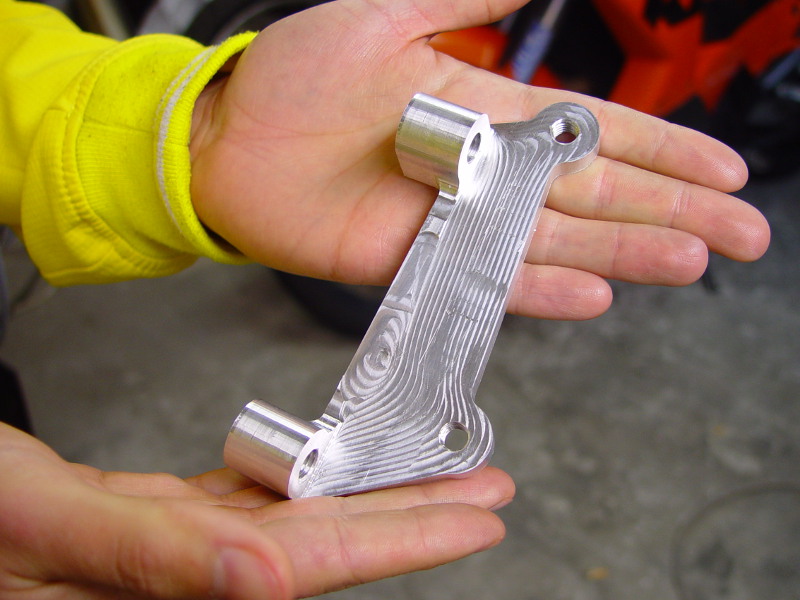
It managed to keep the feedrate up and, more important, constant through the curves.
Around 18000 blocks of G-code, milling time in total an hour or so.
With the default TP I would have to set the tolerances really loose to prevent constant acceleration/deceleration.
It managed to keep the feedrate up and, more important, constant through the curves.
Around 18000 blocks of G-code, milling time in total an hour or so.
With the default TP I would have to set the tolerances really loose to prevent constant acceleration/deceleration.
Please Log in to join the conversation.
12 years 5 months ago #46920
by kostas
Replied by kostas on topic New Trajectory Planner - Testers/programs wanted
The new trajectory planner made a huge difference for me, since I'm experimenting with laser rastering with code that has millions of small F1s/M67s
something like this
and so on ..
The speed difference is huge, with 2.5.4 max feedrate was a little above 300mm/min while with the new planner the feedrate goes up to my max 7500mm/min. At first I had some problems going beyond 6000mm/min, but then changed the lookahead parameter in INI file and the feedrate climbed up to my machine maximum. Excellent!
In the next few days I hope that I will have my setup ready for real laser burning, so I'll see if my experiments will be fruitful!
something like this
Code:
g0 x0 y 0.1
g1 x 0.0 m67 e0 q 0.0
g1 x 0.1 m67 e0 q 0.723347424421
g1 x 0.2 m67 e0 q 1.44669484884
g1 x 0.3 m67 e0 q 2.17004227326
g1 x 0.4 m67 e0 q 2.89338969769
g1 x 0.5 m67 e0 q 3.61673712211
g1 x 0.6 m67 e0 q 4.34008454653
g1 x 0.7 m67 e0 q 5.06343197095
and so on ..
The speed difference is huge, with 2.5.4 max feedrate was a little above 300mm/min while with the new planner the feedrate goes up to my max 7500mm/min. At first I had some problems going beyond 6000mm/min, but then changed the lookahead parameter in INI file and the feedrate climbed up to my machine maximum. Excellent!
In the next few days I hope that I will have my setup ready for real laser burning, so I'll see if my experiments will be fruitful!
Please Log in to join the conversation.
12 years 5 months ago #46923
by kostas
Replied by kostas on topic New Trajectory Planner - Testers/programs wanted
I'd also like to report a behaviour I can't understand. This small g-code program is treated differently from the planner, based on where the tool is located initially.
I'm doing some overscan before and after the line, so that the laser will have the correct velocity before it starts rastering. If the tool is located at the end of the line so that the "g0 x-10 y0.1" makes it move at rapid, everything works as expected, except for the last g1 which has an acceleration/deceleration of its own, which I also don't understand. The screenshot "laser_overscan_2.png" visualizes the moves.
As seen on "laser_overscan_1.png" though, the machine moves differently if the tool is already located at x-10. The first g1 x0 accelerates/decelerates and then accelerates again when it sees the rest of the g1s ..
Is this something normal I don't understand?
Code:
g21
f7500
g0 x -10 y 0.1
g1 x0 m67 e0 q0
g1 x 0.1 m67 e0 q 218.453333333
g1 x 0.2 m67 e0 q 436.906666667
g1 x 0.3 m67 e0 q 655.36
g1 x 0.4 m67 e0 q 873.813333333
g1 x 0.5 m67 e0 q 1092.26666667
g1 x 0.6 m67 e0 q 1310.72
g1 x 0.7 m67 e0 q 1529.17333333
g1 x 0.8 m67 e0 q 1747.62666667
g1 x 0.9 m67 e0 q 1966.08
g1 x 1.0 m67 e0 q 2184.53333333
g1 x 1.1 m67 e0 q 2402.98666667
g1 x 1.2 m67 e0 q 2621.44
g1 x 1.3 m67 e0 q 2839.89333333
g1 x 1.4 m67 e0 q 3058.34666667
g1 x 1.5 m67 e0 q 3276.8
...
g1 x 29.5 m67 e0 q 64443.7333333
g1 x 29.6 m67 e0 q 64662.1866667
g1 x 29.7 m67 e0 q 64880.64
g1 x 29.8 m67 e0 q 65099.0933333
g1 x 29.9 m67 e0 q 65317.5466667
g1 x 30.0 m67 e0 q 65536.0
g1 x 40 m67 e0 q0
m2
I'm doing some overscan before and after the line, so that the laser will have the correct velocity before it starts rastering. If the tool is located at the end of the line so that the "g0 x-10 y0.1" makes it move at rapid, everything works as expected, except for the last g1 which has an acceleration/deceleration of its own, which I also don't understand. The screenshot "laser_overscan_2.png" visualizes the moves.
As seen on "laser_overscan_1.png" though, the machine moves differently if the tool is already located at x-10. The first g1 x0 accelerates/decelerates and then accelerates again when it sees the rest of the g1s ..
Is this something normal I don't understand?
Please Log in to join the conversation.
- rellenberg
- Offline
- Junior Member
-

Less
More
- Posts: 37
- Thank you received: 0
12 years 5 months ago #46927
by rellenberg
Replied by rellenberg on topic New Trajectory Planner - Testers/programs wanted
I'm glad to see such a performance boost! The velocity dips you are seeing at the beginning and end are due to how the TP handles a "short" queue. The short story is, it's a known issue. It stems from the motion module not knowing the current interpreter state.
The origin of this issue is in the way we do lookahead. The velocity lookahead can only work on segments that have a known length. The last segment in the queue has a nominal length, but if another segment is added, then it could be blended with this new segment. In this case, the segment will be shortened. So, this means that we can only trust that the 2nd-to-last segment in the queue has a known length.
The current method code has a simple band-aid fix. If the queue is less than 3 segments deep, it assumes that the last segment will not be arc-blended, locks down its length, and runs lookahead over the queue. However, this means that a new segment added later will do parabolic blending instead of arc blending, which slows the motion down at that point.
Practically, it means that any time the queue gets very short, the blending behavior will not be optimal.
The origin of this issue is in the way we do lookahead. The velocity lookahead can only work on segments that have a known length. The last segment in the queue has a nominal length, but if another segment is added, then it could be blended with this new segment. In this case, the segment will be shortened. So, this means that we can only trust that the 2nd-to-last segment in the queue has a known length.
The current method code has a simple band-aid fix. If the queue is less than 3 segments deep, it assumes that the last segment will not be arc-blended, locks down its length, and runs lookahead over the queue. However, this means that a new segment added later will do parabolic blending instead of arc blending, which slows the motion down at that point.
Practically, it means that any time the queue gets very short, the blending behavior will not be optimal.
Please Log in to join the conversation.
12 years 5 months ago #46928
by kostas
Replied by kostas on topic New Trajectory Planner - Testers/programs wanted
Ok, got it (partially  )
)
What I can't understand now is how it is affected by the queue at the beginning of the line, where the queue is not small (or I misunderstood something), but also how this does not happen after the rapid move. Also, it does not look like a non optimal blending, but more like a full machine stop there. Would a non optimal blending make the velocity go down to nearly zero?
My band aid is adding some small (1mm) g1s at the overscan area, so that the queue is always well filled!
My many thanks and congrats to your work! And the timing with my experiments was great also, so I'm really thrilled about it :woohoo:
)What I can't understand now is how it is affected by the queue at the beginning of the line, where the queue is not small (or I misunderstood something), but also how this does not happen after the rapid move. Also, it does not look like a non optimal blending, but more like a full machine stop there. Would a non optimal blending make the velocity go down to nearly zero?
My band aid is adding some small (1mm) g1s at the overscan area, so that the queue is always well filled!
My many thanks and congrats to your work! And the timing with my experiments was great also, so I'm really thrilled about it :woohoo:
Please Log in to join the conversation.
- rellenberg
- Offline
- Junior Member
-
Less
More
- Posts: 37
- Thank you received: 0
12 years 5 months ago #46929
by rellenberg
Replied by rellenberg on topic New Trajectory Planner - Testers/programs wanted
Yeah, it's annoying because you get that hiccup when the queue is less than 3 segments long, which happens at the beginning of the program (as it's first filling up). This may also happen during "queue buster" commands like turning on/off the spindle.
Please Log in to join the conversation.

12 years 5 months ago #47040
by JZHA1985
Replied by JZHA1985 on topic New Trajectory Planner - Testers/programs wanted
I am getting together a second computer to test this all on.
I have programs at are a few hundred thousand lines long so I'm dying to try.
I have programs at are a few hundred thousand lines long so I'm dying to try.
Please Log in to join the conversation.

12 years 5 months ago #47097
by 1240
Replied by 1240 on topic New Trajectory Planner - Testers/programs wanted
I just now start to write in English
Excuse me in advance.
New TP are present in LinuxCNC 2.6.0-pre1 (or Later)?
i mean
linuxcnc.org/index.php/english/forum/29-...nc-260-pre1-released
Excuse me in advance.
New TP are present in LinuxCNC 2.6.0-pre1 (or Later)?
i mean
linuxcnc.org/index.php/english/forum/29-...nc-260-pre1-released
Please Log in to join the conversation.

12 years 5 months ago #47124
by andypugh
No.
I believe it is present in Machinekit.
Replied by andypugh on topic New Trajectory Planner - Testers/programs wanted
1240 wrote: New TP are present in LinuxCNC 2.6.0-pre1
No.
I believe it is present in Machinekit.
Please Log in to join the conversation.
Time to create page: 0.183 seconds