
- Posts: 5
- Thank you received: 0
auto tool measurement working
7 years 1 month ago #145893
by j.clark91
auto tool measurement working was created by j.clark91
Hello,
Running linuxcnc-2.7.14-wheezy.iso off the live cd downloaded from the website
i am posting this to help people who are trying to get the machine to auto measure there tool after manual tool change, after many hours of searching and reading the wiki pages i found a post on a different site that i based my program on i cant find it again but ill post the link when i do.
my set up means i cant have tool holders as it is a cheap machine from ebay so no tool is the same height.
I am going to change the file slightly as when i type T0 M6 into mdi it still goes to measure which will update later on here once done but it still works just minor inconvenience for now.
onto the tool changer
i have set my tool probe in the G59 datum in X,Y and Z so it can be easily moved around the table as needed depending on setup, to set the z i tool the nut off the spindle and jogged down until the probe pin turned true and set it from there.
I have done this because it is a constant and won't change with the nut on or tool in the spindle it will always change the z location of the tool probe.
when you call the tool with the M6 command the spindle will rise upto the top home location (safe place) and wait for you to change tool, once okay pressed it will move over to the G59 location and begin to measure the tool fast from that location. Then come up and measure again slowly to get a more accurate reading. The height in the tool table will be a plus number, this means you can use multiple work offsets in the program with each tool.
The ngc program DOES NOT change the machine back to G90 or to the datum used before tool change because the way i program
this way the program will always use the write datum and mode relevant to what you are going todo.
when setting the work datum i will use a wobbler to find the x and y location and set these in the work offset as required. when setting the z i will load up a tool (usually the 1st tool i am going to use) and measure it in mdi by calling up the tool number and m6, then once set and g43 active ill touch the tool on top of each workpiece as required by the setup.
with the G43 active it will be relevant to the G59 work offset z location, so when the next tool is measured it will return to the same location on the workpiece.
the code
this is the relevant code in the .ini file
i have seen a lot of posts that seam to over complicate this with inputs and options that i don't really think is very necessary.
in the .hal file this is the relevant part
now for the ngc file, i am going to change this so it is a lot more simple and easier to follow but for now it works,
i am planning on creating one big else if statement so it don't try and measure a tool that's not there.
i hope you followed that okay i've tried to keep it simple as possible so everyone can follow.
please let me know if i can rephrase it so its easier to understand ive also attached the whole config at its current state so you all can see
Running linuxcnc-2.7.14-wheezy.iso off the live cd downloaded from the website
Attachment not found
i am posting this to help people who are trying to get the machine to auto measure there tool after manual tool change, after many hours of searching and reading the wiki pages i found a post on a different site that i based my program on i cant find it again but ill post the link when i do.
my set up means i cant have tool holders as it is a cheap machine from ebay so no tool is the same height.
I am going to change the file slightly as when i type T0 M6 into mdi it still goes to measure which will update later on here once done but it still works just minor inconvenience for now.
onto the tool changer
i have set my tool probe in the G59 datum in X,Y and Z so it can be easily moved around the table as needed depending on setup, to set the z i tool the nut off the spindle and jogged down until the probe pin turned true and set it from there.
I have done this because it is a constant and won't change with the nut on or tool in the spindle it will always change the z location of the tool probe.
when you call the tool with the M6 command the spindle will rise upto the top home location (safe place) and wait for you to change tool, once okay pressed it will move over to the G59 location and begin to measure the tool fast from that location. Then come up and measure again slowly to get a more accurate reading. The height in the tool table will be a plus number, this means you can use multiple work offsets in the program with each tool.
The ngc program DOES NOT change the machine back to G90 or to the datum used before tool change because the way i program
G0 G90 G53 Z0. (SAFE HIGHT)
T1 M6 (CALL TOOL)
M00 (STOP TO TURN SPINDLE ON MANUALY)
G0 G90 G54 X0. Y0. S1000 M3 (SAFE LINE, RESET TO G90 TURN SPINDLE ON AND MOVE TO LOCATION)
G43 H1 Z10. (TOOL COMP ON SAFE PLACE ABOVE WORK)
Z5.
(G CODE HERE)
G0 G90 Z10. M5 (UP TO SAFE LOCATION ABOVE WORK, SPINDLE OFF)
G0 G90 G53 Z0. (SAFE HIGHT)
M01 (OPTIONAL STOP)
this way the program will always use the write datum and mode relevant to what you are going todo.
when setting the work datum i will use a wobbler to find the x and y location and set these in the work offset as required. when setting the z i will load up a tool (usually the 1st tool i am going to use) and measure it in mdi by calling up the tool number and m6, then once set and g43 active ill touch the tool on top of each workpiece as required by the setup.
with the G43 active it will be relevant to the G59 work offset z location, so when the next tool is measured it will return to the same location on the workpiece.
the code
this is the relevant code in the .ini file
[RS274NGC]
PARAMETER_FILE = linuxcnc.var
SUBROUTINE_PATH = macros
REMAP=M6 modalgroup=6 ngc=tool-change
i have seen a lot of posts that seam to over complicate this with inputs and options that i don't really think is very necessary.
in the .hal file this is the relevant part
Code:
loadusr -W hal_manualtoolchange
net tool-change iocontrol.0.tool-change => hal_manualtoolchange.change
net tool-changed iocontrol.0.tool-changed <= hal_manualtoolchange.changed
net tool-number iocontrol.0.tool-prep-number => hal_manualtoolchange.number
net tool-prepare-loopback iocontrol.0.tool-prepare => iocontrol.0.tool-prepared
now for the ngc file, i am going to change this so it is a lot more simple and easier to follow but for now it works,
i am planning on creating one big else if statement so it don't try and measure a tool that's not there.
Code:
O<tool-change> SUB
( Filename: tool-change.ngc )
(------------------------------- CONFIGURATION PARAMETERS ----------------------------------------------)
#<_ProbeRetract> = 2.0 ( small distance to retract before approaching switch/touch-off plate second time )
#<_ProbeFeed1> = 500 ( feed rate for touching switch/touch-off plate first time )
#<_ProbeFeed2> = 10.0 ( feed rate for touching switch/touch-off plate second time )
#<_ProbeMinZ> = -500. ( max distance in z for probe routine. shortest tool should trip before this)
#<_ProbeRetract> = 1 ( distance to retract before starting slow probe )
#<_tool> = #<_selected_tool>
#<_Ztravel> = 82.067 ( distance between machine zero and touch off sensor )
#<_previous_tool> = #<_current_tool> ( sets previous tool variable )
(-------------------------------------------------------------------------------------------------------)
O100 if [#<_task> EQ 0] ( only run the subroutine in milltask interpreter. **Critical** keep )
(debug, Task ist Null)
O100 return [999]
O100 endif
G53 G0 G90 Z0. ( move to high z position )
o200 IF [ #<_tool> EQ 0 ] ( check if tool zero selected and end routine )
(MSG, No Tool Selected )
o200 ENDIF
G49 ( turn off tool compensation )
G94 ( units per minute feed rate )
G40 ( turn off cutter compensation )
G90 ( use absolute mode )
G59
M6 ( run normal M6 operation )
O300 IF [ #<_tool> EQ #<_previous_tool> ]
(debug, Tool in spindle no change required)
O300 return [999]
O300 ELSE
G59 G0 G90 X0. Y0.
G91 G0
G38.2 Z[#<_ProbeMinZ>] F[#<_ProbeFeed1>]
G0 G91 Z2.0
G38.2 Z-2.5 F[#<_ProbeFeed2>]
G90
#<_ToolZRef> = #5063
#<_ToolConv> = [#<_ToolZRef>*-1]
#<_ToolOffset> = [#<_ZTravel> - #<_ToolConv>]
G10 L1 P#<_tool> Z#<_ToolOffset>
G53 G0 Z0
o300 ENDIF
#<_previous_tool> = #<_tool>
G43
O<tool-change> ENDSUB
M2
i hope you followed that okay i've tried to keep it simple as possible so everyone can follow.
please let me know if i can rephrase it so its easier to understand
ive also attached the whole config at its current state so you all can seeAttachment not found
Please Log in to join the conversation.

7 years 1 month ago #145918
by pl7i92
Replied by pl7i92 on topic auto tool measurement working
thank you but it is individual as you searched your needs
some may find it good
others may need different
in general a good example
some may find it good
others may need different
in general a good example
Please Log in to join the conversation.
- REX299
- New Member
-

Less
More
- Thank you received: 0
5 years 2 months ago #217054
by REX299
Replied by REX299 on topic auto tool measurement working
Anyone can confim those stuff work under Linux 2.9pre?? I cant made it work on my machine  (
(
( Please Log in to join the conversation.

5 years 2 months ago #217439
by andypugh
Replied by andypugh on topic auto tool measurement working
It should work. Not that much has changed.
Please Log in to join the conversation.

5 years 2 months ago #217752
by szatri
Replied by szatri on topic auto tool measurement working
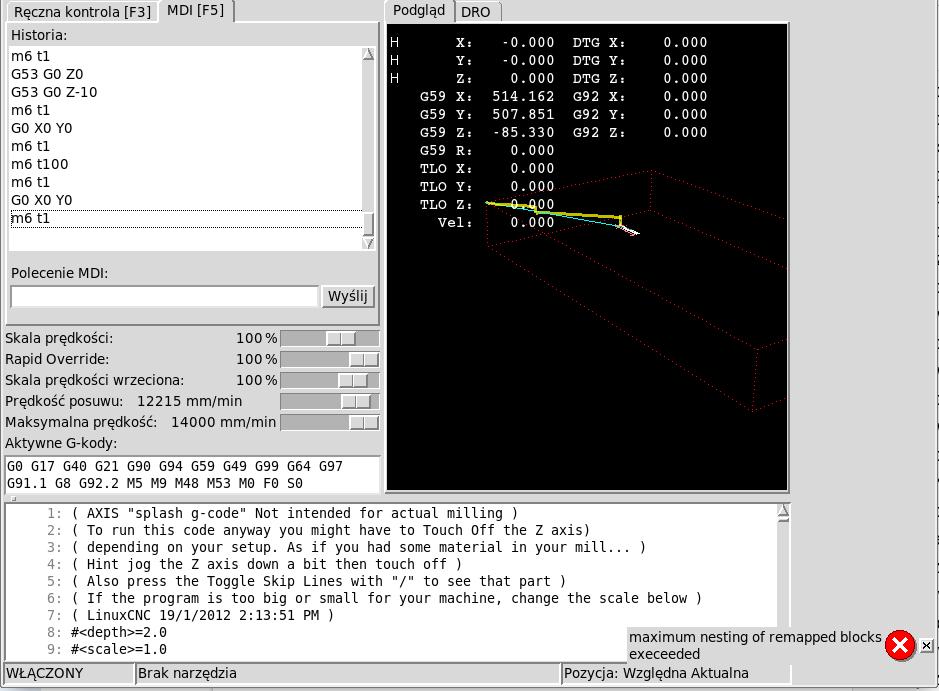
Hello, I have a problem with this tool measurement procedure (in total and with a few others). The program starts normally, the machine is based on limiters, and in MDI I will enter M6 t1. It shows me a message that I don't understand, I don't know where the problem is.
Please Log in to join the conversation.
5 years 2 months ago #217928
by andypugh
Replied by andypugh on topic auto tool measurement working
Can you paste the [RS274NGC] section of your INI file?
Please Log in to join the conversation.
5 years 2 months ago #217987
by szatri
Replied by szatri on topic auto tool measurement working
[RS274NGC]
PARAMETER_FILE = linuxcnc.var
SUBROUTINE_PATH = ./ngc
FEATURES = 12
REMAP=M6 modalgroup=6 ngc=tool-change
REMAP=M06 modalgroup=6 ngc=tool-change
doubling this entry is probably not necessary
PARAMETER_FILE = linuxcnc.var
SUBROUTINE_PATH = ./ngc
FEATURES = 12
REMAP=M6 modalgroup=6 ngc=tool-change
REMAP=M06 modalgroup=6 ngc=tool-change
doubling this entry is probably not necessary
Please Log in to join the conversation.
Time to create page: 0.157 seconds