
- Posts: 12160
- Thank you received: 0
Reading Hal pins from Gcode [SOLVED]
9 years 6 months ago #92328
by rodw
Reading Hal pins from Gcode [SOLVED] was created by rodw
I've been trying to workout how to read the value of hal pins from gcode so I can access values set in the GUI to set various cutting parameters. I'm using Master branch.
From a link to documentation Andy posted on an earlier thread I have changed my .ini file to include:
I have a pin called
So in Gcode on a metric machine in the MDI window, I have tried this
But I get this error
I have not found an example , but it appears to be correct syntax to me.
What am I doing wrong?
Is the upper case in the pin name significant?
A quick example of the correct syntax would be really appreciated.
From a link to documentation Andy posted on an earlier thread I have changed my .ini file to include:
Code:
[RS274NGC]
FEATURES = 8
Code:
plasma.G0-Gap
So in Gcode on a metric machine in the MDI window, I have tried this
Code:
F 2000
g1 y #<_hal[plasma.G0-Gap]>
But I get this error
Code:
Named parameter #<_hal[plasma.g0-gap]> not defined
I have not found an example , but it appears to be correct syntax to me.
What am I doing wrong?
Is the upper case in the pin name significant?
A quick example of the correct syntax would be really appreciated.
Please Log in to join the conversation.
- tommylight
-

- Offline
- Administrator
-

Less
More
- Posts: 22012
- Thank you received: 4
9 years 6 months ago #92330
by tommylight
Replied by tommylight on topic Reading Hal pins from Gcode
Do not take my word for it, but
g1 y #<_hal[plasma.G0-Gap]>
needs a parameter, namely a value of something like 2 or 3 in your case (mm).
Just a stab in the dark.
Also G0 on a pin? An Y in the mdi line with no actual position?
I know it should get that from the pin value, but Y??? Should it be Z?
Oh well, back to cleaning up the mess in the shop.
g1 y #<_hal[plasma.G0-Gap]>
needs a parameter, namely a value of something like 2 or 3 in your case (mm).
Just a stab in the dark.
Also G0 on a pin? An Y in the mdi line with no actual position?
I know it should get that from the pin value, but Y??? Should it be Z?
Oh well, back to cleaning up the mess in the shop.
Please Log in to join the conversation.
9 years 6 months ago #92332
by rodw
Replied by rodw on topic Reading Hal pins from Gcode
Tommy, thanks
I tried adding a G21 to set metric before it but that did not work. Same error.
And yes, it will be Z once I get organised but currently that needs a negative value. I know thats easy, but keeping it nice and simple while testing.
I could net see any examples on parameters to G91.
I have to tell you I know nothing about Gcode
I tried adding a G21 to set metric before it but that did not work. Same error.
And yes, it will be Z once I get organised but currently that needs a negative value. I know thats easy, but keeping it nice and simple while testing.
I could net see any examples on parameters to G91.
I have to tell you I know nothing about Gcode
Please Log in to join the conversation.
9 years 6 months ago #92334
by rodw
Replied by rodw on topic Reading Hal pins from Gcode
Ooops sorry, I meant no examples for G1.
To me, it is clearly not finding the pin #<_hal[plasma.G0-Gap]>
as anything on the line after it does not generate an error.
To me, it is clearly not finding the pin #<_hal[plasma.G0-Gap]>
as anything on the line after it does not generate an error.
Please Log in to join the conversation.
9 years 6 months ago #92336
by rodw
Replied by rodw on topic Reading Hal pins from Gcode
Here is the GUI
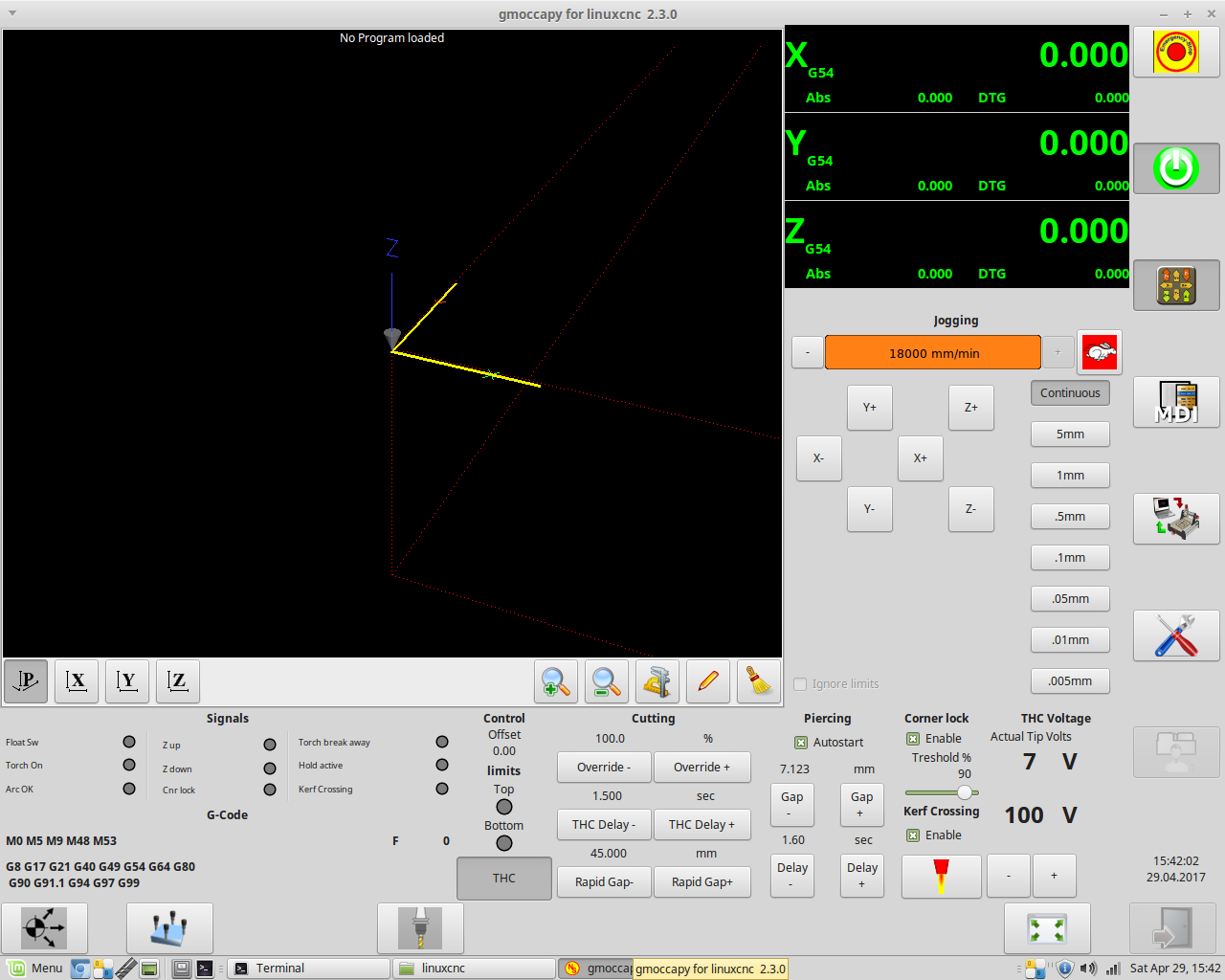
The value I'm trying to read is the 45 above the Rapid Gap - button
The value I'm trying to read is the 45 above the Rapid Gap - button
Please Log in to join the conversation.
9 years 6 months ago #92337
by rodw
Replied by rodw on topic Reading Hal pins from Gcode
Solved.The error is because there is upper case characters in the pin name becasue the interpreter converts everything to lower case.
I tried saving a pin with all lower case characters to parameter #33 with this command
I did not get an error message and after I closed Linuxcnc, the parameter was saved in linuxcnc.var.
I then picked a random gmoccapy plasma pin that was all lower case and it also saved to #33 happily.
Very cool!.
This parameter is the target velocity (frequency) returned by the Mesa THCAD at the required preset torch volts.
For those interested, if you are saving values in your own custom parameters, if you create them in the linuxcnc.var file they become persistent and that are saved from one session to the other.
So now all I need to do is to rename a few pins and I'm in business!
PS. This is feature is very poorly documented
I tried saving a pin with all lower case characters to parameter #33 with this command
Code:
#33 = #<_hal[thcad10.target-velocity]>
I did not get an error message and after I closed Linuxcnc, the parameter was saved in linuxcnc.var.
Code:
33 11288.476562
I then picked a random gmoccapy plasma pin that was all lower case and it also saved to #33 happily.
Very cool!.
This parameter is the target velocity (frequency) returned by the Mesa THCAD at the required preset torch volts.
For those interested, if you are saving values in your own custom parameters, if you create them in the linuxcnc.var file they become persistent and that are saved from one session to the other.
So now all I need to do is to rename a few pins and I'm in business!
PS. This is feature is very poorly documented
Please Log in to join the conversation.
- tommylight
-
- Offline
- Administrator
-
Less
More
- Posts: 22012
- Thank you received: 4
9 years 6 months ago #92348
by tommylight
Replied by tommylight on topic Reading Hal pins from Gcode
Again, there is no stopping you ! Good job.
Please Log in to join the conversation.
- Todd Zuercher
- Offline
- Platinum Member
-

Less
More
- Posts: 4739
- Thank you received: 2
9 years 6 months ago #92375
by Todd Zuercher
Replied by Todd Zuercher on topic Reading Hal pins from Gcode
Using the hal pin parameters might work. But I would not trust it for data entered and used during a run. Those parameters are not always updated during a run. A better approach would be to connect the hal pins to motion.analog-in-xx pins and read them in using G66.
Please Log in to join the conversation.
9 years 6 months ago #92391
by rodw
Thanks Todd, I am aware of the limitations but to set the starting parameters, I think they'll be fine.
Replied by rodw on topic Reading Hal pins from Gcode
Todd Zuercher wrote: Using the hal pin parameters might work. But I would not trust it for data entered and used during a run. Those parameters are not always updated during a run. A better approach would be to connect the hal pins to motion.analog-in-xx pins and read them in using G66.
Thanks Todd, I am aware of the limitations but to set the starting parameters, I think they'll be fine.
Please Log in to join the conversation.
Time to create page: 0.101 seconds