

- Posts: 26
- Thank you received: 0
Manual Tool Change again?
11 years 3 months ago #60930
by FiliP
Manual Tool Change again? was created by FiliP
Hi.
I tested remap function on sample config (sim/axis/remap/manual-tool-change...) and im not happy with it.
Problem is preview and extends values (work area measurements). If i use remap, preview will always show work area including patch to tool lenght probe, and work area values is wrong. For me it is not acceptable
Is there another way to auto probe tools with manual change?
Maybe changing hal_manualtoolchange would help?
Maybe someone modified hal_manualtoolchange to use AXIS tool changer with tool probe?
I tested remap function on sample config (sim/axis/remap/manual-tool-change...) and im not happy with it.
Problem is preview and extends values (work area measurements). If i use remap, preview will always show work area including patch to tool lenght probe, and work area values is wrong. For me it is not acceptable
Is there another way to auto probe tools with manual change?
Maybe changing hal_manualtoolchange would help?
Maybe someone modified hal_manualtoolchange to use AXIS tool changer with tool probe?
Please Log in to join the conversation.

11 years 3 months ago #60937
by cmorley
Replied by cmorley on topic Manual Tool Change again?
so you want the tool change to go into a certain area but not get there with jogging or mdi or program?
or just not allow a program to move there?
There currently is no way to create 'partially barriered' areas in linuxcnc.
It's an interesting problem though
Chris M
or just not allow a program to move there?
There currently is no way to create 'partially barriered' areas in linuxcnc.
It's an interesting problem though
Chris M
Please Log in to join the conversation.
11 years 3 months ago #60942
by FiliP
Whatever method (subroutine, mdi, hal_manualtoolchange) i can use that shouldn't be shown on Axis preview as programed moves by G-Code file.
If i had automatic tool changer at X0Y500 and extends (min, max) of my work piece/area was X50 to X100, Y50 to Y100, and tool change with probe in G code, AXIS will show that my work area is X0 to X100 and Y50 to Y500?
For manual tool change and remap, answer is "Yes" ofcourse, and if i get g-code not prepared by me, it is very hard to know what size of material i should use for job since AXIS show wrong job measurement..
This subject is also connected with: www.linuxcnc.org/index.php/english/forum...9382-move-on-extents
Replied by FiliP on topic Manual Tool Change again?
Yes, and no. I want tool change at certain area but with tool probecmorley wrote: so you want the tool change to go into a certain area but not get there with jogging or mdi or program?
Whatever method (subroutine, mdi, hal_manualtoolchange) i can use that shouldn't be shown on Axis preview as programed moves by G-Code file.
If i had automatic tool changer at X0Y500 and extends (min, max) of my work piece/area was X50 to X100, Y50 to Y100, and tool change with probe in G code, AXIS will show that my work area is X0 to X100 and Y50 to Y500?
For manual tool change and remap, answer is "Yes" ofcourse, and if i get g-code not prepared by me, it is very hard to know what size of material i should use for job since AXIS show wrong job measurement..
This subject is also connected with: www.linuxcnc.org/index.php/english/forum...9382-move-on-extents
Please Log in to join the conversation.
11 years 3 months ago #60951
by cncbasher
can you give example as you say axis is giving wrong job measurment ?
how are you preparing gcode ? ,
i use a cam program that will output a job sheet , this gives material to use and extents
it should not be difficult to output this information ,
do i understand that you want to change tools outside of the boundary area ( shown in red ) in axis
but not allow normal operation into this area , as it's for toolchange only , and therefore out of bounds
Replied by cncbasher on topic Manual Tool Change again?
FiliP wrote:
Yes, and no. I want tool change at certain area but with tool probecmorley wrote: so you want the tool change to go into a certain area but not get there with jogging or mdi or program?
Whatever method (subroutine, mdi, hal_manualtoolchange) i can use that shouldn't be shown on Axis preview as programed moves by G-Code file.
If i had automatic tool changer at X0Y500 and extends (min, max) of my work piece/area was X50 to X100, Y50 to Y100, and tool change with probe in G code, AXIS will show that my work area is X0 to X100 and Y50 to Y500?
For manual tool change and remap, answer is "Yes" ofcourse, and if i get g-code not prepared by me, it is very hard to know what size of material i should use for job since AXIS show wrong job measurement..
This subject is also connected with: www.linuxcnc.org/index.php/english/forum...9382-move-on-extents
can you give example as you say axis is giving wrong job measurment ?
how are you preparing gcode ? ,
i use a cam program that will output a job sheet , this gives material to use and extents
it should not be difficult to output this information ,
do i understand that you want to change tools outside of the boundary area ( shown in red ) in axis
but not allow normal operation into this area , as it's for toolchange only , and therefore out of bounds
Please Log in to join the conversation.
11 years 3 months ago #60952
by FiliP
Replied by FiliP on topic Manual Tool Change again?
I added file to this post. This is screen from sim-demo like i wrote before. As you can see, red lines show wrong numbers becouse remap and tool probe at X10Y10. I think the correct values should be X25.0-X73.5 and Y25.0-Y46.7 (i cant check this now for sure).cncbasher wrote: can you give example as you say axis is giving wrong job measurment ?
HSM Expresscncbasher wrote: how are you preparing gcode ?
Yes, but if i get GCode from other person? And script for boundary area will not work prop. too.cncbasher wrote: i use a cam program that will output a job sheet , this gives material to use and extents
it should not be difficult to output this information ,
I just want AXIS preview (red lines) look like there is no remap function for tool change. If my work have dim. 100x100, that red lines should show. Tool changing and probing is special moves, and boundary lines shouldn't include this.cncbasher wrote: do i understand that you want to change tools outside of the boundary area ( shown in red ) in axis
but not allow normal operation into this area , as it's for toolchange only , and therefore out of bounds
Please Log in to join the conversation.

11 years 3 months ago #60959
by andypugh
I can actually think of a way to do this. You could insert an "offset" HAL component between position-cmd and stepgen.position-cmd.
Tool change positions would then be inside the normal envelope, but the physical axis position would be outside.
www.linuxcnc.org/docs/html/man/man9/offset.9.html
You could drive the offset value with a mux2 component and a suitable bit output. Stepgen should be able to limit the accel and velocity while the offset is applied. Or a limit3 component can be used.
Replied by andypugh on topic Manual Tool Change again?
cncbasher wrote: do i understand that you want to change tools outside of the boundary area ( shown in red ) in axis
but not allow normal operation into this area , as it's for toolchange only , and therefore out of bounds
I can actually think of a way to do this. You could insert an "offset" HAL component between position-cmd and stepgen.position-cmd.
Tool change positions would then be inside the normal envelope, but the physical axis position would be outside.
www.linuxcnc.org/docs/html/man/man9/offset.9.html
You could drive the offset value with a mux2 component and a suitable bit output. Stepgen should be able to limit the accel and velocity while the offset is applied. Or a limit3 component can be used.
Please Log in to join the conversation.
11 years 3 months ago #60961
by FiliP
Replied by FiliP on topic Manual Tool Change again?
andypugh: It is a little too much for me. I'm still learning LinuxCNC.
I incorrectly thought that AXIS preview red lines will show only job from G-code file.
Do hal_manualtoolchange file modification would be the best option here?
Eg. Instead of embedding the JOG during the display shows "replace the tool number...", just run some subroutines or g-code in background?
If not used REMAP function, this should not impact on the value of boundry lines.
I incorrectly thought that AXIS preview red lines will show only job from G-code file.
Do hal_manualtoolchange file modification would be the best option here?
Eg. Instead of embedding the JOG during the display shows "replace the tool number...", just run some subroutines or g-code in background?
If not used REMAP function, this should not impact on the value of boundry lines.
Please Log in to join the conversation.
11 years 3 months ago #60962
by andypugh
The red dotted box shows the machine physical limits.
Is your problem that the G-code preview shows the toolchange moves and you don't want that?
Replied by andypugh on topic Manual Tool Change again?
FiliP wrote: I incorrectly thought that AXIS preview red lines will show only job from G-code file.
The red dotted box shows the machine physical limits.
Is your problem that the G-code preview shows the toolchange moves and you don't want that?
Please Log in to join the conversation.
11 years 3 months ago #60963
by FiliP
Someone before wrote "red" but really this lines is pink, and all time is about "Program Extents"
linuxcnc.org/docs/html/gui/axis.html#_graphical_display_area
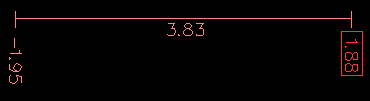
Replied by FiliP on topic Manual Tool Change again?
andypugh wrote: The red dotted box shows the machine physical limits.
Someone before wrote "red" but really this lines is pink, and all time is about "Program Extents"
linuxcnc.org/docs/html/gui/axis.html#_graphical_display_area
Yes. If i use REMAP for manual tool changing and auto probe tool (im using subroutine), preview will change Extents, i dont want that. I'v checked (AXIS,show)/(AXIS,hide) functions, and included them into subroutine file, but it must be for something else.andypugh wrote: Is your problem that the G-code preview shows the toolchange moves and you don't want that?
Please Log in to join the conversation.
11 years 3 months ago #60964
by andypugh
The extents are calculated when the G-code is loaded.
It might be possible to exit your remapped subs before any movement occurs during the preview stage.
Try an IF around the remap moves:
O100 IF [#<_task> EQ 1]
...
O100 ENDIF
www.linuxcnc.org/docs/html/gcode/overview.html#sec:parameters
Replied by andypugh on topic Manual Tool Change again?
FiliP wrote: Yes. If i use REMAP for manual tool changing and auto probe tool (im using subroutine), preview will change Extents,
The extents are calculated when the G-code is loaded.
It might be possible to exit your remapped subs before any movement occurs during the preview stage.
Try an IF around the remap moves:
O100 IF [#<_task> EQ 1]
...
O100 ENDIF
www.linuxcnc.org/docs/html/gcode/overview.html#sec:parameters
Please Log in to join the conversation.
Time to create page: 0.060 seconds