

- Posts: 926
- Thank you received: 0
[solved]Axis for 800x480 screen w/ usercommand
6 years 9 months ago #154720
by cakeslob
[solved]Axis for 800x480 screen w/ usercommand was created by cakeslob
edit, got it goin
forum.linuxcnc.org/21-axis/38188-solved-...w-usercommand#169617
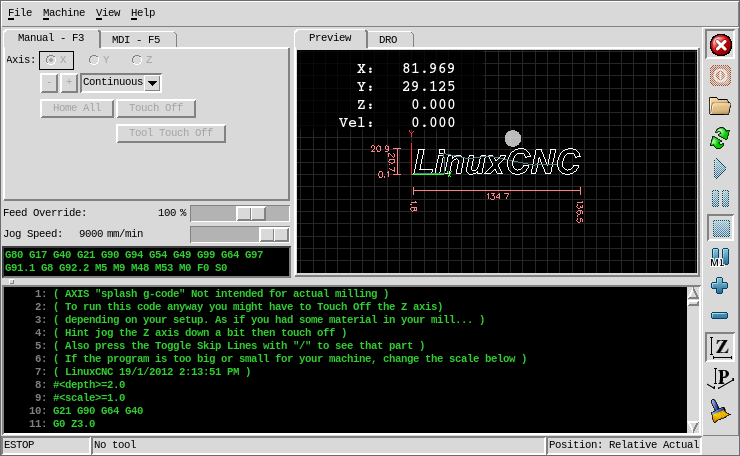
When you start getting down in screen size to 5" and 7" screens, most of them have a 800x480 resolution sometimes not scalable.

pic is just an example i found online but ive seen pictures like this several times. The same thing happened to me the first time I got axis to load on my 7" screen, it completely cuts off the gcode bar. Not totally unusable but not ideal. (I know, im using an RPI4 to do stuff and i mention machine kit so dont judge me to harshly,this is the reason i cannot do a full qtvcp gui but this isnt about that, its about modding the trusted/stable axis gui to work on 800x480 screens, so please keep an open mind) Im not to good with computers and honestly dont know what Im doing, but I have been reading a lot so here is what Ive got
Goal: to get specifically Axis working well in 800x480
Current route: try to resize everything using usercommand file, and reframe the toolbar to a vertical pan on the right
progress so far
forum.linuxcnc.org/21-axis/38188-solved-...w-usercommand#168337
USEABLE AXIS for small screens
[strike]Best option[/strike]: move gcode into the manual/mdi tab
no idea how to do this, but if anyone else does thats cool
[strike]Current route[/strike]first attempt: with qtvcp(or maybe glade) tabs and .axisrc
(hopefully to make it somewhat cross compatible with machinekit, they have a qt thing but idk if it will work with this)
qtvcp tabs: somehow i installed qt designer with the linuxcnc plugins by mashing commands into terminal. from there, I copied the qtvcp tab stuff for axis. I opened up the camview widget and made some panels with widgets like the gcode viewer and added them to the share/qtvcp/panels.
The panel files still need some work, but its a proof of concept
only loads gcode after a new file is loaded also during tests seems 1 line ahead of the axis gcode viewer. need to add run from line and fix sizing, maybe gcode edit
I know there is already a tool table thing in axis, but i like things being in tabs,
I added this to my ini file to get it to load more than 1 tab. i dont know how to do it properly i think its something like usertab1 or something but i dont know, this is just something me and a friend were trying out and it worked
I might have to remove Max velocity slider but I dont know if thats ini or .axisrc
axisrc: ive added this to my axisrc file to try and kill the gcode window, it has worked(kinda, theres still a tiny nub left over), but it looks like theres 1 more thing i need to resize somehow but i dont know what, maybe pane but im not sure, so if anyone can help me with this, that would be great
Ive added my panel files, all I did was copy the cam align panel folder and rename the folder and handler to alarm/gcode/offset/tool2
Im trying to get a alarm tab goings and eventually kill the alarm popup, but it looks like I need to link something or something I dont know. I dont really know what Im doing, so if anyone knows the proper way to do these things, input is appreciated
tl;dr- Axis on a 800x480 screen cuts off the gcode window. I want to remove it and resize the window to 800x480 and add some tabs to compensate
-How do I kill the gcode pane properly and resize the window to 800x480?
-How do I embed the tabs properly and improve tabs over all?
forum.linuxcnc.org/21-axis/38188-solved-...w-usercommand#169617
When you start getting down in screen size to 5" and 7" screens, most of them have a 800x480 resolution sometimes not scalable.
pic is just an example i found online but ive seen pictures like this several times. The same thing happened to me the first time I got axis to load on my 7" screen, it completely cuts off the gcode bar. Not totally unusable but not ideal. (I know, im using an RPI4 to do stuff and i mention machine kit so dont judge me to harshly,this is the reason i cannot do a full qtvcp gui but this isnt about that, its about modding the trusted/stable axis gui to work on 800x480 screens, so please keep an open mind) Im not to good with computers and honestly dont know what Im doing, but I have been reading a lot so here is what Ive got
Goal: to get specifically Axis working well in 800x480
Current route: try to resize everything using usercommand file, and reframe the toolbar to a vertical pan on the right
progress so far
forum.linuxcnc.org/21-axis/38188-solved-...w-usercommand#168337
USEABLE AXIS for small screens
[strike]Best option[/strike]: move gcode into the manual/mdi tab
no idea how to do this, but if anyone else does thats cool
[strike]Current route[/strike]first attempt: with qtvcp(or maybe glade) tabs and .axisrc
(hopefully to make it somewhat cross compatible with machinekit, they have a qt thing but idk if it will work with this)
qtvcp tabs: somehow i installed qt designer with the linuxcnc plugins by mashing commands into terminal. from there, I copied the qtvcp tab stuff for axis. I opened up the camview widget and made some panels with widgets like the gcode viewer and added them to the share/qtvcp/panels.
The panel files still need some work, but its a proof of concept
Attachment not found
Attachment not found
only loads gcode after a new file is loaded also during tests seems 1 line ahead of the axis gcode viewer. need to add run from line and fix sizing, maybe gcode edit
Attachment not found
I know there is already a tool table thing in axis, but i like things being in tabs,
Attachment not found
I added this to my ini file to get it to load more than 1 tab. i dont know how to do it properly i think its something like usertab1 or something but i dont know, this is just something me and a friend were trying out and it worked
Code:
[DISPLAY]
# Embed tabs
#EMBED_TAB_NAME= offset
#EMBED_TAB_COMMAND= halcmd loadusr -Wn qtvcp_embed qtvcp -d -c qtvcp_embed -x {XID} offset
#EMBED_TAB_NAME= alarm
#EMBED_TAB_COMMAND= halcmd loadusr -Wn qtvcp_embed qtvcp -d -c qtvcp_embed -x {XID} alarm
EMBED_TAB_NAME= gcode
EMBED_TAB_COMMAND= halcmd loadusr -Wn qtvcp_embed qtvcp -d -c qtvcp_embed -x {XID} gcode
EMBED_TAB_NAME= offset
EMBED_TAB_COMMAND= qtvcp -d -c qtvcp_embeda -x {XID} offset
EMBED_TAB_NAME= tool2
EMBED_TAB_COMMAND= qtvcp -d -c qtvcp_embedd -x {XID} tool2
I might have to remove Max velocity slider but I dont know if thats ini or .axisrc
axisrc: ive added this to my axisrc file to try and kill the gcode window, it has worked(kinda, theres still a tiny nub left over), but it looks like theres 1 more thing i need to resize somehow but i dont know what, maybe pane but im not sure, so if anyone can help me with this, that would be great
Code:
#window resize
root_window.tk.call("wm","geometry",".","800x480")
root_window.tk.call('pack','forget','.pane.bottom.t.text')
root_window.tk.call('grid','forget','.pane.bottom.t')
root_window.tk.call('pack','forget','.pane.bottom')
Ive added my panel files, all I did was copy the cam align panel folder and rename the folder and handler to alarm/gcode/offset/tool2
Im trying to get a alarm tab goings and eventually kill the alarm popup, but it looks like I need to link something or something I dont know. I dont really know what Im doing, so if anyone knows the proper way to do these things, input is appreciated
tl;dr- Axis on a 800x480 screen cuts off the gcode window. I want to remove it and resize the window to 800x480 and add some tabs to compensate
-How do I kill the gcode pane properly and resize the window to 800x480?
-How do I embed the tabs properly and improve tabs over all?
Please Log in to join the conversation.
6 years 9 months ago #154728
by cmorley
Replied by cmorley on topic Axis for 800x480 screen with qtvcp tabs
I know you said you want AXIS modified and I bet that someone could get you there...
There is actually a lot more info available for modifimg AXIS then there used to be in the manual - not quite enough to show you how to do what you want though.
But I thought I'd point out that qtvcp has an AXIS replica that might be easier to modify. It's certainly not perfect but if you eventually go that way, I could help with that.
Good luck!
Chris M
There is actually a lot more info available for modifimg AXIS then there used to be in the manual - not quite enough to show you how to do what you want though.
But I thought I'd point out that qtvcp has an AXIS replica that might be easier to modify. It's certainly not perfect but if you eventually go that way, I could help with that.
Good luck!
Chris M
Please Log in to join the conversation.
6 years 9 months ago #154732
by cakeslob
Replied by cakeslob on topic Axis for 800x480 screen with qtvcp tabs
I noticed, once day i went to check something, and the axis modification section was huge all of a sudden. it was helpful.
A whole new qtvcp would be ideal and is my plan b. I have been playing with and modding the 800x600 panel. The problem though is I cannot get the graphics preview to work with my setup for any of the qtvcp screens. Not a deal breaker, but i dont know computer hacking so Im trying to find the most realistic option that will run on most things, and if done with axisrc and tabs, that should be easier to integrate into my machinekit setups as well .
not to derail thread, but the errors i get in qt are
which i find refferenced here by scotta forum.linuxcnc.org/41-guis/34895-qtvcp-issues?start=120#120047
who seems to have switched to archlinux because of it as far as i understand
A whole new qtvcp would be ideal and is my plan b. I have been playing with and modding the 800x600 panel. The problem though is I cannot get the graphics preview to work with my setup for any of the qtvcp screens. Not a deal breaker, but i dont know computer hacking so Im trying to find the most realistic option that will run on most things, and if done with axisrc and tabs, that should be easier to integrate into my machinekit setups as well .
not to derail thread, but the errors i get in qt are
Code:
error1
Traceback (most recent call last):
File "/home/pi/emc9/lib/python/qt5_graphics.py", line 471, in initializeGL
self.object = self.makeObject()
File "/home/pi/emc9/lib/python/qt5_graphics.py", line 640, in makeObject
genList = GL.glGenLists(1)
File "/usr/lib/python2.7/dist-packages/OpenGL/platform/baseplatform.py", line 402, in __call__
return self( *args, **named )
File "errorchecker.pyx", line 53, in OpenGL_accelerate.errorchecker._ErrorChecker.glCheckError (src/errorchecker.c:1218)
GLError: GLError(
err = 1282,
description = 'invalid operation',
baseOperation = glGenLists,
cArguments = (1,),
result = 0L
)
error2
Traceback (most recent call last):
File "/home/pi/emc9/lib/python/qt5_graphics.py", line 564, in resizeGL
GL.glMatrixMode(GL.GL_PROJECTION) # To operate on projection-view matrix
File "/usr/lib/python2.7/dist-packages/OpenGL/platform/baseplatform.py", line 402, in __call__
return self( *args, **named )
File "errorchecker.pyx", line 53, in OpenGL_accelerate.errorchecker._ErrorChecker.glCheckError (src/errorchecker.c:1218)
GLError: GLError(
err = 1282,
description = 'invalid operation',
baseOperation = glMatrixMode,
cArguments = (GL_PROJECTION,)
)
which i find refferenced here by scotta forum.linuxcnc.org/41-guis/34895-qtvcp-issues?start=120#120047
who seems to have switched to archlinux because of it as far as i understand
Please Log in to join the conversation.
6 years 9 months ago #154774
by cmorley
Replied by cmorley on topic Axis for 800x480 screen with qtvcp tabs
Ah yes rasberry pi - it seems strange as alot of the code it the same.
Does gladevcp''s gremlin work?
Chris
Does gladevcp''s gremlin work?
Chris
Please Log in to join the conversation.
6 years 9 months ago #154799
by cakeslob
Replied by cakeslob on topic Axis for 800x480 screen with qtvcp tabs
If gladevcp uses the same gremlin as gscreen and gmoccapy(what looks like pyGTK?), then yes it works
Please Log in to join the conversation.
6 years 9 months ago #154800
by cmorley
Phillc54 of plasmac fame probably is the guy to ask about AXIS modifications - he is the one who made all the new docs for AXIS modification in the manual.
Chris
Replied by cmorley on topic Axis for 800x480 screen with qtvcp tabs
I don't mean to redirect your thread here but that is good info. I looks like maybe a change in openGL libraries. Apparently version 3.2 removed deprecated functions (which we surely use) I'd have to guess that maybe there are two versions of openGL libraries on your system. We need an openGL expert to help with this I think. In my case I don/t have a system that shows the problem - I probably need to update my system to something much newer...cakeslob wrote: If gladevcp uses the same gremlin as gscreen and gmoccapy(what looks like pyGTK?), then yes it works
Phillc54 of plasmac fame probably is the guy to ask about AXIS modifications - he is the one who made all the new docs for AXIS modification in the manual.
Chris
Please Log in to join the conversation.
6 years 5 months ago #168337
by cakeslob
Replied by cakeslob on topic [solved]Axis for 800x480 screen w/ usercommand
Ok, I think Ive got it. Not finished but usable.
clocking in at 722x468, which is well within spec (800x480), and could probably go even smaller to make it 640x480 but I didnt adjust any width values
But, I had to remove the toolbar. Not a show stopper by any means, all the items removed are available through the drop down menus, and the main ones i usually have as physical buttons anyways. With the extra space on the sides, Im hoping to (learn how to) reframe the toolbar vertically along the side, looking at the plasmac vertical specifically for guidance. If reframing proves to daunting, I will try to do something with pyvcp, or qtvcp sidebar .
you still have 2 readable bars on the mdi, and can probably squeeze a few more out by playing with the vertical spacers a but more. None of my configs use the rest of the buttons in the manual tab (coolant,mist,spindle, brake), if a config does have these buttons, they will most likely be cut off because of what I have done to resize the top pane, if a config has a 4th axis, it will add an extra line in manual tab(wont change/affect anything) and feeds tab, feeds tab will break the sizing
Any suggestions on how to clean this file up are appreciated. Ive done a bunch of things with the windowsmananger and panconfigure that I really dont understand. I used to be able to control the amount of lines in the gcode pane, but to get to the final size I messed with the stretching, so now its based off of something else. Unfortunatly I did have to modify the axis.tcl file, something I was trying to avoid. If anyone knows how I can make these changed using the usercommand file that would be helpful.
Attachment not found
clocking in at 722x468, which is well within spec (800x480), and could probably go even smaller to make it 640x480 but I didnt adjust any width values
Attachment not found
But, I had to remove the toolbar. Not a show stopper by any means, all the items removed are available through the drop down menus, and the main ones i usually have as physical buttons anyways. With the extra space on the sides, Im hoping to (learn how to) reframe the toolbar vertically along the side, looking at the plasmac vertical specifically for guidance. If reframing proves to daunting, I will try to do something with pyvcp, or qtvcp sidebar .
Attachment not found
you still have 2 readable bars on the mdi, and can probably squeeze a few more out by playing with the vertical spacers a but more. None of my configs use the rest of the buttons in the manual tab (coolant,mist,spindle, brake), if a config does have these buttons, they will most likely be cut off because of what I have done to resize the top pane, if a config has a 4th axis, it will add an extra line in manual tab(wont change/affect anything) and feeds tab, feeds tab will break the sizing
Code:
##remove toolbar
root_window.tk.call('pack','forget','.tabs_manual.spindlef.ccw')
root_window.tk.call('pack','forget','.tabs_manual.spindlef.cw')
root_window.tk.call('pack','forget','.tabs_manual.spindlef.stop')
root_window.tk.call('pack','forget','.tabs_manual.spindlef.spindleplus')
root_window.tk.call('pack','forget','.tabs_manual.spindlef.spindleminus')
root_window.tk.call('pack','forget','.tabs_manual.spindlef.brake')
root_window.tk.call('pack','forget','.tabs_manual.flood')
root_window.tk.call('pack','forget','.tabs_manual.mist')
root_window.tk.call('pack','forget','.toolbar.machine_power')
root_window.tk.call('pack','forget','.toolbar.machine_estop')
root_window.tk.call('pack','forget','.toolbar.file_open')
root_window.tk.call('pack','forget','.toolbar.reload')
root_window.tk.call('pack','forget','.toolbar.program_run')
root_window.tk.call('pack','forget','.toolbar.program_step')
root_window.tk.call('pack','forget','.toolbar.program_pause')
root_window.tk.call('pack','forget','.toolbar.program_stop')
root_window.tk.call('pack','forget','.toolbar.program_blockdelete')
root_window.tk.call('pack','forget','.toolbar.program_optpause')
root_window.tk.call('pack','forget','.toolbar.view_zoomin')
root_window.tk.call('pack','forget','.toolbar.view_zoomout')
root_window.tk.call('pack','forget','.toolbar.view_z')
root_window.tk.call('pack','forget','.toolbar.view_z2')
root_window.tk.call('pack','forget','.toolbar.view_x')
root_window.tk.call('pack','forget','.toolbar.view_y')
root_window.tk.call('pack','forget','.toolbar.view_p')
root_window.tk.call('pack','forget','.toolbar.rotate')
root_window.tk.call('pack','forget','.toolbar.clear_plot')
root_window.tk.call('grid','forget','.toolbar')
##gcode window lines
root_window.tk.call(pane_bottom+".t.text","configure"
,"-height","10"
);
#window resize
root_window.tk.call(".pane","configure"
,"-height","350"
);
#root_window.tk.call("wm","geometry",".","1024x768")
#root_window.attributes("-fullscreen",1)
# display z plane in preview
commands.set_view_z()
#window resize
root_window.tk.call("wm","geometry",".","700x440")
#root_window.tk.call('.pane','paneconfigure',".","800x480")
# change the font
font = 'fixedsys 8'
fname,fsize = font.split()
root_window.tk.call('font','configure','TkDefaultFont','-family',fname,'-size',fsize)
# redo the text in tabs so they resize for the new default font
root_window.tk.call('.pane.top.tabs','itemconfigure','manual','-text',' Manual - F3 ')
root_window.tk.call('.pane.top.tabs','itemconfigure','mdi','-text',' MDI - F5 ')
root_window.tk.call('.pane.top.right','itemconfigure','preview','-text',' Preview ')
root_window.tk.call('.pane.top.right','itemconfigure','numbers','-text',' DRO ')
# disable the do you want to close dialog
root_window.tk.call("wm","protocol",".","WM_DELETE_WINDOW","destroy .")
# change dro screen
root_window.tk.call('.pane.top.right.fnumbers.text','configure','-foreground','limegreen','-background','black')
#modal text
root_window.tk.call('.pane.top.gcodes','configure'
,'-foreground','limegreen'
,"-font","fixedsys 8 bold"
,'-background','black')
#gcode preview text
root_window.tk.call(pane_bottom+".t.text","configure"
,"-foreground","Limegreen"
,"-font","fixedsys 8 bold"
,"-background","black")
Any suggestions on how to clean this file up are appreciated. Ive done a bunch of things with the windowsmananger and panconfigure that I really dont understand. I used to be able to control the amount of lines in the gcode pane, but to get to the final size I messed with the stretching, so now its based off of something else. Unfortunatly I did have to modify the axis.tcl file, something I was trying to avoid. If anyone knows how I can make these changed using the usercommand file that would be helpful.
Code:
vspace $_tabs_mdi.vs1 \
-height 6
vspace $_tabs_mdi.vs2 \
-height 6
vspace $_tabs_mdi.vs3 \
-height 6
.pane add $pane_top -sticky news
.pane add $pane_bottom -sticky news
catch {
.pane paneconfigure $pane_top -stretch always
.pane paneconfigure $pane_bottom -stretch always
after 1 after idle show_all_tabs ${pane_top}.tabs
proc set_pane_minsize {} {
global pane_bottom pane_top
.pane paneconfigure $pane_top -minsize 180
.pane paneconfigure $pane_bottom -minsize 200
}
after 1 after idle set_pane_minsize
listbox $_tabs_mdi.history \
-width 40 \
-height 5 \
Please Log in to join the conversation.
6 years 5 months ago #169372
by cakeslob
Replied by cakeslob on topic [solved]Axis for 800x480 screen w/ usercommand
Alright, I have managed to do it all in the usercommand file, with some pixels to spare
Got it down to 722x468 , thats 12 vertical pixels extra. Unfortunately, I cannot find the correct path to take care of the vertical spacers in the mdi tab, so it will only show 1 history line. Im trying to use grid forget, but cant find the right path. Here is what I have so far
I still need to clean up the code in the file to make it more neat. I also need to repack or replace toolbar. Looking at plasmac portrait view for example, I should be able to pack forget, and then repack the toolbar vertically beside the preview maybe
Attachment not found
Got it down to 722x468 , thats 12 vertical pixels extra. Unfortunately, I cannot find the correct path to take care of the vertical spacers in the mdi tab, so it will only show 1 history line. Im trying to use grid forget, but cant find the right path. Here is what I have so far
Code:
# call to tk window
w = root_window.tk.call
##remove manual
root_window.tk.call('pack','forget','.tabs_manual.spindlef.ccw')
root_window.tk.call('pack','forget','.tabs_manual.spindlef.cw')
root_window.tk.call('pack','forget','.tabs_manual.spindlef.stop')
root_window.tk.call('pack','forget','.tabs_manual.spindlef.spindleplus')
root_window.tk.call('pack','forget','.tabs_manual.spindlef.spindleminus')
root_window.tk.call('pack','forget','.tabs_manual.spindlef.brake')
root_window.tk.call('pack','forget','.tabs_manual.flood')
root_window.tk.call('pack','forget','.tabs_manual.mist')
##remove toolbar
root_window.tk.call('pack','forget','.toolbar.machine_power')
root_window.tk.call('pack','forget','.toolbar.machine_estop')
root_window.tk.call('pack','forget','.toolbar.file_open')
root_window.tk.call('pack','forget','.toolbar.reload')
root_window.tk.call('pack','forget','.toolbar.program_run')
root_window.tk.call('pack','forget','.toolbar.program_step')
root_window.tk.call('pack','forget','.toolbar.program_pause')
root_window.tk.call('pack','forget','.toolbar.program_stop')
root_window.tk.call('pack','forget','.toolbar.program_blockdelete')
root_window.tk.call('pack','forget','.toolbar.program_optpause')
root_window.tk.call('pack','forget','.toolbar.view_zoomin')
root_window.tk.call('pack','forget','.toolbar.view_zoomout')
root_window.tk.call('pack','forget','.toolbar.view_z')
root_window.tk.call('pack','forget','.toolbar.view_z2')
root_window.tk.call('pack','forget','.toolbar.view_x')
root_window.tk.call('pack','forget','.toolbar.view_y')
root_window.tk.call('pack','forget','.toolbar.view_p')
root_window.tk.call('pack','forget','.toolbar.rotate')
root_window.tk.call('pack','forget','.toolbar.clear_plot')
root_window.tk.call('grid','forget','.toolbar')
##bottom configure
root_window.tk.call('.pane','paneconfigure','.pane.bottom'
,"-stretch","always"
,"-height","200"
);
##top configure
root_window.tk.call('.pane','paneconfigure','.pane.top'
,"-stretch","never"
,"-minsize","300"
);
##vspace
#root_window.tk.call('grid','_tabs_mdi.vs2'
#,'-height','6'
#);
root_window.tk.call('pack','forget','_tabs_mdi.vs1')
root_window.tk.call('pack','forget','_tabs_mdi.vs2')
root_window.tk.call('pack','forget','_tabs_mdi.vs3')
##gcode window lines
root_window.tk.call(pane_bottom+".t.text","configure"
,"-height","5"
);
#window resize
root_window.tk.call(".pane","configure"
,"-height","350"
);
#root_window.tk.call("wm","geometry",".","1024x768")
#root_window.attributes("-fullscreen",1)
# display z plane in preview
commands.set_view_z()
#window resize
root_window.tk.call("wm","geometry",".","700x440")
#root_window.tk.call('.pane','paneconfigure',".","800x480")
# change the font
font = 'mono 8'
fname,fsize = font.split()
root_window.tk.call('font','configure','TkDefaultFont','-family',fname,'-size',fsize)
# redo the text in tabs so they resize for the new default font
root_window.tk.call('.pane.top.tabs','itemconfigure','manual','-text',' Manual - F3 ')
root_window.tk.call('.pane.top.tabs','itemconfigure','mdi','-text',' MDI - F5 ')
root_window.tk.call('.pane.top.right','itemconfigure','preview','-text',' Preview ')
root_window.tk.call('.pane.top.right','itemconfigure','numbers','-text',' DRO ')
# disable the do you want to close dialog
root_window.tk.call("wm","protocol",".","WM_DELETE_WINDOW","destroy .")
# change dro screen
root_window.tk.call('.pane.top.right.fnumbers.text','configure','-foreground','limegreen','-background','black')
#modal text
root_window.tk.call('.pane.top.gcodes','configure'
,'-foreground','limegreen'
,"-font","mono 8 bold"
,'-background','black')
#gcode preview text
root_window.tk.call(pane_bottom+".t.text","configure"
,"-foreground","Limegreen"
,"-font","mono 8 bold"
,"-background","black")
I still need to clean up the code in the file to make it more neat. I also need to repack or replace toolbar. Looking at plasmac portrait view for example, I should be able to pack forget, and then repack the toolbar vertically beside the preview maybe
Please Log in to join the conversation.
6 years 4 months ago #169617
by cakeslob
Replied by cakeslob on topic [solved]Axis for 800x480 screen w/ usercommand
I dont think its going to get any better than this,
min size, 740x456
pick and choose tool bar buttons, manual sliders, and gcode lines
Attachment not found
Attachment not found
Attachment not found
Attachment not found
min size, 740x456
pick and choose tool bar buttons, manual sliders, and gcode lines
Code:
########### remove manual buttons ########################
root_window.tk.call('pack','forget','.tabs_manual.spindlef.ccw')
root_window.tk.call('pack','forget','.tabs_manual.spindlef.cw')
root_window.tk.call('pack','forget','.tabs_manual.spindlef.stop')
root_window.tk.call('pack','forget','.tabs_manual.spindlef.spindleplus')
root_window.tk.call('pack','forget','.tabs_manual.spindlef.spindleminus')
root_window.tk.call('pack','forget','.tabs_manual.spindlef.brake')
root_window.tk.call('pack','forget','.tabs_manual.flood')
root_window.tk.call('pack','forget','.tabs_manual.mist')
######################## remove toolbar ##########
root_window.tk.call('pack','forget','.toolbar.machine_power')
root_window.tk.call('pack','forget','.toolbar.machine_estop')
root_window.tk.call('pack','forget','.toolbar.file_open')
root_window.tk.call('pack','forget','.toolbar.reload')
root_window.tk.call('pack','forget','.toolbar.program_run')
root_window.tk.call('pack','forget','.toolbar.program_step')
root_window.tk.call('pack','forget','.toolbar.program_pause')
root_window.tk.call('pack','forget','.toolbar.program_stop')
root_window.tk.call('pack','forget','.toolbar.program_blockdelete')
root_window.tk.call('pack','forget','.toolbar.program_optpause')
root_window.tk.call('pack','forget','.toolbar.view_zoomin')
root_window.tk.call('pack','forget','.toolbar.view_zoomout')
root_window.tk.call('pack','forget','.toolbar.view_z')
root_window.tk.call('pack','forget','.toolbar.view_z2')
root_window.tk.call('pack','forget','.toolbar.view_x')
root_window.tk.call('pack','forget','.toolbar.view_y')
root_window.tk.call('pack','forget','.toolbar.view_p')
root_window.tk.call('pack','forget','.toolbar.rotate')
root_window.tk.call('pack','forget','.toolbar.clear_plot')
root_window.tk.call('pack','forget','.toolbar.rule0')
root_window.tk.call('pack','forget','.toolbar.rule4')
root_window.tk.call('pack','forget','.toolbar.rule8')
root_window.tk.call('pack','forget','.toolbar.rule9')
root_window.tk.call('pack','forget','.toolbar.rule12')
root_window.tk.call('grid','forget','.toolbar')
############### choose/remove sliders ########################
#root_window.tk.call('grid','forget','.pane.top.feedoverride')
root_window.tk.call('grid','forget','.pane.top.rapidoverride')
#root_window.tk.call('grid','forget','.pane.top.spinoverride')
#root_window.tk.call('grid','forget','.pane.top.jogspeed')
root_window.tk.call('grid','forget','.pane.top.ajogspeed')
root_window.tk.call('grid','forget','.pane.top.maxvel')
############ remove active gcodes lable and codes ##########
root_window.tk.call('grid','forget','.pane.top.gcodel')
#root_window.tk.call('grid','forget','.pane.top.gcodes')
########### move toolbar ###############
root_window.tk.call('grid','.toolbar','-row','1','-column','6','-sticky','nsew')
########### move/choose toolbar buttons ################
root_window.tk.call('pack','.toolbar.machine_estop','-side','top','-fill','y')
root_window.tk.call('pack','.toolbar.machine_power','-side','top','-fill','y')
root_window.tk.call('pack','.toolbar.file_open','-side','top','-fill','y')
root_window.tk.call('pack','.toolbar.reload','-side','top','-fill','y')
root_window.tk.call('pack','.toolbar.program_run','-side','top','-fill','y')
root_window.tk.call('pack','.toolbar.program_pause','-side','top','-fill','y')
root_window.tk.call('pack','.toolbar.program_stop','-side','top','-fill','y')
#root_window.tk.call('pack','.toolbar.program_blockdelete','-side','top','-fill','y')
root_window.tk.call('pack','.toolbar.program_optpause','-side','top','-fill','y')
root_window.tk.call('pack','.toolbar.view_zoomin','-side','top','-fill','y')
root_window.tk.call('pack','.toolbar.view_zoomout','-side','top','-fill','y')
root_window.tk.call('pack','.toolbar.view_z','-side','top','-fill','y')
#root_window.tk.call('pack','.toolbar.view_z2','-side','top','-fill','y')
#root_window.tk.call('pack','.toolbar.view_x','-side','top','-fill','y')
#root_window.tk.call('pack','.toolbar.view_y','-side','top','-fill','y')
root_window.tk.call('pack','.toolbar.view_p','-side','top','-fill','y')
#root_window.tk.call('pack','.toolbar.rotate','-side','top','-fill','y')
root_window.tk.call('pack','.toolbar.clear_plot','-side','top','-fill','y')
########## resize bottom pane #######
root_window.tk.call('.pane','paneconfigure','.pane.bottom',"-stretch","always","-height","200");
######### resize top pane ########
###### smaller manual frame /11 lines of gcode ########
root_window.tk.call('.pane','paneconfigure','.pane.top',"-stretch","never","-minsize","250");
##### bigger manual frame /7 lines of gcode #####
#root_window.tk.call('.pane','paneconfigure','.pane.top',"-stretch","never","-minsize","300");
########### window resize #########
root_window.tk.call(".pane","configure","-height","350");
########### display z plane in preview ###########
commands.set_view_z()
########### window resize ##################
#root_window.tk.call("wm","geometry",".","700x440")
#root_window.tk.call("wm","geometry",".","800x480")
#root_window.attributes("-fullscreen",1)
# change the font
font = 'mono 8'
fname,fsize = font.split()
root_window.tk.call('font','configure','TkDefaultFont','-family',fname,'-size',fsize)
# redo the text in tabs so they resize for the new default font
root_window.tk.call('.pane.top.tabs','itemconfigure','manual','-text',' Manual - F3 ')
root_window.tk.call('.pane.top.tabs','itemconfigure','mdi','-text',' MDI - F5 ')
root_window.tk.call('.pane.top.right','itemconfigure','preview','-text',' Preview ')
root_window.tk.call('.pane.top.right','itemconfigure','numbers','-text',' DRO ')
# disable the do you want to close dialog
root_window.tk.call("wm","protocol",".","WM_DELETE_WINDOW","destroy .")
# change dro screen
root_window.tk.call('.pane.top.right.fnumbers.text','configure','-foreground','limegreen','-background','black')
#modal text
root_window.tk.call('.pane.top.gcodes','configure'
,'-foreground','limegreen'
,"-font","mono 8 bold"
,'-background','black')
#gcode preview text
root_window.tk.call(pane_bottom+".t.text","configure"
,"-foreground","Limegreen"
,"-font","mono 8 bold"
,"-background","black")
Please Log in to join the conversation.
- tommylight
-

- Offline
- Administrator
-

Less
More
- Posts: 22010
- Thank you received: 3
6 years 4 months ago #169648
by tommylight
Replied by tommylight on topic [solved]Axis for 800x480 screen w/ usercommand
Cute, and very neat. Thank you.
Please Log in to join the conversation.
Time to create page: 0.144 seconds