

- Posts: 49
- Thank you received: 0
[ Vfdmod ] An easy VFD control over MODBUS RTU
6 years 6 months ago #162435
by aekhv
[ Vfdmod ] An easy VFD control over MODBUS RTU was created by aekhv
Hello everyone!
I wrote my own HAL userspace component - it's called Vfdmod - to control any VFD that supports standard MODBUS RTU transfer mode.
Features
Screenshots
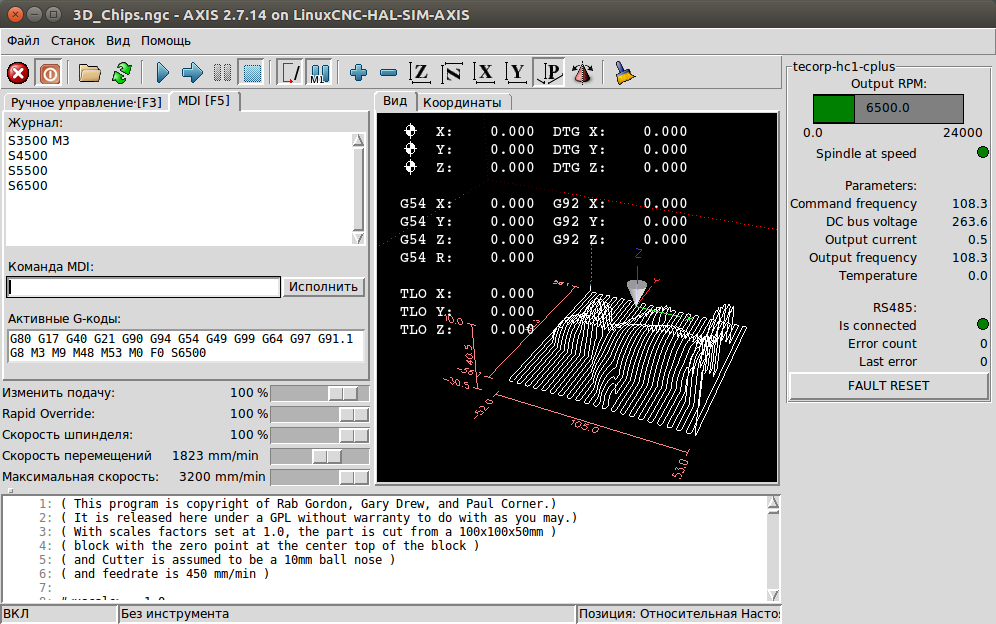

Examples
I wrote my own HAL userspace component - it's called Vfdmod - to control any VFD that supports standard MODBUS RTU transfer mode.
- Sources: github.com/aekhv/vfdmod
- Documentation: github.com/aekhv/vfdmod/wiki
- DEB packages: github.com/aekhv/vfdmod/releases
Features
- Setting command speed with MODBUS function codes 0x06 (write holding register) and 0x10 (write multiple holding registers).
- Setting control word with MODBUS function codes 0x06, 0x10, 0x05 (write coil) and 0x0F (write multiple coils).
- Reading any count of user defined parameters with MODBUS function codes 0x01 and 0x03.
- Four types of user defined parameters are supported: bit, float, s32 and u32.
- Built-in PyVcp generator.
- RS485 connection state monitoring including total error count and last error code.
- Auto reconnection attempts when USB-to-RS485 adapter was physically re-plugged.
- Huanyang VFDs are not supported because they use non-standard MODBUS function codes.
Screenshots
Examples
- Configuration file for Tecorp HC1C+ (low cost chinese VFD):
Code:[Common] MaxSpeedRPM=24000 MinSpeedRPM=3000 AtSpeedThreshold=0.01 [RS485] SlaveAddress=1 SerialDevice=/dev/rs485 BaudRate=19200 DataBits=8 Parity=N StopBits=1 [Control] Address=0x2000 RunForwardValue=0x000A RunReverseValue=0x0006 FaultResetValue=0x0010 StopValue=0x0001 [SpindleRpmIn] Address=0x2001 Multiplier=1 Divider=6 [SpindleRpmOut] Address=0x0004 Multiplier=10 Divider=1 [Command frequency] Address=0x0001 Multiplier=1 Divider=10 PinType=float PinName=command-frequency [Output frequency] Address=0x0002 Multiplier=1 Divider=10 PinType=float PinName=output-frequency [Output current] Address=0x0003 Multiplier=1 Divider=10 PinType=float PinName=output-current [DC bus voltage] Address=0x0005 Multiplier=1 Divider=10 PinType=float PinName=dc-bus-voltage [Temperature] Address=0x0006 Multiplier=1 Divider=10 PinType=float PinName=temperature
Please Log in to join the conversation.
- Todd Zuercher
- Offline
- Platinum Member
-

Less
More
- Posts: 4739
- Thank you received: 2
6 years 6 months ago #162462
by Todd Zuercher
Replied by Todd Zuercher on topic [ Vfdmod ] An easy VFD control over MODBUS RTU
Sounds a lot like Mb2hal. How is your component different/better?
Please Log in to join the conversation.
6 years 6 months ago #162469
by bbsr_5a
Replied by bbsr_5a on topic [ Vfdmod ] An easy VFD control over MODBUS RTU
seams onlyinteresting for longtime users to see the state of the VFD
most wont need it as they just use the error channel to stop f somthing happens
but it is good to have it there
What VFD did you test this
most wont need it as they just use the error channel to stop f somthing happens
but it is good to have it there
What VFD did you test this
Please Log in to join the conversation.
6 years 6 months ago #162521
by aekhv

Replied by aekhv on topic [ Vfdmod ] An easy VFD control over MODBUS RTU
It's hard to answer because I didn't work with mb2halTodd Zuercher wrote: Sounds a lot like Mb2hal. How is your component different/better?
Please Log in to join the conversation.
- Todd Zuercher
- Offline
- Platinum Member
-
Less
More
- Posts: 4739
- Thank you received: 2
6 years 6 months ago #163001
by Todd Zuercher
Replied by Todd Zuercher on topic [ Vfdmod ] An easy VFD control over MODBUS RTU
Your new component may be mostly replicating the same function of the pre-existing Mb2hal component. You might want to look into it
Please Log in to join the conversation.
6 years 6 months ago #164147
by COFHAL
Replied by COFHAL on topic [ Vfdmod ] An easy VFD control over MODBUS RTU
Excellent work, could you post your hal file? I have questions about how you control your spindle.
Please Log in to join the conversation.
6 years 6 months ago #164192
by COFHAL
Replied by COFHAL on topic [ Vfdmod ] An easy VFD control over MODBUS RTU
Does this userspace component work with linuxcnc version 2.9?
Please Log in to join the conversation.
6 years 6 months ago #164213
by aekhv
Replied by aekhv on topic [ Vfdmod ] An easy VFD control over MODBUS RTU
My CNC machine works on LinuxCNC 2.7, so I can test Vfdmod with this version only.COFHAL wrote: Does this userspace component work with linuxcnc version 2.9?
Please Log in to join the conversation.
6 years 6 months ago #164215
by aekhv
Replied by aekhv on topic [ Vfdmod ] An easy VFD control over MODBUS RTU
Thanks a lot! About HAL file see user guide above or ask free hereCOFHAL wrote: Excellent work, could you post your hal file? I have questions about how you control your spindle.
Please Log in to join the conversation.
6 years 6 months ago #164341
by COFHAL
Replied by COFHAL on topic [ Vfdmod ] not control
I have a problem with the userspace component vdfmod vdfmod. I installed it to control my VDF Fuling DZB280, when I run linuxcnc, the VDF automatically receives the minimum RPM command, in this case 300 RPM, but it is not possible to control the VDF, it cannot RUN, STOP or change frequency. And on the control panel, the RS245 connection LED is always red. When seeing the HAL configuration, I see that all the vdfmod.parameters are connected to the panel but not to any input as it appears in its picture. The same goes for all vdfmod rs485 commands.
Please Log in to join the conversation.
Time to create page: 0.206 seconds