
- Posts: 76
- Thank you received: 0
Ditching Mach 3/4 LinuxCNC is The Plan!
- Rhine_Labs
- Topic Author
- Offline
- Senior Member
-

Less
More
11 years 1 month ago #62419
by Rhine_Labs
Replied by Rhine_Labs on topic Ditching Mach 3/4 LinuxCNC is The Plan!
Latency Test after a 1/2 hour of my son playing hard max jitter was 159,657ns so maybe not good enough for using the LPT port?
"If the numbers are 100 us or more (100,000 nanoseconds), then the PC is not a good candidate for software stepping."
"If the numbers are 100 us or more (100,000 nanoseconds), then the PC is not a good candidate for software stepping."
Please Log in to join the conversation.
- LearningLinuxCNC
- Offline
- Elite Member
-

Less
More
- Posts: 208
- Thank you received: 0
11 years 1 month ago #62420
by LearningLinuxCNC
Did you make sure to disable all power saving features in BIOS?
Replied by LearningLinuxCNC on topic Ditching Mach 3/4 LinuxCNC is The Plan!
Latency Test after a 1/2 hour of my son playing hard max jitter was 159,657ns so maybe not good enough for using the LPT port?
Did you make sure to disable all power saving features in BIOS?
Please Log in to join the conversation.
- Todd Zuercher
- Offline
- Platinum Member
-

Less
More
- Posts: 4739
- Thank you received: 2
11 years 1 month ago #62421
by Todd Zuercher
Replied by Todd Zuercher on topic Ditching Mach 3/4 LinuxCNC is The Plan!
If those are the numbers it probably isn't a good candidate for Linuxcnc at all. But have you properly configured it?
You need to be sure to turn off most if not all power saving features in the bios, as well as disabling any hyper-threading. If it is a multi core cpu, (most are anymore) it often will benefit from setting up isolcpus.
There are some tricks here
wiki.linuxcnc.org/cgi-bin/wiki.pl?The_Is..._Parameter_And_GRUB2
You need to be sure to turn off most if not all power saving features in the bios, as well as disabling any hyper-threading. If it is a multi core cpu, (most are anymore) it often will benefit from setting up isolcpus.
There are some tricks here
wiki.linuxcnc.org/cgi-bin/wiki.pl?The_Is..._Parameter_And_GRUB2
Please Log in to join the conversation.
- Rhine_Labs
- Topic Author
- Offline
- Senior Member
-
Less
More
- Posts: 76
- Thank you received: 0
11 years 1 month ago #62425
by Rhine_Labs
Replied by Rhine_Labs on topic Ditching Mach 3/4 LinuxCNC is The Plan!
Disabled Hyper threading and turned off fan management so for 99534ns
Unless it is the bottom Number.. then it is a lot better 51238ns
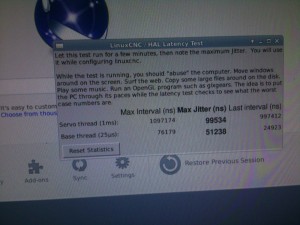
Not many power option in the bios.
Will let it run while I go to the surplus junk store!
Unless it is the bottom Number.. then it is a lot better 51238ns
Not many power option in the bios.
Will let it run while I go to the surplus junk store!
Please Log in to join the conversation.
- Rhine_Labs
- Topic Author
- Offline
- Senior Member
-
Less
More
- Posts: 76
- Thank you received: 0
11 years 1 month ago #62434
by Rhine_Labs
Replied by Rhine_Labs on topic Ditching Mach 3/4 LinuxCNC is The Plan!
Well was running for hours both numbers is 125000ish had YouTube on a playlist + other items running to where it was getting bogged down! I know my laptop could not handle that the load on it it said to abuse it! 15Min of average use not hammering on it stayed 60000's
CPU Pentium 4 @ 3ghz W/2GB Ram
I Turned every power item I could find off in the bios.
Hyper-threading Disabled
On Board Audio Off
Fan On
Wake on Anything Disabled or to Stay On
Floppy Disabled
ACPI Suspend State S1 "S1 is the safest mode but consumes more power. S3 consumes less power, but some drivers may not support this state."
Gateway Midway 4000887 Board Info.
Closest MB Manual since it is a gateway dont have all the options. Even updated it to the latest Bios I could find.
So should I pitch this box and look for another with better latency or do you think it would work with a mesa card?
CPU Pentium 4 @ 3ghz W/2GB Ram
I Turned every power item I could find off in the bios.
Hyper-threading Disabled
On Board Audio Off
Fan On
Wake on Anything Disabled or to Stay On
Floppy Disabled
ACPI Suspend State S1 "S1 is the safest mode but consumes more power. S3 consumes less power, but some drivers may not support this state."
Gateway Midway 4000887 Board Info.
Closest MB Manual since it is a gateway dont have all the options. Even updated it to the latest Bios I could find.
So should I pitch this box and look for another with better latency or do you think it would work with a mesa card?
Please Log in to join the conversation.

11 years 1 month ago #62451
by andypugh
You could try using it anyway. Get started on the fun parts of the project.
Replied by andypugh on topic Ditching Mach 3/4 LinuxCNC is The Plan!
Contract_Pilot wrote: So should I pitch this box and look for another with better latency or do you think it would work with a mesa card?
You could try using it anyway. Get started on the fun parts of the project.
Please Log in to join the conversation.
- Todd Zuercher
- Offline
- Platinum Member
-
Less
More
- Posts: 4739
- Thank you received: 2
11 years 1 month ago #62466
by Todd Zuercher
Replied by Todd Zuercher on topic Ditching Mach 3/4 LinuxCNC is The Plan!
Since I think that is a single core cpu you could try the old 8.04 based install. It usually worked much better on older single core systems.
The only problem is it would limit you to older releases of linuxcnc (I think 2.5 was the last version to support it)
The only problem is it would limit you to older releases of linuxcnc (I think 2.5 was the last version to support it)
Please Log in to join the conversation.
- Rhine_Labs
- Topic Author
- Offline
- Senior Member
-
Less
More
- Posts: 76
- Thank you received: 0
11 years 1 month ago #62586
by Rhine_Labs
Replied by Rhine_Labs on topic Ditching Mach 3/4 LinuxCNC is The Plan!
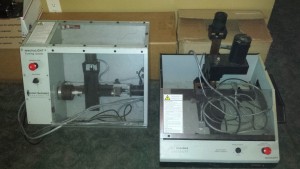
Ohhh know dragged home more boat anchors. Maybe next week I will get to ordering my disk! Time to disassemble and see if i can get these machines to run.
Please Log in to join the conversation.
- Rhine_Labs
- Topic Author
- Offline
- Senior Member
-
Less
More
- Posts: 76
- Thank you received: 0
11 years 1 month ago #62667
by Rhine_Labs
Replied by Rhine_Labs on topic Ditching Mach 3/4 LinuxCNC is The Plan!
Paid Tormach Their $30.00 + $7.65 Shipping! Maybe next week Mesa Combo!
Business Name:
Tormach, Inc. (The recipient of this payment is Verified)
Email:
info@tormach.XXX
Total amount:
-$37.65 USD
Fee amount:
$0.00 USD
Net amount:
-$37.65 USD
Item amount:
$37.65 USD
Quantity:
1
Item Title:
Online Order
Item Number:
ORD20150916XX
Date:
Sep 16, 2015
Time:
16:34:17 PDT
Status:
Completed
I should have never went mach!!! LCNC way simpler just from playing around! To bad Tormach does not offer pay and download foring to be an interesting 2-3 week wait for the disk!
Was able to get every thing but the steppers to move on the new additions.
Business Name:
Tormach, Inc. (The recipient of this payment is Verified)
Email:
info@tormach.XXX
Total amount:
-$37.65 USD
Fee amount:
$0.00 USD
Net amount:
-$37.65 USD
Item amount:
$37.65 USD
Quantity:
1
Item Title:
Online Order
Item Number:
ORD20150916XX
Date:
Sep 16, 2015
Time:
16:34:17 PDT
Status:
Completed
I should have never went mach!!! LCNC way simpler just from playing around! To bad Tormach does not offer pay and download foring to be an interesting 2-3 week wait for the disk!
Was able to get every thing but the steppers to move on the new additions.
Please Log in to join the conversation.
- racedirector
- Offline
- Elite Member
-
Less
More
- Posts: 218
- Thank you received: 0
11 years 1 month ago #62672
by racedirector

Replied by racedirector on topic Ditching Mach 3/4 LinuxCNC is The Plan!
Hear, hear, I agree 100%. Was never able to get my machine to do what I wanted it to under Mach3. Under LCNC, after figuring out a few bugs, I just ran a test part with 3 different tool changes and some 3D thrown in for good measure and the machine performed flawlessly. Only touched off once manually at the beginning of the job to set Z zero, everything else was automated aside from physically changing the cuttersContract_Pilot wrote: I should have never went mach!!! LCNC way simpler just from playing around!
Please Log in to join the conversation.
Time to create page: 0.065 seconds