

- Posts: 72
- Thank you received: 0
Planning - Bridgeport Interact 1 linuxCNC Retrofit
10 years 9 months ago #68588
by csbrady
Replied by csbrady on topic Planning - Bridgeport Interact 1 linuxCNC Retrofit
I have not tried inverse deadband yet, it's on my list. I am a little sceptical that it will help, but figured it's worth trying. I spent a lot of time searching for more information and found very little.
Please Log in to join the conversation.
- cncnoob1979
- Topic Author
- Offline
- Platinum Member
-

Less
More
- Posts: 403
- Thank you received: 0
10 years 9 months ago #68636
by cncnoob1979
Replied by cncnoob1979 on topic Planning - Bridgeport Interact 1 linuxCNC Retrofit
I might have a go at reverse deadband, if so I'll post the results.
Here is an image of me placing my components into my pendant.
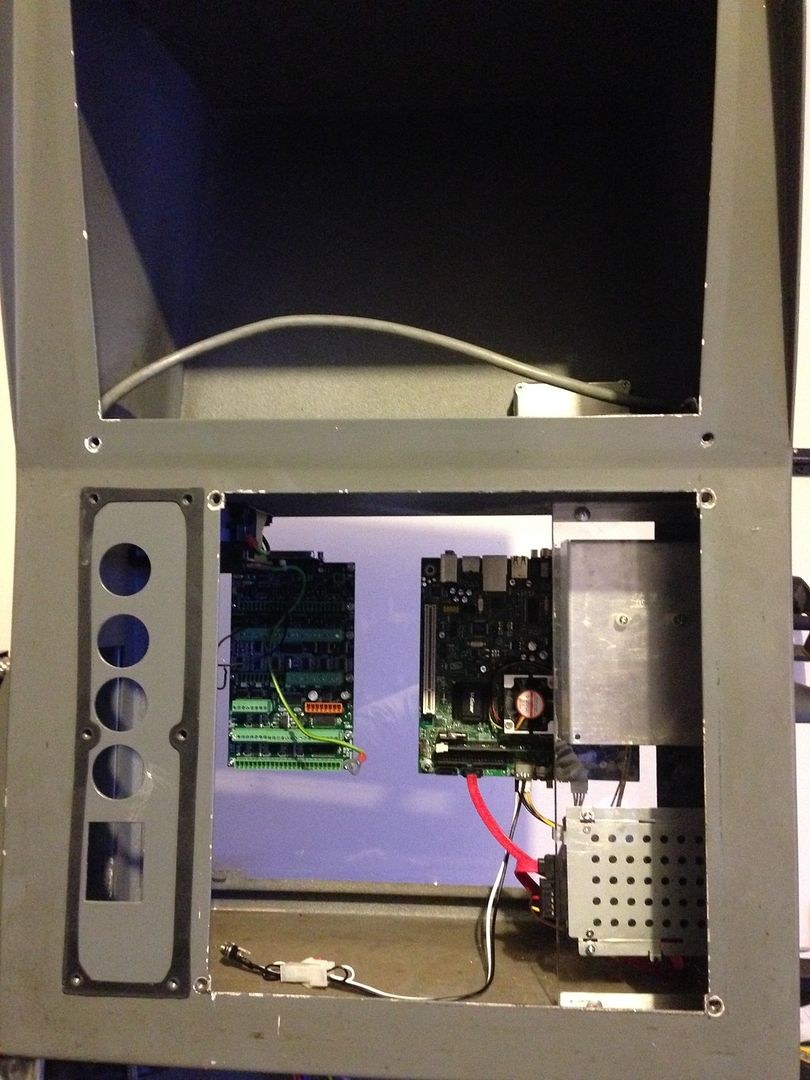
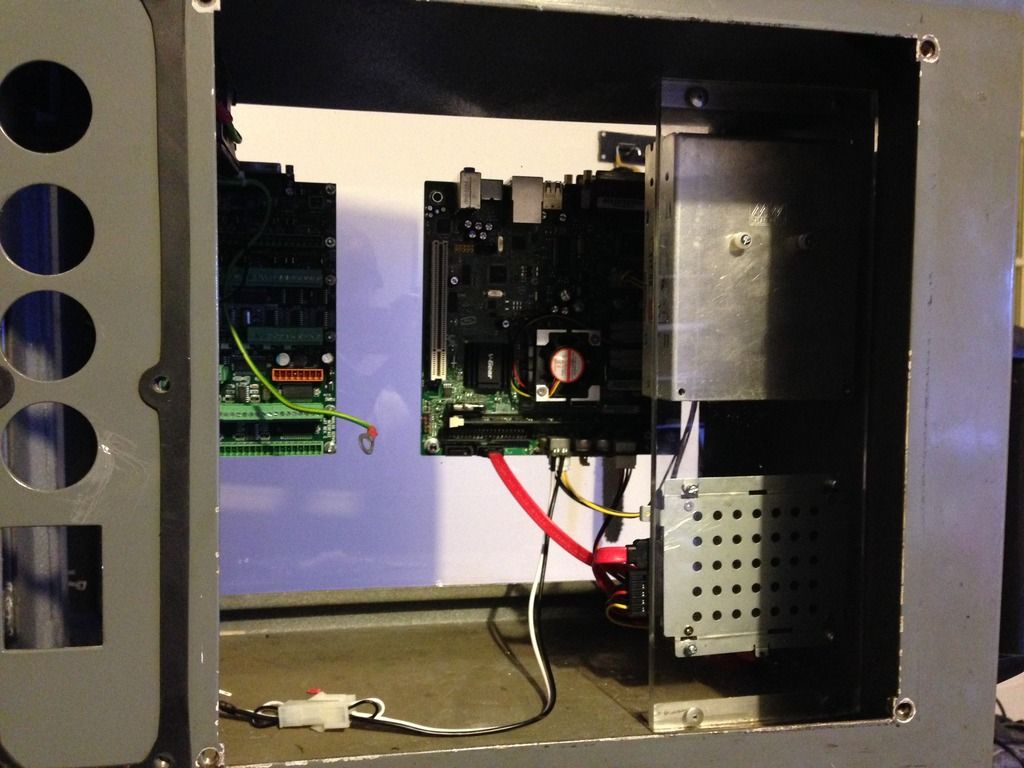
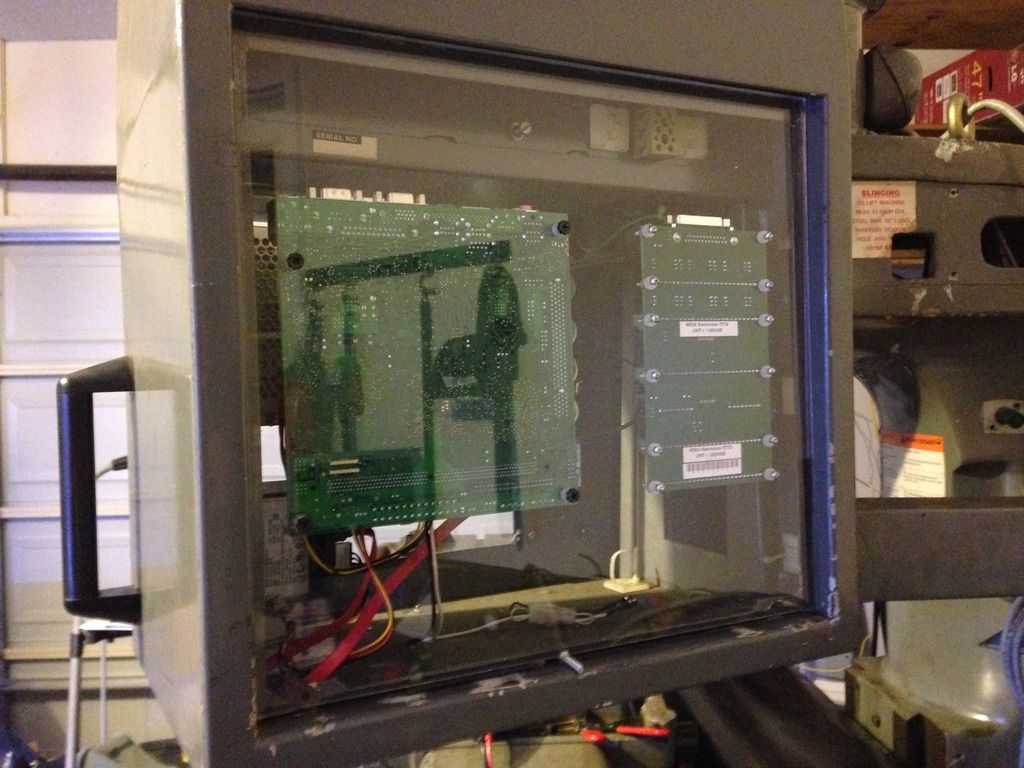
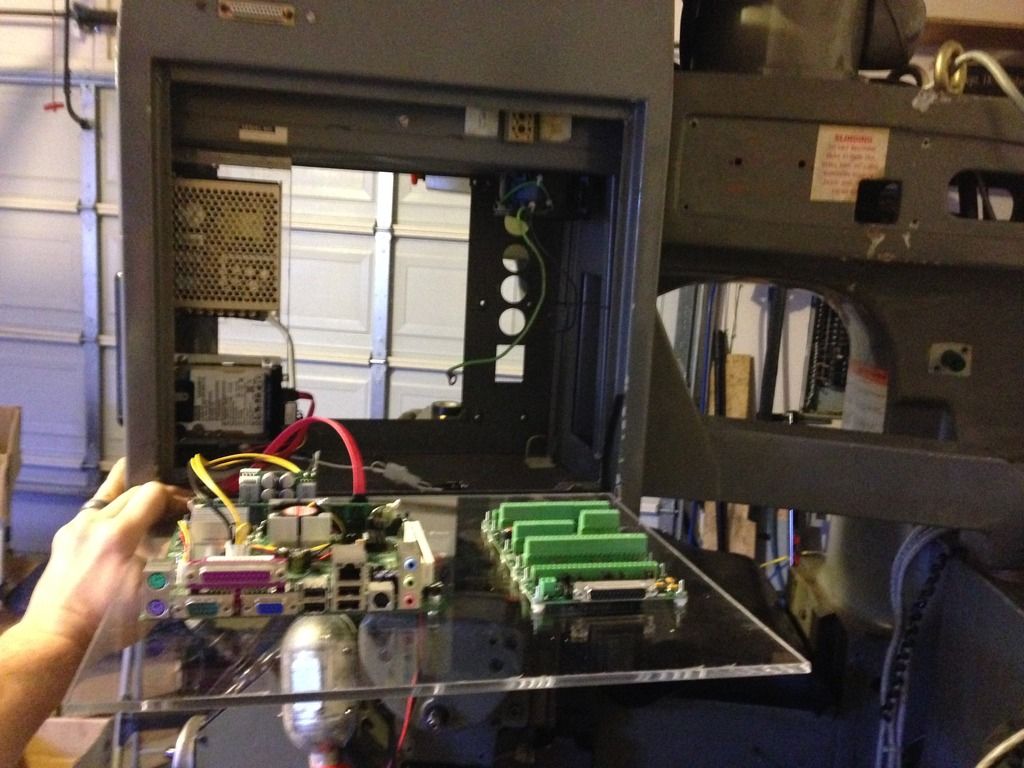
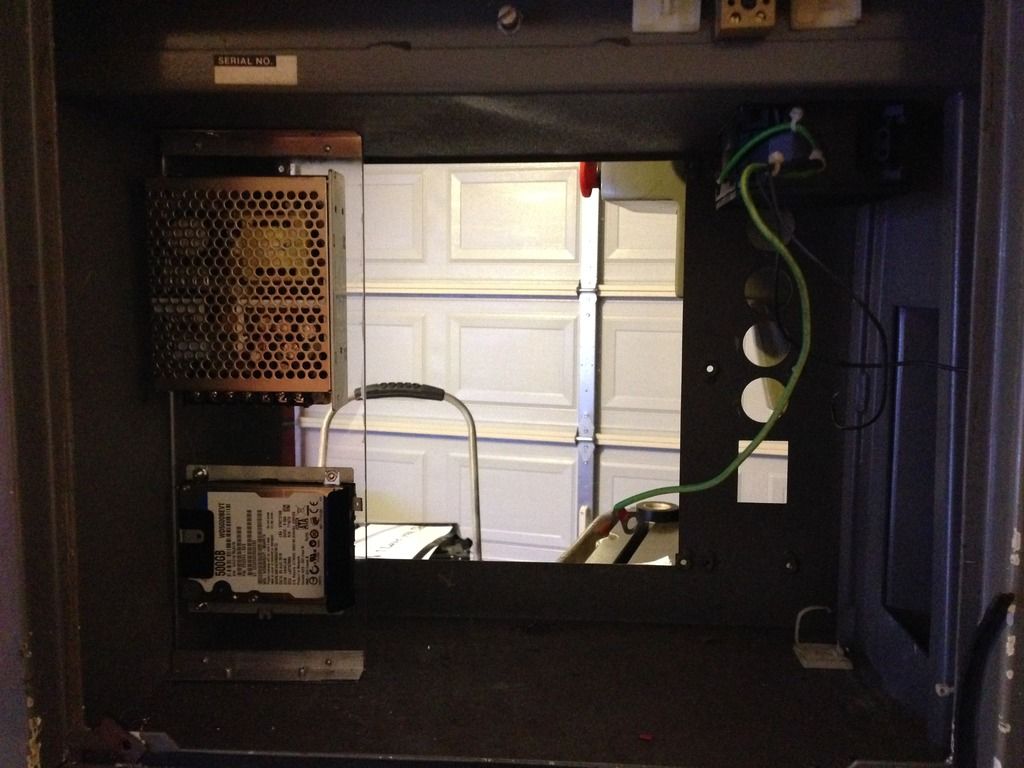
I mounted it this way because on the back, I'll have a hinge and spring loaded cables. That way I can access everything directly from the rear.
I'm not sure if I'll leave the plexi clear or not. I might paint it.
Here is an image of me placing my components into my pendant.


I mounted it this way because on the back, I'll have a hinge and spring loaded cables. That way I can access everything directly from the rear.
I'm not sure if I'll leave the plexi clear or not. I might paint it.
Please Log in to join the conversation.
- cncnoob1979
- Topic Author
- Offline
- Platinum Member
-
Less
More
- Posts: 403
- Thank you received: 0
10 years 9 months ago #68719
by cncnoob1979
Replied by cncnoob1979 on topic Planning - Bridgeport Interact 1 linuxCNC Retrofit
Ive ran into a snag I cant seem to figure out.
I'm trying to link my joystick commands to jog my axes. The outputs are 24v to the 7i77 via input TB8 pins 06-09. However I am getting no movement and looking through HAL configuration, the readings are false. Ive connected the pins via PncConf Wizard.
I haven't started tackling editing the hal file yet.
Ive posted my hal and ini files below.
Im reading up in the DOC's at the moment. Any help is much appreciated.
I'm trying to link my joystick commands to jog my axes. The outputs are 24v to the 7i77 via input TB8 pins 06-09. However I am getting no movement and looking through HAL configuration, the readings are false. Ive connected the pins via PncConf Wizard.
I haven't started tackling editing the hal file yet.
Ive posted my hal and ini files below.
Attachment not found
Attachment not found
Im reading up in the DOC's at the moment. Any help is much appreciated.
Please Log in to join the conversation.

10 years 9 months ago #68723
by andypugh
If you can't see any action on the hm2 input pins when you move the joystick then it is probably a wiring problem. How is the joystick connected? Perhaps the joystick connects pins to GND?
Replied by andypugh on topic Planning - Bridgeport Interact 1 linuxCNC Retrofit
cncnoob1979 wrote: I'm trying to link my joystick commands to jog my axes. The outputs are 24v to the 7i77 via input TB8 pins 06-09. However I am getting no movement and looking through HAL configuration, the readings are false.
If you can't see any action on the hm2 input pins when you move the joystick then it is probably a wiring problem. How is the joystick connected? Perhaps the joystick connects pins to GND?
Please Log in to join the conversation.
- cncnoob1979
- Topic Author
- Offline
- Platinum Member
-
Less
More
- Posts: 403
- Thank you received: 0
10 years 9 months ago #68725
by cncnoob1979
Replied by cncnoob1979 on topic Planning - Bridgeport Interact 1 linuxCNC Retrofit
Hey! Thanks Andy,
I looked at the input pins and they go to true when I use the joystick, and a true on jog-x-pos. So its getting the 24v, so Im not sure what I need to do?
Ive been trying to figure it out.
Edit:
I was looking at the wrong pins in my previous post [When I stated the pins were false]. I have found the correct pins as stated above and they are true, but still no movement. ~Just to clarify my issue.
Am I using the right pins for jogging? I cant seem to find simple literature to explain this to me. I see a ton of stuff for hand-wheels ect. Not simple connections.
I looked at the input pins and they go to true when I use the joystick, and a true on jog-x-pos. So its getting the 24v, so Im not sure what I need to do?
Ive been trying to figure it out.
Edit:
I was looking at the wrong pins in my previous post [When I stated the pins were false]. I have found the correct pins as stated above and they are true, but still no movement. ~Just to clarify my issue.
Am I using the right pins for jogging? I cant seem to find simple literature to explain this to me. I see a ton of stuff for hand-wheels ect. Not simple connections.
Please Log in to join the conversation.
10 years 9 months ago #68726
by andypugh
At a guess (and this is a guess) your halui.jog-speed is zero?
Replied by andypugh on topic Planning - Bridgeport Interact 1 linuxCNC Retrofit
cncnoob1979 wrote: I looked at the input pins and they go to true when I use the joystick, and a true on jog-x-pos. So its getting the 24v, so Im not sure what I need to do?
Ive been trying to figure it out.
At a guess (and this is a guess) your halui.jog-speed is zero?
Please Log in to join the conversation.
- cncnoob1979
- Topic Author
- Offline
- Platinum Member
-
Less
More
- Posts: 403
- Thank you received: 0
10 years 9 months ago #68727
by cncnoob1979
Replied by cncnoob1979 on topic Planning - Bridgeport Interact 1 linuxCNC Retrofit
My jog speed in the axis GUI is @ 15in per min.
Unless you mean elsewhere?
Unless you mean elsewhere?
Please Log in to join the conversation.
10 years 9 months ago #68728
by andypugh
I do mean elsewhere, I mean the halui.jog-speed pin itself.
That is, I think, independent of the slider, which is purely an Axis thing.
Replied by andypugh on topic Planning - Bridgeport Interact 1 linuxCNC Retrofit
cncnoob1979 wrote: My jog speed in the axis GUI is @ 15in per min.
Unless you mean elsewhere?
I do mean elsewhere, I mean the halui.jog-speed pin itself.
That is, I think, independent of the slider, which is purely an Axis thing.
Please Log in to join the conversation.
- cncnoob1979
- Topic Author
- Offline
- Platinum Member
-
Less
More
- Posts: 403
- Thank you received: 0
10 years 9 months ago #68729
by cncnoob1979
Replied by cncnoob1979 on topic Planning - Bridgeport Interact 1 linuxCNC Retrofit
Awesome guess!
I looked at that pin in halmeter, it is currently zero [0], so where do I go from here?
Ill read up on that pin, I have no idea what to do with it!
This is in my hal file attached above:
I dont seem to have any mention of jog speed in my ini, so Im assuming I need to add it in the INI or in the HAL file.
I looked at that pin in halmeter, it is currently zero [0], so where do I go from here?
Ill read up on that pin, I have no idea what to do with it!
This is in my hal file attached above:
Code:
#******************************
# connect miscellaneous signals
#******************************
# ---HALUI signals---
net joint-select-a halui.joint.0.select
net x-is-homed halui.joint.0.is-homed
net jog-x-pos halui.jog.0.plus
net jog-x-neg halui.jog.0.minus
net jog-x-analog halui.jog.0.analog
net joint-select-b halui.joint.1.select
net y-is-homed halui.joint.1.is-homed
net jog-y-pos halui.jog.1.plus
net jog-y-neg halui.jog.1.minus
net jog-y-analog halui.jog.1.analog
net joint-select-c halui.joint.2.select
net z-is-homed halui.joint.2.is-homed
net jog-z-pos halui.jog.2.plus
net jog-z-neg halui.jog.2.minus
net jog-z-analog halui.jog.2.analog
net jog-selected-pos halui.jog.selected.plus
net jog-selected-neg halui.jog.selected.minus
net spindle-manual-cw halui.spindle.forward
net spindle-manual-ccw halui.spindle.reverse
net spindle-manual-stop halui.spindle.stop
net machine-is-on halui.machine.is-on
net jog-speed halui.jog-speed
net MDI-mode halui.mode.is-mdi
I dont seem to have any mention of jog speed in my ini, so Im assuming I need to add it in the INI or in the HAL file.
Please Log in to join the conversation.
10 years 9 months ago #68730
by andypugh
As a first step, try "setp halui.jog-speed 10" in the box at the bottom of the "show HAL config" window.
Then work out where you want the jog speed to be set.
Replied by andypugh on topic Planning - Bridgeport Interact 1 linuxCNC Retrofit
cncnoob1979 wrote: Awesome guess!
I looked at that pin in halmeter, it is currently zero [0], so where do I go from here?.
As a first step, try "setp halui.jog-speed 10" in the box at the bottom of the "show HAL config" window.
Then work out where you want the jog speed to be set.
Please Log in to join the conversation.
Time to create page: 0.115 seconds