

- Posts: 648
- Thank you received: 0
Chiron FZ12W Retrofit
8 years 10 months ago #103199
by anfänger
Chiron FZ12W Retrofit was created by anfänger
Hi I'am new to this community.
A while I go a Chiron FZ12W found its way to my shop.
It was my first contact with a CNC machine and cause playing with machines is just a hobby of mine it took me about two years to get her running again.
But this old baby has very few memory and a even slower serial connection I decided to give her a retrofit.
My chois was linuxCNC and Mesa cards.
I went thru alle the wiring plans and made me a spreadsheet with all the connections and I/Os i would need.
After about half a year of thinking and planning I ordered all I think to need:


I wired up the Mesa cards to the adapters.
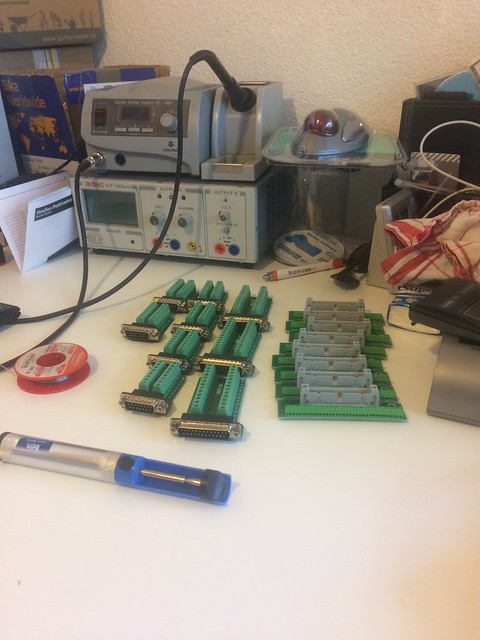
I decides to male two boards one which comes in the old user panel together with the computer and the Monitor
This board contains the 7i92H the 7i77 and the 7i74

an one board with the 7i70 and 7i71 is placed in the cabinet in back of the machine

This way I can reuse alle the connectors from the old control unit.
The computer is a passive J1900 machine with 4gb of ram and a 32gb SSD and two ethernet ports. I installed an 12.4 Ubuntu and use the linuxnc repo the the rtai kernel from this repo. later I will compile my own kernel to get the touchscreen running again.
But for now trackball and keybord are fine.
so i fired up the computer and put power to the boards...

I can ping the 7i92 which, for me, is a good sign.
Now I am at the point where I would need some Help. I would really set up everything an do some tests before i put everything into the machine.
I read most of the manuals in summer and forgot everything again. But as far as I am aware pncConf does not support the 7i92.
Is there a good tutorial hot to set up (7i92H, 7i77, 7i74, 7i70 and 7i71) Mesacards or has someone a sample hal file?
Thanks Patrick
A while I go a Chiron FZ12W found its way to my shop.
It was my first contact with a CNC machine and cause playing with machines is just a hobby of mine it took me about two years to get her running again.
But this old baby has very few memory and a even slower serial connection I decided to give her a retrofit.
My chois was linuxCNC and Mesa cards.
I went thru alle the wiring plans and made me a spreadsheet with all the connections and I/Os i would need.
After about half a year of thinking and planning I ordered all I think to need:
I wired up the Mesa cards to the adapters.
I decides to male two boards one which comes in the old user panel together with the computer and the Monitor
This board contains the 7i92H the 7i77 and the 7i74
an one board with the 7i70 and 7i71 is placed in the cabinet in back of the machine
This way I can reuse alle the connectors from the old control unit.
The computer is a passive J1900 machine with 4gb of ram and a 32gb SSD and two ethernet ports. I installed an 12.4 Ubuntu and use the linuxnc repo the the rtai kernel from this repo. later I will compile my own kernel to get the touchscreen running again.
But for now trackball and keybord are fine.
so i fired up the computer and put power to the boards...
I can ping the 7i92 which, for me, is a good sign.
Now I am at the point where I would need some Help. I would really set up everything an do some tests before i put everything into the machine.
I read most of the manuals in summer and forgot everything again. But as far as I am aware pncConf does not support the 7i92.
Is there a good tutorial hot to set up (7i92H, 7i77, 7i74, 7i70 and 7i71) Mesacards or has someone a sample hal file?
Thanks Patrick
Please Log in to join the conversation.
8 years 10 months ago #103212
by PCW
Replied by PCW on topic Chiron FZ12W Retrofit
I would start by making a trial configuration file set with pncconf (for 5i25 and 7I77)
Then edit the created hal file by replacing:
1. All the instances of 5i25 with 7i92
2. The loadrt hm2_pci command line with loadrt hm2_eth board_ip="10.10.10.10"
3. Enable both sserial ports by adding the tokens sserial_port_0 =000xxxxx sserial_port_1=00000000
to the loadrt hostmot2 command line
This assumes you have the jumpered for a 10.10.10.10 ip address and the host Ethernet port is setup to talk to this port
(typically the host would use 10.10.10.1 as its IP address in this case)
At this point you should be able to start LinuxCNC and if field power is applied to all sserial devices
you should be able to get a complete pinout list of all available I/O
Then edit the created hal file by replacing:
1. All the instances of 5i25 with 7i92
2. The loadrt hm2_pci command line with loadrt hm2_eth board_ip="10.10.10.10"
3. Enable both sserial ports by adding the tokens sserial_port_0 =000xxxxx sserial_port_1=00000000
to the loadrt hostmot2 command line
This assumes you have the jumpered for a 10.10.10.10 ip address and the host Ethernet port is setup to talk to this port
(typically the host would use 10.10.10.1 as its IP address in this case)
At this point you should be able to start LinuxCNC and if field power is applied to all sserial devices
you should be able to get a complete pinout list of all available I/O
Please Log in to join the conversation.
8 years 10 months ago #103227
by anfänger
Replied by anfänger on topic Chiron FZ12W Retrofit
Thanks for the reply.
Am I right that the hm2_et doesn't run on the RTAI kernel and needs the RT Kernel?
Am I right that the hm2_et doesn't run on the RTAI kernel and needs the RT Kernel?
Please Log in to join the conversation.
8 years 10 months ago #103247
by rodw
Yes, you need the preemptive real time kernel.
Replied by rodw on topic Chiron FZ12W Retrofit
anfänger wrote: Thanks for the reply.
Am I right that the hm2_et doesn't run on the RTAI kernel and needs the RT Kernel?
Yes, you need the preemptive real time kernel.
Please Log in to join the conversation.
8 years 10 months ago #103340
by anfänger
Replied by anfänger on topic Chiron FZ12W Retrofit
thanks I got at least one running Kernel right now.
but the hal-file conversion dint run as I expected.
pncconf made the folwing line (already edited to match my 7i92):
loadrt hm2_eth board_ip="192.168.1.121" config=" num_encoders=6 num_pwmgens=0 num_stepgens=0 sserial_port_0=000xxx"
the set of my cards should be supported
i flashed the fitting bitfie.
now when i run linuxcnc i the the following.
it seems the serial ports for the 7i77 are not set up.
bit when i add sserial_port_1=00000000
i loose all he serial io's
but the hal-file conversion dint run as I expected.
pncconf made the folwing line (already edited to match my 7i92):
loadrt hm2_eth board_ip="192.168.1.121" config=" num_encoders=6 num_pwmgens=0 num_stepgens=0 sserial_port_0=000xxx"
the set of my cards should be supported
SUPPLIED CONFIGURATIONS
7I77_7I74D
7I74_7I77D is a configuration intended to work with
a7I77 six axis analog servo
daughtercard on P2 and a 7I74 eight channel RS-422
interface daughtercard on P1. It
includes six encoder inputs, 14 smart serial interf
aces (2 used on the 7I77 for 48 bit
isolated field I/O and analog out) , a watchdog tim
er and GPIO.
i flashed the fitting bitfie.
now when i run linuxcnc i the the following.
Code:
hm2: loading Mesa HostMot2 driver version 0.15
hm2_eth: loading Mesa AnyIO HostMot2 ethernet driver version 0.2
hm2_eth: 192.168.1.121: Hardware address: 00:60:1b:12:03:8b
hm2_eth: discovered 7I92
hm2/hm2_7i92.0: Smart Serial Firmware Version 43
hm2/hm2_7i92.0: 34 I/O Pins used:
hm2/hm2_7i92.0: IO Pin 000 (P2-01): IOPort
hm2/hm2_7i92.0: IO Pin 001 (P2-14): IOPort
hm2/hm2_7i92.0: IO Pin 002 (P2-02): IOPort
hm2/hm2_7i92.0: IO Pin 003 (P2-15): IOPort
hm2/hm2_7i92.0: IO Pin 004 (P2-03): IOPort
hm2/hm2_7i92.0: IO Pin 005 (P2-16): IOPort
hm2/hm2_7i92.0: IO Pin 006 (P2-04): IOPort
hm2/hm2_7i92.0: IO Pin 007 (P2-17): Muxed Encoder Select #0, pin Mux Select 0 (Output)
hm2/hm2_7i92.0: IO Pin 008 (P2-05): Muxed Encoder #0, pin Muxed A (Input)
hm2/hm2_7i92.0: IO Pin 009 (P2-06): Muxed Encoder #0, pin Muxed B (Input)
hm2/hm2_7i92.0: IO Pin 010 (P2-07): Muxed Encoder #0, pin Muxed Index (Input)
hm2/hm2_7i92.0: IO Pin 011 (P2-08): Muxed Encoder #1, pin Muxed A (Input)
hm2/hm2_7i92.0: IO Pin 012 (P2-09): Muxed Encoder #1, pin Muxed B (Input)
hm2/hm2_7i92.0: IO Pin 013 (P2-10): Muxed Encoder #1, pin Muxed Index (Input)
hm2/hm2_7i92.0: IO Pin 014 (P2-11): Muxed Encoder #2, pin Muxed A (Input)
hm2/hm2_7i92.0: IO Pin 015 (P2-12): Muxed Encoder #2, pin Muxed B (Input)
hm2/hm2_7i92.0: IO Pin 016 (P2-13): Muxed Encoder #2, pin Muxed Index (Input)
hm2/hm2_7i92.0: IO Pin 017 (P1-01): Smart Serial Interface #1, pin RxData0 (Input)
hm2/hm2_7i92.0: IO Pin 018 (P1-14): Smart Serial Interface #1, pin RxData1 (Input)
hm2/hm2_7i92.0: IO Pin 019 (P1-02): Smart Serial Interface #1, pin RxData2 (Input)
hm2/hm2_7i92.0: IO Pin 020 (P1-15): Smart Serial Interface #1, pin RxData3 (Input)
hm2/hm2_7i92.0: IO Pin 021 (P1-03): Smart Serial Interface #1, pin TxData0 (Output)
hm2/hm2_7i92.0: IO Pin 022 (P1-16): Smart Serial Interface #1, pin TxData1 (Output)
hm2/hm2_7i92.0: IO Pin 023 (P1-04): Smart Serial Interface #1, pin TxData2 (Output)
hm2/hm2_7i92.0: IO Pin 024 (P1-17): Smart Serial Interface #1, pin TxData3 (Output)
hm2/hm2_7i92.0: IO Pin 025 (P1-05): Smart Serial Interface #1, pin RxData4 (Input)
hm2/hm2_7i92.0: IO Pin 026 (P1-06): Smart Serial Interface #1, pin RxData5 (Input)
hm2/hm2_7i92.0: IO Pin 027 (P1-07): IOPort
hm2/hm2_7i92.0: IO Pin 028 (P1-08): IOPort
hm2/hm2_7i92.0: IO Pin 029 (P1-09): Smart Serial Interface #1, pin TxData4 (Output)
hm2/hm2_7i92.0: IO Pin 030 (P1-10): Smart Serial Interface #1, pin TxData5 (Output)
hm2/hm2_7i92.0: IO Pin 031 (P1-11): IOPort
hm2/hm2_7i92.0: IO Pin 032 (P1-12): IOPort
hm2/hm2_7i92.0: IO Pin 033 (P1-13): IOPort
hm2/hm2_7i92.0: registered
./Igor.hal:32: Pin 'hm2_7i92.0.7i77.0.0.output-01' does not exist
bit when i add sserial_port_1=00000000
i loose all he serial io's
Please Log in to join the conversation.
8 years 10 months ago #103341
by PCW
Replied by PCW on topic Chiron FZ12W Retrofit
If neither 7I77 sserial ports show up, I would check the 7I77s 5V supply
Please Log in to join the conversation.
8 years 10 months ago #103347
by anfänger
Replied by anfänger on topic Chiron FZ12W Retrofit
one mistake found.
My cables are wrong...
They should go 1<->1 2<->14 and so on
but actually go 1<->1 2<->2 ...
My cables are wrong...
They should go 1<->1 2<->14 and so on
but actually go 1<->1 2<->2 ...
Please Log in to join the conversation.

8 years 10 months ago #103348
by calvin.d
Replied by calvin.d on topic Chiron FZ12W Retrofit
what motherboard are you using for this build ?
Thank You
Calvin
Thank You
Calvin
Please Log in to join the conversation.
8 years 10 months ago #103350
by anfänger
Replied by anfänger on topic Chiron FZ12W Retrofit
I'm using a zotac zbox CI327 nao pc
new cables an some corrected timing seems to do the trick:
new cables an some corrected timing seems to do the trick:
Code:
INUXCNC - 2.8.0~pre1
Machine configuration directory is '/home/pl/linuxcnc/configs/Igor'
Machine configuration file is 'Igor.ini'
Starting LinuxCNC...
Found file(REL): ./Igor.hal
Note: Using POSIX realtime
hm2: loading Mesa HostMot2 driver version 0.15
hm2_eth: loading Mesa AnyIO HostMot2 ethernet driver version 0.2
hm2_eth: 192.168.1.121: Hardware address: 00:60:1b:12:03:8b
hm2_eth: discovered 7I92
hm2/hm2_7i92.0: Smart Serial Firmware Version 43
Board hm2_7i92.0.7i77.0.0 Hardware Mode 0 = standard
Board hm2_7i92.0.7i77.0.0 Software Mode 0 = input_output
Board hm2_7i92.0.7i77.0.0 Software Mode 1 = io_analog
Board hm2_7i92.0.7i77.0.0 Software Mode 2 = io_analog_fieldvoltage
Board hm2_7i92.0.7i77.0.0 Software Mode 3 = io_encoder_analog_fieldvoltage
Board hm2_7i92.0.7i77.0.1 Hardware Mode 0 = standard
Board hm2_7i92.0.7i77.0.1 Software Mode 0 = analogout_enables
hm2/hm2_7i92.0: Smart Serial Firmware Version 43
Board hm2_7i92.0.7i70.1.0 Hardware Mode 0 = standard
Board hm2_7i92.0.7i70.1.0 Software Mode 0 = input_only
Board hm2_7i92.0.7i70.1.0 Software Mode 1 = input_analog
Board hm2_7i92.0.7i70.1.0 Software Mode 2 = input_fieldvoltage
Board hm2_7i92.0.7i71.1.1 Hardware Mode 0 = standard
Board hm2_7i92.0.7i71.1.1 Software Mode 0 = output_only
Board hm2_7i92.0.7i71.1.1 Software Mode 1 = output_fieldvoltage
hm2/hm2_7i92.0: 34 I/O Pins used:
hm2/hm2_7i92.0: IO Pin 000 (P2-01): IOPort
hm2/hm2_7i92.0: IO Pin 001 (P2-14): IOPort
hm2/hm2_7i92.0: IO Pin 002 (P2-02): IOPort
hm2/hm2_7i92.0: IO Pin 003 (P2-15): Smart Serial Interface #0, pin TxData1 (Output)
hm2/hm2_7i92.0: IO Pin 004 (P2-03): Smart Serial Interface #0, pin RxData1 (Input)
hm2/hm2_7i92.0: IO Pin 005 (P2-16): Smart Serial Interface #0, pin TxData0 (Output)
hm2/hm2_7i92.0: IO Pin 006 (P2-04): Smart Serial Interface #0, pin RxData0 (Input)
hm2/hm2_7i92.0: IO Pin 007 (P2-17): Muxed Encoder Select #0, pin Mux Select 0 (Output)
hm2/hm2_7i92.0: IO Pin 008 (P2-05): Muxed Encoder #0, pin Muxed A (Input)
hm2/hm2_7i92.0: IO Pin 009 (P2-06): Muxed Encoder #0, pin Muxed B (Input)
hm2/hm2_7i92.0: IO Pin 010 (P2-07): Muxed Encoder #0, pin Muxed Index (Input)
hm2/hm2_7i92.0: IO Pin 011 (P2-08): Muxed Encoder #1, pin Muxed A (Input)
hm2/hm2_7i92.0: IO Pin 012 (P2-09): Muxed Encoder #1, pin Muxed B (Input)
hm2/hm2_7i92.0: IO Pin 013 (P2-10): Muxed Encoder #1, pin Muxed Index (Input)
hm2/hm2_7i92.0: IO Pin 014 (P2-11): Muxed Encoder #2, pin Muxed A (Input)
hm2/hm2_7i92.0: IO Pin 015 (P2-12): Muxed Encoder #2, pin Muxed B (Input)
hm2/hm2_7i92.0: IO Pin 016 (P2-13): Muxed Encoder #2, pin Muxed Index (Input)
hm2/hm2_7i92.0: IO Pin 017 (P1-01): Smart Serial Interface #1, pin RxData0 (Input)
hm2/hm2_7i92.0: IO Pin 018 (P1-14): Smart Serial Interface #1, pin RxData1 (Input)
hm2/hm2_7i92.0: IO Pin 019 (P1-02): IOPort
hm2/hm2_7i92.0: IO Pin 020 (P1-15): IOPort
hm2/hm2_7i92.0: IO Pin 021 (P1-03): Smart Serial Interface #1, pin TxData0 (Output)
hm2/hm2_7i92.0: IO Pin 022 (P1-16): Smart Serial Interface #1, pin TxData1 (Output)
hm2/hm2_7i92.0: IO Pin 023 (P1-04): IOPort
hm2/hm2_7i92.0: IO Pin 024 (P1-17): IOPort
hm2/hm2_7i92.0: IO Pin 025 (P1-05): IOPort
hm2/hm2_7i92.0: IO Pin 026 (P1-06): IOPort
hm2/hm2_7i92.0: IO Pin 027 (P1-07): IOPort
hm2/hm2_7i92.0: IO Pin 028 (P1-08): IOPort
hm2/hm2_7i92.0: IO Pin 029 (P1-09): IOPort
hm2/hm2_7i92.0: IO Pin 030 (P1-10): IOPort
hm2/hm2_7i92.0: IO Pin 031 (P1-11): IOPort
hm2/hm2_7i92.0: IO Pin 032 (P1-12): IOPort
hm2/hm2_7i92.0: IO Pin 033 (P1-13): IOPort
hm2/hm2_7i92.0: registered
Please Log in to join the conversation.
Time to create page: 0.176 seconds