

- Posts: 19306
- Thank you received: 0
6x6 Stewart (Parallel Kinematic Machine Tool)
10 years 4 months ago #75287
by andypugh
Replied by andypugh on topic 6x6 Stewart (Parallel Kinematic Machine Tool)
You could try the more long-winded:
sudo find / -name genhexkins.ko
sudo find / -name genhexkins.ko
Please Log in to join the conversation.

10 years 4 months ago #75404
by ommar
Replied by ommar on topic 6x6 Stewart (Parallel Kinematic Machine Tool)
Hi,
I defined my hexapod joints coordinates in the kinematics.ini file. (linuxcnc/configs/sim.axis.vismach.hexapod-sim/)
Will i edit additionally files ? Is it enough for the kinematic calculation ?
On the other hand;
I tested all of the motors in pncconfig successfully. I can move them. I have one 6i25 and two 7i76 mesa cards.
I am planning that;
I will define X,Y,Z axis in Pncconfig for one mesa 7i76 card and
i will define A,B,C axis for the other mesa 7i76card.
Pnconfig will create two ini file.
Will i copy these ini files into linuxcnc/configs/sim.axis.vismach.hexapod-sim/hexapd.ini ?
Thank you.
I defined my hexapod joints coordinates in the kinematics.ini file. (linuxcnc/configs/sim.axis.vismach.hexapod-sim/)
Will i edit additionally files ? Is it enough for the kinematic calculation ?
On the other hand;
I tested all of the motors in pncconfig successfully. I can move them. I have one 6i25 and two 7i76 mesa cards.
I am planning that;
I will define X,Y,Z axis in Pncconfig for one mesa 7i76 card and
i will define A,B,C axis for the other mesa 7i76card.
Pnconfig will create two ini file.
Will i copy these ini files into linuxcnc/configs/sim.axis.vismach.hexapod-sim/hexapd.ini ?
Thank you.
Please Log in to join the conversation.
10 years 4 months ago #75410
by andypugh
Replied by andypugh on topic 6x6 Stewart (Parallel Kinematic Machine Tool)
You will have one INI file and one config. LinuxCNC handles up to 9 joints, and does not really care what hardware they are connected to.
To save confusion, it is probably better to talk about joints 0, 1, 2,..5 for each leg of the hexapod. The axes XYZABC define the position in space and the orientation of the platform, not the leg lengths.
To save confusion, it is probably better to talk about joints 0, 1, 2,..5 for each leg of the hexapod. The axes XYZABC define the position in space and the orientation of the platform, not the leg lengths.
Please Log in to join the conversation.
10 years 4 months ago #75416
by ommar
You are right. I am confused.
I will not use pncconfig in that case. I will only edit hexapod.ini. Am i true ?
May you explain step by step.
Replied by ommar on topic 6x6 Stewart (Parallel Kinematic Machine Tool)
To save confusion, it is probably better to talk about joints 0, 1, 2,..5 for each leg of the hexapod. The axes XYZABC define the position in space and the orientation of the platform, not the leg lengths.
You are right. I am confused.
I will not use pncconfig in that case. I will only edit hexapod.ini. Am i true ?
May you explain step by step.
Please Log in to join the conversation.
10 years 4 months ago #75418
by andypugh
Replied by andypugh on topic 6x6 Stewart (Parallel Kinematic Machine Tool)
A config is both an INI and a HAL file. The demo hexapod config does not (as far as I know) use a Mesa card.
Setting up as an XYZABC config in pncconf will probably get you close, but then you will need to edit the hal and ini to suit a genhexkins configuration.
I would set the machine up as XYZABC first, and get the motors all responding in the right way to G-code moves in those directions with the motors _not_ connected to the platform.
Then, and only then, change the machine to genhexkins and make sure that the motors still move in the right sort of way. Then, and only then, you can connect the motors to the frame.
I have slightly lost track, are you using 2.7.4 or Joints_Axes14?
Setting up as an XYZABC config in pncconf will probably get you close, but then you will need to edit the hal and ini to suit a genhexkins configuration.
I would set the machine up as XYZABC first, and get the motors all responding in the right way to G-code moves in those directions with the motors _not_ connected to the platform.
Then, and only then, change the machine to genhexkins and make sure that the motors still move in the right sort of way. Then, and only then, you can connect the motors to the frame.
I have slightly lost track, are you using 2.7.4 or Joints_Axes14?
Please Log in to join the conversation.
10 years 4 months ago #75419
by ommar
Replied by ommar on topic 6x6 Stewart (Parallel Kinematic Machine Tool)
I am using 2.7.4. My hexapod has got six motors. 6 axes.
Please Log in to join the conversation.
10 years 4 months ago #75421
by andypugh
In that case you should probably start with pncconf to get all the motors moving, and them look at the hexapos sample files to see how a hexapod configuration is different from a trivkins configuration.
Note that the number of Axes and the number of motors are not necessarily the same.
Replied by andypugh on topic 6x6 Stewart (Parallel Kinematic Machine Tool)
ommar wrote: I am using 2.7.4. My hexapod has got six motors. 6 axes.
In that case you should probably start with pncconf to get all the motors moving, and them look at the hexapos sample files to see how a hexapod configuration is different from a trivkins configuration.
Note that the number of Axes and the number of motors are not necessarily the same.
Please Log in to join the conversation.
10 years 4 months ago #75423
by ommar
Replied by ommar on topic 6x6 Stewart (Parallel Kinematic Machine Tool)
I can move the motors in the pncconfig. But Pncconfig allows maximum 4 axes (XYZA). Whats is trivkins ? I don't know.
Please Log in to join the conversation.
10 years 4 months ago #75424
by andypugh
Replied by andypugh on topic 6x6 Stewart (Parallel Kinematic Machine Tool)
OK, so you have slightly more to do, but it is mainly just a copy-and-paste exercise in the HAL and INI files.
linuxcnc.org/docs/2.7/html/motion/kinematics.html
linuxcnc.org/docs/2.7/html/motion/kinematics.html
Please Log in to join the conversation.
10 years 4 months ago #75544
by ommar
Replied by ommar on topic 6x6 Stewart (Parallel Kinematic Machine Tool)
Can you analyze my pncconfig settings ?
Here are the windows;
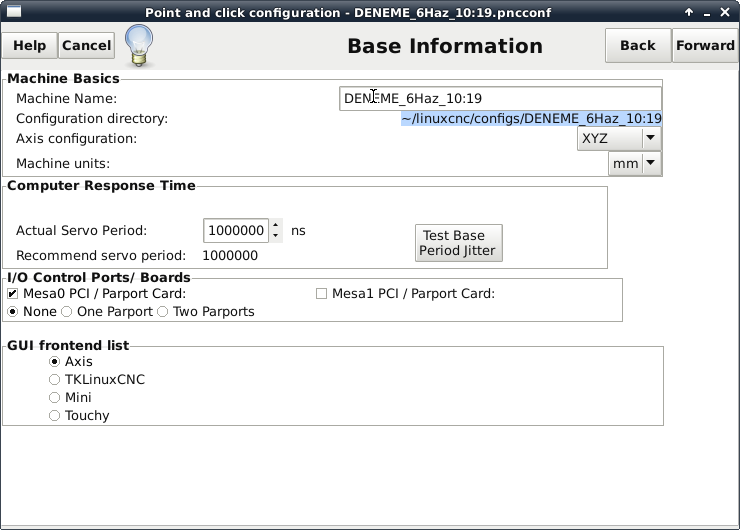
1. Base information
Are the settings suitable in the I/O Control Ports / Boards ? (6i25+7i76+7i76)
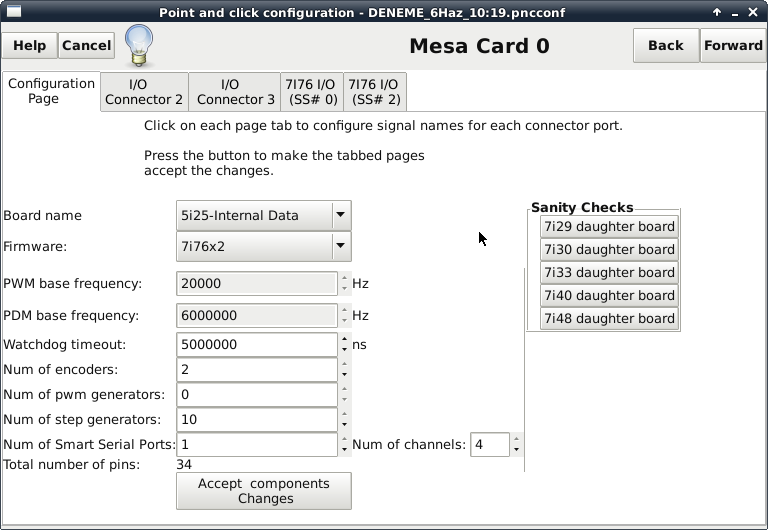
2. Mesa Card
Are the selections of the board name and firmware true for my combination ?
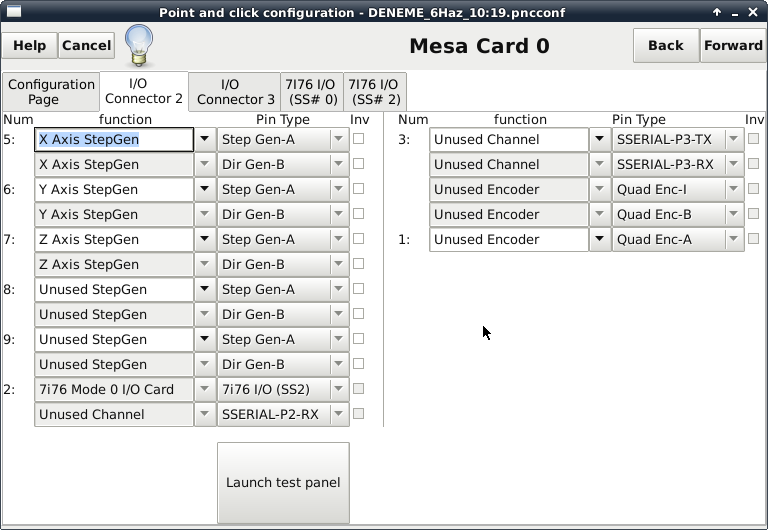
3. I/O Connector 2
I think that I/O connector 2 is part of one of 7i76 card. Is it true ? I defined 3 motor in this page.
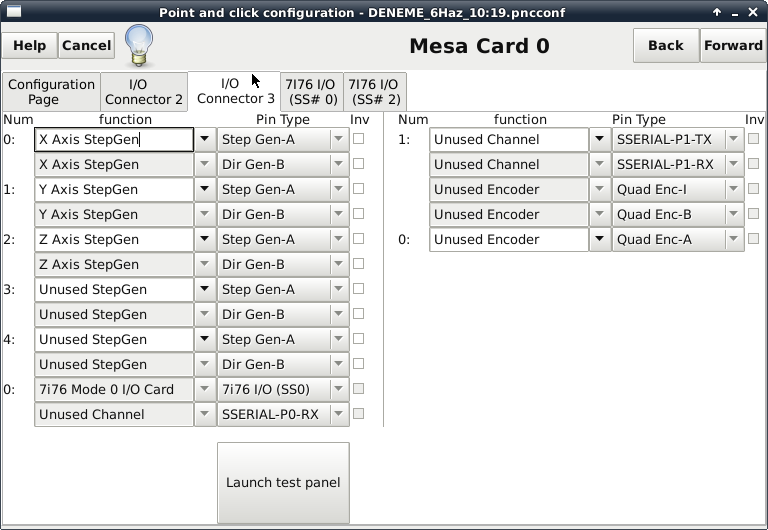
4. I/O Connector 3
I think that I/O connector 2 is part of the another 7i76 card. Is it true ? I defined other 3 motors in this page but i can only test the perivous 3 motors.
5. X Motor
Here are the stepper parameters. I can move the motor.
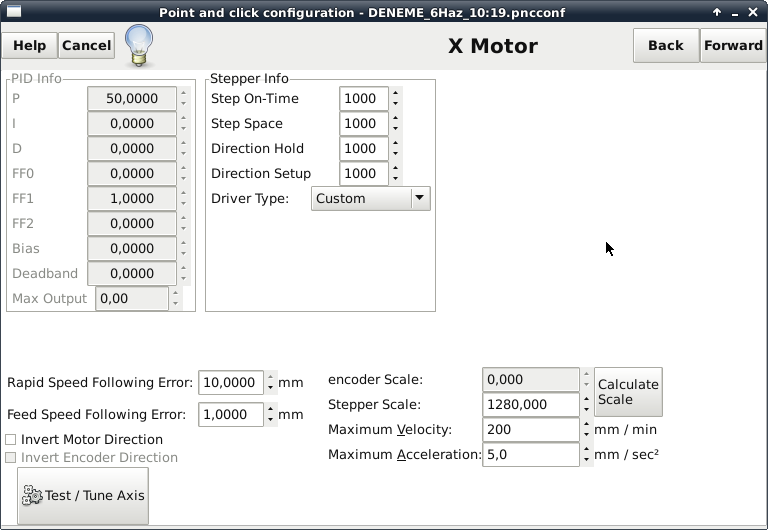
I can move the y and z motors like these. Pncconfig created hal and ini file. Here are the files.
HAL File;
INI file
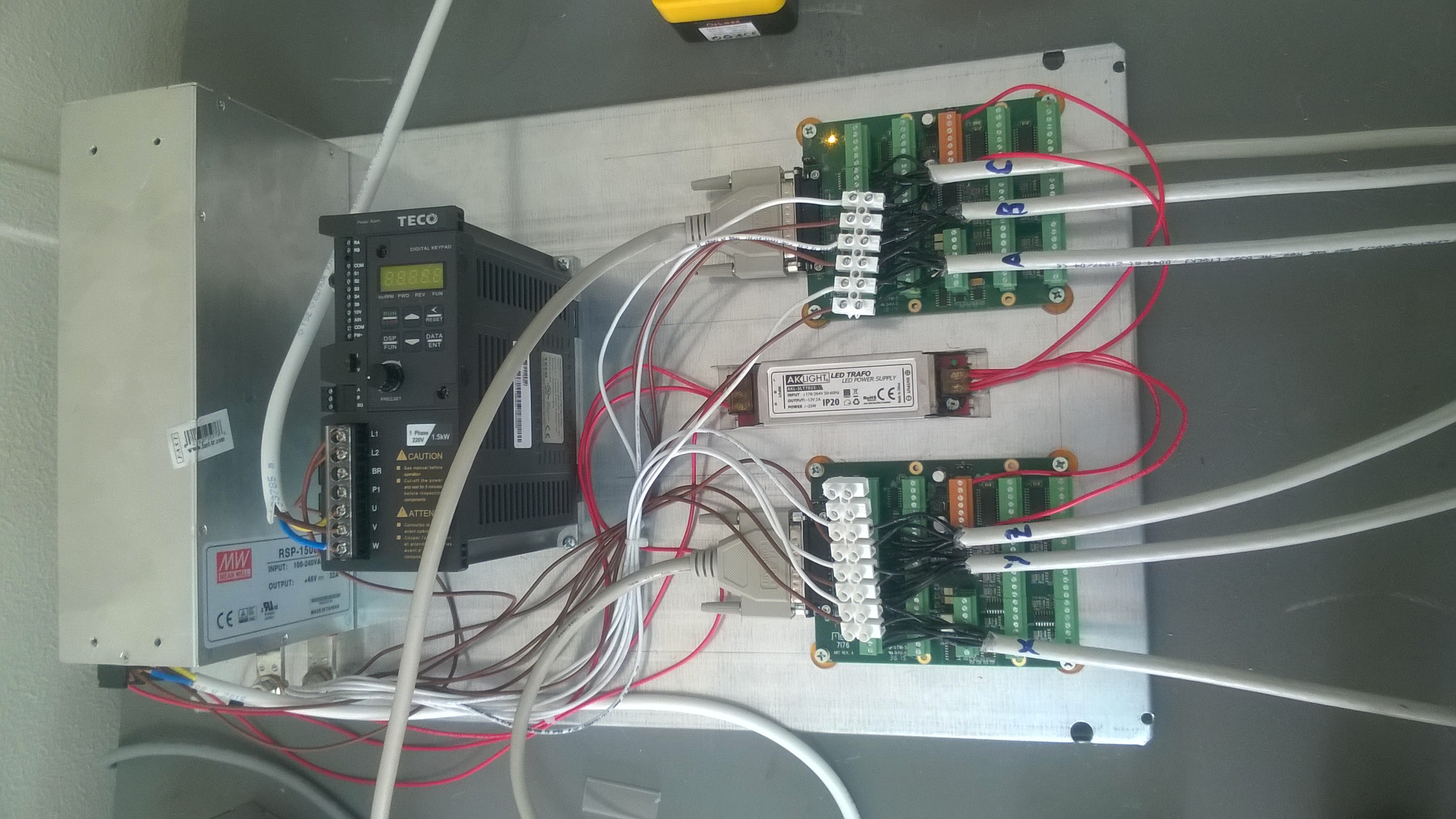
Harware connections.
Here are the windows;
1. Base information
Are the settings suitable in the I/O Control Ports / Boards ? (6i25+7i76+7i76)
2. Mesa Card
Are the selections of the board name and firmware true for my combination ?
3. I/O Connector 2
I think that I/O connector 2 is part of one of 7i76 card. Is it true ? I defined 3 motor in this page.
4. I/O Connector 3
I think that I/O connector 2 is part of the another 7i76 card. Is it true ? I defined other 3 motors in this page but i can only test the perivous 3 motors.
5. X Motor
Here are the stepper parameters. I can move the motor.
I can move the y and z motors like these. Pncconfig created hal and ini file. Here are the files.
HAL File;
Code:
# Generated by PNCconf at Mon Jun 6 10:24:33 2016
# If you make changes to this file, they will be
# overwritten when you run PNCconf again
loadrt trivkins
loadrt [EMCMOT]EMCMOT servo_period_nsec=[EMCMOT]SERVO_PERIOD num_joints=[TRAJ]AXES
loadrt hostmot2
loadrt hm2_pci config=" num_encoders=2 num_pwmgens=0 num_stepgens=10 sserial_port_0=0000xx"
setp hm2_5i25.0.watchdog.timeout_ns 5000000
loadrt pid names=pid.x,pid.y,pid.z,pid.s
addf hm2_5i25.0.read servo-thread
addf motion-command-handler servo-thread
addf motion-controller servo-thread
addf pid.x.do-pid-calcs servo-thread
addf pid.y.do-pid-calcs servo-thread
addf pid.z.do-pid-calcs servo-thread
addf pid.s.do-pid-calcs servo-thread
addf hm2_5i25.0.write servo-thread
# external output signals
# external input signals
#*******************
# AXIS X
#*******************
setp pid.x.Pgain [AXIS_0]P
setp pid.x.Igain [AXIS_0]I
setp pid.x.Dgain [AXIS_0]D
setp pid.x.bias [AXIS_0]BIAS
setp pid.x.FF0 [AXIS_0]FF0
setp pid.x.FF1 [AXIS_0]FF1
setp pid.x.FF2 [AXIS_0]FF2
setp pid.x.deadband [AXIS_0]DEADBAND
setp pid.x.maxoutput [AXIS_0]MAX_OUTPUT
setp pid.x.error-previous-target true
setp pid.x.maxerror .0005
net x-index-enable <=> pid.x.index-enable
net x-enable => pid.x.enable
net x-pos-cmd => pid.x.command
net x-vel-cmd => pid.x.command-deriv
net x-pos-fb => pid.x.feedback
net x-output => pid.x.output
# Step Gen signals/setup
setp hm2_5i25.0.stepgen.05.dirsetup [AXIS_0]DIRSETUP
setp hm2_5i25.0.stepgen.05.dirhold [AXIS_0]DIRHOLD
setp hm2_5i25.0.stepgen.05.steplen [AXIS_0]STEPLEN
setp hm2_5i25.0.stepgen.05.stepspace [AXIS_0]STEPSPACE
setp hm2_5i25.0.stepgen.05.position-scale [AXIS_0]STEP_SCALE
setp hm2_5i25.0.stepgen.05.step_type 0
setp hm2_5i25.0.stepgen.05.control-type 1
setp hm2_5i25.0.stepgen.05.maxaccel [AXIS_0]STEPGEN_MAXACCEL
setp hm2_5i25.0.stepgen.05.maxvel [AXIS_0]STEPGEN_MAXVEL
# ---closedloop stepper signals---
net x-pos-cmd <= axis.0.motor-pos-cmd
net x-vel-cmd <= axis.0.joint-vel-cmd
net x-output <= hm2_5i25.0.stepgen.05.velocity-cmd
net x-pos-fb <= hm2_5i25.0.stepgen.05.position-fb
net x-pos-fb => axis.0.motor-pos-fb
net x-enable <= axis.0.amp-enable-out
net x-enable => hm2_5i25.0.stepgen.05.enable
# ---setup home / limit switch signals---
net x-home-sw => axis.0.home-sw-in
net x-neg-limit => axis.0.neg-lim-sw-in
net x-pos-limit => axis.0.pos-lim-sw-in
#*******************
# AXIS Y
#*******************
setp pid.y.Pgain [AXIS_1]P
setp pid.y.Igain [AXIS_1]I
setp pid.y.Dgain [AXIS_1]D
setp pid.y.bias [AXIS_1]BIAS
setp pid.y.FF0 [AXIS_1]FF0
setp pid.y.FF1 [AXIS_1]FF1
setp pid.y.FF2 [AXIS_1]FF2
setp pid.y.deadband [AXIS_1]DEADBAND
setp pid.y.maxoutput [AXIS_1]MAX_OUTPUT
setp pid.y.error-previous-target true
setp pid.y.maxerror .0005
net y-index-enable <=> pid.y.index-enable
net y-enable => pid.y.enable
net y-pos-cmd => pid.y.command
net y-vel-cmd => pid.y.command-deriv
net y-pos-fb => pid.y.feedback
net y-output => pid.y.output
# Step Gen signals/setup
setp hm2_5i25.0.stepgen.06.dirsetup [AXIS_1]DIRSETUP
setp hm2_5i25.0.stepgen.06.dirhold [AXIS_1]DIRHOLD
setp hm2_5i25.0.stepgen.06.steplen [AXIS_1]STEPLEN
setp hm2_5i25.0.stepgen.06.stepspace [AXIS_1]STEPSPACE
setp hm2_5i25.0.stepgen.06.position-scale [AXIS_1]STEP_SCALE
setp hm2_5i25.0.stepgen.06.step_type 0
setp hm2_5i25.0.stepgen.06.control-type 1
setp hm2_5i25.0.stepgen.06.maxaccel [AXIS_1]STEPGEN_MAXACCEL
setp hm2_5i25.0.stepgen.06.maxvel [AXIS_1]STEPGEN_MAXVEL
# ---closedloop stepper signals---
net y-pos-cmd <= axis.1.motor-pos-cmd
net y-vel-cmd <= axis.1.joint-vel-cmd
net y-output <= hm2_5i25.0.stepgen.06.velocity-cmd
net y-pos-fb <= hm2_5i25.0.stepgen.06.position-fb
net y-pos-fb => axis.1.motor-pos-fb
net y-enable <= axis.1.amp-enable-out
net y-enable => hm2_5i25.0.stepgen.06.enable
# ---setup home / limit switch signals---
net y-home-sw => axis.1.home-sw-in
net y-neg-limit => axis.1.neg-lim-sw-in
net y-pos-limit => axis.1.pos-lim-sw-in
#*******************
# AXIS Z
#*******************
setp pid.z.Pgain [AXIS_2]P
setp pid.z.Igain [AXIS_2]I
setp pid.z.Dgain [AXIS_2]D
setp pid.z.bias [AXIS_2]BIAS
setp pid.z.FF0 [AXIS_2]FF0
setp pid.z.FF1 [AXIS_2]FF1
setp pid.z.FF2 [AXIS_2]FF2
setp pid.z.deadband [AXIS_2]DEADBAND
setp pid.z.maxoutput [AXIS_2]MAX_OUTPUT
setp pid.z.error-previous-target true
setp pid.z.maxerror .0005
net z-index-enable <=> pid.z.index-enable
net z-enable => pid.z.enable
net z-pos-cmd => pid.z.command
net z-vel-cmd => pid.z.command-deriv
net z-pos-fb => pid.z.feedback
net z-output => pid.z.output
# Step Gen signals/setup
setp hm2_5i25.0.stepgen.07.dirsetup [AXIS_2]DIRSETUP
setp hm2_5i25.0.stepgen.07.dirhold [AXIS_2]DIRHOLD
setp hm2_5i25.0.stepgen.07.steplen [AXIS_2]STEPLEN
setp hm2_5i25.0.stepgen.07.stepspace [AXIS_2]STEPSPACE
setp hm2_5i25.0.stepgen.07.position-scale [AXIS_2]STEP_SCALE
setp hm2_5i25.0.stepgen.07.step_type 0
setp hm2_5i25.0.stepgen.07.control-type 1
setp hm2_5i25.0.stepgen.07.maxaccel [AXIS_2]STEPGEN_MAXACCEL
setp hm2_5i25.0.stepgen.07.maxvel [AXIS_2]STEPGEN_MAXVEL
# ---closedloop stepper signals---
net z-pos-cmd <= axis.2.motor-pos-cmd
net z-vel-cmd <= axis.2.joint-vel-cmd
net z-output <= hm2_5i25.0.stepgen.07.velocity-cmd
net z-pos-fb <= hm2_5i25.0.stepgen.07.position-fb
net z-pos-fb => axis.2.motor-pos-fb
net z-enable <= axis.2.amp-enable-out
net z-enable => hm2_5i25.0.stepgen.07.enable
# ---setup home / limit switch signals---
net z-home-sw => axis.2.home-sw-in
net z-neg-limit => axis.2.neg-lim-sw-in
net z-pos-limit => axis.2.pos-lim-sw-in
#*******************
# SPINDLE S
#*******************
setp pid.s.Pgain [SPINDLE_9]P
setp pid.s.Igain [SPINDLE_9]I
setp pid.s.Dgain [SPINDLE_9]D
setp pid.s.bias [SPINDLE_9]BIAS
setp pid.s.FF0 [SPINDLE_9]FF0
setp pid.s.FF1 [SPINDLE_9]FF1
setp pid.s.FF2 [SPINDLE_9]FF2
setp pid.s.deadband [SPINDLE_9]DEADBAND
setp pid.s.maxoutput [SPINDLE_9]MAX_OUTPUT
setp pid.s.error-previous-target true
net spindle-index-enable <=> pid.s.index-enable
net spindle-enable => pid.s.enable
net spindle-vel-cmd-rpm => pid.s.command
net spindle-vel-fb-rpm => pid.s.feedback
net spindle-output <= pid.s.output
# ---setup spindle control signals---
net spindle-vel-cmd-rps <= motion.spindle-speed-out-rps
net spindle-vel-cmd-rps-abs <= motion.spindle-speed-out-rps-abs
net spindle-vel-cmd-rpm <= motion.spindle-speed-out
net spindle-vel-cmd-rpm-abs <= motion.spindle-speed-out-abs
net spindle-enable <= motion.spindle-on
net spindle-cw <= motion.spindle-forward
net spindle-ccw <= motion.spindle-reverse
net spindle-brake <= motion.spindle-brake
net spindle-revs => motion.spindle-revs
net spindle-at-speed => motion.spindle-at-speed
net spindle-vel-fb-rps => motion.spindle-speed-in
net spindle-index-enable <=> motion.spindle-index-enable
# ---Setup spindle at speed signals---
sets spindle-at-speed true
#******************************
# connect miscellaneous signals
#******************************
# ---HALUI signals---
net joint-select-a halui.joint.0.select
net x-is-homed halui.joint.0.is-homed
net jog-x-pos halui.jog.0.plus
net jog-x-neg halui.jog.0.minus
net jog-x-analog halui.jog.0.analog
net joint-select-b halui.joint.1.select
net y-is-homed halui.joint.1.is-homed
net jog-y-pos halui.jog.1.plus
net jog-y-neg halui.jog.1.minus
net jog-y-analog halui.jog.1.analog
net joint-select-c halui.joint.2.select
net z-is-homed halui.joint.2.is-homed
net jog-z-pos halui.jog.2.plus
net jog-z-neg halui.jog.2.minus
net jog-z-analog halui.jog.2.analog
net jog-selected-pos halui.jog.selected.plus
net jog-selected-neg halui.jog.selected.minus
net spindle-manual-cw halui.spindle.forward
net spindle-manual-ccw halui.spindle.reverse
net spindle-manual-stop halui.spindle.stop
net machine-is-on halui.machine.is-on
net jog-speed halui.jog-speed
net MDI-mode halui.mode.is-mdi
# ---coolant signals---
net coolant-mist <= iocontrol.0.coolant-mist
net coolant-flood <= iocontrol.0.coolant-flood
# ---probe signal---
net probe-in => motion.probe-input
# ---motion control signals---
net in-position <= motion.in-position
net machine-is-enabled <= motion.motion-enabled
# ---digital in / out signals---
# ---estop signals---
net estop-out <= iocontrol.0.user-enable-out
net estop-out => iocontrol.0.emc-enable-in
# ---manual tool change signals---
loadusr -W hal_manualtoolchange
net tool-change-request iocontrol.0.tool-change => hal_manualtoolchange.change
net tool-change-confirmed iocontrol.0.tool-changed <= hal_manualtoolchange.changed
net tool-number iocontrol.0.tool-prep-number => hal_manualtoolchange.number
net tool-prepare-loopback iocontrol.0.tool-prepare => iocontrol.0.tool-prepared
INI file
Code:
# Generated by PNCconf at Mon Jun 6 10:24:33 2016
# If you make changes to this file, they will be
# overwritten when you run PNCconf again
[EMC]
MACHINE = DENEME_6Haz_10:19
DEBUG = 0
[DISPLAY]
DISPLAY = axis
POSITION_OFFSET = RELATIVE
POSITION_FEEDBACK = ACTUAL
MAX_FEED_OVERRIDE = 2.000000
MAX_SPINDLE_OVERRIDE = 1.000000
MIN_SPINDLE_OVERRIDE = 0.500000
INTRO_GRAPHIC = linuxcnc.gif
INTRO_TIME = 5
PROGRAM_PREFIX = /home/egmach/linuxcnc/nc_files
INCREMENTS = 5mm 1mm .5mm .1mm .05mm .01mm .005mm
POSITION_FEEDBACK = ACTUAL
DEFAULT_LINEAR_VELOCITY = 0.250000
MAX_LINEAR_VELOCITY = 1.000000
MIN_LINEAR_VELOCITY = 0.010000
DEFAULT_ANGULAR_VELOCITY = 0.250000
MAX_ANGULAR_VELOCITY = 1.000000
MIN_ANGULAR_VELOCITY = 0.010000
EDITOR = gedit
GEOMETRY = xyz
[FILTER]
PROGRAM_EXTENSION = .png,.gif,.jpg Greyscale Depth Image
PROGRAM_EXTENSION = .py Python Script
png = image-to-gcode
gif = image-to-gcode
jpg = image-to-gcode
py = python
[TASK]
TASK = milltask
CYCLE_TIME = 0.010
[RS274NGC]
PARAMETER_FILE = linuxcnc.var
[EMCMOT]
EMCMOT = motmod
COMM_TIMEOUT = 1.0
COMM_WAIT = 0.010
SERVO_PERIOD = 1000000
[HOSTMOT2]
# **** This is for info only ****
# DRIVER0=hm2_pci
# BOARD0=5i25
[HAL]
HALUI = halui
HALFILE = DENEME_6Haz_10:19.hal
HALFILE = custom.hal
POSTGUI_HALFILE = postgui_call_list.hal
SHUTDOWN = shutdown.hal
[HALUI]
[TRAJ]
AXES = 3
COORDINATES = X Y Z
LINEAR_UNITS = mm
ANGULAR_UNITS = degree
CYCLE_TIME = 0.010
DEFAULT_VELOCITY = 0.33
MAX_LINEAR_VELOCITY = 3.33
[EMCIO]
EMCIO = io
CYCLE_TIME = 0.100
TOOL_TABLE = tool.tbl
#********************
# Axis X
#********************
[AXIS_0]
TYPE = LINEAR
HOME = 0.0
FERROR = 10.0
MIN_FERROR = 1.0
MAX_VELOCITY = 3.33333333333
MAX_ACCELERATION = 5.0
# The values below should be 25% larger than MAX_VELOCITY and MAX_ACCELERATION
# If using BACKLASH compensation STEPGEN_MAXACCEL should be 100% larger.
STEPGEN_MAXVEL = 4.17
STEPGEN_MAXACCEL = 6.25
P = 50.0
I = 0.0
D = 0.0
FF0 = 0.0
FF1 = 1.0
FF2 = 0.0
BIAS = 0.0
DEADBAND = 0.0
MAX_OUTPUT = 0.0
# these are in nanoseconds
DIRSETUP = 1000
DIRHOLD = 1000
STEPLEN = 1000
STEPSPACE = 1000
STEP_SCALE = 1280.0
MIN_LIMIT = -0.01
MAX_LIMIT = 200.0
HOME_OFFSET = 0.0
#********************
# Axis Y
#********************
[AXIS_1]
TYPE = LINEAR
HOME = 0.0
FERROR = 10.0
MIN_FERROR = 1.0
MAX_VELOCITY = 3.33333333333
MAX_ACCELERATION = 5.0
# The values below should be 25% larger than MAX_VELOCITY and MAX_ACCELERATION
# If using BACKLASH compensation STEPGEN_MAXACCEL should be 100% larger.
STEPGEN_MAXVEL = 4.17
STEPGEN_MAXACCEL = 6.25
P = 50.0
I = 0.0
D = 0.0
FF0 = 0.0
FF1 = 1.0
FF2 = 0.0
BIAS = 0.0
DEADBAND = 0.0
MAX_OUTPUT = 0.0
# these are in nanoseconds
DIRSETUP = 1000
DIRHOLD = 1000
STEPLEN = 1000
STEPSPACE = 1000
STEP_SCALE = 1280.0
MIN_LIMIT = -0.01
MAX_LIMIT = 200.0
HOME_OFFSET = 0.0
#********************
# Axis Z
#********************
[AXIS_2]
TYPE = LINEAR
HOME = 0.0
FERROR = 10.0
MIN_FERROR = 1.0
MAX_VELOCITY = 3.33333333333
MAX_ACCELERATION = 5.0
# The values below should be 25% larger than MAX_VELOCITY and MAX_ACCELERATION
# If using BACKLASH compensation STEPGEN_MAXACCEL should be 100% larger.
STEPGEN_MAXVEL = 4.17
STEPGEN_MAXACCEL = 6.25
P = 50.0
I = 0.0
D = 0.0
FF0 = 0.0
FF1 = 1.0
FF2 = 0.0
BIAS = 0.0
DEADBAND = 0.0
MAX_OUTPUT = 0.0
# these are in nanoseconds
DIRSETUP = 1000
DIRHOLD = 1000
STEPLEN = 1000
STEPSPACE = 1000
STEP_SCALE = 1280.0
MIN_LIMIT = -100.0
MAX_LIMIT = 0.01
HOME_OFFSET = 0.0
#********************
# Spindle
#********************
[SPINDLE_9]
P = 0
I = 0
D = 0
FF0 = 1
FF1 = 0
FF2 = 0
BIAS = 0
DEADBAND = 0
MAX_OUTPUT = 2000
Harware connections.
Please Log in to join the conversation.
Time to create page: 0.235 seconds