

- Posts: 99
- Thank you received: 0
Rounded corners and "rounded down".
10 years 7 months ago #71635
by aparecido
Replied by aparecido on topic Rounded corners and "rounded down".
I tried the two suggestions above, also did not work, now debug returned it (hal file modified attached):
Code:
Print file information:
RUN_IN_PLACE=no
LINUXCNC_DIR=
LINUXCNC_BIN_DIR=/usr/bin
LINUXCNC_TCL_DIR=/usr/lib/tcltk/linuxcnc
LINUXCNC_SCRIPT_DIR=
LINUXCNC_RTLIB_DIR=/usr/realtime-3.4-9-rtai-686-pae/modules/linuxcnc
LINUXCNC_CONFIG_DIR=
LINUXCNC_LANG_DIR=/usr/share/linuxcnc/tcl/msgs
INIVAR=inivar
HALCMD=halcmd
LINUXCNC_EMCSH=/usr/bin/wish8.5
LINUXCNC - 2.7.4
Machine configuration directory is '/home/aparecido/linuxcnc/configs/cnc3ax'
Machine configuration file is 'cnc3ax.ini'
INIFILE=/home/aparecido/linuxcnc/configs/cnc3ax/cnc3ax.ini
PARAMETER_FILE=linuxcnc.var
TASK=milltask
HALUI=
DISPLAY=axis
Starting LinuxCNC...
Starting LinuxCNC server program: linuxcncsvr
Loading Real Time OS, RTAPI, and HAL_LIB modules
Starting LinuxCNC IO program: io
Found file(REL): ./cnc3ax.hal
Shutting down and cleaning up LinuxCNC...
Killing task linuxcncsvr, PID=4056
Removing HAL_LIB, RTAPI, and Real Time OS modules
Removing NML shared memory segments
Debug file information:
.
./cnc3ax.hal:4: Warning: File contains DOS-style line endings.
HAL: ERROR: function 'sim-hardware.update' not found
./cnc3ax.hal:16: addf failed
4056
PID TTY STAT TIME COMMAND
Stopping realtime threads
Unloading hal components
Kernel message information:
[ 0.000000] Initializing cgroup subsys cpuset
[ 0.000000] Initializing cgroup subsys cpu
[ 0.000000] Linux version 3.4-9-rtai-686-pae (Debian 3.4.55-4linuxcnc) () (gcc version 4.6.3 (Debian 4.6.3-14) ) #1 SMP PREEMPT Debian 3.4.55-4linuxcnc
[ 0.000000] BIOS-provided physical RAM map:
[ 0.000000] BIOS-e820: 0000000000000000 - 000000000009fc00 (usable)
[ 0.000000] BIOS-e820: 000000000009fc00 - 00000000000a0000 (reserved)
[ 0.000000] BIOS-e820: 00000000000e4000 - 0000000000100000 (reserved)
[ 0.000000] BIOS-e820: 0000000000100000 - 000000007ffb0000 (usable)
[ 0.000000] BIOS-e820: 000000007ffb0000 - 000000007ffc0000 (ACPI data)
[ 0.000000] BIOS-e820: 000000007ffc0000 - 000000007fff0000 (ACPI NVS)
[ 0.000000] BIOS-e820: 000000007fff0000 - 0000000080000000 (reserved)
[ 0.000000] BIOS-e820: 00000000ff780000 - 0000000100000000 (reserved)
[ 0.000000] Notice: NX (Execute Disable) protection cannot be enabled: non-PAE kernel!
[ 0.000000] SMBIOS 2.3 present.
[ 0.000000] DMI: System manufacturer System Product Name/K8V-X SE, BIOS 1015.001 04/20/2006
[ 0.000000] e820 update range: 0000000000000000 - 0000000000010000 (usable) ==> (reserved)
[ 0.000000] e820 remove range: 00000000000a0000 - 0000000000100000 (usable)
[ 0.000000] last_pfn = 0x7ffb0 max_arch_pfn = 0x100000
[ 0.000000] MTRR default type: uncachable
[ 0.000000] MTRR fixed ranges enabled:
[ 0.000000] 00000-9FFFF write-back
[ 0.000000] A0000-EFFFF uncachable
[ 0.000000] F0000-FFFFF write-protect
[ 0.000000] MTRR variable ranges enabled:
[ 0.000000] 0 base 0000000000 mask FF80000000 write-back
[ 0.000000] 1 disabled
[ 0.000000] 2 disabled
[ 0.000000] 3 disabled
[ 0.000000] 4 disabled
[ 0.000000] 5 disabled
[ 0.000000] 6 disabled
[ 0.000000] 7 disabled
.......
Please Log in to join the conversation.

10 years 7 months ago #71636
by andypugh
I am wondering why you have all this simulated hardware stuff.
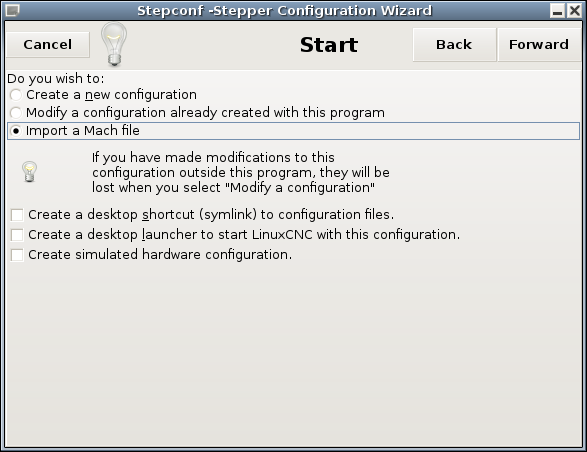
Probably best to go back to Stepconf and turn of the simulated parallel port and enable the real one.
Replied by andypugh on topic Rounded corners and "rounded down".
aparecido wrote: HAL: ERROR: function 'sim-hardware.update' not found
I am wondering why you have all this simulated hardware stuff.
Probably best to go back to Stepconf and turn of the simulated parallel port and enable the real one.
Please Log in to join the conversation.
10 years 7 months ago #71638
by aparecido
I tried to find where I leave enabled only real parallel port (physical) in stepconf. In which of the screens is this option? Tks
Replied by aparecido on topic Rounded corners and "rounded down".
andypugh wrote:
I am wondering why you have all this simulated hardware stuff.aparecido wrote: HAL: ERROR: function 'sim-hardware.update' not found
Probably best to go back to Stepconf and turn of the simulated parallel port and enable the real one.
I tried to find where I leave enabled only real parallel port (physical) in stepconf. In which of the screens is this option? Tks
Please Log in to join the conversation.
10 years 7 months ago #71642
by andypugh
I think it is on the very first page:
forum.linuxcnc.org/media/kunena/attachments/405/Stepconf.png
Replied by andypugh on topic Rounded corners and "rounded down".
aparecido wrote: I tried to find where I leave enabled only real parallel port (physical) in stepconf. In which of the screens is this option? Tks
I think it is on the very first page:
forum.linuxcnc.org/media/kunena/attachments/405/Stepconf.png
Please Log in to join the conversation.
10 years 7 months ago #71645
by aparecido
Resolved, to leave disabled the "Create simulated hardware configuration." and engines properly handled with the 'isplay the Linuxcnc. Thank all a lot for your help. :laugh:
Replied by aparecido on topic Rounded corners and "rounded down".
andypugh wrote:
I think it is on the very first page:aparecido wrote: I tried to find where I leave enabled only real parallel port (physical) in stepconf. In which of the screens is this option? Tks
forum.linuxcnc.org/media/kunena/attachments/405/Stepconf.png
Resolved, to leave disabled the "Create simulated hardware configuration." and engines properly handled with the 'isplay the Linuxcnc. Thank all a lot for your help. :laugh:
Please Log in to join the conversation.
Time to create page: 0.053 seconds