

- Posts: 1111
- Thank you received: 0
hal-core
4 years 9 months ago #231704
by bkt
@grotius with plasure You have my attention...
For first I have my running machinery with ethercat and linux mint 19 with customized flavour .... try to not change it ... so instead to install all in your install script can only install these?
After I can get some problem with my actual Lcnc 2.9 installation?
For first I have my running machinery with ethercat and linux mint 19 with customized flavour .... try to not change it ... so instead to install all in your install script can only install these?
After I can get some problem with my actual Lcnc 2.9 installation?
Warning: Spoiler!
wget
github.com/grotius-cnc/Linux-Pro/release...1.0.0/qt-creator.deb
wget
github.com/grotius-cnc/Linux-Pro/release...0/kdl-kinematics.deb
# New wget link with opencascade image support wget
github.com/grotius-cnc/oce/releases/down....0.1/opencascade.deb
# Dependencies opencascade sudo apt-get install -y doxygen cmake tcllib tklib tcl-dev tk-dev \ libfreetype-dev libx11-dev libgl1-mesa-dev libfreeimage-dev rapidjson-dev \ libxmu-dev libxi-dev libfreeimage3 libfreeimage-dev ffmpeg # Install packages sudo dpkg -i qt-creator.deb kdl-kinematics.deb opencascade.deb # Install hal-core sudo /opt/hal-core/./make # Download & install hal-view wget
github.com/grotius-cnc/hal-view/releases...ad/1.0.0/halview.deb
sudo dpkg -i halview.deb sudo chmod +x /opt/hal-core/runtest_halview # Download & install cam wget
github.com/grotius-cnc/cam/releases/download/1.0.0/cam.deb
# Install dependencies for cam sudo apt-get install -y zenity zenity-common sudo dpkg -i cam.deb # Set user permissions to the /opt dir. sudo chmod -R -f 777 /opt # Change owner sudo chown -R $USER /opt # Change group sudo chown -R $USER:$USER /opt
Please Log in to join the conversation.
4 years 9 months ago #231719
by Grotius
Hi Btk,
If you just want to make that classicladder gui in c++ you could use your excisting lcnc without installing hal-core.
Hal-core will install in the /opt dir.
After I can get some problem with my actual Lcnc 2.9 installation?
It is not entirely without risks. It could be some dependencies have slightly different versions. But i supspect it
will not break your excisting lcnc tower down to the floor.
You could try this first:
$ sudo apt-get install tcllib tklib tcl-dev tk-dev libx11-dev libgl1-mesa-dev
If all goes ok. Then i think no further risks are at the horizon.
If you just want to make that classicladder gui in c++ you could use your excisting lcnc without installing hal-core.
Hal-core will install in the /opt dir.
After I can get some problem with my actual Lcnc 2.9 installation?
It is not entirely without risks. It could be some dependencies have slightly different versions. But i supspect it
will not break your excisting lcnc tower down to the floor.
You could try this first:
$ sudo apt-get install tcllib tklib tcl-dev tk-dev libx11-dev libgl1-mesa-dev
If all goes ok. Then i think no further risks are at the horizon.
Please Log in to join the conversation.
4 years 9 months ago #231720
by Grotius
So if interested in a qt app without external hal component to replace classicladder i/o.
We can use lcnc compile flags to link it to lcnc's hal environment. Then at the moment you don't need
hal-core install. But if you have time, i recommend to play a little bit with hal-core.
If this is what you want, then pls give a short description of the i/o and functions. Then i can make a honey pot.
We can use lcnc compile flags to link it to lcnc's hal environment. Then at the moment you don't need
hal-core install. But if you have time, i recommend to play a little bit with hal-core.
If this is what you want, then pls give a short description of the i/o and functions. Then i can make a honey pot.
Please Log in to join the conversation.
4 years 9 months ago #231721
by bkt
I want to use classicladder .... but using a qt-c++ gui ....so not need to learn python language needed for use qtvcp gui ....
about-hal core project see you are interested in someone can make doc and other annoing things .... for sure can play with these things in feb/march .... and for sure test your app ... but not these mount ...too full of work.
about-hal core project see you are interested in someone can make doc and other annoing things .... for sure can play with these things in feb/march .... and for sure test your app ... but not these mount ...too full of work.
Please Log in to join the conversation.
4 years 9 months ago #231751
by bkt


 every now and then my English fries me .... do not take into account the previous one .... OK added in my pro the path of linuxcnc 2.9 the usual libraries ....
now I have never tried to recall an input in the sense that I do not remember their names or where I find them .... I do not remember the structure of the Lcnc programs but above all I see that 2.9 is diffident in many things .... moved folders and found in different places .... in short about where do I connect a digital input? not from cannon because I want to use generic inputs if possible (lcec.0.1.din-xx) input linked to motion .... but htink stady you code better for understand how.
thanks
We can use lcnc compile flags to link it to lcnc's hal environment. Then at the moment you don't need
And how can do these? Never try ....
thanks
now I have never tried to recall an input in the sense that I do not remember their names or where I find them .... I do not remember the structure of the Lcnc programs but above all I see that 2.9 is diffident in many things .... moved folders and found in different places .... in short about where do I connect a digital input? not from cannon because I want to use generic inputs if possible (lcec.0.1.din-xx) input linked to motion .... but htink stady you code better for understand how.
thanks
Please Log in to join the conversation.
4 years 9 months ago #232116
by bkt
peraphs
You could try this first:
Plus noted you use a "nml_plugin.h" for connect nml to gui ..... so problabily use your plugin is the best way to make a GUI QT5 c++ for classicladder plc program GUI (not gui for classicladder, but for machinery using classicladder) ....
In these case how can call and set lcec.0.1.dout-0 with qt toggle button?
You could try this first:
seems no produce any error type ...$ sudo apt-get install tcllib tklib tcl-dev tk-dev libx11-dev libgl1-mesa-dev
Plus noted you use a "nml_plugin.h" for connect nml to gui ..... so problabily use your plugin is the best way to make a GUI QT5 c++ for classicladder plc program GUI (not gui for classicladder, but for machinery using classicladder) ....
In these case how can call and set lcec.0.1.dout-0 with qt toggle button?
Please Log in to join the conversation.
4 years 9 months ago #232120
by bkt
Need to use classic ladder and simply connect some push button or toggle button to "lcec.0.0.dout-0 to dout.14" and the same with din from 0 to 14 ... for example ... or connect classicladder.0.out-00 from classicladder.0.out-14 and the same with input .... nothing of difficult .... is for choose some simply static option (pneumatic cylinder always ON ... or always OFF) or for choose if use a sub routine "A" ladder or soubroutine "B" ladder ....If this is what you want, then pls give a short description of the i/o and functions. Then i can make a honey pot.
Please Log in to join the conversation.
4 years 9 months ago #232534
by Grotius
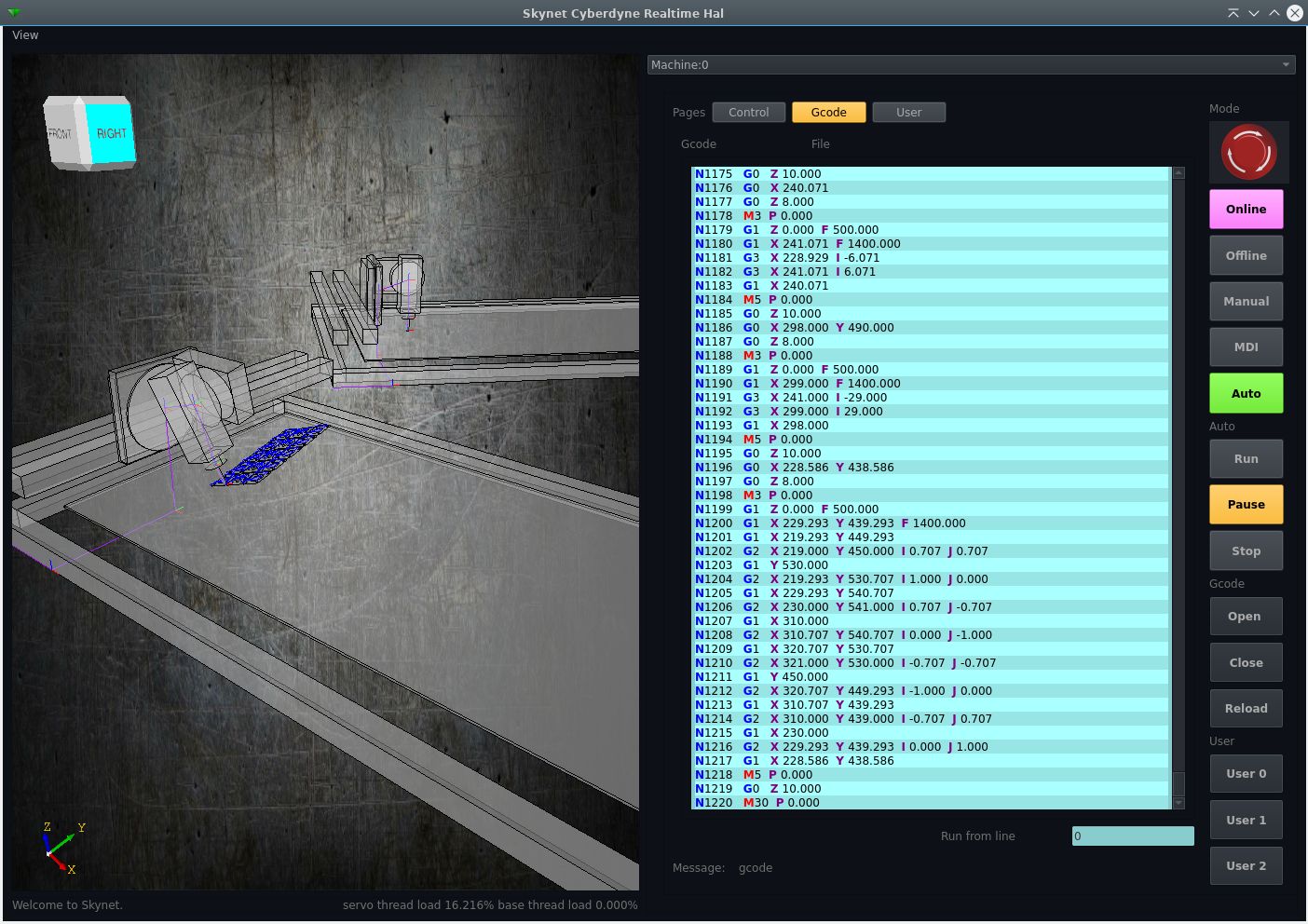
A tiny update.
In general the program is working.
I think it is usable to perform a plasma cut or a complex 3d mill operation with the program now.
Specs until now:
1. Run a gcode forward or reversed during the full gcode file, full scurve implementation.
2. Run a gcode file containing a 3d motion. cartesian xyz=XYZ euler xyz=ABC
3. Run a multiline mdi command.
4. Run the machine in manual mode, Offline will jump to target pos. Online will perform the scurve motion.
5. Run multiple machines at the same time, each machine may load a gcode file.
6. Run a gcode from a certain line nr. It will ask to get in position with a Mdi multiline safe height move.
7. Hal outputs available for joint positions and basic Mcode's like m3,m5,m7,m8,m9.
8. Load a different machine models, like a robot on a track or a gantry.
9. Load a different (exotic) kinematic model.
10. Code your own user tab.
11. It can rotate and translate the gcode workframe in any position.
12. This is a realtime program, driven by a kernel module.
Todo : look ahead function.

In general the program is working.
I think it is usable to perform a plasma cut or a complex 3d mill operation with the program now.
Specs until now:
1. Run a gcode forward or reversed during the full gcode file, full scurve implementation.
2. Run a gcode file containing a 3d motion. cartesian xyz=XYZ euler xyz=ABC
3. Run a multiline mdi command.
4. Run the machine in manual mode, Offline will jump to target pos. Online will perform the scurve motion.
5. Run multiple machines at the same time, each machine may load a gcode file.
6. Run a gcode from a certain line nr. It will ask to get in position with a Mdi multiline safe height move.
7. Hal outputs available for joint positions and basic Mcode's like m3,m5,m7,m8,m9.
8. Load a different machine models, like a robot on a track or a gantry.
9. Load a different (exotic) kinematic model.
10. Code your own user tab.
11. It can rotate and translate the gcode workframe in any position.
12. This is a realtime program, driven by a kernel module.
Todo : look ahead function.
Please Log in to join the conversation.
4 years 9 months ago #232539
by bkt
bkt
These for sure .... but maybe your hal_widget is enought ....Hi btk,
If i make a example gui with some buttons that produces a hal output and some input pins that will fire up a led.
Is that good enough? You than can connect to classicladder in hal. etc
bkt
Please Log in to join the conversation.
Time to create page: 0.146 seconds