

- Posts: 29
- Thank you received: 0
message about exceeding the maximum range in the Z axis
5 years 2 months ago #216978
by szatri
message about exceeding the maximum range in the Z axis was created by szatri
Hello everyone
I'm using linuxcnc 2.9 with debian buster
I have a problem with the range of the Z axis.
I'm using the tool height sensor.
I wrote a simple program for a test purpose (drive over the object at the same height and with different tools)
After loading the program, I have a message about exceeding the work range in the Z axis, after clicking continue, the program goes to the tool change and its measurement, after measuring I have this error:
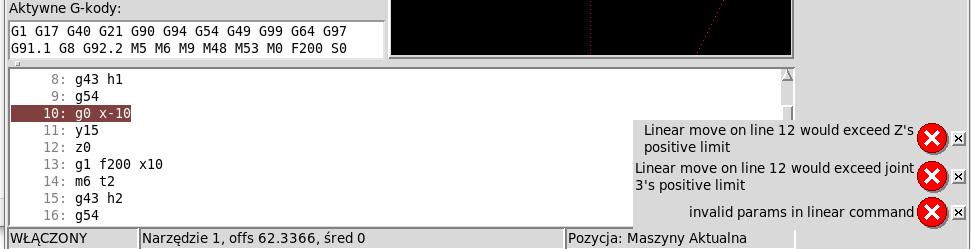
this is the test program:
my configuration in the attachment
thanks
I'm using linuxcnc 2.9 with debian buster
I have a problem with the range of the Z axis.
I'm using the tool height sensor.
I wrote a simple program for a test purpose (drive over the object at the same height and with different tools)
After loading the program, I have a message about exceeding the work range in the Z axis, after clicking continue, the program goes to the tool change and its measurement, after measuring I have this error:
this is the test program:
Code:
G90 G94 G17 G91.1
G21
m6 t1
g43 h1
g54
g0 x-10
y15
z0
g1 f200 x10
m6 t2
g43 h2
g54
g0 x-10
y15
z0
g1 f200 x10
m6 t3
g43 h3
g54
g0 x-10
y15
z0
g1 f200 x10
m6 t1
g43 h1
g54
g0 x-10
y15
z0
g1 f200 x10
g49
N64 M30
thanks
Please Log in to join the conversation.

5 years 2 months ago #216993
by BigJohnT
Replied by BigJohnT on topic message about exceeding the maximum range in the Z axis
I get that error on line 22 with the Axis simulator so I suspect that your tool table Z offset is causing the problem.
JT
JT
Please Log in to join the conversation.
5 years 2 months ago #216998
by szatri
Replied by szatri on topic message about exceeding the maximum range in the Z axis
in my machine the z axis works from the top max 1.1 to the bottom min -250
tool height adjustments in the table are given in positive values
I do not use tools longer than 100mm and they fit in the machine's working area
to what is the height of the sensor given?
PS:
sorry, I provided an incomplete configuration
tool height adjustments in the table are given in positive values
I do not use tools longer than 100mm and they fit in the machine's working area
to what is the height of the sensor given?
PS:
sorry, I provided an incomplete configuration
Please Log in to join the conversation.

5 years 2 months ago #217013
by MaHa
Replied by MaHa on topic message about exceeding the maximum range in the Z axis
If you enter in MDI (debug,#5223), it will show the G54 Z-Offset in machinecoordinates. If this is lower than toollength, this may be the error, when you try to go to Z0 with G43 active.
Please Log in to join the conversation.
5 years 2 months ago #217042
by szatri
Replied by szatri on topic message about exceeding the maximum range in the Z axis
I found a problem, in the ini file I corrected the DISTANCE parameter to 97.2 (this is a height from g53Z0 to z-97.2 as the tool sensor clicks) This parameter is used in tool-change.ngc.
now it gives no errors but the test run is not correct
After homing the machine, I will enter m6 t1 in MDI and t1 will be measured, then I will enter g43, then I can do homing to g54, then everything works correctly
Code:
(--------------------------)
G30 ( go to toolsensor )
#<PlaneOffset> = [#5183 - #5422] ( get the current plane Z offset )
G38.2 Z-[#<_ini[TOOLSENSOR]TRAVEL>] F[#<_ini[TOOLSENSOR]FEED1>] ( fast touch )
G38.4 Z5 F[#<_ini[TOOLSENSOR]FEED2>]
G10 L1 P#<tool> Z-[-#<PlaneOffset> - #5063 - #<_ini[TOOLSENSOR]DISTANCE>] ( store offset in tooltable )
G30 ( go to safe position )
#<previous_tool> = #<tool>
(--- restore parameters ---)
After homing the machine, I will enter m6 t1 in MDI and t1 will be measured, then I will enter g43, then I can do homing to g54, then everything works correctly
Please Log in to join the conversation.
5 years 2 months ago #217058
by szatri
Replied by szatri on topic message about exceeding the maximum range in the Z axis
I ran the program with several tools, the first tool did my job, I ran the second and after clicking the height sensor and the tool, I got this message:
"Probe tripped durnig non-probe move."
"Probe tripped durnig non-probe move."
Please Log in to join the conversation.
5 years 2 months ago #217216
by BigJohnT
JT
Replied by BigJohnT on topic message about exceeding the maximum range in the Z axis
What does clicking the height sensor mean? The error is pretty straight forward and means just what it says.I ran the program with several tools, the first tool did my job, I ran the second and after clicking the height sensor and the tool, I got this message:
"Probe tripped durnig non-probe move."
JT
Please Log in to join the conversation.
5 years 2 months ago #217416
by szatri
Replied by szatri on topic message about exceeding the maximum range in the Z axis
why not pop up on the first measurement
The procedure is the same for the first and each subsequent measurement.
But always with the second tool in the program.
The procedure is the same for the first and each subsequent measurement.
But always with the second tool in the program.
Please Log in to join the conversation.
Time to create page: 0.545 seconds