

- Posts: 59
- Thank you received: 0
G54 issue with limit switch
2 years 9 months ago #291540
by Lpkkk
G54 issue with limit switch was created by Lpkkk
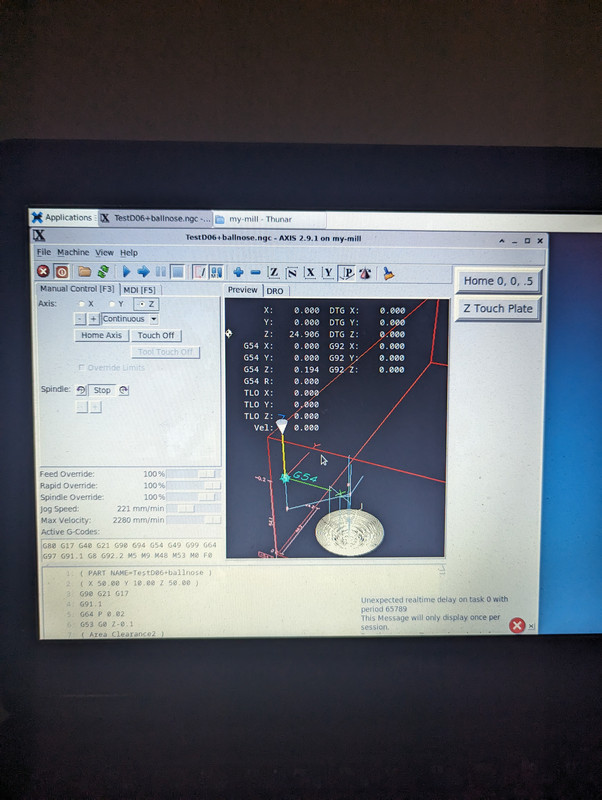
Hi I've recently added limit switches to my 3040. Before I was using touchplate to measure tool and set g54 z. After adding limit switches, I'm not sure what happened but when I load any program, it's is offseted much lower than it should be. Please look at screen below
Please Log in to join the conversation.
- tommylight
-

- Offline
- Administrator
-

Less
More
- Posts: 22010
- Thank you received: 3
2 years 9 months ago #291543
by tommylight
Replied by tommylight on topic G54 issue with limit switch
Please attach the pictures here on the forum, not on 3rd party sites, they tend to have way to much suspicious scripts running, so present a security risk.
Please Log in to join the conversation.
2 years 9 months ago #291544
by Lpkkk
Replied by Lpkkk on topic G54 issue with limit switch
Thx. Corrected
Please Log in to join the conversation.
2 years 9 months ago #291589
by Lpkkk
Replied by Lpkkk on topic G54 issue with limit switch
Ok lads, I've found it. The issue was caused by using
REMAP=M6 modalgroup=6 ngc=touch_plate
I've added it because after each tool change I would like to use touchplate to measure tool.
What I'm doing wrong? Any help?
REMAP=M6 modalgroup=6 ngc=touch_plate
I've added it because after each tool change I would like to use touchplate to measure tool.
What I'm doing wrong? Any help?
Please Log in to join the conversation.
2 years 9 months ago #291590
by Aciera
Replied by Aciera on topic G54 issue with limit switch
Looking at your hal file, I don't see any links for limit switches for the Z axis:
Then in your ini I see you have HOME = 25 and HOME_OFFSET=25 yet you have not set any homing velocities, which makes me wonder how you home your z-axis?
Code:
setp stepgen.2.position-scale [JOINT_2]SCALE
setp stepgen.2.steplen 1
setp stepgen.2.stepspace 0
setp stepgen.2.dirhold 70000
setp stepgen.2.dirsetup 70000
setp stepgen.2.maxaccel [JOINT_2]STEPGEN_MAXACCEL
net zpos-cmd joint.2.motor-pos-cmd => stepgen.2.position-cmd
net zpos-fb stepgen.2.position-fb => joint.2.motor-pos-fb
net zstep <= stepgen.2.step
net zdir <= stepgen.2.dir
net zenable joint.2.amp-enable-out => stepgen.2.enable
#net max-home-z => joint.2.home-sw-in
#net max-home-z => joint.2.pos-lim-sw-in
Then in your ini I see you have HOME = 25 and HOME_OFFSET=25 yet you have not set any homing velocities, which makes me wonder how you home your z-axis?
Please Log in to join the conversation.
2 years 9 months ago #291683
by Lpkkk
Replied by Lpkkk on topic G54 issue with limit switch
You are right, I've commented out my limitswitch on Z as I thought this config could be the reason for my issue with g54. I will bring it back.
It's still not answer for my problem
It's still not answer for my problem
Please Log in to join the conversation.
2 years 9 months ago #291727
by Aciera
Replied by Aciera on topic G54 issue with limit switch
Limit switches have no influence on your Z-offset but not properly homing your Z-axis certainly does.
Please Log in to join the conversation.
2 years 9 months ago #291728
by Lpkkk
Replied by Lpkkk on topic G54 issue with limit switch
That's interesting, could you please extend this topic?
Please Log in to join the conversation.
2 years 9 months ago #291729
by Aciera
Replied by Aciera on topic G54 issue with limit switch
Please Log in to join the conversation.
2 years 9 months ago #291760
by Lpkkk
Replied by Lpkkk on topic G54 issue with limit switch
Ok. I've enabled limit sw on Z axis and everything is correct.
After I add remap line, it is still wrong like on 1st screenshot. I've found out it is like that because of what I have in routines/touchplate.ngc.
Can someone point me where?
Is it missing G49? If yes where?
Ps. When I press on button to manually measure the tool it works like a charm. But in connection with remaping M6 it cause an issue.
All I want is if in gcode there is a tool change, lift z axis up, display message box to start manual change, measure tool in some position xy, measure using touchplate, display another messagebox with info to take touchplate, carry on the gcode.
After I add remap line, it is still wrong like on 1st screenshot. I've found out it is like that because of what I have in routines/touchplate.ngc.
Can someone point me where?
Is it missing G49? If yes where?
Ps. When I press on button to manually measure the tool it works like a charm. But in connection with remaping M6 it cause an issue.
All I want is if in gcode there is a tool change, lift z axis up, display message box to start manual change, measure tool in some position xy, measure using touchplate, display another messagebox with info to take touchplate, carry on the gcode.
Please Log in to join the conversation.
Time to create page: 0.188 seconds