

- Posts: 196
- Thank you received: 0
Control Panel Design for PlasmaC
6 years 1 month ago #183861
by pinder
Control Panel Design for PlasmaC was created by pinder
Hi everyone, I designed GUI for plasma machines and @KCJ is developing the QTPYVCP for that. You can check that out
here
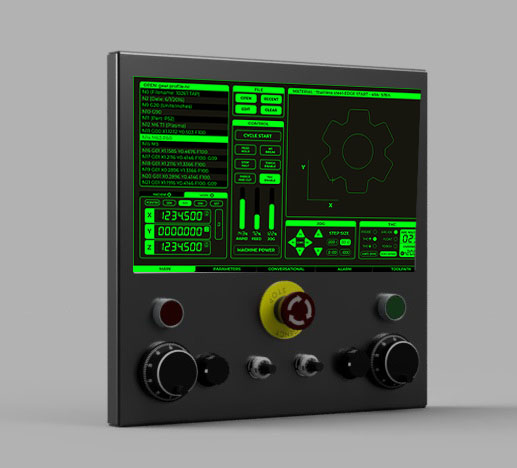
Now, I wanted to share the idea for a physical controller along with the touch GUI.
I will share here design files, and specially sheet designs so that you can cut and make one.
I'll update the github links here.
Suggestions and criticisms are welcome.
Want any change just ask.
checkout the render
Now, I wanted to share the idea for a physical controller along with the touch GUI.
I will share here design files, and specially sheet designs so that you can cut and make one.
I'll update the github links here.
Suggestions and criticisms are welcome.
Want any change just ask.
checkout the render
Attachment not found
Please Log in to join the conversation.
6 years 1 month ago #183872
by pinder
Replied by pinder on topic Control Panel Design for PlasmaC
Attachment not found
Attachment not found
Attachment not found
Please Log in to join the conversation.

6 years 1 month ago #183874
by rodw
Replied by rodw on topic Control Panel Design for PlasmaC
Looks like a couple of us had the same idea with Pinder's developing GUI. I've had this idea in my head for a long time.
15.6" monitor. Entry level is an Asus VT168 touch screen but there are industrial panels the same size available but they cost 6-7 times the price.
I had in mind the keyboard would be in a separate hook on arm that mounts to a similar upright post so it could be removed. You don't often need a keyboard and if the GUI is full featured with separate popup alpha and numeric data entry.
I need to make the mount to see if it actually works!
15.6" monitor. Entry level is an Asus VT168 touch screen but there are industrial panels the same size available but they cost 6-7 times the price.
I had in mind the keyboard would be in a separate hook on arm that mounts to a similar upright post so it could be removed. You don't often need a keyboard and if the GUI is full featured with separate popup alpha and numeric data entry.
I need to make the mount to see if it actually works!
Please Log in to join the conversation.
6 years 1 month ago #183903
by AgentWD40
Replied by AgentWD40 on topic Control Panel Design for PlasmaC
How are you planning on connecting the buttons and knobs? Mesa card IO or something else that's connected to the computer through usb? It occurs to me the 7i96 will run out of IO pretty fast, there's always expansion cards.
...or arduinos!
...or arduinos!
Please Log in to join the conversation.
6 years 1 month ago #183918
by pinder
Yeah thats what I was thinking if keyboard could removed altogether.
As the GUI is fully featured, thanks to Kurt.
Next time I'll remove the keyboard and move the the Switches to left or right.
Replied by pinder on topic Control Panel Design for PlasmaC
rodw wrote: Looks like a couple of us had the same idea with Pinder's developing GUI. I've had this idea in my head for a long time.
15.6" monitor. Entry level is an Asus VT168 touch screen but there are industrial panels the same size available but they cost 6-7 times the price.
I had in mind the keyboard would be in a separate hook on arm that mounts to a similar upright post so it could be removed. You don't often need a keyboard and if the GUI is full featured with separate popup alpha and numeric data entry.
I need to make the mount to see if it actually works!
Yeah thats what I was thinking if keyboard could removed altogether.
As the GUI is fully featured, thanks to Kurt.
Next time I'll remove the keyboard and move the the Switches to left or right.
Please Log in to join the conversation.
6 years 1 month ago #183919
by pinder
Because there are estop, pressure indicator, Plasma power and key switch.
If needed, this time i'll switch to Arduino or stm32 usb io. But thats the problem for some other day.
Replied by pinder on topic Control Panel Design for PlasmaC
There are not much io needed for the momentAgentWD40 wrote: How are you planning on connecting the buttons and knobs? Mesa card IO or something else that's connected to the computer through usb? It occurs to me the 7i96 will run out of IO pretty fast, there's always expansion cards.
...or arduinos!
Because there are estop, pressure indicator, Plasma power and key switch.
If needed, this time i'll switch to Arduino or stm32 usb io. But thats the problem for some other day.
Please Log in to join the conversation.
6 years 1 month ago #183932
by rodw
I thought I'd run a 7i73 in the console. It supports 4 encoders, 22 inputs and 24 outputs and still connect to the 7i96 without consuming i/o.
I'd be tempted to use a 7i76e so I could run a 433 mHz wireless pendant like I do now. With the exception of the 7i73, all the other hardware and motor drives would be in a different enclosure. There would be a few ethernet cables to interconnect the two boxes. Ethernet, smart serial and probably a cable for estop. The Odroid has two UARTS onboard, so probably would run that to the control box and patch it out to the plasma cutter.
If we ran a safety relay in the main control box, we might be able to run the estop through the spare wires in the smart serial cable.
Replied by rodw on topic Control Panel Design for PlasmaC
AgentWD40 wrote: How are you planning on connecting the buttons and knobs? Mesa card IO or something else that's connected to the computer through usb? It occurs to me the 7i96 will run out of IO pretty fast, there's always expansion cards.
I thought I'd run a 7i73 in the console. It supports 4 encoders, 22 inputs and 24 outputs and still connect to the 7i96 without consuming i/o.
I'd be tempted to use a 7i76e so I could run a 433 mHz wireless pendant like I do now. With the exception of the 7i73, all the other hardware and motor drives would be in a different enclosure. There would be a few ethernet cables to interconnect the two boxes. Ethernet, smart serial and probably a cable for estop. The Odroid has two UARTS onboard, so probably would run that to the control box and patch it out to the plasma cutter.
If we ran a safety relay in the main control box, we might be able to run the estop through the spare wires in the smart serial cable.
Please Log in to join the conversation.
6 years 1 month ago #183933
by pinder
Replied by pinder on topic Control Panel Design for PlasmaC
which wireless pendent? XHC?rodw wrote:
I'd be tempted to use a 7i76e so I could run a 433 mHz wireless pendant like I do now.
Please Log in to join the conversation.
6 years 1 month ago #183934
by pinder
Replied by pinder on topic Control Panel Design for PlasmaC
if you want I can design a sheet metal box for your design which you can cut on plasmarodw wrote: Looks like a couple of us had the same idea with Pinder's developing GUI. I've had this idea in my head for a long time.
Please Log in to join the conversation.
6 years 1 month ago #183940
by rodw
Replied by rodw on topic Control Panel Design for PlasmaC
Thanks, I am struggling trying to learn Fusion 360 at the moment. Its quite different to what I'm used to.
I've only got a couple more parts to draw and we'll be done aside from making sure the cutouts are all correct. I roughly drew a monitor today so I just need to make the monitor mount and the back.
I don't mind sharing the files when I get a bit further. If you use F360, maybe you can help I can share it. I think I can share it with other users.
The wireless pendant is from XHC but a more industrial version so it does not use USB. It has a hard wired receiver that plays with Mesa cards perfecctly.
I've only got a couple more parts to draw and we'll be done aside from making sure the cutouts are all correct. I roughly drew a monitor today so I just need to make the monitor mount and the back.
I don't mind sharing the files when I get a bit further. If you use F360, maybe you can help I can share it. I think I can share it with other users.
The wireless pendant is from XHC but a more industrial version so it does not use USB. It has a hard wired receiver that plays with Mesa cards perfecctly.
Please Log in to join the conversation.
Time to create page: 0.234 seconds