
- Posts: 6
- Thank you received: 0
RTelligent EtherCAT Servo Drive Setup: RS750E
1 year 5 months ago #328849
by MTate01
RTelligent EtherCAT Servo Drive Setup: RS750E was created by MTate01
Good day
I am currently trying to configure my linuxcnc to communicate with an RTelligent (Shenzhen Ruitech) RS750E AC Servo Drive.
So far, I think I've correctly compiled an ethercat-conf.xml file for the single slave (for now) (from here) but am struggling with any further steps. I can successfully read registers (ie cia-controlword) and things like that, I can attempt to write them - by setting pins eg setp lcec.0.0.cia-controlword 15, but there is no change in cia-statusword. The same applies for opmode.
Additionally, my drive never seems to exit PREOP. sudo ethercat states -p0 OP doesn't change state from PREOP. I figure that there is something I might need to do with registers, either in a specific order, or through the PC software (RSConfigurator), but the latter is rather confusing and i've had no success attempting such. I can change it to and from INIT (without errors) to PREOP (without errors), but as soon as I try SAFEOP or OP it stalls back to PREOP and has an error flag. I assume this means my XML might be wrong.
I've also attempted to set up my ethercat.hal and changed the joint/axis info in my axis-edited.ini, but still no change occurs on the drive or servo.
I cannot find any documentation on these AC servo drives from RTelligent here, but I will also be sending their support a ticket to see if they can help me. The appropriate files are below:
ethercat-conf.xml:
a modified ethercat-conf, with the same results:
ethercat.hal:
[/code][/code][/code]
I am currently trying to configure my linuxcnc to communicate with an RTelligent (Shenzhen Ruitech) RS750E AC Servo Drive.
So far, I think I've correctly compiled an ethercat-conf.xml file for the single slave (for now) (from here) but am struggling with any further steps. I can successfully read registers (ie cia-controlword) and things like that, I can attempt to write them - by setting pins eg setp lcec.0.0.cia-controlword 15, but there is no change in cia-statusword. The same applies for opmode.
Additionally, my drive never seems to exit PREOP. sudo ethercat states -p0 OP doesn't change state from PREOP. I figure that there is something I might need to do with registers, either in a specific order, or through the PC software (RSConfigurator), but the latter is rather confusing and i've had no success attempting such. I can change it to and from INIT (without errors) to PREOP (without errors), but as soon as I try SAFEOP or OP it stalls back to PREOP and has an error flag. I assume this means my XML might be wrong.
I've also attempted to set up my ethercat.hal and changed the joint/axis info in my axis-edited.ini, but still no change occurs on the drive or servo.
I cannot find any documentation on these AC servo drives from RTelligent here, but I will also be sending their support a ticket to see if they can help me. The appropriate files are below:
ethercat-conf.xml:
Code:
[code]<masters>
<master idx="0" appTimePeriod="1000000" refClockSyncCycles="1000">
<slave idx="0" type="generic" vid="00000A88" pid="0a880013" configPdos="tru>
<!-- Joint 0 -->
<syncManager idx="0" dir="out">
</syncManager>
<syncManager idx="1" dir="out">
</syncManager>
<syncManager idx="2" dir="out">
<pdo idx="1600">
<pdoEntry idx="6040" subIdx="00" bitLen="16" halPin="cia-controlword">
<pdoEntry idx="607a" subIdx="00" bitLen="32" halPin="target-position">
<pdoEntry idx="60b8" subIdx="00" bitLen="16" halPin="touchprobefuncti>
</pdo>
<pdo idx="1601">
<pdoEntry idx="6040" subIdx="00" bitLen="16" halPin="cia-controlword0>
<pdoEntry idx="607a" subIdx="00" bitLen="32" halPin="target-position0>
<pdoEntry idx="6081" subIdx="00" bitLen="32" halPin="target-velocity">
<pdoEntry idx="6083" subIdx="00" bitLen="32" halPin="target-accel" ha>
<pdoEntry idx="6084" subIdx="00" bitLen="32" halPin="target-decel" ha>
<pdoEntry idx="6060" subIdx="00" bitLen="8" halPin="opmode" halType=">
</pdo>
<pdo idx="1602">
<pdoEntry idx="6040" subIdx="00" bitLen="16" halPin="drivecontrol2" h>
<pdoEntry idx="6083" subIdx="00" bitLen="32" halPin="accelcommand2" h>
<pdoEntry idx="6084" subIdx="00" bitLen="32" halPin="decelcommand2" h>
<pdoEntry idx="60ff" subIdx="00" bitLen="32" halPin="targetvelocomman>
<pdoEntry idx="6060" subIdx="00" bitLen="8" halPin="modeofoperation2">
</pdo>
</syncManager>
<syncManager idx="3" dir="in">
<pdo idx="1a00">
<pdoEntry idx="603f" subIdx="00" bitLen="16" halPin="errorcode" halTy>
<pdoEntry idx="6041" subIdx="00" bitLen="16" halPin="cia-statusword" >
<pdoEntry idx="6061" subIdx="00" bitLen="8" halPin="opmode-display" h>
<pdoEntry idx="6064" subIdx="00" bitLen="32" halPin="actual-position">
<pdoEntry idx="60b9" subIdx="00" bitLen="16" halPin="touchprobestat" >
<pdoEntry idx="60ba" subIdx="00" bitLen="32" halPin="touchprobe1pos" >
<pdoEntry idx="60fd" subIdx="00" bitLen="32" halPin="digitalinputs" h>
</pdo>
<pdo idx="1a01">
<pdoEntry idx="6041" subIdx="00" bitLen="16" halPin="drivecontroltx1">
<pdoEntry idx="6061" subIdx="00" bitLen="8" halPin="modeofoperationtx>
<pdoEntry idx="6064" subIdx="00" bitLen="32" halPin="actual-velocity">
<pdoEntry idx="60fd" subIdx="00" bitLen="32" halPin="digitalinputs1" >
</pdo>
</syncManager>
<dcConf assignActivate="300" sync0Cycle="1"/>
</slave>
</master>
</masters>
a modified ethercat-conf, with the same results:
Code:
[code]<masters>
<master idx="0" appTimePeriod="1000000" refClockSyncCycles="1000">
<slave idx="0" type="generic" vid="0x00000A88" pid="0x0A880013" configPdos="true">
<syncManager idx="2" dir="out">
<pdo idx="1600">
<pdoEntry idx="6040" subIdx="00" bitLen="16" halPin="cia-controlword"/>
<pdoEntry idx="607A" subIdx="00" bitLen="32" halPin="target-position"/>
</pdo>
</syncManager>
<syncManager idx="3" dir="in">
<pdo idx="1A00">
<pdoEntry idx="6041" subIdx="00" bitLen="16" halPin="cia-statusword"/>
<pdoEntry idx="6064" subIdx="00" bitLen="32" halPin="actual-position"/>
</pdo>
</syncManager>
<dcConf assignActivate="300" sync0Cycle="1"/>
</slave>
</master>
</masters>
ethercat.hal:
Code:
[code]loadusr -W lcec_conf ethercat-conf.xml
loadrt lcec
addf lcec.read-all servo-thread
addf lcec.write-all servo-thread
setp lcec.0.0.opmode 8
setp lcec.0.0.cia-controlword 15
setp lcec.0.0.opmode 8
Please Log in to join the conversation.

1 year 5 months ago #328851
by Hakan
Replied by Hakan on topic RTelligent EtherCAT Servo Drive Setup: RS750E
Typically you want to use the cia402 component with such a drive.
The cia402 component is in your installation already, here is an
example of how to set it up in hal.
github.com/dbraun1981/hal-cia402/tree/main/example
The cia402 component is in your installation already, here is an
example of how to set it up in hal.
github.com/dbraun1981/hal-cia402/tree/main/example
Please Log in to join the conversation.
1 year 5 months ago #328856
by MTate01
Replied by MTate01 on topic RTelligent EtherCAT Servo Drive Setup: RS750E
Thanks for the reply - didn't get a notification of it, sorry for taking a little while to respond.
Okay noted, I will do my best to configure a cia402.hal file instead of the method i've been doing it...
but good news is that i've been able to move the drive to an "OP"erational state. very happy with even this little progress haha. will post my cia402.hal once i've got it to compile.
Okay noted, I will do my best to configure a cia402.hal file instead of the method i've been doing it...
but good news is that i've been able to move the drive to an "OP"erational state. very happy with even this little progress haha. will post my cia402.hal once i've got it to compile.
Please Log in to join the conversation.
1 year 5 months ago #328877
by Hakan
Replied by Hakan on topic RTelligent EtherCAT Servo Drive Setup: RS750E
Yes ethercat OP state is one thing, cia402 enable state is another thing (on top of OP state)
Linuxcnc need to go through every step to enable the drive. Skipping steps or shortcuts are not allowed.
But I have never worried about that, the cia402 component does that automatically.
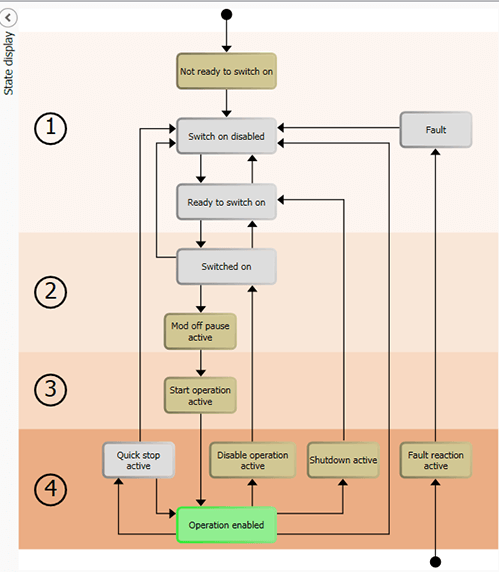
Linuxcnc need to go through every step to enable the drive. Skipping steps or shortcuts are not allowed.
But I have never worried about that, the cia402 component does that automatically.
Please Log in to join the conversation.
1 year 5 months ago #328894
by MTate01
Replied by MTate01 on topic RTelligent EtherCAT Servo Drive Setup: RS750E
hi Hakan,
Thanks for the recommendation to move to cia402 - the drive runs and i can at least move the motor! I feel like I might have taken some weird workarounds trying to chase linuxcnc compile errors, so I probably need to touch on whether these are "acceptable" - perhaps you can comment on the below?
ethercat-conf_n.xml:
and ethercat.hal:
note with the above: I had to comment out quite a few lines to avoid having to go "deeper" into ini files to remove errors from occuring... one such example was with the cia402.0.motor-pos-fb and cmd, I had errors stating that they were already linked to Xpos - so I just "reassigned" them. basically any line in the above that is commented out is just due to an error. definitely also need to uncomment the fault reporting...
next step for me is to set up a physical axis where I can test homing and rotation distance of a ball screw etc. and get an IO board working
Thanks for the recommendation to move to cia402 - the drive runs and i can at least move the motor! I feel like I might have taken some weird workarounds trying to chase linuxcnc compile errors, so I probably need to touch on whether these are "acceptable" - perhaps you can comment on the below?
ethercat-conf_n.xml:
Code:
<masters>
<master idx="0" appTimePeriod="1000000" refClockSyncCycles="1000">
<slave idx="0" type="generic" vid="00000A88" pid="0a880013" configPdos="true">
<!-- Joint 0 -->
<syncManager idx="0" dir="out"> </syncManager>
<syncManager idx="1" dir="out"> </syncManager>
<syncManager idx="2" dir="out">
<pdo idx="1600">
<pdoEntry idx="6040" subIdx="00" bitLen="16" halPin="cia-controlword" halType="u32"/>
<pdoEntry idx="607a" subIdx="00" bitLen="32" halPin="target-position" halType="s32"/>
<pdoEntry idx="60b8" subIdx="00" bitLen="16" halPin="touchprobefunction0" halType="bit"/>
</pdo>
<pdo idx="1601">
<pdoEntry idx="6081" subIdx="00" bitLen="32" halPin="profile-velocity" halType="u32"/>
<pdoEntry idx="6083" subIdx="00" bitLen="32" halPin="target-accel" halType="u32"/>
<pdoEntry idx="6084" subIdx="00" bitLen="32" halPin="target-decel" halType="u32"/>
<pdoEntry idx="6060" subIdx="00" bitLen="8" halPin="opmode" halType="s32"/>
</pdo>
<pdo idx="1602">
<pdoEntry idx="60ff" subIdx="00" bitLen="32" halPin="target-velocity" halType="s32"/>
</pdo>
</syncManager>
<syncManager idx="3" dir="in">
<pdo idx="1a00">
<pdoEntry idx="603f" subIdx="00" bitLen="16" halPin="errorcode" halType="bit"/>
<pdoEntry idx="6041" subIdx="00" bitLen="16" halPin="cia-statusword" halType="u32"/>
<pdoEntry idx="6061" subIdx="00" bitLen="8" halPin="opmode-display" halType="s32"/>
<pdoEntry idx="6064" subIdx="00" bitLen="32" halPin="actual-position" halType="s32"/>
<pdoEntry idx="60b9" subIdx="00" bitLen="16" halPin="touchprobestat" halType="bit"/>
<pdoEntry idx="60ba" subIdx="00" bitLen="32" halPin="touchprobe1pos" halType="s32"/>
<pdoEntry idx="60fd" subIdx="00" bitLen="32" halPin="digitalinputs" halType="s32"/>
</pdo>
<pdo idx="1a01">
<pdoEntry idx="606c" subIdx="00" bitLen="32" halPin="actual-velocity" halType="s32"/>
</pdo>
</syncManager>
<dcConf assignActivate="300" sync0Cycle="1000000"/>
</slave>
</master>
</masters>
and ethercat.hal:
Code:
loadusr -W lcec_conf ethercat-conf_n.xml
loadrt lcec
loadrt cia402 count=1
loadrt pid names=x-pid
##########################################
addf lcec.read-all servo-thread
addf cia402.0.read-all servo-thread
#addf motion-command-handler servo-thread
#addf motion-controller servo-thread
addf x-pid.do-pid-calcs servo-thread
addf cia402.0.write-all servo-thread
addf lcec.write-all servo-thread
#######################################
#net emc-enable => iocontrol.0.emc-enable-in
#sets emc-enable 1
setp cia402.0.csp-mode 1
setp cia402.0.pos-scale 3600000000
#from servo to cia402:
net x-statusword lcec.0.0.cia-statusword => cia402.0.statusword
net x-opmode-display lcec.0.0.opmode-display => cia402.0.opmode-display
net x-drv-act-pos lcec.0.0.actual-position => cia402.0.drv-actual-position
net x-drv-act-velo lcec.0.0.actual-velocity => cia402.0.drv-actual-velocity
#from cia402 to servo
net x-controlword cia402.0.controlword => lcec.0.0.cia-controlword
net x-modes-of-operation cia402.0.opmode => lcec.0.0.opmode
net x-drv-target-pos cia402.0.drv-target-position => lcec.0.0.target-position
net x-drv-target-velo cia402.0.drv-target-velocity => lcec.0.0.target-velocity
net Xpos => cia402.0.pos-cmd
#net x-pos-fb => joint.0.motor-pos-fb <= cia402.0.pos-fb
#from motion to cia
net x-enable <= joint.0.amp-enable-out => cia402.0.enable
#net x-pos-cmd <= joint.0.motor-pos-cmd => cia402.0.pos-cmd
#from cia to motion
#net x-amp-fault => joint.0.amp-fault-in <= cia402.0.drv-fault
#net x-pos-fb => joint.0.motor-pos-fb <= cia402.0.pos-fb
#homing
net x-home-index <= joint.0.index-enable => cia402.0.home
next step for me is to set up a physical axis where I can test homing and rotation distance of a ball screw etc. and get an IO board working
Please Log in to join the conversation.
- farmer_mike
- Offline
- New Member
-

Less
More
- Posts: 17
- Thank you received: 0
1 year 4 months ago #329995
by farmer_mike
Replied by farmer_mike on topic RTelligent EtherCAT Servo Drive Setup: RS750E
Hi I’ll be following this discussion, as I’m also using rtelligent rs 750E drives.
I don’t have a config file made yet, so MTate01 is a few steps ahead of me.
I don’t have a config file made yet, so MTate01 is a few steps ahead of me.
Please Log in to join the conversation.
- farmer_mike
- Offline
- New Member
-
Less
More
- Posts: 17
- Thank you received: 0
1 year 3 months ago #331802
by farmer_mike
Replied by farmer_mike on topic RTelligent EtherCAT Servo Drive Setup: RS750E
Hi MTate01, thanks for your posts. I have my RS 750E drives jogging. My next step is to wire the E stop.
I don’t know what differential input e stop means or how to wire that circuit. The manual seems to indicate that 24v gets wired to both pins 19 and 21. What is supposed to happen to the voltage on pins 19 and 21 when the e stop button is pressed?
I don’t know what differential input e stop means or how to wire that circuit. The manual seems to indicate that 24v gets wired to both pins 19 and 21. What is supposed to happen to the voltage on pins 19 and 21 when the e stop button is pressed?
Please Log in to join the conversation.
4 months 3 weeks ago #346898
by low79fx
Replied by low79fx on topic RTelligent EtherCAT Servo Drive Setup: RS750E
Have you had any further development in your motion control plan.
Please Log in to join the conversation.

4 months 3 weeks ago #346905
by Benb
Replied by Benb on topic RTelligent EtherCAT Servo Drive Setup: RS750E
The manual for your drive (pages 27–28) shows that Digital Output 5 (pins 19–20) and Digital Output 6 (pins 21–22) are digital output pairs rated to switch loads up to 200 mA. Output 6 can be used to send a stop signal to your system, indicating that the drive has entered stop mode.If your goal is to feed an external E‑stop signal into the drive, you must wire that signal to digital input IN1 (Servo Enable) as shown in the wiring diagram on page 26.The reference to “differential input” in the documentation is simply a translation error and can be disregarded.
Please Log in to join the conversation.
- farmer_mike
- Offline
- New Member
-
Less
More
- Posts: 17
- Thank you received: 0
3 months 4 weeks ago #347434
by farmer_mike
Replied by farmer_mike on topic RTelligent EtherCAT Servo Drive Setup: RS750E
Thanks Benb, I did figure out the e stop input and did tie the input into my ui e stop.
I guess it’s not a true e stop as I’m only killing the enable, but everything does work the way I want it to.
I pasted all my configuration files into my build thread.
I guess it’s not a true e stop as I’m only killing the enable, but everything does work the way I want it to.
I pasted all my configuration files into my build thread.
Please Log in to join the conversation.
Time to create page: 0.114 seconds