

- Posts: 12160
- Thank you received: 0
(SOLVED) BUG REPORT: Gmocappy Homing buttons in joint mode in Master
9 years 9 months ago #86927
by rodw
Norbert, This is not something the user needs acces to. If you could incorporate an ini file variable that hid everything but the home all button (and also hid the world mode button), gantry users could build a more robust machine.
As it is currently, sooner or later somebody will hit the wrong button and try to tear their gantry apart
Replied by rodw on topic BUG REPORT: Gmocappy Homing buttons in joint mode in Master
newbynobi wrote: A Gantry is only one of many JA machines, imagine a Scara or 6 joints robot, they must home each Joint individualy.
May be we need a settings on the homing page to disable individual homing?
Norbert, This is not something the user needs acces to. If you could incorporate an ini file variable that hid everything but the home all button (and also hid the world mode button), gantry users could build a more robust machine.
As it is currently, sooner or later somebody will hit the wrong button and try to tear their gantry apart
Please Log in to join the conversation.
9 years 9 months ago #86988
by newbynobi
Replied by newbynobi on topic BUG REPORT: Gmocappy Homing buttons in joint mode in Master
Hallo Rodw,
I take that one on my to do list, but not in the INI.
IMHO it should go to the settings page.
Norbert
I take that one on my to do list, but not in the INI.
IMHO it should go to the settings page.
Norbert
Please Log in to join the conversation.
9 years 9 months ago #86998
by rodw
Thanks Norbert. Whatever is easier for you.
Replied by rodw on topic BUG REPORT: Gmocappy Homing buttons in joint mode in Master
newbynobi wrote: Hallo Rodw,
I take that one on my to do list, but not in the INI.
IMHO it should go to the settings page.
Norbert
Thanks Norbert. Whatever is easier for you.
Please Log in to join the conversation.
9 years 9 months ago #87002
by rodw
Replied by rodw on topic BUG REPORT: Gmocappy Homing buttons in joint mode in Master
Norbert, there might be an even simpler way.
Your JA example has this
If you use
the Joint mode is disabled, the world mode selection button is hidden but gmocappy incorrectly provides Homing buttons for separate XYZ axis but these are tied to joints as there is no homing pins for a separate axis. This is actually the source of the bug as gmoccappy is out of step with the new joint model.
So I think the correct resolution is to hide the individual axis homing buttons and display a home all button only if the .ini file does not support
That would make me very happy!
Others might not be as happy with this change, but a GUI needs to reflect the LCNC model and currently it does not.
Your JA example has this
Code:
KINEMATICS = trivkins coordinates=xyyz kinstype=BOTH
If you use
Code:
KINEMATICS = trivkins coordinates=xyyz
So I think the correct resolution is to hide the individual axis homing buttons and display a home all button only if the .ini file does not support
Code:
kinstype=BOTH
That would make me very happy!
Others might not be as happy with this change, but a GUI needs to reflect the LCNC model and currently it does not.
Please Log in to join the conversation.
9 years 9 months ago #87007
by newbynobi
Replied by newbynobi on topic BUG REPORT: Gmocappy Homing buttons in joint mode in Master
Again, it is not a bug!
That is the way Joint Axis branch behave.
If you would use a config XYZX in your case, the homing button would home the correct joints.
I have not checked jet, but axis should behave very similar, try to home the joints individualy with axis and report. You can do that, using the menu, not button.
Norbert
That is the way Joint Axis branch behave.
If you would use a config XYZX in your case, the homing button would home the correct joints.
I have not checked jet, but axis should behave very similar, try to home the joints individualy with axis and report. You can do that, using the menu, not button.
Norbert
Please Log in to join the conversation.
9 years 9 months ago #87008
by newbynobi
Replied by newbynobi on topic BUG REPORT: Gmocappy Homing buttons in joint mode in Master
Please consider, you are using a trivial kinematics, but LinucCNC can handle also non trivial kinematics!
Norbert
Norbert
Please Log in to join the conversation.
9 years 9 months ago #87012
by rodw
Thanks Norbert, I will try your suggestion and review Axis tonight. A simple solution would be nice. I suspect however, the Home X axis will still only move Joint 0 and not move Joint 3
Replied by rodw on topic BUG REPORT: Gmocappy Homing buttons in joint mode in Master
newbynobi wrote: Again, it is not a bug!
That is the way Joint Axis branch behave.
If you would use a config XYZX in your case, the homing button would home the correct joints.
I have not checked jet, but axis should behave very similar, try to home the joints individualy with axis and report. You can do that, using the menu, not button.
Norbert
Thanks Norbert, I will try your suggestion and review Axis tonight. A simple solution would be nice. I suspect however, the Home X axis will still only move Joint 0 and not move Joint 3
Please Log in to join the conversation.
9 years 8 months ago #87083
by rodw
Replied by rodw on topic BUG REPORT: Gmocappy Homing buttons in joint mode in Master
Ok, its 4:00 am but I was awake!
Though trying to resolve this issue, I have developed a much greater understanding of the operating modes of LCNC.
I took the standard Gmocappy Joint axis sim (which has XYYZ geometry) and made 2 changes in the .ini file:
1. Told it to use Axis instead of Gmocappy
2. Removed the kinstype=both from the KINEMATICS setting
So the .ini changes are shown below
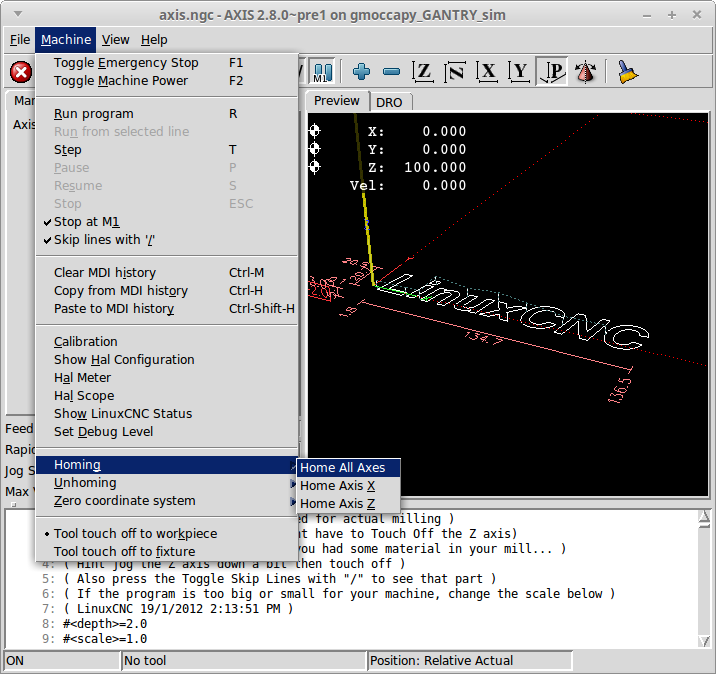
Hers is a screen dump from axis showing homing menu
so then I changed the display back to Gmoccappy
And here is the homing screen dump

As you can see, Axis does not allow you to home the Y axis (which is the joint axis in this config). I believe it does this to prevent a user from tearing the gantry apart by only homing one side.
Gmocappy on the other hand, does not prevent the user to home just one side of the gantry and thus could result in a damaged machine.
I also believe from all the research id did in building my config that
should not be used in a Joint Axis configuration. Perhaps somebody with more experience can confirm this.
So from this testing, it would appear that there are 2 issues in Gmocappy.
1. The KINEMATICS statement in the default Joint Axis config is incorrect. It should be
2. Gmocappy incorrectly displays homing buttons in a Joint Axis Config and places the machine at risk of being damaged.
Though trying to resolve this issue, I have developed a much greater understanding of the operating modes of LCNC.
I took the standard Gmocappy Joint axis sim (which has XYYZ geometry) and made 2 changes in the .ini file:
1. Told it to use Axis instead of Gmocappy
2. Removed the kinstype=both from the KINEMATICS setting
So the .ini changes are shown below
Code:
[DISPLAY]
DISPLAY = axis
#DISPLAY = gmoccapy
[KINS]
KINEMATICS = trivkins coordinates=xyyz
#KINEMATICS = trivkins coordinates=xyyz kinstype=BOTH
JOINTS = 4
Hers is a screen dump from axis showing homing menu
so then I changed the display back to Gmoccappy
Code:
#DISPLAY = axis
DISPLAY = gmoccapy
And here is the homing screen dump
As you can see, Axis does not allow you to home the Y axis (which is the joint axis in this config). I believe it does this to prevent a user from tearing the gantry apart by only homing one side.
Gmocappy on the other hand, does not prevent the user to home just one side of the gantry and thus could result in a damaged machine.
I also believe from all the research id did in building my config that
Code:
kinstype=BOTH
So from this testing, it would appear that there are 2 issues in Gmocappy.
1. The KINEMATICS statement in the default Joint Axis config is incorrect. It should be
Code:
KINEMATICS = trivkins coordinates=xyyz
2. Gmocappy incorrectly displays homing buttons in a Joint Axis Config and places the machine at risk of being damaged.
Please Log in to join the conversation.
9 years 8 months ago #87592
by newbynobi
Replied by newbynobi on topic BUG REPORT: Gmocappy Homing buttons in joint mode in Master
I am a little bit short of time, but I will work on this with priority A++
Norbert
Norbert
Please Log in to join the conversation.
9 years 8 months ago #87595
by rodw
Norbert, thanks. I have been the same way. I have spent a fair bit of time on this myself but have not had time to post my findings.
I added some code to detect if there were any joint axis right above where you configure a lathe. If joint axes were found, disable the relevant homing button. This was easy to do using the string.count() function. Then I added some code in the homing functions to renumber the joints. At this point, the DRO's were not being refreshed correctly (eg. Stayed red when homed). So When I added some code in an attempt to fix this but Joint 4 (Z) became Axis A.
At this point, I decided that enough was enough and went back to the setup code (near the lathe config) and just made it to hide every joint homing button if a joint axis was sensed. Anyway, I won't be able to post anything until tonight (6:00am and at work already)
Replied by rodw on topic BUG REPORT: Gmocappy Homing buttons in joint mode in Master
newbynobi wrote: I am a little bit short of time, but I will work on this with priority A++
Norbert
Norbert, thanks. I have been the same way. I have spent a fair bit of time on this myself but have not had time to post my findings.
I added some code to detect if there were any joint axis right above where you configure a lathe. If joint axes were found, disable the relevant homing button. This was easy to do using the string.count() function. Then I added some code in the homing functions to renumber the joints. At this point, the DRO's were not being refreshed correctly (eg. Stayed red when homed). So When I added some code in an attempt to fix this but Joint 4 (Z) became Axis A.
At this point, I decided that enough was enough and went back to the setup code (near the lathe config) and just made it to hide every joint homing button if a joint axis was sensed. Anyway, I won't be able to post anything until tonight (6:00am and at work already)
Please Log in to join the conversation.
Time to create page: 0.134 seconds