
- Posts: 403
- Thank you received: 0
NativeCAM is Features renamed
- cncnoob1979
- Offline
- Platinum Member
-

Less
More
9 years 9 months ago #85452
by cncnoob1979
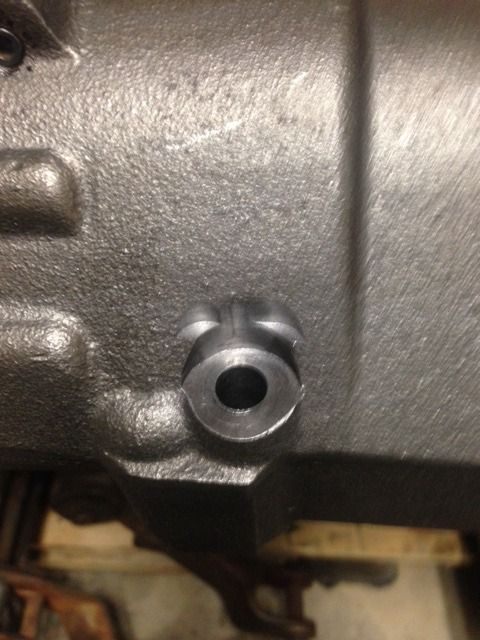
Above is the result of trying to cut a .75in in cast iron. It goes to a diesel tractor balancer. The part is not trashed however I'm trying to figure out why my 1/2in end-mill went outside of the planned trajectory. As you can see in the pictures I tried clockwise and counter-clockwise I stopped the machine before any major damage.
I waited until the end-mill was done with the ramp in, the ran the table up to match the required depth I needed. After the ramp the machine stayed in the .75 inch constraints.
The machine would start to ramp in about .25in outside the planned cut. However I do not see that in gremlin.
I have not experienced this before. Is this a result of linuxcnc or NativeCam? Any ideas? Or ---- Did I do it to myself and not realize my mistake?
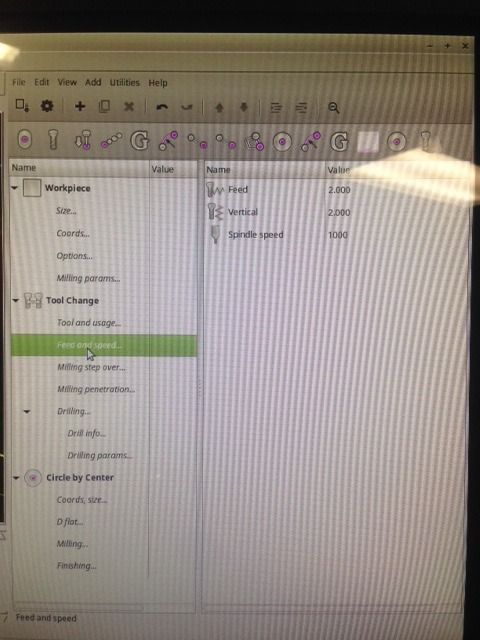
Setting below, sorry was easier for me to take pictures at the time.
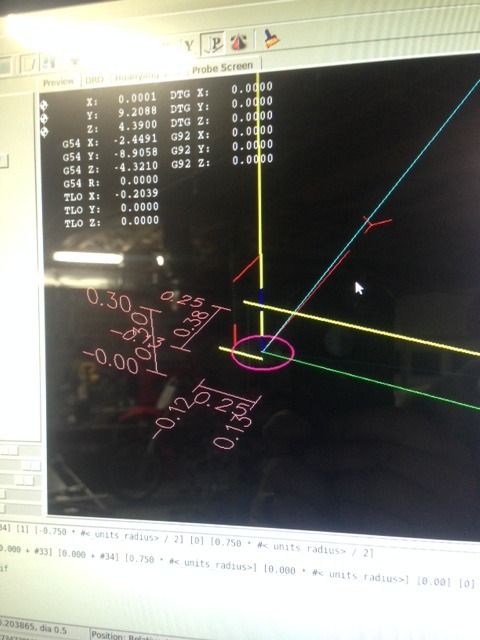
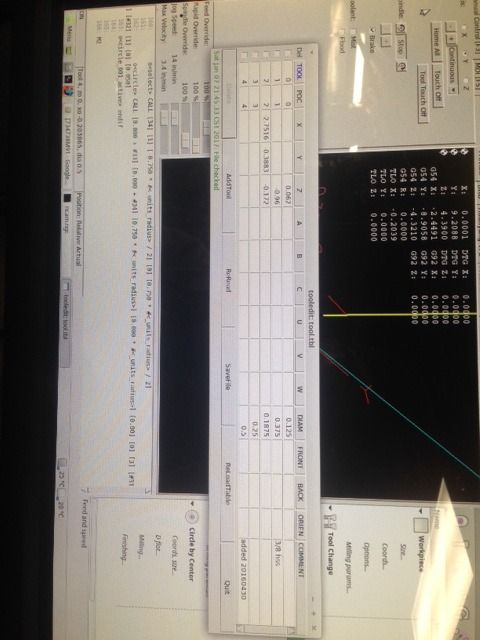
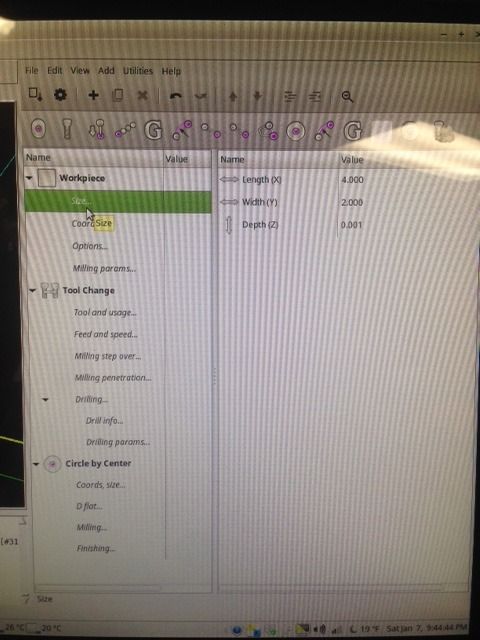
Replied by cncnoob1979 on topic NativeCAM is Features renamed

Above is the result of trying to cut a .75in in cast iron. It goes to a diesel tractor balancer. The part is not trashed however I'm trying to figure out why my 1/2in end-mill went outside of the planned trajectory. As you can see in the pictures I tried clockwise and counter-clockwise
I stopped the machine before any major damage.I waited until the end-mill was done with the ramp in, the ran the table up to match the required depth I needed. After the ramp the machine stayed in the .75 inch constraints.
The machine would start to ramp in about .25in outside the planned cut. However I do not see that in gremlin.
I have not experienced this before. Is this a result of linuxcnc or NativeCam? Any ideas? Or ---- Did I do it to myself and not realize my mistake?
Code:
~ $ uname -a
Linux bridgeport 4.8.11-rt7 #1 SMP PREEMPT RT Wed Dec 28 16:50:40 CST 2016 i686 i686 i686 GNU/Linux
~ $ cat /etc/issue
Linux Mint 17.3 Rosa
Linuxcnc 2.8Pre latest git pull last week as well.
NativeCAM for LinuxCNC 2.5 latest git pull was last week sometime.
Setting below, sorry was easier for me to take pictures at the time.
Warning: Spoiler!


Please Log in to join the conversation.
- cncnoob1979
- Offline
- Platinum Member
-
Less
More
- Posts: 403
- Thank you received: 0
9 years 9 months ago #85453
by cncnoob1979
Replied by cncnoob1979 on topic NativeCAM is Features renamed
Had to reduce links, settings continued here:
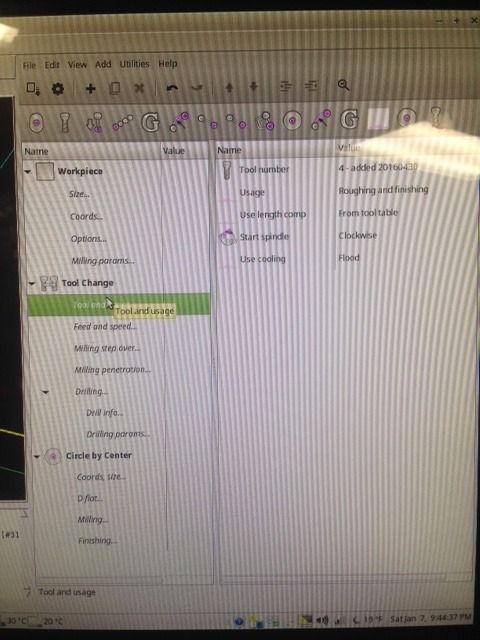
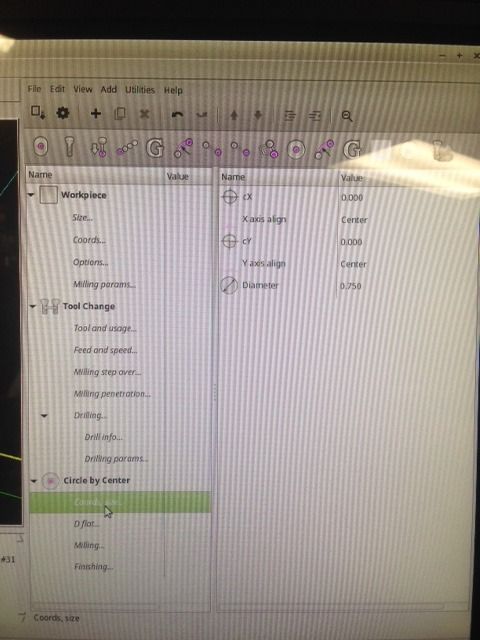
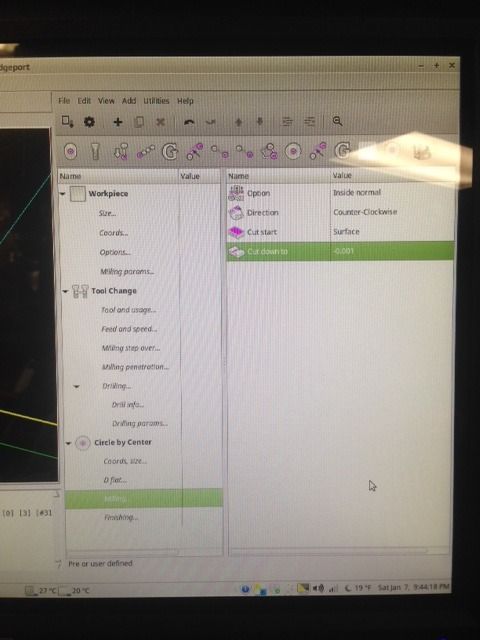
Warning: Spoiler!


Please Log in to join the conversation.

9 years 9 months ago #85476
by kjacobs
in addition, in ncam.py after line 2208 you should add
self.builder.set_translation_domain('ncam')
otherwise the glade file entries do not get translated. Stupidly enough I was using
an outdated pygtk version before I got the translation stuff to work. 2.24 is fine.
Once I have a german version completed, I will send it to you if you like. I'll have to clone
your new version before that, though.
Best regards,
Karl
Replied by kjacobs on topic NativeCAM is Features renamed
Hi Fern,FernV wrote:
Hi Karl,
This may be just the error I was looking for. Nice if you succeed and have a po file.
in addition, in ncam.py after line 2208 you should add
self.builder.set_translation_domain('ncam')
otherwise the glade file entries do not get translated. Stupidly enough I was using
an outdated pygtk version before I got the translation stuff to work. 2.24 is fine.
Once I have a german version completed, I will send it to you if you like. I'll have to clone
your new version before that, though.
Best regards,
Karl
Please Log in to join the conversation.
9 years 9 months ago #85522
by FernV
Hi
Using a pre-release version instead of a stable one is always risky but it is not the problem
In fact there is no problem with the pre-release version or NativeCAM in your case but some params not set properly.
First a few explanation : every shape you mill ends with a G40 (same for plasma), so it means it always starts with a G40 condition and when milling inside or outside, it will compute a pre-entry point at a distance which is off the start point by 0.501 X tool radius hence "about .25in outside the planned cut" then it will move in an arc to the entry point with a condition of G41 or G42. (The 0.501 factor makes it look like a straight line but it is the same formula in plasma where the factor is higher for a larger arc when firing the torch). This movement is always done at "cut start" + 'Workpiece/Milling params/Rapid to Z' + 'Workpiece/Milling params/Z clear', then moves down at G0 feed to "cut start" + 'Workpiece/Milling params/Rapid to Z' then to "cut start" at "Tool Change/Feed and speed/Vertical" feed. You can see this in simulation and the code is in lead_in.ngc and material.cfg
In your case, since you started at the high side of material, you could have increase params "Workpiece/Milling params/Rapid to Z" and/or "Workpiece/Milling params/Z clear" and/or "cut start". (If someone suggest a better name for those params, I will change it)
Experiment before running.
Increasing "cut start" would be sufficient I think
Another solution would be to rotate the circle 180° so it starts on the low side but it will take a big bite at the first half. I do not recommend this.
Hope this help.
Best regards
Fern
Replied by FernV on topic NativeCAM is Features renamed
cncnoob1979 wrote: ...The part is not trashed however I'm trying to figure out why my 1/2in end-mill went outside of the planned trajectory. As you can see in the pictures I tried clockwise and counter-clockwise. I stopped the machine before any major damage.
I waited until the end-mill was done with the ramp in, the ran the table up to match the required depth I needed. After the ramp the machine stayed in the .75 inch constraints.
The machine would start to ramp in about .25in outside the planned cut. However I do not see that in gremlin.
I have not experienced this before. Is this a result of linuxcnc or NativeCam? Any ideas? Or ---- Did I do it to myself and not realize my mistake?
Hi
Using a pre-release version instead of a stable one is always risky but it is not the problem
In fact there is no problem with the pre-release version or NativeCAM in your case but some params not set properly.
First a few explanation : every shape you mill ends with a G40 (same for plasma), so it means it always starts with a G40 condition and when milling inside or outside, it will compute a pre-entry point at a distance which is off the start point by 0.501 X tool radius hence "about .25in outside the planned cut" then it will move in an arc to the entry point with a condition of G41 or G42. (The 0.501 factor makes it look like a straight line but it is the same formula in plasma where the factor is higher for a larger arc when firing the torch). This movement is always done at "cut start" + 'Workpiece/Milling params/Rapid to Z' + 'Workpiece/Milling params/Z clear', then moves down at G0 feed to "cut start" + 'Workpiece/Milling params/Rapid to Z' then to "cut start" at "Tool Change/Feed and speed/Vertical" feed. You can see this in simulation and the code is in lead_in.ngc and material.cfg
In your case, since you started at the high side of material, you could have increase params "Workpiece/Milling params/Rapid to Z" and/or "Workpiece/Milling params/Z clear" and/or "cut start". (If someone suggest a better name for those params, I will change it)
Experiment before running.
Increasing "cut start" would be sufficient I think
Another solution would be to rotate the circle 180° so it starts on the low side but it will take a big bite at the first half. I do not recommend this.
Hope this help.
Best regards
Fern
Please Log in to join the conversation.

9 years 9 months ago #85566
by BigJohnT
Replied by BigJohnT on topic NativeCAM is Features renamed
Hi Fern,
I just got Native Cam up and going thanks to some outside help. It looks like a useful tool.
So far without watching any videos I've figured out how to use it I think.
Thanks
JT
I just got Native Cam up and going thanks to some outside help. It looks like a useful tool.
So far without watching any videos I've figured out how to use it I think.
Thanks
JT
Please Log in to join the conversation.

9 years 9 months ago #85633
by orpheus
Replied by orpheus on topic NativeCAM is Features renamed
I've been using NativeCAM for a while now, and it's been very useful; the only thing it didn't offer that my old conversational control did was Helical moves, so I've written a quick sub for it - As usual with these things it's had little testing and probably too little sanity testing for its input - therefore use at your own risk! it's been fine for me, but YMMV!
(Strip the .txt from the cfg file and put the ngc in a folder LinuxCNC can see)
[Updated the ngc file - Realised I uploaded an older version with a few bugs]
[The running product]
(Strip the .txt from the cfg file and put the ngc in a folder LinuxCNC can see)
Attachment not found
[Updated the ngc file - Realised I uploaded an older version with a few bugs]
[The running product]
Attachment not found
Please Log in to join the conversation.
9 years 9 months ago #85643
by FernV
Hi orpheus
Very well done, I will sure give it some serious tests if I can find the right cutter for it. And I will sure include it before long.
Best regards
Fern
Replied by FernV on topic NativeCAM is Features renamed
orpheus wrote: ... I've written a quick sub for it - I've used it a few times today for some threadmilling I'd been putting off, and it's worked for both single-point and multi-toothed cutters. As usual with these things it's had little testing and probably too little sanity testing for its input - therefore use at your own risk! it's been fine for me, but YMMV!
Hi orpheus
Very well done, I will sure give it some serious tests if I can find the right cutter for it. And I will sure include it before long.
Best regards
Fern
Please Log in to join the conversation.
9 years 9 months ago #85783
by FernV
Hi orpheus,
You have done a fantastic job on this one and I am preparing to include it in the package.
Changes I will do
If you think of something else, let it be known
Best regards
Fern
p.s. : 'orpheus' or just Philip may be strange in the contributors list
Replied by FernV on topic NativeCAM is Features renamed
orpheus wrote: ... therefore use at your own risk! it's been fine for me, but YMMV!
Hi orpheus,
You have done a fantastic job on this one and I am preparing to include it in the package.
Changes I will do
- rename it 'Thread Milling' (I think it is the purpose, right?)
- give the option to select metric or imperial no matter the mill setup
- imperial will be TPI which is standard
- move the cutter params to 'Tool Change' and add usage for threading, this will prevent wrong usage of the cutter
- I do not think I will buy a cutter to try it, so users should be warned
If you think of something else, let it be known
Best regards
Fern
p.s. : 'orpheus' or just Philip may be strange in the contributors list
Please Log in to join the conversation.
9 years 9 months ago #85785
by orpheus
Replied by orpheus on topic NativeCAM is Features renamed
Hi Fern,
I can't think of anything else major. It is mostly what for threadmilling, so the name change should be fine. I'm glad you moved the cutting params, I had thought of doing that, but didn't want to mess too much with your underlying parts.
Thanks for seeing fit to include it in the package
As for my name, Mullen is my Surname.
Regards!
I can't think of anything else major. It is mostly what for threadmilling, so the name change should be fine. I'm glad you moved the cutting params, I had thought of doing that, but didn't want to mess too much with your underlying parts.
Thanks for seeing fit to include it in the package
As for my name, Mullen is my Surname.
Regards!
Please Log in to join the conversation.

9 years 8 months ago #87415
by grijalvap
Replied by grijalvap on topic Plasma modifications
Nice I installed your new version and it worked pretty straight forward,
the only changes I did were:
add M66 to wait for the Arc-Ok signal at the lead_in.ngc
then add M5 to stop plasma at lead-out
Thanks for your great work.
One more question, I want to add a command to disable the plasma THC, it should happen .25 or .375 inch before the end,
actually, it can be done just before starting the lead-out.
the problem is that when I place the M62 M66 Code, it throws the following error
"Cannot set auxiliary digital output with cutter radius compensation on"
does it exist any walk around for this?
the only changes I did were:
add M66 to wait for the Arc-Ok signal at the lead_in.ngc
then add M5 to stop plasma at lead-out
Thanks for your great work.
One more question, I want to add a command to disable the plasma THC, it should happen .25 or .375 inch before the end,
actually, it can be done just before starting the lead-out.
the problem is that when I place the M62 M66 Code, it throws the following error
"Cannot set auxiliary digital output with cutter radius compensation on"
does it exist any walk around for this?
Please Log in to join the conversation.
Time to create page: 0.173 seconds