
- Posts: 67
- Thank you received: 0
How to install dxf2gcode
- hermann1976
- Topic Author
- Offline
- Senior Member
-

Less
More
6 years 2 months ago #179441
by hermann1976
How to install dxf2gcode was created by hermann1976
Hey everyone,
Since I have increasingly noticed that there are problems with the installation of dxf2gcode under linux and I also had problems with the installation, I created a step by step installation instructions that worked for me. I performed this installation with a fresh debian 9 installation (virtualbox installation).
I cannot guarantee the functionality or damage to the system.
You use the installation guide at your own risk. Make a system backup before you start the installation!
So let´s start (copy-paste each row into terminal):
Normaly it should work.
Also attached screenshots of the pp config for plasmac.
Have fun!
Since I have increasingly noticed that there are problems with the installation of dxf2gcode under linux and I also had problems with the installation, I created a step by step installation instructions that worked for me. I performed this installation with a fresh debian 9 installation (virtualbox installation).
I cannot guarantee the functionality or damage to the system.
You use the installation guide at your own risk. Make a system backup before you start the installation!
So let´s start (copy-paste each row into terminal):
Code:
su -l
enter "root passwd"
apt-get update
apt-get upgrade
apt-get install python3-pip
apt install python3-pyqt5
apt-get install python3-opengl
apt-get install qttools5-dev-tools
apt-get install pyqt5-dev-tools
apt-get install pstoedit
apt-get install python3-configobj
apt-get install libpcap-dev libpq-dev
pip3 install --upgrade setuptools
cd /tmp
wget https://sourceforge.net/projects/dxf2gcode/files/dxf2gcode-20191025.zip
cd "go to folder where you want to install dxf2gcode"
unzip /tmp/dxf2gcode-20191025.zip
mv ./dxf2gcode-20191025 ./dxf2gcode
cd ./dxf2gcode
./make_tr.py
./make_py_uic.py
python3 ./st-setup.py build
cd ..
chown -R "user:user" ./dxf2gcode/
python3 dxf2gcode.py
Normaly it should work.
Also attached screenshots of the pp config for plasmac.
Have fun!
Please Log in to join the conversation.
- tommylight
-

- Offline
- Administrator
-

Less
More
- Posts: 22010
- Thank you received: 3
6 years 2 months ago #179447
by tommylight
Replied by tommylight on topic How to install dxf2gcode
Nicely done, thank you.
Please Log in to join the conversation.
- Aldenflorio
- Offline
- Platinum Member
-

Less
More
- Posts: 388
- Thank you received: 0
6 years 1 month ago #182935
by Aldenflorio
Replied by Aldenflorio on topic How to install dxf2gcode
I was having trouble, i realized the second to last command was what messed up so i went back to ~/Desktop/dxf2gcode$ python3 dxf2gcode.py
then it worked. I do have one question though. How do i make a shortcut on desktop so i don't have to type in the command every time?
When I open up the new saved file from dxf2gcode in Linuxcnc it says
Near line 8 of
Tmp/tmpp78t9j/Librycam2.ngc:
Unknown gcode used
Here’s the gcode:
it seems to be having a problem with this line:
N80 F#<_hal[plasmac.cut-feed-rate]
then it worked. I do have one question though. How do i make a shortcut on desktop so i don't have to type in the command every time?
When I open up the new saved file from dxf2gcode in Linuxcnc it says
Near line 8 of
Tmp/tmpp78t9j/Librycam2.ngc:
Unknown gcode used
Here’s the gcode:
Code:
N10 (Generated with: DXF2GCODE, Version: Py3.5.3 PyQt5.7, Date: $Date: Fri Oct 25 20:45:56 2019 +0200 $)
N20 (Created from file: /home/user/Desktop/Unfinished Designs/Librycam.dxf)
N30 (Output format description: G-CODE for LinuxCNC - Plasmac)
N40 (Time: Sun Sep 20 14:42:01 2020)
N50 G20 (Units in inches)
N60 G90 (Absolute programming)
N70 G64 P0.1 G40 G49 G80 G90 G92.1 G94 G67 (preamble)
N80 F#<_hal[plasmac.cut-feed-rate]
N90
(*** LAYER: 0 ***)
N100
(* SHAPE Nr: 1 *)
N110 G0 X 10.0000 Y 18.0000
N120 M3 $0 S1
N130 G1 X 10.0000 Y 8.0000
N140 G1 X 10.0000 Y 18.0000
N150 M5 $0
N160 G0 X 0.0000 Y 0.0000
N170 M2 (Program end)
it seems to be having a problem with this line:
N80 F#<_hal[plasmac.cut-feed-rate]
Please Log in to join the conversation.
- tommylight
-
- Offline
- Administrator
-
Less
More
- Posts: 22010
- Thank you received: 3
6 years 1 month ago #182964
by tommylight
Replied by tommylight on topic How to install dxf2gcode
This was answered on another topic.
Please Log in to join the conversation.
- Aldenflorio
- Offline
- Platinum Member
-
Less
More
- Posts: 388
- Thank you received: 0
6 years 1 month ago #182966
by Aldenflorio
Replied by Aldenflorio on topic How to install dxf2gcode
Yes it was. Sorry. The issue was that there was no > for the line it was having trouble with. Along with that G67 was unknown. If those two things are changed it worked for me
Please Log in to join the conversation.
- hermann1976
- Topic Author
- Offline
- Senior Member
-
Less
More
- Posts: 67
- Thank you received: 0
5 years 10 months ago #193220
by hermann1976
Replied by hermann1976 on topic How to install dxf2gcode
Hello and Merry Christmas to all!
I'm sorry that I caused confusion with the G67 command in my description of the configuration of the post processor from dxf2gcode:
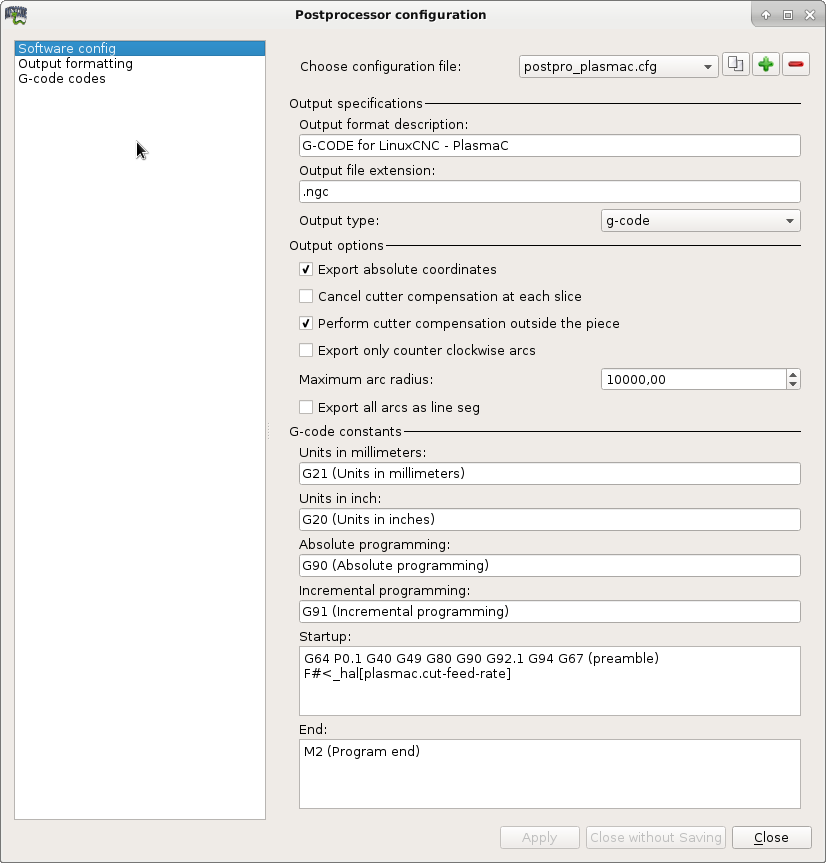
I suspect that this G command was part of the template from the standard postprocessor of dxfgcode. Unfortunately, I don't know exactly anymore.
The entry in the "Startup" field should look like this:
G64 P0.1 G40 G49 G80 G92.1 G94 (preamble)
F#<_hal[plasmac.cut-feed-rate]>
The parameter value of G64 could also be specified smaller - for example G64 P0.05
Please also remove the G90 command from the preamble line. This entry comes from the "Absolute programming" field.
Thank you.
I'm sorry that I caused confusion with the G67 command in my description of the configuration of the post processor from dxf2gcode:
I suspect that this G command was part of the template from the standard postprocessor of dxfgcode. Unfortunately, I don't know exactly anymore.
The entry in the "Startup" field should look like this:
G64 P0.1 G40 G49 G80 G92.1 G94 (preamble)
F#<_hal[plasmac.cut-feed-rate]>
The parameter value of G64 could also be specified smaller - for example G64 P0.05
Please also remove the G90 command from the preamble line. This entry comes from the "Absolute programming" field.
Thank you.
Please Log in to join the conversation.
3 years 9 months ago #262054
by Studi
Replied by Studi on topic How to install dxf2gcode
Hello hermann1976, the installation fails on my computer already at the first line: su -l , su: error at authentication. During the installation of the "ISO Linuxcnc 2.8.4" there was no dialog asking for the root password.
I confess that I am a beginner!
Please give me a hint where to look, or what was my error....
Greetings studi
I confess that I am a beginner!
Please give me a hint where to look, or what was my error....
Greetings studi
Please Log in to join the conversation.
3 years 9 months ago #262188
by andypugh
Replied by andypugh on topic How to install dxf2gcode
The LinuxCNC installer ISO deliberately does not give the option to choose a root password.
Please Log in to join the conversation.
- raggielyle1@gmail.com
- Offline
- New Member
-

Less
More
- Posts: 14
- Thank you received: 0
2 years 7 months ago #295718
by raggielyle1@gmail.com
Replied by raggielyle1@gmail.com on topic How to install dxf2gcode
I had difficulty with dxf2gcode. It loaded up fine but crashed when I tried to export shapes.
The solution is use the installation sh file that can be found here:
github.com/ltspicer/dxf2gcode.linux.inst...n/linux.installer.sh
The script detected that I had python3 installed and that the developer version of dxf2gcode was required.
After I ran the script all worked fine.
I hope this helps others
The solution is use the installation sh file that can be found here:
github.com/ltspicer/dxf2gcode.linux.inst...n/linux.installer.sh
The script detected that I had python3 installed and that the developer version of dxf2gcode was required.
After I ran the script all worked fine.
I hope this helps others
Please Log in to join the conversation.
Time to create page: 0.098 seconds