

- Posts: 58
- Thank you received: 0
linuxcnc post processor for Siemens NX CAM
2 years 7 months ago #296442
by pmchetan
linuxcnc post processor for Siemens NX CAM was created by pmchetan
I couldn't find resources to download linuxcnc post and install it in NX CAM. Are there downloadable post available or if we need to build the post manually, are there resources available from official linuxcnc team somewhere?
Please Log in to join the conversation.

2 years 7 months ago #296450
by Mecanix
Replied by Mecanix on topic linuxcnc post processor for Siemens NX CAM
None of posthub for lcnc, although some of the mach3 posts are still lingering there. Kinda strange.
If you're on post configurator then just create a new fanuc post (ootb). That'll get you 95% up to speed. Slight mods required in the threading/tapping cycles, some more if you use the lathe spindle D (max speed). Other than that it's ready to postprocess as-is.
Let us know if you're stuck, we'll see what we can do for you. gl
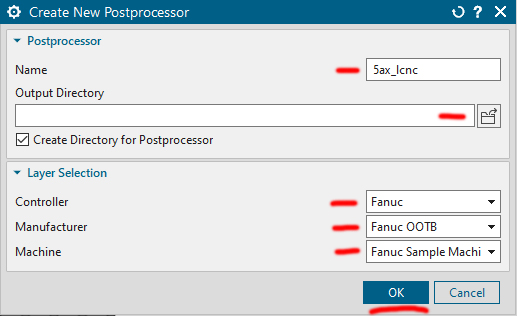
If you're on post configurator then just create a new fanuc post (ootb). That'll get you 95% up to speed. Slight mods required in the threading/tapping cycles, some more if you use the lathe spindle D (max speed). Other than that it's ready to postprocess as-is.
Let us know if you're stuck, we'll see what we can do for you. gl
Please Log in to join the conversation.

2 years 3 months ago #305339
by alwinjohn
Replied by alwinjohn on topic linuxcnc post processor for Siemens NX CAM
Hi sir, I have done it but is showing
" Near line 2 of //
Bad character '\357' used.
for a cavity milling operation.
I am using NX 11.0 and Linux CNC 2.8
" Near line 2 of //
Bad character '\357' used.
for a cavity milling operation.
I am using NX 11.0 and Linux CNC 2.8
Please Log in to join the conversation.
2 years 3 months ago #305353
by Mecanix
Under the tab "NC Program Manager", select UTF-8 without BOM as your output encoding.
Hope this helps.
Replied by Mecanix on topic linuxcnc post processor for Siemens NX CAM
File -> Utilities -> Customer Defaults -> Manufacturing -> Simulation & VisualizationBad character '\357' used.
Under the tab "NC Program Manager", select UTF-8 without BOM as your output encoding.
Hope this helps.
Please Log in to join the conversation.

1 year 1 month ago #335333
by JackRay
Replied by JackRay on topic linuxcnc post processor for Siemens NX CAM
Bonjour,
Je suis trés intressé pour la création d'un post pro full 5 axes sous NX .
Existe il plus de documentation pour cela .
Merci
Je suis trés intressé pour la création d'un post pro full 5 axes sous NX .
Existe il plus de documentation pour cela .
Merci
Please Log in to join the conversation.
Time to create page: 0.083 seconds