
- Posts: 425
- Thank you received: 0
qtvcp issues
- auto-mation-assist
- Offline
- Platinum Member
-

Less
More
7 years 11 months ago #121360
by auto-mation-assist
Replied by auto-mation-assist on topic qtvcp issues
Chris,
I have done more work on conversion of the verser code, including the v2 additions so they are not producing errors and will need to move on to testing them on my machine but that will likely need some additional work in a post gui hal file.
I did some work for the preparation to write probing data to a history file but for now have that just showing up the a display window in a stacked widget in my normal status area as show in the attached picture. I will display the the probing result that would write to a history file for the button that was pushed.
I have seen some coding errors in the verser tool diameter measurements related to attempting to do math inside strings. I have have changed the code just a bit to eliminate those problems.
I will need to update my standalone version on the probing panel which I think could be usable as a popup if there is not a interface problem. After that I should start work on a tool table and tool chooser panel.
I have done more work on conversion of the verser code, including the v2 additions so they are not producing errors and will need to move on to testing them on my machine but that will likely need some additional work in a post gui hal file.
I did some work for the preparation to write probing data to a history file but for now have that just showing up the a display window in a stacked widget in my normal status area as show in the attached picture. I will display the the probing result that would write to a history file for the button that was pushed.
I have seen some coding errors in the verser tool diameter measurements related to attempting to do math inside strings. I have have changed the code just a bit to eliminate those problems.
I will need to update my standalone version on the probing panel which I think could be usable as a popup if there is not a interface problem. After that I should start work on a tool table and tool chooser panel.
Attachment not found
Please Log in to join the conversation.
7 years 11 months ago #121399
by scotta
Replied by scotta on topic qtvcp issues
Hi Chris,
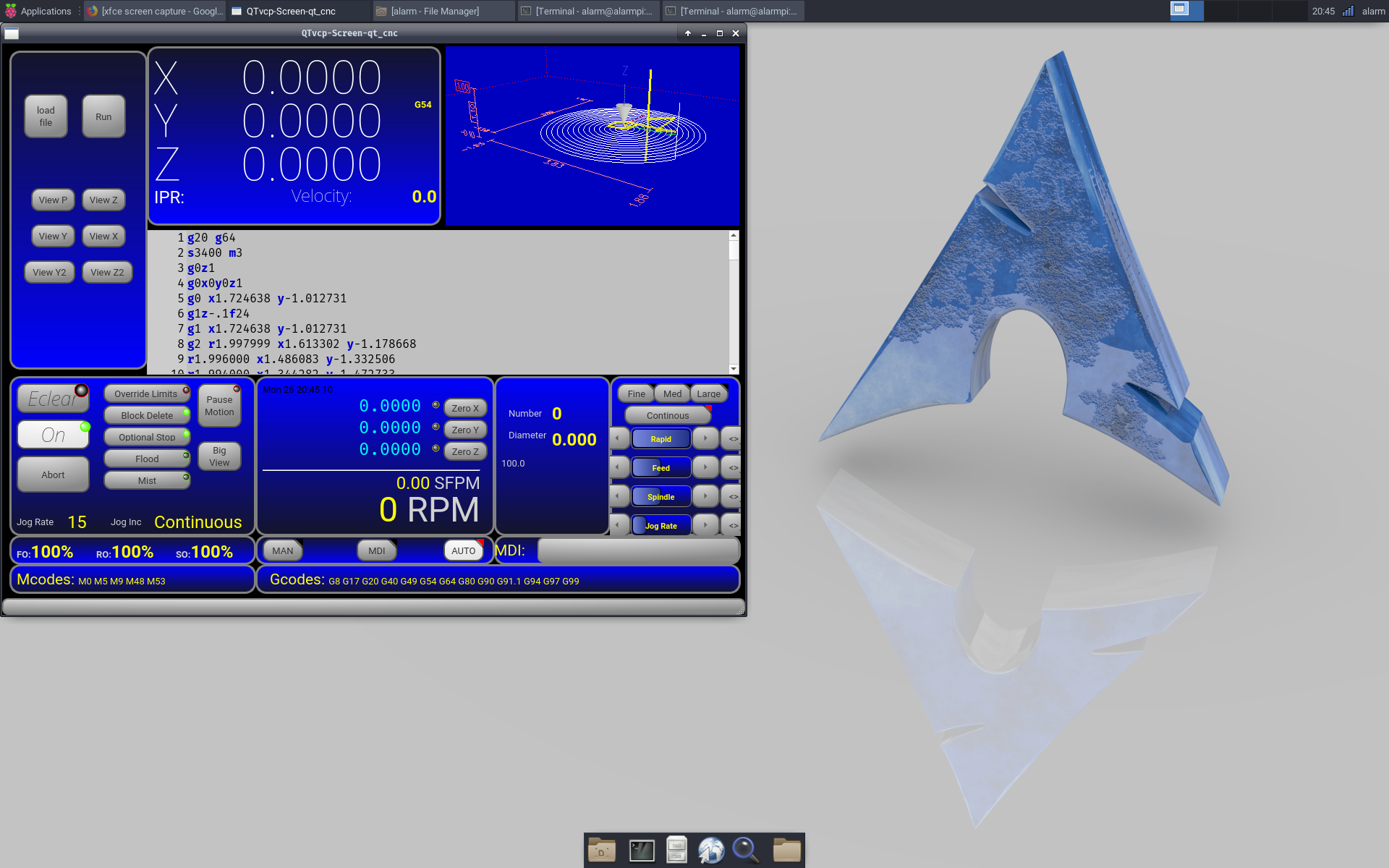
I have had some luck, albeit after some work to build a new system. Just shows how out of date the raspbian distro is. A Arch Linux build for the RPi and the work to build the dependencies for a Linuxcnc build on Arch Linux and qt5vcp is working 100%. Great! BTW Arch Linux seems to be faster than raspbian or mate.
Just need to build pyqt5 from scratch now to get the widgets showing up in designer and then I'll be one step closer to a custom 3D Printer GUI.
Thanks again for all your great hard work. Greatly appreciated!
BR
Scott
I have had some luck, albeit after some work to build a new system. Just shows how out of date the raspbian distro is. A Arch Linux build for the RPi and the work to build the dependencies for a Linuxcnc build on Arch Linux and qt5vcp is working 100%. Great! BTW Arch Linux seems to be faster than raspbian or mate.
Just need to build pyqt5 from scratch now to get the widgets showing up in designer and then I'll be one step closer to a custom 3D Printer GUI.
Thanks again for all your great hard work. Greatly appreciated!
BR
Scott
Please Log in to join the conversation.
7 years 11 months ago #121417
by cmorley
Replied by cmorley on topic qtvcp issues
Thats great Scott - If you post the pyqt library after you compile it, I will add it to the project so others don't have to compile it.
Chris M
Chris M
Please Log in to join the conversation.
- auto-mation-assist
- Offline
- Platinum Member
-
Less
More
- Posts: 425
- Thank you received: 0
7 years 11 months ago #121419
by auto-mation-assist
Replied by auto-mation-assist on topic qtvcp issues
This makes me want to get a 3D printer. It looks great.
Please Log in to join the conversation.
7 years 11 months ago #121435
by scotta
Replied by scotta on topic qtvcp issues
Chris, I have compiled the libpyqt5.so and designer is trying to load the custom widgets, but failing with:
ModuleNotFoundError: No module named 'PyQt5.QtGui'
Qtgui.so is present for Python2.7 but not Python3.7, so I think for some reason designer is trying to use Python3. Any idea how to force to use Python2 when both exist in the system?
Thanks
Scott
ModuleNotFoundError: No module named 'PyQt5.QtGui'
Qtgui.so is present for Python2.7 but not Python3.7, so I think for some reason designer is trying to use Python3. Any idea how to force to use Python2 when both exist in the system?
Thanks
Scott
Please Log in to join the conversation.
- tommylight
-

- Away
- Administrator
-

Less
More
- Posts: 22012
- Thank you received: 4
7 years 11 months ago #121455
by tommylight
Thank you.
Replied by tommylight on topic qtvcp issues
Could you please make an image of it and upload it somewhere, i would like to give it a try but since i am very low on time, i can not afford to do the full install.scotta wrote: I have had some luck, albeit after some work to build a new system. Just shows how out of date the raspbian distro is. A Arch Linux build for the RPi and the work to build the dependencies for a Linuxcnc build on Arch Linux and qt5vcp is working 100%. Great! BTW Arch Linux seems to be faster than raspbian or mate.
Just need to build pyqt5 from scratch now to get the widgets showing up in designer and then I'll be one step closer to a custom 3D Printer GUI.
Scott
Thank you.
Please Log in to join the conversation.
7 years 11 months ago #121619
by scotta
Replied by scotta on topic qtvcp issues
So now I have a complete linuxcnc-qt5vcp and Qt Designer up and running on Raspberry Pi 3 under Arch Linux. I had to start again from scratch and just install python2.
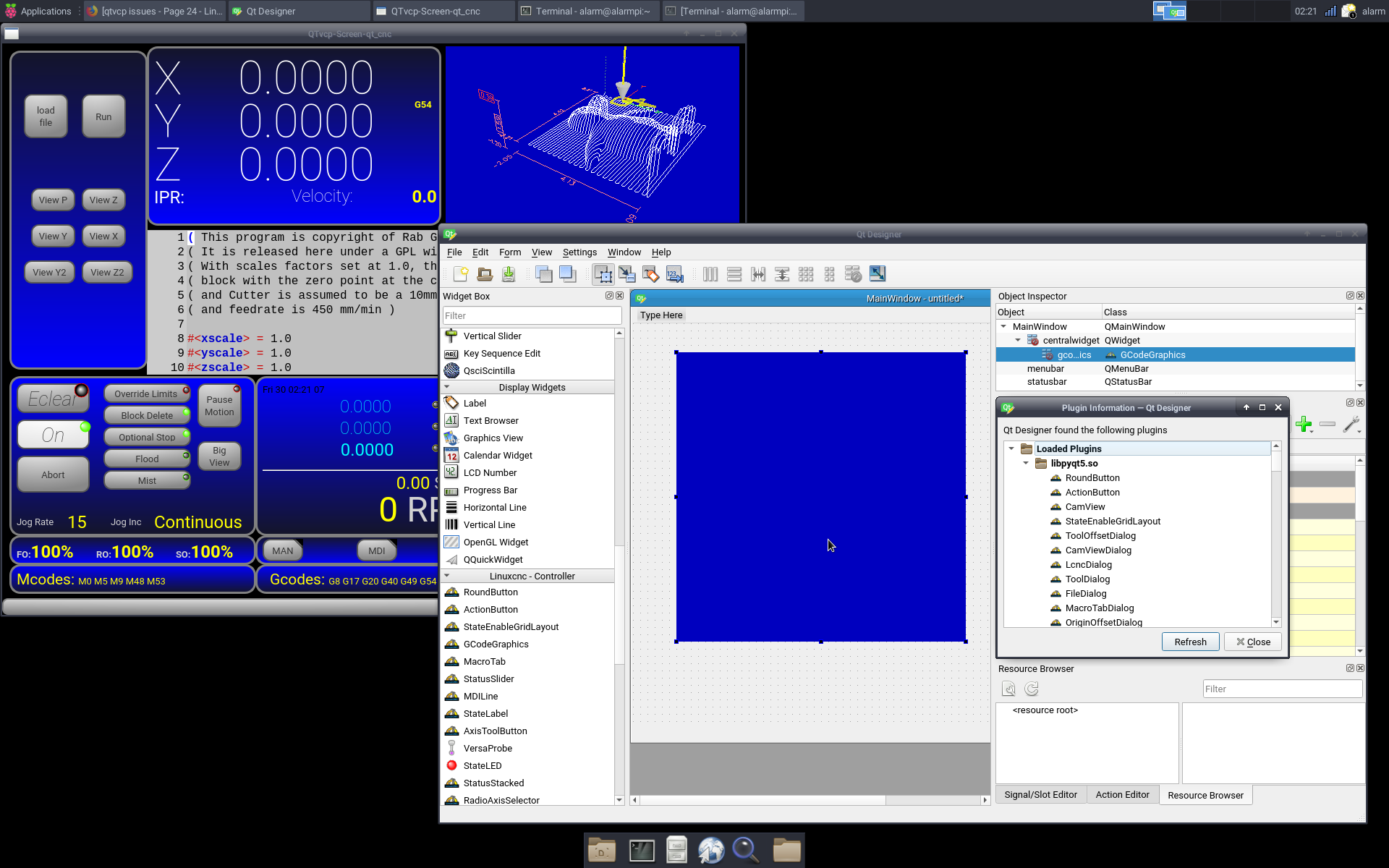
Next step is to add the RT-preempt kernel and I'll be finally back to 3D Printer development.
If there is interest I can start another topic on the steps needed to build the system on the RPi.
Chris, again, thanks for your great work!!
BR
Scott
Next step is to add the RT-preempt kernel and I'll be finally back to 3D Printer development.
If there is interest I can start another topic on the steps needed to build the system on the RPi.
Chris, again, thanks for your great work!!
BR
Scott
Please Log in to join the conversation.
- auto-mation-assist
- Offline
- Platinum Member
-
Less
More
- Posts: 425
- Thank you received: 0
7 years 11 months ago #121628
by auto-mation-assist
Replied by auto-mation-assist on topic qtvcp issues
I have a raspberry pi board 3 that is not being used and will be interested in learning the steps required to get it working. I have to finish my work on the x1Mill gui first.
Please Log in to join the conversation.
- auto-mation-assist
- Offline
- Platinum Member
-
Less
More
- Posts: 425
- Thank you received: 0
7 years 11 months ago #121629
by auto-mation-assist
Replied by auto-mation-assist on topic qtvcp issues
I'm still working on the probing section of the x1Mill gui which is taken a lot longer than anticipated. I did add two more buttons to the probing panel. One for the remap m6 and the other to pull up a probing history display if desired..
I have all the required hal pins built for probing and able load the default probing configuration from the .ini file and also from the preference file. Still need to finish the ability to write updates into the preference file and some pin additions to the post gui hal file before more testing can be done. Some of the changes required for the 'o code' files related to some name changes has also been completed.
There will likely be more things to do that are related to probing as refinements are made.
I have all the required hal pins built for probing and able load the default probing configuration from the .ini file and also from the preference file. Still need to finish the ability to write updates into the preference file and some pin additions to the post gui hal file before more testing can be done. Some of the changes required for the 'o code' files related to some name changes has also been completed.
There will likely be more things to do that are related to probing as refinements are made.
Please Log in to join the conversation.
7 years 11 months ago #121630
by rodw
X2
Replied by rodw on topic qtvcp issues
auto-mation-assist wrote: I have a raspberry pi board 3 that is not being used and will be interested in learning the steps required to get it working.
X2
Please Log in to join the conversation.
Time to create page: 0.137 seconds