
- Posts: 2419
- Thank you received: 0
Rods "Spaceship" Scratch built Plasma Cutter build
7 years 8 months ago #125507
by Grotius
Replied by Grotius on topic Rods "Spaceship" Scratch built Plasma Cutter build
I contact you by mail. Source coding is still on github, but out of sight. It includes eo and reverse feed. You need to connect your mesa yourself.
Are that automotive parts for your company?
Are that automotive parts for your company?
Please Log in to join the conversation.
7 years 8 months ago #125524
by rodw
Mesa should be OK.Yes the parts are for my business. I have an unregistered brand new Toyota Hilux Revo in my work shop that is a Second Stage of Manufacture compliance project to get around the ludicrous compliance rules we have in this country. I keep finding problems that need a plasma cutter to solve. I've even designed some rubber parts which are cut out with a waterjet for it!
I did not have a very good day today. I've been revising my gmoccappy config and have a limit switch problem in that config but not elsewhere. Then I had a brutal lesson about water in the air supply. I do have a dessicant drier and 3 filters on the plasma cutter but it isn't enough.
Replied by rodw on topic Rods "Spaceship" Scratch built Plasma Cutter build
Grotius wrote: I contact you by mail. Source coding is still on github, but out of sight. It includes eo and reverse feed. You need to connect your mesa yourself.
Are that automotive parts for your company?
Mesa should be OK.Yes the parts are for my business. I have an unregistered brand new Toyota Hilux Revo in my work shop that is a Second Stage of Manufacture compliance project to get around the ludicrous compliance rules we have in this country. I keep finding problems that need a plasma cutter to solve. I've even designed some rubber parts which are cut out with a waterjet for it!
I did not have a very good day today. I've been revising my gmoccappy config and have a limit switch problem in that config but not elsewhere. Then I had a brutal lesson about water in the air supply. I do have a dessicant drier and 3 filters on the plasma cutter but it isn't enough.
Please Log in to join the conversation.
7 years 8 months ago #125724
by rodw
Replied by rodw on topic Rods "Spaceship" Scratch built Plasma Cutter build
When , I tried to get my test config rolled back into my touch screen production config on the weekend but had a lot of trouble with air that stopped me in my tracks. There was a pool of water under the regulator at the plasma and the air was quite hot (and very wet). You can imagine what the consumables were like! I was pretty sure I would need a refrigerated dryer at my new workshop and now I know its critical! When I went looking, I read that you should also add a pre-cooler so that the lowest dewpoint could be reached to maximise water extraction. Then I learnt that the pre-cooler should be fitted before the air tank which is easier said then done with a horizontal tank compressor.
Then I saw some examples where people had fitted an oil cooler in front of the pulley so the fan built into the pulley would pull air through the heat exchanger.
This is what I came up with. since the weekend:
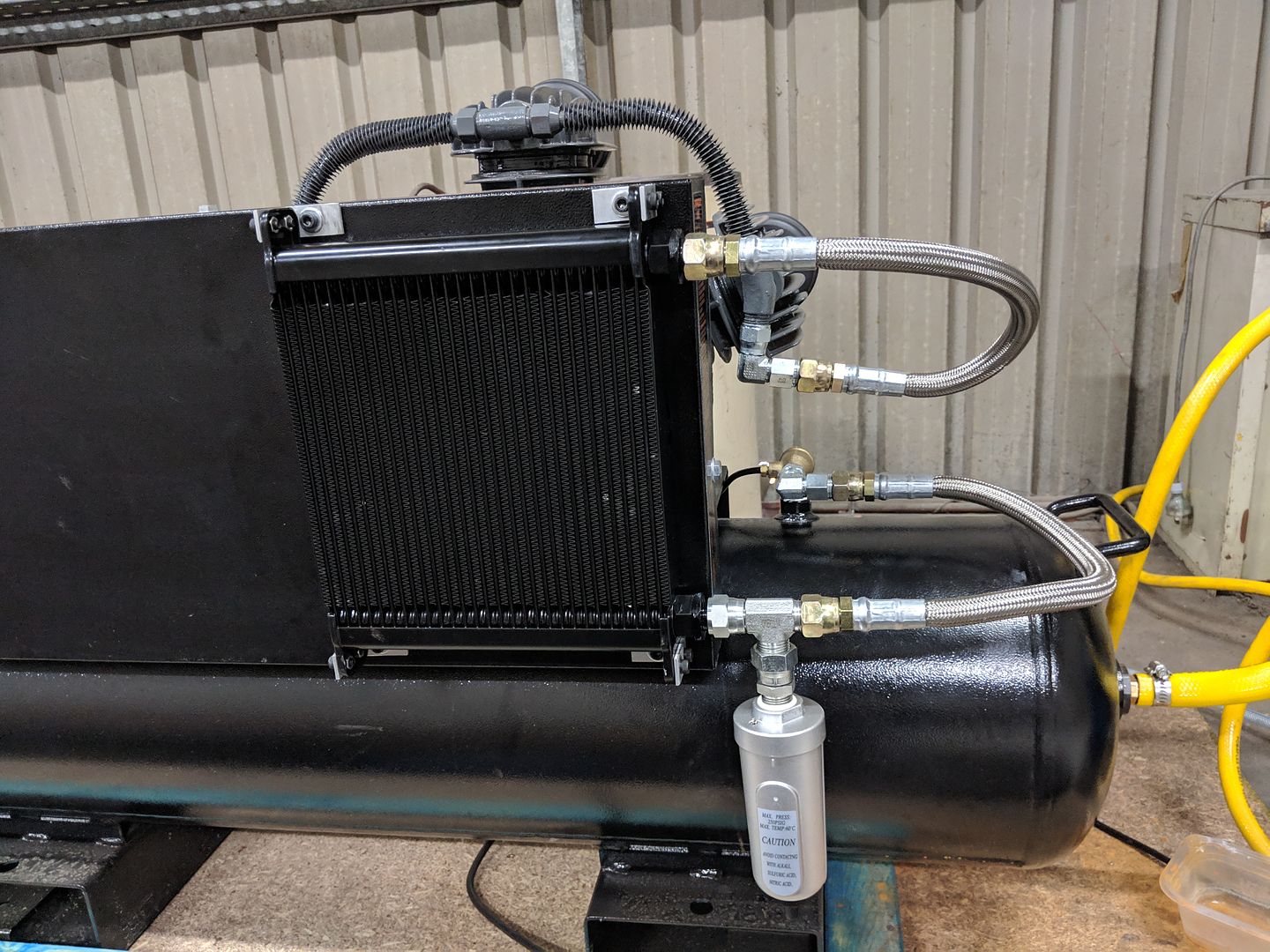
I certainly achieved my objective as the top pipe from the compressor head got too hot to touch and the bottom pipe running to the air tank remained as cool as a cucumber. Way better than I expected!
So then it runs off to the refrigerated dryer.
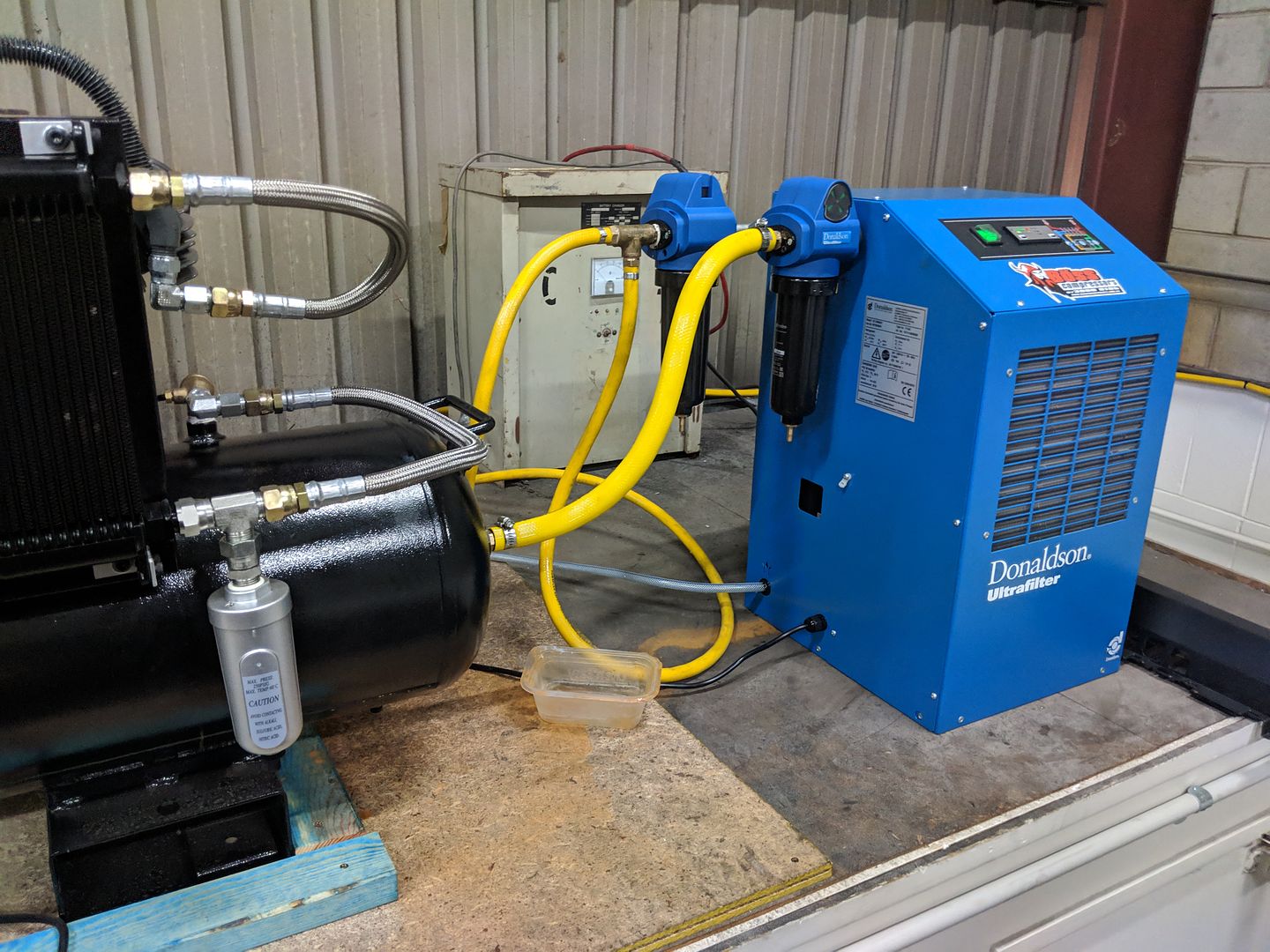
I suspect I should change the pipework so the auto drain sits lower in a u shaped pipe section which I think might increase the water removed before it enters the tank.
Anyway, hopefully I will get everything working again. Its amazing how cool and dry the air feels now in comparison with the weekend when I'm sure you could have showered under my air hose!
Then I saw some examples where people had fitted an oil cooler in front of the pulley so the fan built into the pulley would pull air through the heat exchanger.
This is what I came up with. since the weekend:
I certainly achieved my objective as the top pipe from the compressor head got too hot to touch and the bottom pipe running to the air tank remained as cool as a cucumber. Way better than I expected!
So then it runs off to the refrigerated dryer.
I suspect I should change the pipework so the auto drain sits lower in a u shaped pipe section which I think might increase the water removed before it enters the tank.
Anyway, hopefully I will get everything working again. Its amazing how cool and dry the air feels now in comparison with the weekend when I'm sure you could have showered under my air hose!
Please Log in to join the conversation.
7 years 8 months ago #125916
by rodw
Replied by rodw on topic Rods "Spaceship" Scratch built Plasma Cutter build
Well, I had another learning about air systems yesterday. I got to work and my compressor was running flat out. The O ring on my toilet roll (Motorguard) filter mounted on the plasma table had let go. The auto drain had clearly prevented some water entering the tank but I drained about 3 litres of water out of the tank. The refrigerated dryer handled it perfectly as after hours of running with air going through the dessicant dryer before the failed filter, the crystals were still 100% blue so clearly the dryer is 100% effective. So now I removed everything I had mounted on the table to manage the air and mounted a regulator on the wall to feed the plasma cutter. There is no need for any filtering as its all done with the pre and post filters on the refrigerated dryer.
Please Log in to join the conversation.
7 years 8 months ago #126092
by rodw
Replied by rodw on topic Rods "Spaceship" Scratch built Plasma Cutter build
Well I finally cut a couple of small parts yesterday and it seemed that the Z axis tracking had improved further due to having dryer air. I did not do any plots of it though, that was just an observation from looking at the Z axis while cutting. I tried to take my basic eoffset_pid config and fold it back into my gmocappy config. For some reason, I was getting problems with a shared home/limit switch on the Z axis and I don't think I've changed anything. It just seems to refuse to respect the home offset to move it off the limit switch. If you are thinking of building a gantry plasma machine, I can highly recommend using seperate home and limit switches on every joint. This is the only one I have and it has caused me no end of grief!
So for now I am going to keep working on the experimental Axis GUI of Dewey's so there are no settings required. Just load and cut!
So I have two pressing things to do to get cutting
1. modify my Sheetcam post processor as we are using a different torch enable method (simple fix, its just one line of code)
2. Get remap working on the F command so I can get the desired cut speed into the system for cornerlock sensing.
Getting that far will be a big milestone as I'll be able to cut what I want and other software features can be added over time.
I also need to test the PID settings on different material thicknesses. From some of my earlier work, I don't think the PID will need retuning as the arc behaviour seemed to be consistent regardless of thickness.
So for now I am going to keep working on the experimental Axis GUI of Dewey's so there are no settings required. Just load and cut!
So I have two pressing things to do to get cutting
1. modify my Sheetcam post processor as we are using a different torch enable method (simple fix, its just one line of code)
2. Get remap working on the F command so I can get the desired cut speed into the system for cornerlock sensing.
Getting that far will be a big milestone as I'll be able to cut what I want and other software features can be added over time.
I also need to test the PID settings on different material thicknesses. From some of my earlier work, I don't think the PID will need retuning as the arc behaviour seemed to be consistent regardless of thickness.
Please Log in to join the conversation.
- islander261
- Offline
- Platinum Member
-

Less
More
- Posts: 757
- Thank you received: 0
7 years 8 months ago #126098
by islander261
Replied by islander261 on topic Rods "Spaceship" Scratch built Plasma Cutter build
Rod
Glad you are making some progress. I use a single switch for my Z+ limit and homing and am using Gmoccapy UI. Homing offset works just fine and is about 11mm down from Z+ limit. What examples do you want to see?
I haven't needed to change my Z PID settings for different material thicknesses or types.
I remember when we found out about the TP not providing the Gcode F value all the time. I took a different approach because I think what actually matters is the commanded velocity at the start of the corner hold condition. What I do is save the commanded velocity at the start of the corner hold and use that value to determine when to release the corner hold. That way if the TP commanded velocity value changes during the hold, usually reduced, the corner hold isn't released while the torch is still moving slowly. That is how I found the problem in the first place.
It is usually much cooler here with lower humidity and I still use all of the tricks to keep my cutting air dry. Cooler between last compressor stage and volume tank, automated tank drain on low point of volume tank that runs every cycle, Copper pipe cooling run with water trap leg before air enters building, then a refrigerated air drier and desiccant bead filter on the plumbing leg to the plasma cutter.
It is a balmy -4C here today with steady 50km winds gusting to near 100km. Blew an 20m tall pine tree down in our front yard last night. Salt spray freezing as it blows across the road.
John
Glad you are making some progress. I use a single switch for my Z+ limit and homing and am using Gmoccapy UI. Homing offset works just fine and is about 11mm down from Z+ limit. What examples do you want to see?
I haven't needed to change my Z PID settings for different material thicknesses or types.
I remember when we found out about the TP not providing the Gcode F value all the time. I took a different approach because I think what actually matters is the commanded velocity at the start of the corner hold condition. What I do is save the commanded velocity at the start of the corner hold and use that value to determine when to release the corner hold. That way if the TP commanded velocity value changes during the hold, usually reduced, the corner hold isn't released while the torch is still moving slowly. That is how I found the problem in the first place.
It is usually much cooler here with lower humidity and I still use all of the tricks to keep my cutting air dry. Cooler between last compressor stage and volume tank, automated tank drain on low point of volume tank that runs every cycle, Copper pipe cooling run with water trap leg before air enters building, then a refrigerated air drier and desiccant bead filter on the plumbing leg to the plasma cutter.
It is a balmy -4C here today with steady 50km winds gusting to near 100km. Blew an 20m tall pine tree down in our front yard last night. Salt spray freezing as it blows across the road.
John
Please Log in to join the conversation.
- tommylight
-

- Away
- Administrator
-

Less
More
- Posts: 22012
- Thank you received: 4
7 years 8 months ago #126109
by tommylight
Wait.....what ???
Another Axis GUI that i do not know about ???
I'll go in the corner and feel left out for a bit.
On the bright side of things, i think i made the toma_thc config work with Mesa boards, tested it on a 6i25 that is set as 7i77 on one port and 4 stepgens on the other port.
Everything seems to be working on the table ( that is work table, not plasma table ) .
I do not have any plasma machine with Mesa stepgens so i can not test it further until mock up something on that said table.
Moving on to make that work with servos as the 7i77 is already wired and powered.
I will upload the config after i clean it a bit and add instructions on what to change, then you can give it a try.....or not, you have a THCAD ! I also have a THCAD already wired, so more eye strain for me !
Replied by tommylight on topic Rods "Spaceship" Scratch built Plasma Cutter build
rodw wrote: So for now I am going to keep working on the experimental Axis GUI of Dewey's so there are no settings required.
Wait.....what ???
Another Axis GUI that i do not know about ???
I'll go in the corner and feel left out for a bit.
On the bright side of things, i think i made the toma_thc config work with Mesa boards, tested it on a 6i25 that is set as 7i77 on one port and 4 stepgens on the other port.
Everything seems to be working on the table ( that is work table, not plasma table ) .
I do not have any plasma machine with Mesa stepgens so i can not test it further until mock up something on that said table.
Moving on to make that work with servos as the 7i77 is already wired and powered.
I will upload the config after i clean it a bit and add instructions on what to change, then you can give it a try.....or not, you have a THCAD ! I also have a THCAD already wired, so more eye strain for me !
Please Log in to join the conversation.
7 years 8 months ago #126120
by rodw
John, thanks I don't really need examples of shared homing. I've had it working for ages until this week! I don't expect metal thickness will change the pid settings from earlier experience.
Well, I think I have a remap working on a sim. I tried to get it going once before and failed due to my inability to do a simple cut and paste from one config to another but I had more luck today. If I am going to persevere with the eoffset code, it expects a minimum velocity to be set to act on the corner lock.
I now suspect poor air quality as being a major factor in tuning issues I experienced in the past. I'm just waiting for an electric tank drain to arrive to complete my air setup.
Its only +34 degrees C as I write this, not looking forward to going up to my workshop to implement this....
Tommy, this is not really a useful gui at all. It resembles a Frankenstein lab as it opens up countless tuning windows on startup to change configs on the fly. It also opens up the Halscope Oscilloscope with all key signals traced. I think the only useful part on the GUI is a LED that shows if the torch is on (in case you can't see a shower of sparks!)
I'm sticking with it for now to keep all of the config as close as I can to Dewey's original eoffset-pid config from the external offsets branch as he removed this component from the branch when it was merged with master branch. Hopefully, a working config will encourage him to republish it in master branch where it deserves a second chance!
I've seen your updates and will have a closer look when I get the chance. I don't want to change anything now as it will be a distraction from getting a working machine that I really need right now!
Replied by rodw on topic Rods "Spaceship" Scratch built Plasma Cutter build
islander261 wrote: Rod
Glad you are making some progress. I use a single switch for my Z+ limit and homing and am using Gmoccapy UI. Homing offset works just fine and is about 11mm down from Z+ limit. What examples do you want to see?
I haven't needed to change my Z PID settings for different material thicknesses or types.
I remember when we found out about the TP not providing the Gcode F value all the time. I took a different approach because I think what actually matters is the commanded velocity at the start of the corner hold condition. What I do is save the commanded velocity at the start of the corner hold and use that value to determine when to release the corner hold. That way if the TP commanded velocity value changes during the hold, usually reduced, the corner hold isn't released while the torch is still moving slowly. That is how I found the problem in the first place.
It is usually much cooler here with lower humidity and I still use all of the tricks to keep my cutting air dry. Cooler between last compressor stage and volume tank, automated tank drain on low point of volume tank that runs every cycle, Copper pipe cooling run with water trap leg before air enters building, then a refrigerated air drier and desiccant bead filter on the plumbing leg to the plasma cutter.
It is a balmy -4C here today with steady 50km winds gusting to near 100km. Blew an 20m tall pine tree down in our front yard last night. Salt spray freezing as it blows across the road.
John
John, thanks I don't really need examples of shared homing. I've had it working for ages until this week! I don't expect metal thickness will change the pid settings from earlier experience.
Well, I think I have a remap working on a sim. I tried to get it going once before and failed due to my inability to do a simple cut and paste from one config to another but I had more luck today. If I am going to persevere with the eoffset code, it expects a minimum velocity to be set to act on the corner lock.
I now suspect poor air quality as being a major factor in tuning issues I experienced in the past. I'm just waiting for an electric tank drain to arrive to complete my air setup.
Its only +34 degrees C as I write this, not looking forward to going up to my workshop to implement this....
Another Axis GUI that i do not know about ???
Tommy, this is not really a useful gui at all. It resembles a Frankenstein lab as it opens up countless tuning windows on startup to change configs on the fly. It also opens up the Halscope Oscilloscope with all key signals traced. I think the only useful part on the GUI is a LED that shows if the torch is on (in case you can't see a shower of sparks!)
I'm sticking with it for now to keep all of the config as close as I can to Dewey's original eoffset-pid config from the external offsets branch as he removed this component from the branch when it was merged with master branch. Hopefully, a working config will encourage him to republish it in master branch where it deserves a second chance!
I've seen your updates and will have a closer look when I get the chance. I don't want to change anything now as it will be a distraction from getting a working machine that I really need right now!
Please Log in to join the conversation.
7 years 8 months ago #126123
by rodw
Replied by rodw on topic Rods "Spaceship" Scratch built Plasma Cutter build
For Tomy's bennefit, here is the GUI I've been using to tune my THC
Hardly a work of art, but it does make me wonder why we need all of the controls we plasma nerds insist on adding to our GUI's
Attachment not found
Hardly a work of art, but it does make me wonder why we need all of the controls we plasma nerds insist on adding to our GUI's
Please Log in to join the conversation.
- islander261
- Offline
- Platinum Member
-
Less
More
- Posts: 757
- Thank you received: 0
7 years 8 months ago #126124
by islander261
Replied by islander261 on topic Rods "Spaceship" Scratch built Plasma Cutter build
Rod
I think you've hit the nail on the head. My GUI and PP have every possible adjustment available to the operator. In routine production cutting I make no adjustments. I only make sure that the torch is enabled (I intentionally made this a required user setting) and that I choose to use cutting parameters from the cut file or the GUI. I know that if I was running a job shop that cut many different thicknesses and materials every day that this wouldn't be the case. I think this is because we all have such unique systems that we don't know the cutting parameters until we actually start using them. If you look at some of the attempts by commercial offerings to simplify things by using many tools in the PP to cover all possible combinations of materials and thicknesses you will see how plasma cutting needs a wide range of settings that need to be set some place.
John
I think you've hit the nail on the head. My GUI and PP have every possible adjustment available to the operator. In routine production cutting I make no adjustments. I only make sure that the torch is enabled (I intentionally made this a required user setting) and that I choose to use cutting parameters from the cut file or the GUI. I know that if I was running a job shop that cut many different thicknesses and materials every day that this wouldn't be the case. I think this is because we all have such unique systems that we don't know the cutting parameters until we actually start using them. If you look at some of the attempts by commercial offerings to simplify things by using many tools in the PP to cover all possible combinations of materials and thicknesses you will see how plasma cutting needs a wide range of settings that need to be set some place.
John
Please Log in to join the conversation.
Time to create page: 0.263 seconds