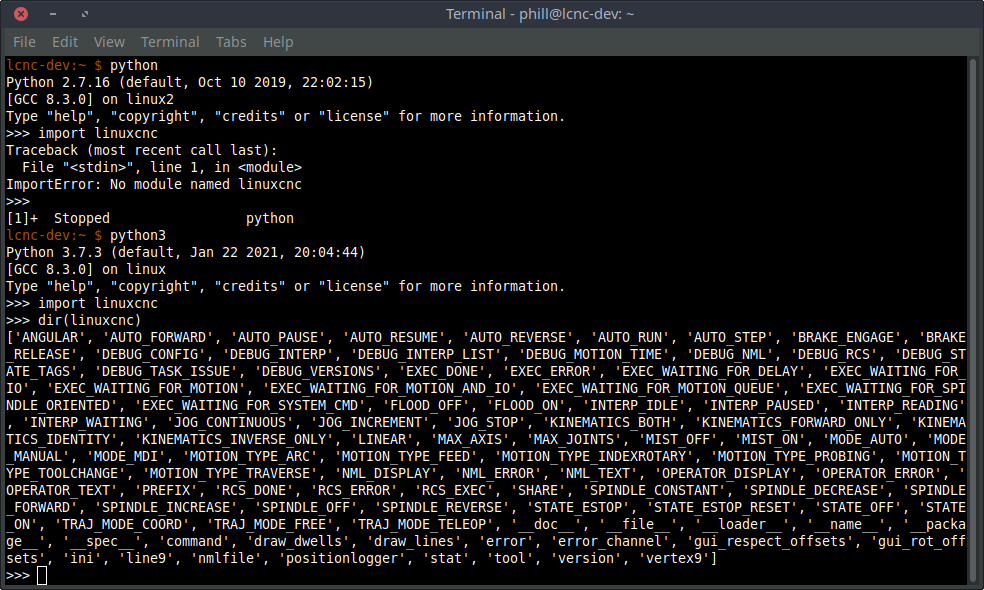
After more trial and error this DOES NOT appear to be a NativeCam issue.
I found something interesting that may help troubleshoot this issue by those more knowledgeable of Linuxcnc than me.
Using fresh installs of Buster 2.9 and NativeCam......
Trial 1: Using Linuxcnc 2.8.2.
Open a terminal anywhere and type python. Then type import linuxcnc.
Python imports linuxcnc with no issues.
Trial 2: Using Buster Buildbot 2.9.0-pre0-3801-gd4ed11e17 (Note this is an older Buster buildbot version)
LinuxCNC launches perfectly.
Open a terminal anywhere and type python. Then type import linuxcnc.
Python imports linuxcnc with no issues.
Trial 3: Using linuxcnc Buildbot 2.9.0-pre0-5132-gaf2e71ae9 (This is the latest build)
Follow the directions on
buildbot.linuxcnc.org/
to install
deb
buildbot.linuxcnc.org/
buster master-rtpreempt
deb-src
buildbot.linuxcnc.org/
buster master-rtpreempt
Note: After installation, LinuxCNC launches perfectly.
Open a terminal anywhere and type python. Then type import linuxcnc.
Python reports an error message: no module named linuxcnc
Note: NativeCam won't run because it can't import the module named linuxcnc under Linuxcnc Buildbot 2.9.0-pre0-5132-gaf2e71ae9!
Please let me know if you know a solution to this issue because I'm stuck.
Thank you,
Barry