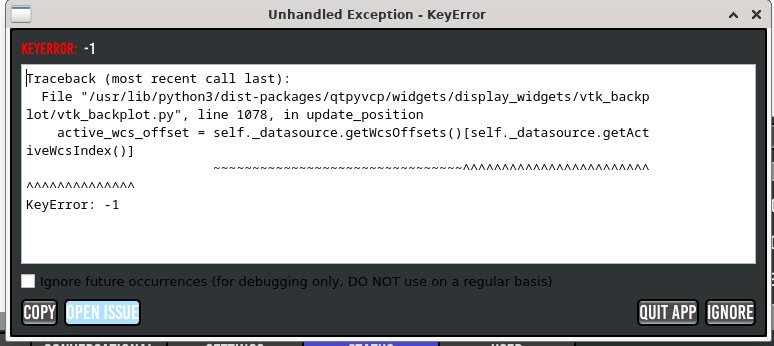
"KeyError" suddenly appears after moving a limitswitch

More
1 year 3 months ago - 1 year 2 months ago #332206 by SebastianM
Hey guys!
My linuxcnc / probebasic started to show a weird behaviour today.
After I start the system and home the machine, I get a popup saying "KeyError" _everytime_ when I jog any of the axes.
I can ignore that message, but it comes back everyime I jog again (no matter if via keyboard, softkey or pendant).

BUT - what I found out... as soon as I zero one of the axes (or all three), the error is gone.
I have not changed anything in my (software) config the last week, BUT I have modified my x axis yesterday and therefore moved the limitswitch a bit. 
Can this somehow be related? The popup says somewthing with "...active.WCSoffset..."... maybe some cached value doesnt fit anymore after I moved that switch?


Thx in advance!
Last edit: 1 year 2 months ago by SebastianM.

Please Log in or Create an account to join the conversation.

More
1 year 3 months ago #332280 by SebastianM

Please Log in or Create an account to join the conversation.

More
1 year 3 months ago #332325 by andypugh
"Key Error" means that the system is looking in the object returned by getWcsOffsets() call for an item that doesn't exist.

It looks like, for whatever reason, the getActiveWcsIndex() call is returning -1. There isn't a -1-th WCS, so it returns an error message.

This looks like qtPyVcp isn't handling the case when the apparent WCs is zero properly.

github.com/kcjengr/qtpyvcp/blob/main/src...c_datasource.py#L194

I think you should raise this as a bug:
. github.com/kcjengr/qtpyvcp/issues

Please Log in or Create an account to join the conversation.

More
1 year 3 months ago #332344 by Lcvette
Weird.. Never seen that before. Have you setup the latest in settings for the last update? We changed a lot with offset table display, drop display and jog key display. If those in settings and yaml settings require some updates. If you would double check the docs and your config if you are running the development version and just make sure you caught all the updates.

Please Log in or Create an account to join the conversation.

More
1 year 2 months ago #332776 by SebastianM
Hi, sorry for the late reply but I was travelling.
I havent run any updates since I installed PB (never change a running system). 

What exactly do you want me do double check?

This is my config..
github.com/SebastianMusser/LinuxCNC/

regards!

Please Log in or Create an account to join the conversation.

More
1 year 2 months ago #332784 by Lcvette
I've got nothing, I've not seen that write and cannot produce it here to troubleshoot. I would update to the develop branch and update your config files. Start there so at least we know you're on a known working version.

Please Log in or Create an account to join the conversation.

Moderators: KCJ, Lcvette
Time to create page: 0.280 seconds
Powered by Kunena Forum