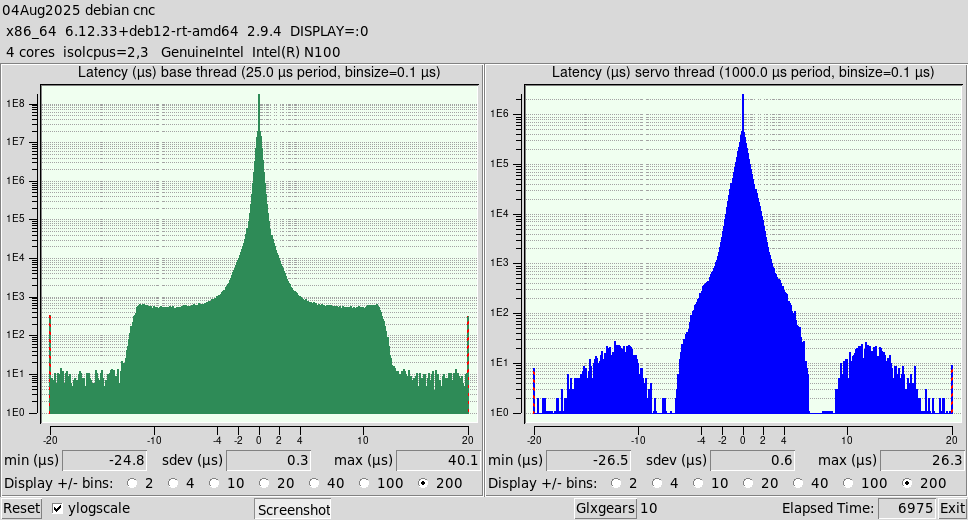
It's been a while, but please allow me to post a little update on my experience with N100 based systems. I noticed that sometimes my mini-pc completely freezes, while running my mini-PC with Windows 11 never caused any problems. So the fix that I implemented was simply to ditch Debian and run LinuxCNC on Windows 11. image missing /media/kunena/emoticons/w00t.png
Okay, all jokes aside..... After struggling for quite a while and running all possible checks, I finally discovered that the mainstream Debian 12 and 13 (Trixie) kernels, drivers and firmware have some problems with Alder Lake processors, especially the iGPU part. This can easily be resolved by upgrading Debian with the latest RT kernel (6.12.33+ at this moment), drivers and firmware. Ever since, my system is rock solid. I am using isolcpus=2,3 and irqaffinity=0,1, which gives me a responsive system with with a servo thread latency of 26.3us and a base thread latency of 40.1us, which are both excellent. This was measured during several hours, while simultaneously running 10 instances of glxgears, playing Youtube videos and stress testing the system with:
$ sudo stress-ng --cpu 4 --vm 2 --hdd 2 --fork 4 --timeout 7200s
Here is a brief summary of the upgrade process, for those who may be interested:
1. Enable backports:
Edit /etc/apt/sources.list and add:
deb
deb.debian.org/debian
bookworm-backports main contrib non-free-firmware
Then:
2. Install RT kernel:
Code:
$ sudo apt install -t bookworm-backports linux-image-rt-amd64 linux-headers-rt-amd6
3. Reboot and check Debian is running the latest RT kernel:
4. Update firmware:
Code:
$ sudo apt install firmware-linux firmware-linux-nonfree firmware-misc-nonfree
5. Update Mesa drivers (iGPU):
Code:
$ sudo apt install -t bookworm-backports mesa-vulkan-drivers mesa-opencl-icd libgl1-mesa-dri
6. Check setup:
– RT kernel:
(already done at step 3)
– Mesa version:
Code:
$ glxinfo | grep "OpenGL version"
– Firmware:
Code:
$ dmesg | grep firmware