
Question about an Intel NUC core-i3
- dlv
- Offline
- Senior Member
-

Less
More
- Posts: 43
- Thank you received: 18
05 Jun 2026 16:45 - 05 Jun 2026 16:56 #346919
by dlv
Question about an Intel NUC core-i3 was created by dlv
I'm very new to this so please pardon the questions. I recently acquired an INTEL NUC core-i3 with 8GB of ram. This is intended to drive a MESA 7i76e board on a plasma table.
tldr; I'm primarily curious to know if the latency results I'm getting are going to work (if that's possible to advise).
I've downloaded the latest iso and went through performance tuning. I *think* I've done all the things. It's sometimes hard to follow all the different threads on tuning.
1) Turned off things in BIOS (hyper threading, power management etc.). This left me with two CPUs
2) Grub configured (including isolcpus)
3) CPU governor set to performance
4) IRQ coalescing disabled (intel NIC)
5) CPU core isolated for LinuxCNC (cpu 1) (I am not sure how to confirm this is actually working as intended)
6) Ethernet IRQ pinned to isolated CPU (cpu 1)
The latency histogram as a result looks like this (6 glxgears & running YT videos):
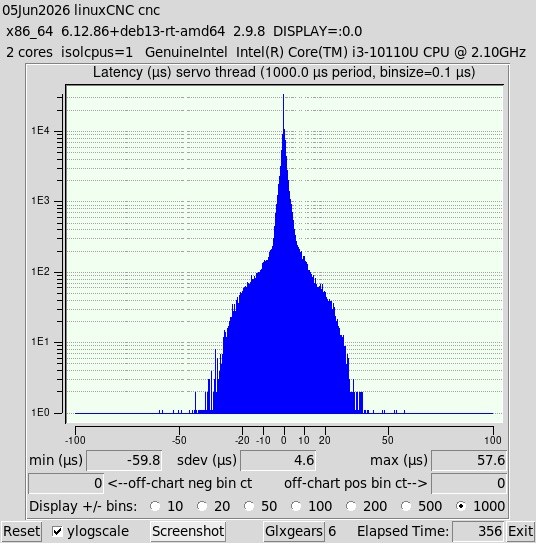
~60 us of max latency. Is this worth continuing to try to use or should I be looking at a better computer? Any advice appreciated.
I have not hooked it up to the machine yet to try it. Hope to be attempting that in coming weeks. Thought I'd post this to see if I need a different computer first.
- Dave
tldr; I'm primarily curious to know if the latency results I'm getting are going to work (if that's possible to advise).
I've downloaded the latest iso and went through performance tuning. I *think* I've done all the things. It's sometimes hard to follow all the different threads on tuning.
1) Turned off things in BIOS (hyper threading, power management etc.). This left me with two CPUs
2) Grub configured (including isolcpus)
3) CPU governor set to performance
4) IRQ coalescing disabled (intel NIC)
5) CPU core isolated for LinuxCNC (cpu 1) (I am not sure how to confirm this is actually working as intended)
6) Ethernet IRQ pinned to isolated CPU (cpu 1)
The latency histogram as a result looks like this (6 glxgears & running YT videos):
~60 us of max latency. Is this worth continuing to try to use or should I be looking at a better computer? Any advice appreciated.
I have not hooked it up to the machine yet to try it. Hope to be attempting that in coming weeks. Thought I'd post this to see if I need a different computer first.
- Dave
Attachments:
Last edit: 05 Jun 2026 16:56 by dlv.
Please Log in or Create an account to join the conversation.
- dlv
- Offline
- Senior Member
-
Less
More
- Posts: 43
- Thank you received: 18
05 Jun 2026 16:54 #346920
by dlv
Replied by dlv on topic Question about an Intel NUC core-i3
Also not sure about the frequency on cpu 1. The governor looks right but current freq = 400Mhz. This doesn't seem good if I understand it right. (again very new to this)
$ sudo cpupower -c all frequency-info
[sudo] password for cnc:
analyzing CPU 0:
driver: intel_pstate
CPUs which run at the same hardware frequency: 0
CPUs which need to have their frequency coordinated by software: 0
maximum transition latency: Cannot determine or is not supported.
hardware limits: 400 MHz - 2.10 GHz
available cpufreq governors: performance powersave
current policy: frequency should be within 400 MHz and 2.10 GHz.
The governor "performance" may decide which speed to use
within this range.
current CPU frequency: Unable to call hardware
current CPU frequency: 2.10 GHz (asserted by call to kernel)
boost state support:
Supported: no
Active: no
analyzing CPU 1:
driver: intel_pstate
CPUs which run at the same hardware frequency: 1
CPUs which need to have their frequency coordinated by software: 1
maximum transition latency: Cannot determine or is not supported.
hardware limits: 400 MHz - 2.10 GHz
available cpufreq governors: performance powersave
current policy: frequency should be within 400 MHz and 2.10 GHz.
The governor "performance" may decide which speed to use
within this range.
current CPU frequency: Unable to call hardware
current CPU frequency: 400 MHz (asserted by call to kernel)
boost state support:
Supported: no
Active: no
$ sudo cpupower -c all frequency-info
[sudo] password for cnc:
analyzing CPU 0:
driver: intel_pstate
CPUs which run at the same hardware frequency: 0
CPUs which need to have their frequency coordinated by software: 0
maximum transition latency: Cannot determine or is not supported.
hardware limits: 400 MHz - 2.10 GHz
available cpufreq governors: performance powersave
current policy: frequency should be within 400 MHz and 2.10 GHz.
The governor "performance" may decide which speed to use
within this range.
current CPU frequency: Unable to call hardware
current CPU frequency: 2.10 GHz (asserted by call to kernel)
boost state support:
Supported: no
Active: no
analyzing CPU 1:
driver: intel_pstate
CPUs which run at the same hardware frequency: 1
CPUs which need to have their frequency coordinated by software: 1
maximum transition latency: Cannot determine or is not supported.
hardware limits: 400 MHz - 2.10 GHz
available cpufreq governors: performance powersave
current policy: frequency should be within 400 MHz and 2.10 GHz.
The governor "performance" may decide which speed to use
within this range.
current CPU frequency: Unable to call hardware
current CPU frequency: 400 MHz (asserted by call to kernel)
boost state support:
Supported: no
Active: no
Please Log in or Create an account to join the conversation.
- tommylight
-

- Offline
- Moderator
-

Less
More
- Posts: 21959
- Thank you received: 7478
06 Jun 2026 00:19 #346931
by tommylight
Replied by tommylight on topic Question about an Intel NUC core-i3
All is good, move on to testing on a machine.current CPU frequency: 2.10 GHz (asserted by call to kernel)
The following user(s) said Thank You: dlv
Please Log in or Create an account to join the conversation.
- dlv
- Offline
- Senior Member
-
Less
More
- Posts: 43
- Thank you received: 18
06 Jun 2026 14:28 - 06 Jun 2026 14:29 #346938
by dlv
Replied by dlv on topic Question about an Intel NUC core-i3
Thanks Tommy.
FWIW I've been digging into isolcpus and becoming convinced it's not a good idea on this 2 core CPU at least. Maybe it helps on CPUs with more cores but I am finding very bad results with it here.
I discovered even tho I have isolcpus=1 and I locked the NIC IRQ to CPU 1 rtapi_app was running on CPU 0 during the latency measurements above. When I ran latency-histogram using taskset to lock it on CPU 1 I got horrible latency spikes.
I also found that *all* the IRQs are on CPU 1 which defeats the whole purpose of isolating it.
So I'm going to remove all the CPU isolation optimizations and just run this 2 core setup with the CPU scheduler left to do whatever it decides to do and see what happens. Of course I'll keep all the other optimizations. i.e. power management disabled, governor on performance, etc.
FWIW I've been digging into isolcpus and becoming convinced it's not a good idea on this 2 core CPU at least. Maybe it helps on CPUs with more cores but I am finding very bad results with it here.
I discovered even tho I have isolcpus=1 and I locked the NIC IRQ to CPU 1 rtapi_app was running on CPU 0 during the latency measurements above. When I ran latency-histogram using taskset to lock it on CPU 1 I got horrible latency spikes.
I also found that *all* the IRQs are on CPU 1 which defeats the whole purpose of isolating it.
So I'm going to remove all the CPU isolation optimizations and just run this 2 core setup with the CPU scheduler left to do whatever it decides to do and see what happens. Of course I'll keep all the other optimizations. i.e. power management disabled, governor on performance, etc.
Last edit: 06 Jun 2026 14:29 by dlv.
The following user(s) said Thank You: tommylight
Please Log in or Create an account to join the conversation.
- rodw
-

- Offline
- Platinum Member
-

Less
More
- Posts: 12156
- Thank you received: 4149
07 Jun 2026 10:11 #346949
by rodw
Replied by rodw on topic Question about an Intel NUC core-i3
The latency with isolcpus=1 you show is fine. I ran with latency of 120 to 150 us for years and yours is half that!
Just move on for now. Come back if you get an error finishing read.
Just move on for now. Come back if you get an error finishing read.
The following user(s) said Thank You: dlv
Please Log in or Create an account to join the conversation.
Time to create page: 0.379 seconds