
- Posts: 158
- Thank you received: 10
G-code error
- grump
- Offline
- Premium Member
-

Less
More
9 years 5 months ago #93148
by grump
G-code error was created by grump
Just recently started to pick up this error message.
I load the initial code and it works fine, after completed job load next job or ngc file and this error appears.
Coordinates disappear from screen and I have to reload axis to load another file then cycle repeats.
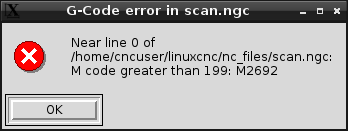
I load the initial code and it works fine, after completed job load next job or ngc file and this error appears.
Coordinates disappear from screen and I have to reload axis to load another file then cycle repeats.
Please Log in or Create an account to join the conversation.
- grump
- Offline
- Premium Member
-
Less
More
- Posts: 158
- Thank you received: 10
9 years 5 months ago #93252
by grump
Replied by grump on topic G-code error
Does nobody know what the cause of this error is?
It's peeing me off now and only started since I played with NativeCam .
It don't matter what I do I can't clear it, I even went back to the old Wheezy 7 I had on dvd and installed from that.
It's peeing me off now and only started since I played with NativeCam .
It don't matter what I do I can't clear it, I even went back to the old Wheezy 7 I had on dvd and installed from that.
Please Log in or Create an account to join the conversation.
- tommylight
- Away
- Moderator
-

Less
More
- Posts: 22011
- Thank you received: 7491
9 years 5 months ago #93258
by tommylight
Replied by tommylight on topic G-code error
What does scan.ngc do? There must be a variable attached to an M code there that changes its value somewhere in the process. Are you using remap? Chect if a O sub is calling scan.ngc and why and how it is related to M codes.
Normaly M codes can not change by just running an ngc file.
Provide us with more info and attach the hal ini and ngc files you are using when that happens.
Regards,
Tom
Normaly M codes can not change by just running an ngc file.
Provide us with more info and attach the hal ini and ngc files you are using when that happens.
Regards,
Tom
Please Log in or Create an account to join the conversation.
- grump
- Offline
- Premium Member
-
Less
More
- Posts: 158
- Thank you received: 10
9 years 5 months ago - 9 years 5 months ago #93259
by grump
Replied by grump on topic G-code error
Hi Tom, scan is just an engraving pattern, it doesn't matter which ngc file i try to use its just not having it.
I have to load the file before homing, once a home button is pushed it won't let me load a different file.
I then need to restart axis and load a file before homing. There is nothing in the G-code to create this.
Research seems to point at the [RS274NGC] but there is little to research on Google.
I have installed Jessie 8 this morning and downloaded from the Buildbot a new lcnc uspace setup my mill with stepcof wizard and generated a fresh engrave ngc with F-engrave and still get the same error.
I am not doing anything different to what I have always done and it happens now on all my computers even the simulated laptop which has a git clone lcnc, stretch 9 and 4.9.0-2 rt.
It only started recently and won't relent.
I have to load the file before homing, once a home button is pushed it won't let me load a different file.
I then need to restart axis and load a file before homing. There is nothing in the G-code to create this.
Research seems to point at the [RS274NGC] but there is little to research on Google.
I have installed Jessie 8 this morning and downloaded from the Buildbot a new lcnc uspace setup my mill with stepcof wizard and generated a fresh engrave ngc with F-engrave and still get the same error.
I am not doing anything different to what I have always done and it happens now on all my computers even the simulated laptop which has a git clone lcnc, stretch 9 and 4.9.0-2 rt.
It only started recently and won't relent.
Last edit: 9 years 5 months ago by grump. Reason: attach hal file
Please Log in or Create an account to join the conversation.
- cts1085
- Offline
- Senior Member
-

Less
More
- Posts: 50
- Thank you received: 1
9 years 5 months ago - 9 years 5 months ago #93266
by cts1085
Replied by cts1085 on topic G-code error
I am seeing a similar error with 2.8.0-pre1-3126-gcb74ca8
After running a few NGCGUI routines then i get a error about an m31 code - sometimes different numbers show up.
After than the back plot no longer shows
If i exit Axis/LinuxCNC and re-run the last command - it works with no errors.
Smells like a memory leak or something similar...
After running a few NGCGUI routines then i get a error about an m31 code - sometimes different numbers show up.
After than the back plot no longer shows
If i exit Axis/LinuxCNC and re-run the last command - it works with no errors.
Smells like a memory leak or something similar...
Last edit: 9 years 5 months ago by cts1085.
Please Log in or Create an account to join the conversation.
- grump
- Offline
- Premium Member
-
Less
More
- Posts: 158
- Thank you received: 10
9 years 5 months ago #93276
by grump
Replied by grump on topic G-code error
I have uploaded one of my crappy attempts at filming the error.
Not very good but you might see the problem and hopefully give a solution.
Not very good but you might see the problem and hopefully give a solution.
Please Log in or Create an account to join the conversation.
Time to create page: 3.781 seconds