Tool offsets issue, cannot start program[video question]

More
3 years 1 month ago #281188 by Aciera
That error message comes from the Axis GUI and, as far as I am aware, no other GUI checks for limit violations. In my opinion it is one of the very few bugs in the AxisGUI and should probably just be removed because checking for limit violations is done elsewhere in the code.
So, no, the machine will not violate limits even if you ignore that message.
The following user(s) said Thank You: petmakris

Please Log in or Create an account to join the conversation.
More
3 years 1 month ago #281293 by petmakris
I skipped the warning and everything went fine.
Thanks.

I might try a different UI though now I've seen this.

Please Log in or Create an account to join the conversation.

More
3 years 1 month ago #281324 by Henk
Hi. Are you running a cam generated program? I didn't see any gcode above.

I noticed that your z axis max limit is 0. In my experience, when this is 0, and your program contains lines like "G53 G0 Z0" as a retract move, it causes errors similar to these.

Replacing those lines with G53 G0 Z-5 for example eliminates these errors (in my case at least)

For this reason, I always set the maximum limit for z in the ini file to something slightly larger than 0. Even 0.1 usually prevents this issue.
The following user(s) said Thank You: petmakris

Please Log in or Create an account to join the conversation.

More
3 years 1 month ago - 3 years 1 month ago #281377 by Aciera
This is caused by a bug in Axis' limit checking. The method used calculates the maximum and minimum gcode movements and then adds the tool offset values that are active at the time when the 'RUN' or 'STEP' command is issued.
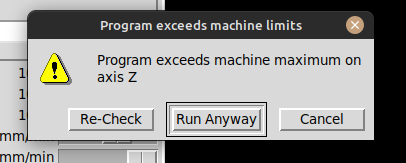
It has no knowledge of any tool changes in the gcode and thus it uses the same tool offset values for the entire gcode in the program. If the tool offset values of the tools do not vary much then you may not see an error message from Axis although you may get one from the interpreter/trajectory planner anyway. On the other hand, if you use a long tool (like a probe here) and start the gcode with that offset active you will very likely get a false warning and the code will actually run just fine when you ignore the message by clicking on the 'Run anyway' button.

I have filed a pull request to remove separate limit violation checking in AXIS.
github.com/LinuxCNC/linuxcnc/pull/2652
Last edit: 3 years 1 month ago by Aciera.
The following user(s) said Thank You: petmakris

Please Log in or Create an account to join the conversation.

More
3 years 1 month ago #281566 by petmakris

Hi. Are you running a cam generated program? I didn't see any gcode above.

I noticed that your z axis max limit is 0. In my experience, when this is 0, and your program contains lines like "G53 G0 Z0" as a retract move, it causes errors similar to these.

Replacing those lines with G53 G0 Z-5 for example eliminates these errors (in my case at least)

For this reason, I always set the maximum limit for z in the ini file to something slightly larger than 0. Even 0.1 usually prevents this issue.
 

Thanks nice idea.

I don't think I have a move command in machine coords though (G53).

The sample I was trying to execute is
Code:
G0 G17 G80 G90 G21 G43 T4 M6  M3 S3000  M183 P3000 G1 X17.0000 Y-29.6675 Z80.0000  F1500.0 Z6.0000  F300.0 G17 G03X23.0000I3.0000J0.0000 X17.0000I-3.0000J0.0000 G1 Z0.0000 G02X23.0000I3.0000J0.0000 X17.0000I-3.0000J0.0000 G1 Z80.0000  F1500.0 (Path 2 - Tool #3) (Work Zero) (Standard Drill ) M6 T5 G43 M3 S3000 M183 P3000 X65.0000 Y-29.6675 Z80.0000 Z32.0000 G81 X65.0000 Y-29.6675 Z11.0000 R14.5000 F300.0 G80 G1 X80.0000 Z32.0000  F1500.0 G81 X80.0000 Y-29.6675 Z11.0000 R14.5000 F300.0 G80 G1 Z80.0000  F1500.0 M5 M9 M30

Please Log in or Create an account to join the conversation.

More
3 years 4 weeks ago - 3 years 4 weeks ago #282068 by Aciera
As my analysis of the problem was somewhat off I link a better explanation of the situation here:
forum.linuxcnc.org/20-g-code/44244-g43-1...axis?start=20#282062

[edit]
For future reference:
Limit checking in the AXIS gui is useful because it checks for limit violations in the entire gcode and can detect soft limit errors before the code is 'run'. In contrast the 'milltask' interpreter will only check for limit violations up to the next queuebuster (eg toolchange) so a long program may run for hours and then fail with a softlimit error after some tool change far along in the gcode.
It is important to note that AXIS calculates the limits when the Gcode is _loaded/reloaded_ and uses the tool offsets active _at this time_. Hence if the user issues a change to the tool offset values (eg a toolchange in MDI) _after_ loading/reloading the gcode the calculation may not be up to date and produce a false error message.
For this purpose a 're-check' option has been added to the error popup window in LinuxCNC version 2.9 which will reload the gcode and thus recalculate soft limit violations using the current tool offset values:


Last edit: 3 years 4 weeks ago by Aciera.
The following user(s) said Thank You: COFHAL, petmakris

Please Log in or Create an account to join the conversation.

Time to create page: 0.371 seconds
Powered by Kunena Forum
