Manual Tool Change again?

More
11 years 3 months ago #60961 by FiliP
Replied by FiliP on topic Manual Tool Change again?
andypugh: It is a little too much for me. I'm still learning LinuxCNC.

I incorrectly thought that AXIS preview red lines will show only job from G-code file.

Do hal_manualtoolchange file modification would be the best option here?
Eg. Instead of embedding the JOG during the display shows "replace the tool number...", just run some subroutines or g-code in background?
If not used REMAP function, this should not impact on the value of boundry lines.

Please Log in or Create an account to join the conversation.

More
11 years 3 months ago #60962 by andypugh
Replied by andypugh on topic Manual Tool Change again?

FiliP wrote: I incorrectly thought that AXIS preview red lines will show only job from G-code file.


The red dotted box shows the machine physical limits.
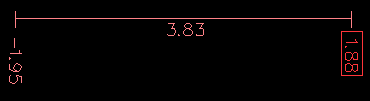
Is your problem that the G-code preview shows the toolchange moves and you don't want that?

Please Log in or Create an account to join the conversation.

More
11 years 3 months ago - 11 years 3 months ago #60963 by FiliP
Replied by FiliP on topic Manual Tool Change again?

andypugh wrote: The red dotted box shows the machine physical limits.


Someone before wrote "red" but really this lines is pink, and all time is about "Program Extents"
linuxcnc.org/docs/html/gui/axis.html#_graphical_display_area


andypugh wrote: Is your problem that the G-code preview shows the toolchange moves and you don't want that?

Yes. If i use REMAP for manual tool changing and auto probe tool (im using subroutine), preview will change Extents, i dont want that. I'v checked (AXIS,show)/(AXIS,hide) functions, and included them into subroutine file, but it must be for something else.
Last edit: 11 years 3 months ago by FiliP.

Please Log in or Create an account to join the conversation.

More
11 years 3 months ago #60964 by andypugh
Replied by andypugh on topic Manual Tool Change again?

FiliP wrote: Yes. If i use REMAP for manual tool changing and auto probe tool (im using subroutine), preview will change Extents,


The extents are calculated when the G-code is loaded.
It might be possible to exit your remapped subs before any movement occurs during the preview stage.

Try an IF around the remap moves:

O100 IF [#<_task> EQ 1]
...
O100 ENDIF

www.linuxcnc.org/docs/html/gcode/overview.html#sec:parameters
The following user(s) said Thank You: FiliP

Please Log in or Create an account to join the conversation.

More
11 years 3 months ago - 11 years 3 months ago #60998 by FiliP
Replied by FiliP on topic Manual Tool Change again?

andypugh wrote: Try an IF around the remap moves:
O100 IF [#<_task> EQ 1]
...
O100 ENDIF
www.linuxcnc.org/docs/html/gcode/overview.html#sec:parameters


I'v checked it on sim machine, and it works. THX :) Will check on my real one.
Last edit: 11 years 3 months ago by FiliP.

Please Log in or Create an account to join the conversation.

More
10 years 8 months ago - 10 years 8 months ago #69958 by FiliP
Replied by FiliP on topic Manual Tool Change again?
Hi.
I have wondering why my tool change probe and scripts, somethimes crash my machine.
I was blind (noob also) and didnt recognise this command: G43 Z15. H0 :blush:
Its in every my GCode file, after load new one and run it, it reset my tool Z offset, and calculations to next being reset.

Im using HSM Express post processor, there i should search for answer (modify)?
Anyone had same problems?

Edit: I made changes in postprocesor. It seems like its not ready to handle manual tool change, strange.
Last edit: 10 years 8 months ago by FiliP. Reason: Resolved.

Please Log in or Create an account to join the conversation.

Time to create page: 0.316 seconds
Powered by Kunena Forum
