Mesa 7i92 Dolt not cleared

More
4 years 4 months ago #245535 by DoWerna
Replied by DoWerna on topic Mesa 7i92 Dolt not cleared
$ lscpu
Architecture:        x86_64
CPU op-mode(s):      32-bit, 64-bit
Byte Order:          Little Endian
Address sizes:       36 bits physical, 48 bits virtual
CPU(s):              4
On-line CPU(s) list: 0-3
Thread(s) per core:  1
Core(s) per socket:  4
Socket(s):           1
NUMA node(s):        1
Vendor ID:           GenuineIntel
CPU family:          6
Model:               42
Model name:          Intel(R) Core(TM) i5-2500 CPU @ 3.30GHz
Stepping:            7
CPU MHz:             1596.286
CPU max MHz:         3700.0000
CPU min MHz:         1600.0000
BogoMIPS:            6584.73
Virtualization:      VT-x
L1d cache:           32K
L1i cache:           32K
L2 cache:            256K
L3 cache:            6144K
NUMA node0 CPU(s):   0-3


Please Log in or Create an account to join the conversation.

More
4 years 4 months ago - 4 years 4 months ago #245536 by PCW
Replied by PCW on topic Mesa 7i92 Dolt not cleared
OK so the timings look OK

Does your system have a Intel Ethernet chip?

What are your ping times if you ping the 7I92?
Last edit: 4 years 4 months ago by PCW.

Please Log in or Create an account to join the conversation.
More
4 years 4 months ago #245580 by DoWerna
Replied by DoWerna on topic Mesa 7i92 Dolt not cleared
ping timings

ping 192.168.1.121
PING 192.168.1.121 (192.168.1.121) 56(84) bytes of data.
64 bytes from 192.168.1.121: icmp_seq=1 ttl=64 time=0.392 ms
64 bytes from 192.168.1.121: icmp_seq=2 ttl=64 time=0.240 ms
64 bytes from 192.168.1.121: icmp_seq=3 ttl=64 time=0.165 ms
64 bytes from 192.168.1.121: icmp_seq=4 ttl=64 time=0.221 ms
64 bytes from 192.168.1.121: icmp_seq=5 ttl=64 time=0.139 ms
64 bytes from 192.168.1.121: icmp_seq=6 ttl=64 time=0.226 ms
64 bytes from 192.168.1.121: icmp_seq=7 ttl=64 time=0.166 ms
64 bytes from 192.168.1.121: icmp_seq=8 ttl=64 time=0.120 ms
64 bytes from 192.168.1.121: icmp_seq=9 ttl=64 time=0.175 ms
64 bytes from 192.168.1.121: icmp_seq=10 ttl=64 time=0.281 ms
64 bytes from 192.168.1.121: icmp_seq=11 ttl=64 time=0.360 ms
64 bytes from 192.168.1.121: icmp_seq=12 ttl=64 time=0.116 ms
64 bytes from 192.168.1.121: icmp_seq=13 ttl=64 time=0.321 ms
64 bytes from 192.168.1.121: icmp_seq=14 ttl=64 time=0.385 ms
64 bytes from 192.168.1.121: icmp_seq=15 ttl=64 time=0.280 ms
64 bytes from 192.168.1.121: icmp_seq=16 ttl=64 time=0.289 ms
64 bytes from 192.168.1.121: icmp_seq=17 ttl=64 time=0.324 ms
64 bytes from 192.168.1.121: icmp_seq=18 ttl=64 time=0.336 ms


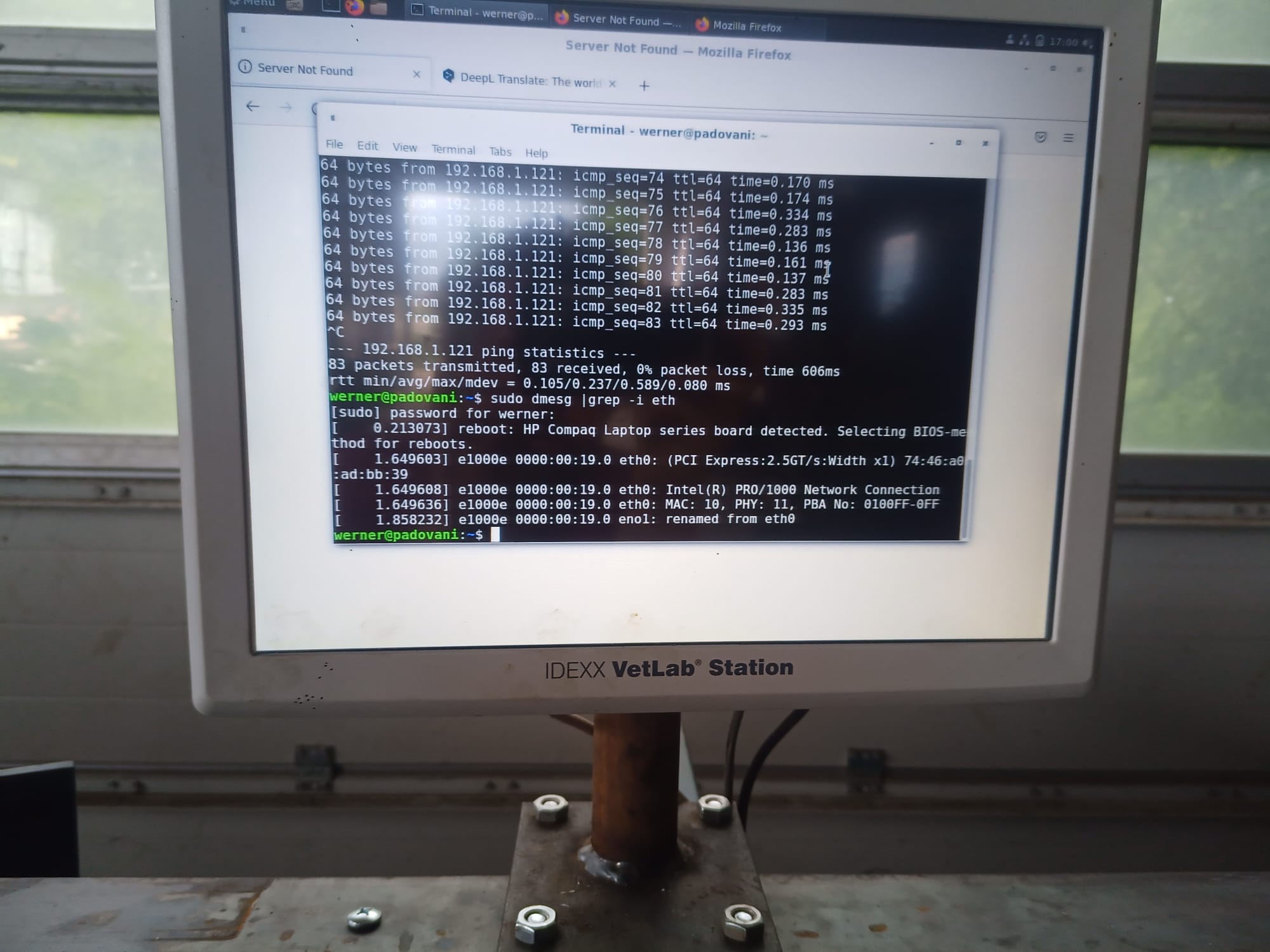
Is there a terminal command with which I can display my network chip?

Please Log in or Create an account to join the conversation.

More
4 years 4 months ago #245593 by PCW
Replied by PCW on topic Mesa 7i92 Dolt not cleared
Those ping times look pretty bad...

You might try:

dmesg | grep -i eth

Please Log in or Create an account to join the conversation.

More
4 years 4 months ago #245599 by DoWerna
Replied by DoWerna on topic Mesa 7i92 Dolt not cleared
looks like i have the Intel chip :-(


Please Log in or Create an account to join the conversation.

More
4 years 4 months ago - 4 years 4 months ago #245601 by PCW
Replied by PCW on topic Mesa 7i92 Dolt not cleared
OK for Intel Ethernet chips, you must disable RX IRQ coalescing
This is typically done in the interfaces file

man hm2_eth

for instructions

Also you can try this temporary fix:

sudo ethtool -C eno1 rx-usecs 0

and then try the ping test / LinuxCNC again

(this fix will only last until you reboot)

 
Last edit: 4 years 4 months ago by PCW.
The following user(s) said Thank You: DoWerna

Please Log in or Create an account to join the conversation.

Moderators: PCW, jmelson
Time to create page: 0.398 seconds
Powered by Kunena Forum
