Backlash compensation - strange behaviour on circular shapes

More
7 years 10 months ago - 7 years 10 months ago #122830 by gimpo
Hello,

I'm using the previous version of LinuxCNC (version 2.6.x IIRC) with satisfaction, but few days ago I have registered strange results when milling some test shapes on MDF wood material.
My small portal-router has developed a backlash of 0,2 mm on X and Y axis both, because of wearing. So I gave the backlash-compensation mechanism of LinuxCNC a chance.

After consulting the documentation, I have added the compensation option to my configuration file.
Results was amazing, all my square/rectangular shapes returned to be perfect! I have registered an error around 0.005 mm or less. Wow! :woohoo:

Now the bad news... :(
My tests on circular pockets shows that all of the internal diameters are around 0,2 mm bigger than what expected. This is exactly the amount of backlash compensation that I'have introduced.

What's going on? I'm missing something? :unsure:

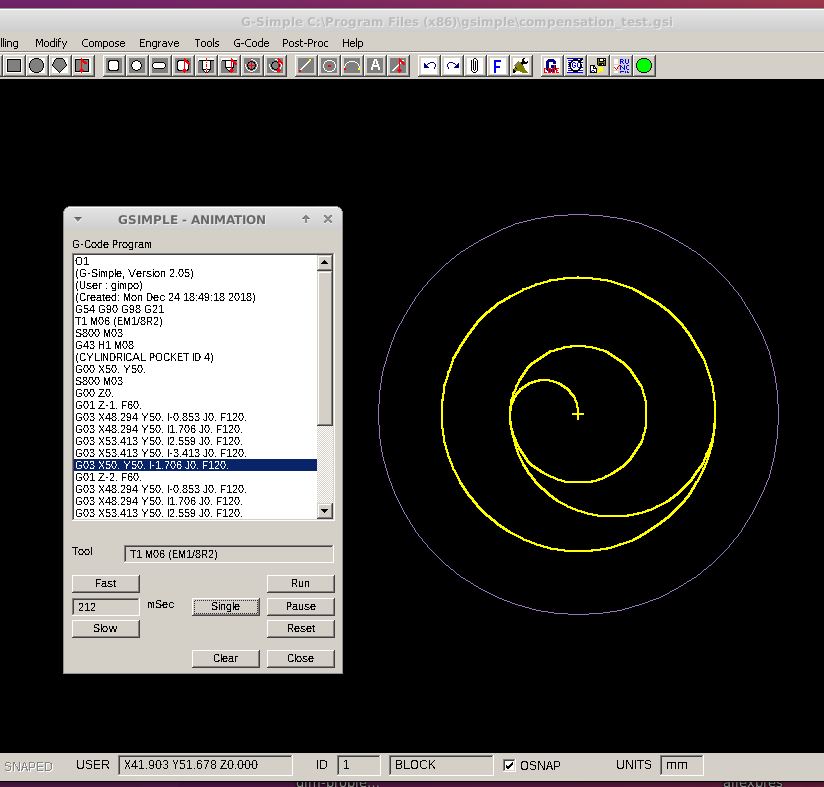
To cut a cylindrical pocket, my software produce a spiral-like path, cutting from the center and then moving outward by using arcs (see below - 12 mm pocket-diameter and 1/8" cutting mill).
Maybe this type of movement somehow influences the effectiveness of the backlash compensation mechanism?


Last edit: 7 years 10 months ago by gimpo.

Please Log in or Create an account to join the conversation.

More
7 years 10 months ago #122834 by Todd Zuercher
You could try using conventional milling instead of climb milling (reverse direction. )

That may change the direction of the cutting forces and hopefully reduce the effect of your backlash.

Unfortunately I don't think the cnc can know the difference if you're doing a female climb milling cut or a male conventional cut. For this reason it is best to eliminate or at least minimize backlash mechanically if possible.

I don’t use backlash comp on our wood routers because for us and the kind of routing we do it usually causes more problems than it solves.

Please Log in or Create an account to join the conversation.

More
7 years 10 months ago #122847 by gimpo
Hallo,

I will try your suggestion, but I don't know if the simple CAM program (g-simple) support this option (I love it, it is primitive but I get my basic stuff done in few minutes).

Yesterday I have received new bronze spindle-nuts. Hopefully, with that, I will reduce the backlash below 0,1 mm (finger crossed!).

I'm going to accommodate a TFT display behind a POM/Delrin frame. The frame is perfectly copying the display shape.
It would be fantastic if I could perfectly center the display (the human eye is a perfect machine for catching misalignments). So I'would like to use the compensation for reducing the backlash to around half-tenth of mm (0,05 mm).
Maybe I'm asking too much, but results with circular shapes have confused me...

Please Log in or Create an account to join the conversation.

More
7 years 10 months ago #122922 by gimpo
Doubt:
maybe LinuxCNC simply does not support backlash compensation on G02/G03 instructions?

As I understand, applying compensation on a straightforward movement is relatively "easy", but doing the same on an arc-trajectory can quickly turn in a nightmare...

Please Log in or Create an account to join the conversation.

More
7 years 10 months ago #122934 by GeneRF
I believe the backlash compensation is very simple. If an axis is moving in a positive direction, no matter how slowly or how small the motion there is no compensation.

If an axis is moving in a negative direction, no matter how slowly or how small the motion there is the full specified compensation.

There is no ramping or blending for curves. Backlash compensation is either fully applied or not applied. It is independent for each axis.

Gene

Please Log in or Create an account to join the conversation.

More
7 years 10 months ago #122972 by gimpo
For the arcs is not that simple. Take a piece of paper and a pencil and make some tests.

While for linear movements the compensation turns simply in a longer segment (even for segments not parallel to the X or Y axis), for arcs you can encounter the situation where there is zero backlash in the Y direction, but non-zero backlash in the Y direction, or vice-versa.

The resulting path is no more an arc, but a very strange curve, difficult to draw by using g-code instructions (i.e. a linear transformation along one axis).

Please Log in or Create an account to join the conversation.

Time to create page: 0.064 seconds
Powered by Kunena Forum