Configuring double axis stepper motor

More
6 years 8 months ago - 6 years 8 months ago #157581 by Arro
Hallo everybody,

I'm trying to run a double stepper motor (e.g for Y-axis) with the following setup:

- LinuxCNC version: LinuxCNC-uspace 2.9.0
- Communication card: MESA 7i76e (Ethernet connection)

The configuration of the axis-motor is made withing the MESA I/O Connector 1
With the setup of one motor per axis there is no problem, everything working fine.

Issues setting up tandem motor:
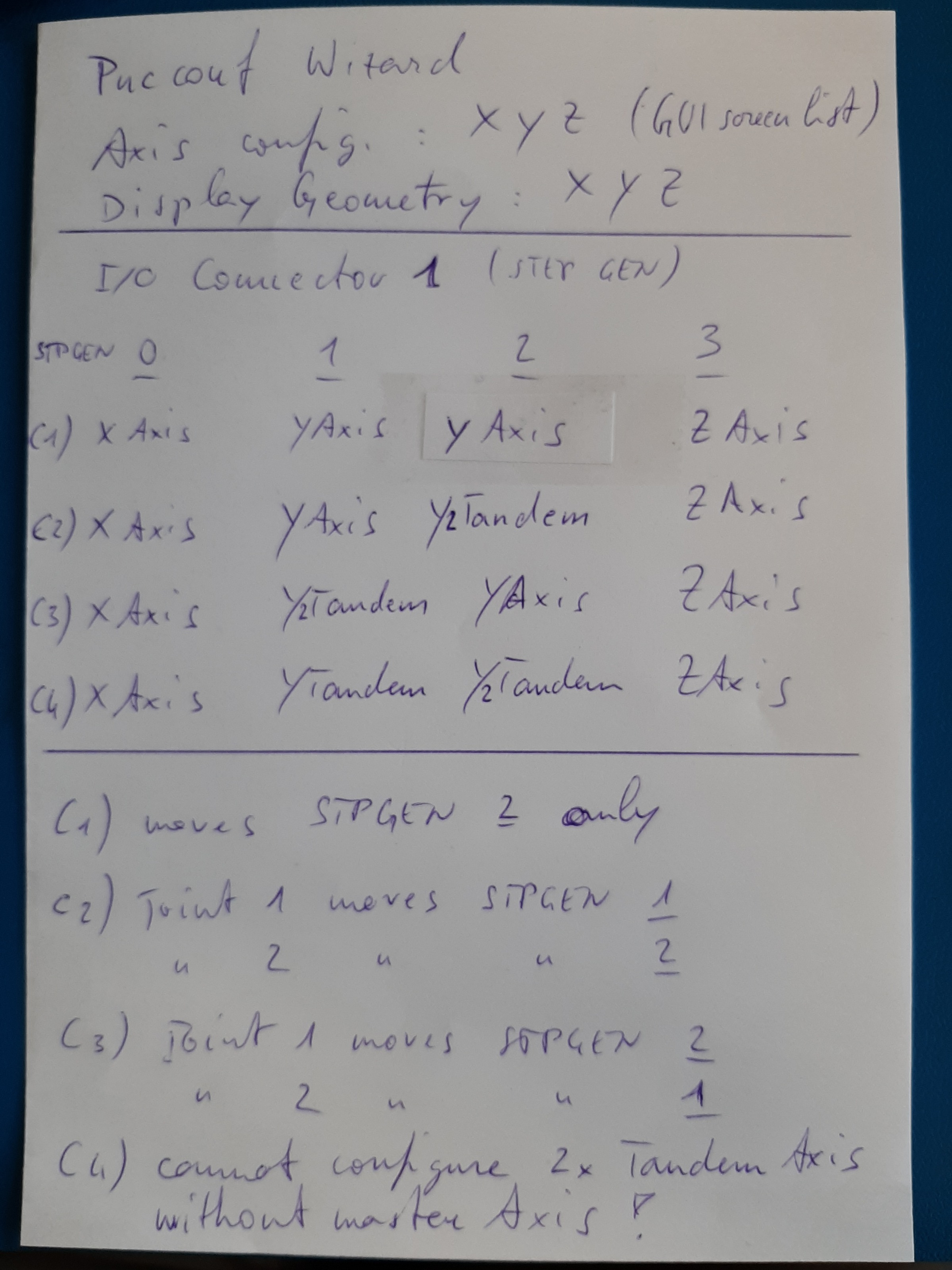
1) configuring a tandem STPGEN the XYZ-display mode desappears automatically (maintaining the XYZ config) and the Joint-mode appears instead.
2) configuration of two main STPGEN (no tandem STPGEN ) for a single axis maintains the XYZ-mode on display but does not run both motors together
3) the definition of a tandem STPGEN switches directly to the Joint-mode and gives the test-results as shown on the attachment

Note: test result on case C1 is giving the correct XYZ-mode, so you can select Y for ex to run the Y-axis

Somehow/Somewhen I was able to run two STPGEN simultaneously, unfortunately I don't remember the configuration cause I had to re-install all the OS :((

thanks for sharing
Last edit: 6 years 8 months ago by Arro. Reason: completing

Please Log in or Create an account to join the conversation.

More
6 years 8 months ago #157589 by bbsr_5a
Hi Welcome
the setupwizard is only for making BASIC setup
open up your TEXTeditor
go to the Folder of the Machine
open up INI File and copy past the JOINT you need to add
XYYZ in Kinetics section and then open up the
HAL File and copy the Y axis to the tird or wherever you connected it STEPGEN

if you add your INI and HAL file here someone will do it for YOU

I myself had to learn that the Wizards are most BASIC and the main thing is to Control it by Texteditor
as of HAL INI you will Very quick understand how to do it and get a better machining
It's not like "ein/Mach3" all in the setup Gui

Please Log in or Create an account to join the conversation.

More
6 years 8 months ago #157595 by cmorley
What is it that you are looking for ? tandem y axis that homes together (so it doesn't show the joint mode first?)

What home switch options did you select?
Could ypu post your config files.

Chris

Please Log in or Create an account to join the conversation.

More
6 years 8 months ago #157600 by Arro
Thank you for the quick reply !

Pls find attached the .ini and .hal files

Seems the XYYZ configuration is already set up. Maybe some other details missing.

Answering to cmorley: the target is... having X Y Z in the display graphics for axis selection and two motors (STEPGEN 1 and STEPGEN 2) running together

Appreciated
Aronne


File Attachment:

File Name: my_LinuxCN...hine.hal
File Size:11.41 KB

File Attachment:

File Name: my_LinuxCN...hine.ini
File Size:4.49 KB

Please Log in or Create an account to join the conversation.

More
6 years 8 months ago #157601 by cmorley
you are missing HOME_SEQUENCE entries for each joint in the INI file.
Dp you have home/limit switches?

Please Log in or Create an account to join the conversation.

More
6 years 8 months ago #157602 by Arro
I got it guys...

The problem was the switch from Joint-view to the World-view.
To do this the joint-homing process was necessary and I did not perfomr it...

After homing, just switch to the world-mode and both motors are moving with Y-axis selection

Another new topic learned :)

Cheers for now
Aronne

Please Log in or Create an account to join the conversation.

Moderators: cmorley
Time to create page: 0.294 seconds
Powered by Kunena Forum