Help with 7i84 power connections

More
6 years 4 months ago #170876 by simonmn
Ok I will try that tomorrow when I get to the shop. Thanks for the help! will report back

Please Log in or Create an account to join the conversation.

More
6 years 4 months ago #170917 by simonmn
Heres a dumb from the terminal
Code:
bridgeport@Bridgeport-Interact-308:~/linuxcnc/configs/pre_med_manual_tool_change$ linuxcnc pre_med_manual_tool_change.ini LINUXCNC - 2.7.14 Machine configuration directory is '/home/bridgeport/linuxcnc/configs/pre_med_manual_tool_change' Machine configuration file is 'pre_med_manual_tool_change.ini' Starting LinuxCNC... Found file(REL): ./pre_med_manual_tool_change.hal Note: Using POSIX realtime hm2: loading Mesa HostMot2 driver version 0.15 hm2_eth: loading Mesa AnyIO HostMot2 ethernet driver version 0.2 hm2_eth: 192.168.1.121: Hardware address: 00:60:1b:10:43:58 hm2_eth: discovered 7I76E-16 hm2/hm2_7i76e.0: Smart Serial Firmware Version 43 Board hm2_7i76e.0.7i76.0.0 Hardware Mode 0 = standard Board hm2_7i76e.0.7i76.0.0 Software Mode 0 = io_spin Board hm2_7i76e.0.7i76.0.0 Software Mode 1 = io_ana_spin Board hm2_7i76e.0.7i76.0.0 Software Mode 2 = io_enc_ana_spin_fv Board hm2_7i76e.0.7i84.0.1 Hardware Mode 0 = standard Board hm2_7i76e.0.7i84.0.1 Software Mode 0 = input_output Board hm2_7i76e.0.7i84.0.1 Software Mode 1 = io_analog_fieldvoltage Board hm2_7i76e.0.7i84.0.1 Software Mode 2 = io_encoder_analog hm2/hm2_7i76e.0: 51 I/O Pins used: hm2/hm2_7i76e.0: IO Pin 000 (P1-01): StepGen #0, pin Direction (Output) hm2/hm2_7i76e.0: IO Pin 001 (P1-14): StepGen #0, pin Step (Output) hm2/hm2_7i76e.0: IO Pin 002 (P1-02): StepGen #1, pin Direction (Output) hm2/hm2_7i76e.0: IO Pin 003 (P1-15): StepGen #1, pin Step (Output) hm2/hm2_7i76e.0: IO Pin 004 (P1-03): StepGen #2, pin Direction (Output) hm2/hm2_7i76e.0: IO Pin 005 (P1-16): StepGen #2, pin Step (Output) hm2/hm2_7i76e.0: IO Pin 006 (P1-04): StepGen #3, pin Direction (Output) hm2/hm2_7i76e.0: IO Pin 007 (P1-17): StepGen #3, pin Step (Output) hm2/hm2_7i76e.0: IO Pin 008 (P1-05): StepGen #4, pin Direction (Output) hm2/hm2_7i76e.0: IO Pin 009 (P1-06): StepGen #4, pin Step (Output) hm2/hm2_7i76e.0: IO Pin 010 (P1-07): Smart Serial Interface #0, pin TxData0 (Output) hm2/hm2_7i76e.0: IO Pin 011 (P1-08): Smart Serial Interface #0, pin RxData0 (Input) hm2/hm2_7i76e.0: IO Pin 012 (P1-09): Smart Serial Interface #0, pin TxData1 (Output) hm2/hm2_7i76e.0: IO Pin 013 (P1-10): Smart Serial Interface #0, pin RxData1 (Input) hm2/hm2_7i76e.0: IO Pin 014 (P1-11): Encoder #0, pin Index (Input) hm2/hm2_7i76e.0: IO Pin 015 (P1-12): Encoder #0, pin B (Input) hm2/hm2_7i76e.0: IO Pin 016 (P1-13): Encoder #0, pin A (Input) hm2/hm2_7i76e.0: IO Pin 017 (P2-01): IOPort hm2/hm2_7i76e.0: IO Pin 018 (P2-14): IOPort hm2/hm2_7i76e.0: IO Pin 019 (P2-02): IOPort hm2/hm2_7i76e.0: IO Pin 020 (P2-15): IOPort hm2/hm2_7i76e.0: IO Pin 021 (P2-03): IOPort hm2/hm2_7i76e.0: IO Pin 022 (P2-16): IOPort hm2/hm2_7i76e.0: IO Pin 023 (P2-04): IOPort hm2/hm2_7i76e.0: IO Pin 024 (P2-17): IOPort hm2/hm2_7i76e.0: IO Pin 025 (P2-05): IOPort hm2/hm2_7i76e.0: IO Pin 026 (P2-06): IOPort hm2/hm2_7i76e.0: IO Pin 027 (P2-07): IOPort hm2/hm2_7i76e.0: IO Pin 028 (P2-08): IOPort hm2/hm2_7i76e.0: IO Pin 029 (P2-09): IOPort hm2/hm2_7i76e.0: IO Pin 030 (P2-10): IOPort hm2/hm2_7i76e.0: IO Pin 031 (P2-11): IOPort hm2/hm2_7i76e.0: IO Pin 032 (P2-12): IOPort hm2/hm2_7i76e.0: IO Pin 033 (P2-13): IOPort hm2/hm2_7i76e.0: IO Pin 034 (P3-01): IOPort hm2/hm2_7i76e.0: IO Pin 035 (P3-14): IOPort hm2/hm2_7i76e.0: IO Pin 036 (P3-02): IOPort hm2/hm2_7i76e.0: IO Pin 037 (P3-15): IOPort hm2/hm2_7i76e.0: IO Pin 038 (P3-03): IOPort hm2/hm2_7i76e.0: IO Pin 039 (P3-16): IOPort hm2/hm2_7i76e.0: IO Pin 040 (P3-04): IOPort hm2/hm2_7i76e.0: IO Pin 041 (P3-17): IOPort hm2/hm2_7i76e.0: IO Pin 042 (P3-05): IOPort hm2/hm2_7i76e.0: IO Pin 043 (P3-06): IOPort hm2/hm2_7i76e.0: IO Pin 044 (P3-07): IOPort hm2/hm2_7i76e.0: IO Pin 045 (P3-08): IOPort hm2/hm2_7i76e.0: IO Pin 046 (P3-09): IOPort hm2/hm2_7i76e.0: IO Pin 047 (P3-10): IOPort hm2/hm2_7i76e.0: IO Pin 048 (P3-11): IOPort hm2/hm2_7i76e.0: IO Pin 049 (P3-12): IOPort hm2/hm2_7i76e.0: IO Pin 050 (P3-13): IOPort hm2/hm2_7i76e.0: registered sysctl: cannot stat /proc/sys/net/ipv6/conf/eth0:avahi/disable_ipv6: No such file or directory hm2_eth: ERROR: Failed to execute '/sbin/sysctl -q net.ipv6.conf.eth0:avahi.disable_ipv6=1' Found file(REL): ./custom.hal

This
Code:
sysctl: cannot stat /proc/sys/net/ipv6/conf/eth0:avahi/disable_ipv6: No such file or directory hm2_eth: ERROR: Failed to execute '/sbin/sysctl -q net.ipv6.conf.eth0:avahi.disable_ipv6=1'
Could that be my issue? I am a little surprised to see that message, after a successful start of linuxcnc. And for what I can tell, most of the 7i76e works fine.
I usually just start linuxcnc with the desktop shortcut, so not to sure what look out for, then using the terminal instead.

Please Log in or Create an account to join the conversation.
More
6 years 4 months ago #170937 by tommylight
That is an IPV6 error, or internet protocol version 6. You can safely ignore it or disable it completely for the network card attached to Mesa board.

Please Log in or Create an account to join the conversation.
More
6 years 4 months ago #170952 by simonmn
Done some more testing, but are not really getting anywhere.
Tried to disconnect everything but the ethernet = red, then keep only ethernet and TB1 = red.
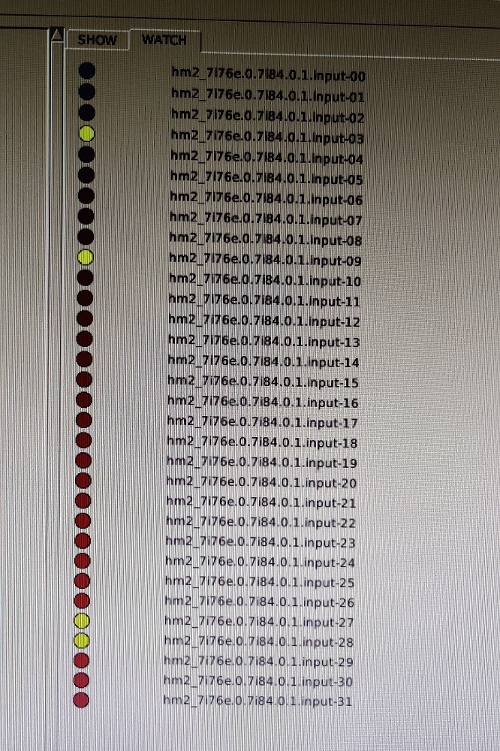
Pulled up the hal configuration, and with TB2 and TB3 rows disconnected, I still get some active signals:


Even if I connect everything again, input 3, 27 and 28 are not connected to anything. Could I have fried my board, or do I have a noise issue?

Please Log in or Create an account to join the conversation.

More
6 years 4 months ago #170962 by PCW
Not sure what's going on, Normally you would see a number of sserial errors if
you lose communications with the 7I84 or there is a remote fault.

What happens if you disconnect the 7I84s RJ45 when running?

Please Log in or Create an account to join the conversation.

More
6 years 4 months ago - 6 years 4 months ago #170994 by simonmn
I actually think I managed to solve the problem!

Tried unplugging the Ethernet from the 7i84 while running, and no error messages from either the linuxcnc gui or the terminal. Although starting linuxcnc with it Unplugged failed.

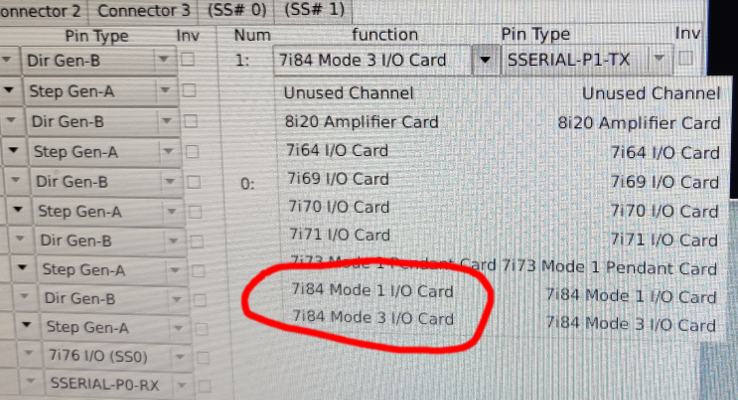
While driving home, I thought about the specific mode I selected in pncconf, and was pretty sure I selected something like "mode3", because I wanted the third mode. But when reading the manual, I recalled modes 0, 1 and 2.
Just went out and pulled up the config in pncconf, and sure enough, I did select a mode3:


Switched to mode 1, and away was the red led and falsely active signals in "hal configuration". Replaced with a green blinking led!
Hooray!

I was acually going to sleep, but I just wanted to test it out while I had it in my head, so haven't checked other than "does it work?".

Is this a small mistake in pncconf?
Regarding the modes, can I just switch modes like on the 7i76e in "myconfig.hal"?

Anyway, thanks for help so far! You guys are always quick to respond!
Last edit: 6 years 4 months ago by simonmn.
The following user(s) said Thank You: tommylight

Please Log in or Create an account to join the conversation.

Moderators: cmorley
Time to create page: 0.146 seconds
Powered by Kunena Forum
