Pncconf qtplasmac

More
4 years 11 months ago #226989 by paulsao
Pncconf qtplasmac was created by paulsao
Hi everyone.
I have debian 10 and linuxcnc 2.9 I want to run pncconf in the Qt version to configure Qtplasmac but when I run the pncconf command in the terminal the old wizard opens and not the qtplasmac one, someone could help me

Please Log in or Create an account to join the conversation.

More
4 years 11 months ago #226990 by snowgoer540
Replied by snowgoer540 on topic Pncconf qtplasmac
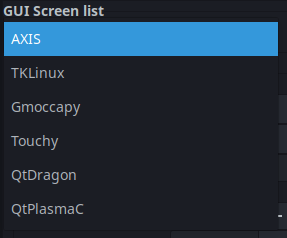
There is not a pncconf that is specific to QtPlasmaC. It was added to the GUI Screen List.

You will find it in the drop down below:

The following user(s) said Thank You: paulsao

Please Log in or Create an account to join the conversation.
More
4 years 11 months ago #226991 by paulsao
Replied by paulsao on topic Pncconf qtplasmac
Oh no how could I have skipped that option image missing /media/kunena/emoticons/grin.png, thanks for helping me.

Please Log in or Create an account to join the conversation.
More
4 years 11 months ago #226992 by paulsao
Replied by paulsao on topic Pncconf qtplasmac
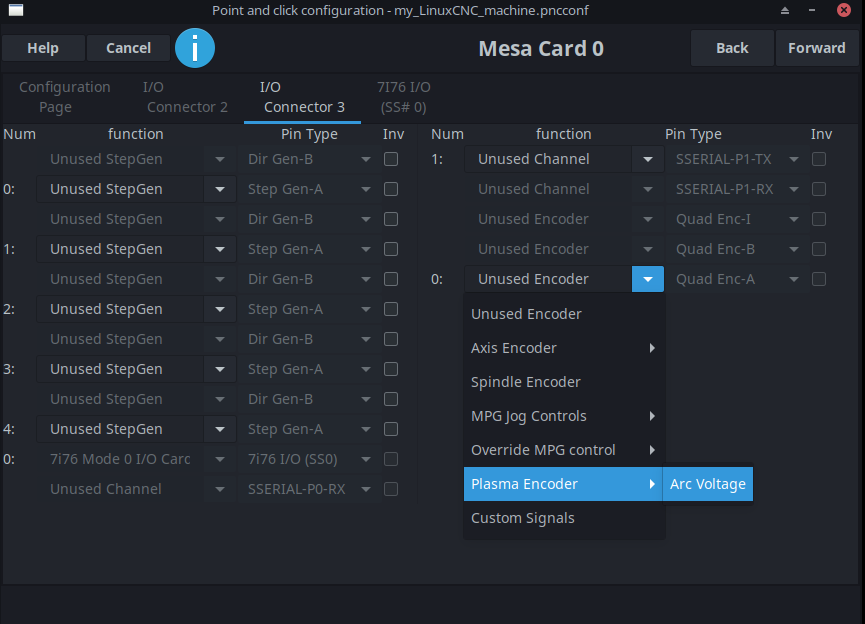
Where do the thcad configuration windows appear as the frequency? , because I finished the configuration

Please Log in or Create an account to join the conversation.

More
4 years 11 months ago #226993 by snowgoer540
Replied by snowgoer540 on topic Pncconf qtplasmac
That's listed where the encoders are:


Please Log in or Create an account to join the conversation.

More
4 years 11 months ago #227000 by paulsao
Replied by paulsao on topic Pncconf qtplasmac
I made a new configuration with pncconf to correct the problem I have about the ohmic test that when I press it, the z axis does not move but everything remains the same. Maybe I am missing something if you were so kind to help me please.

Please Log in or Create an account to join the conversation.

Moderators: cmorley
Time to create page: 0.112 seconds
Powered by Kunena Forum
