Help with auto tool changer

More
7 years 1 week ago #148544 by jonch919
Hello,
Im looking for some help and advice on how to incorporate my ATC.
Below is a diagram from the machine manual, plus a video of the tool changing sequence on an identical machine that I found on YouTube.

I'm new to LinuxCNC so I don't have experience on what to use for what.
I've found topics where a Carousel script is used, and others where Classic Ladder is used. I don't know much about any of those yet, but I'd appreciate advice on where to start and how you would do it.

Later I'd also like to have tool touch-off as in the YouTube-video. So the solution I chose can be integrated with that as well later on.


SW = switch
P = proximity sensor
EV = pneumatic solenoid valve
M1 is a stepper motor

Please Log in or Create an account to join the conversation.

More
7 years 1 week ago #148583 by pl7i92
Replied by pl7i92 on topic Help with auto tool changer
hi
lots of switches to be controlled
so What is your hardware
you need to get every switch to the control Linuxcnc
do you got a Mesa Board on the mashine 7i76?
then it is no problem to connect via a simple Remap M6
you just right a ngc Gcode file that got the logic and makes the moves

Please Log in or Create an account to join the conversation.

More
7 years 1 week ago #148590 by jonch919

pl7i92 wrote: hi
lots of switches to be controlled
so What is your hardware
you need to get every switch to the control Linuxcnc
do you got a Mesa Board on the mashine 7i76?
then it is no problem to connect via a simple Remap M6
you just right a ngc Gcode file that got the logic and makes the moves

Yes I have the 7i92 plus 7i76.

Please Log in or Create an account to join the conversation.

More
7 years 1 week ago - 7 years 1 week ago #148594 by jonch919

pl7i92 wrote: hi
lots of switches to be controlled
so What is your hardware
you need to get every switch to the control Linuxcnc
do you got a Mesa Board on the mashine 7i76?
then it is no problem to connect via a simple Remap M6
you just right a ngc Gcode file that got the logic and makes the moves

And that is basically what the Carousel script does?
So I can use that script as a template?
Last edit: 7 years 1 week ago by jonch919.

Please Log in or Create an account to join the conversation.

More
7 years 1 week ago #148608 by pl7i92
Replied by pl7i92 on topic Help with auto tool changer
Yes the carousell makes this things
from the image it is not clear as it is a real carousell that is driven by M1
as you got a real mashine can you provide a side view to the toolsystem
also there is a graycode like switch system to encode the position of the carousell
but you got a pneumatic system as well behind to insert the tool
you might be forced to go you own way IT is offen as in your system better to go for a simple IF...Then ngc
linuxcnc.org/docs/html/man/man9/carousel.9.html

Please Log in or Create an account to join the conversation.

More
7 years 1 week ago - 7 years 1 week ago #148798 by jonch919
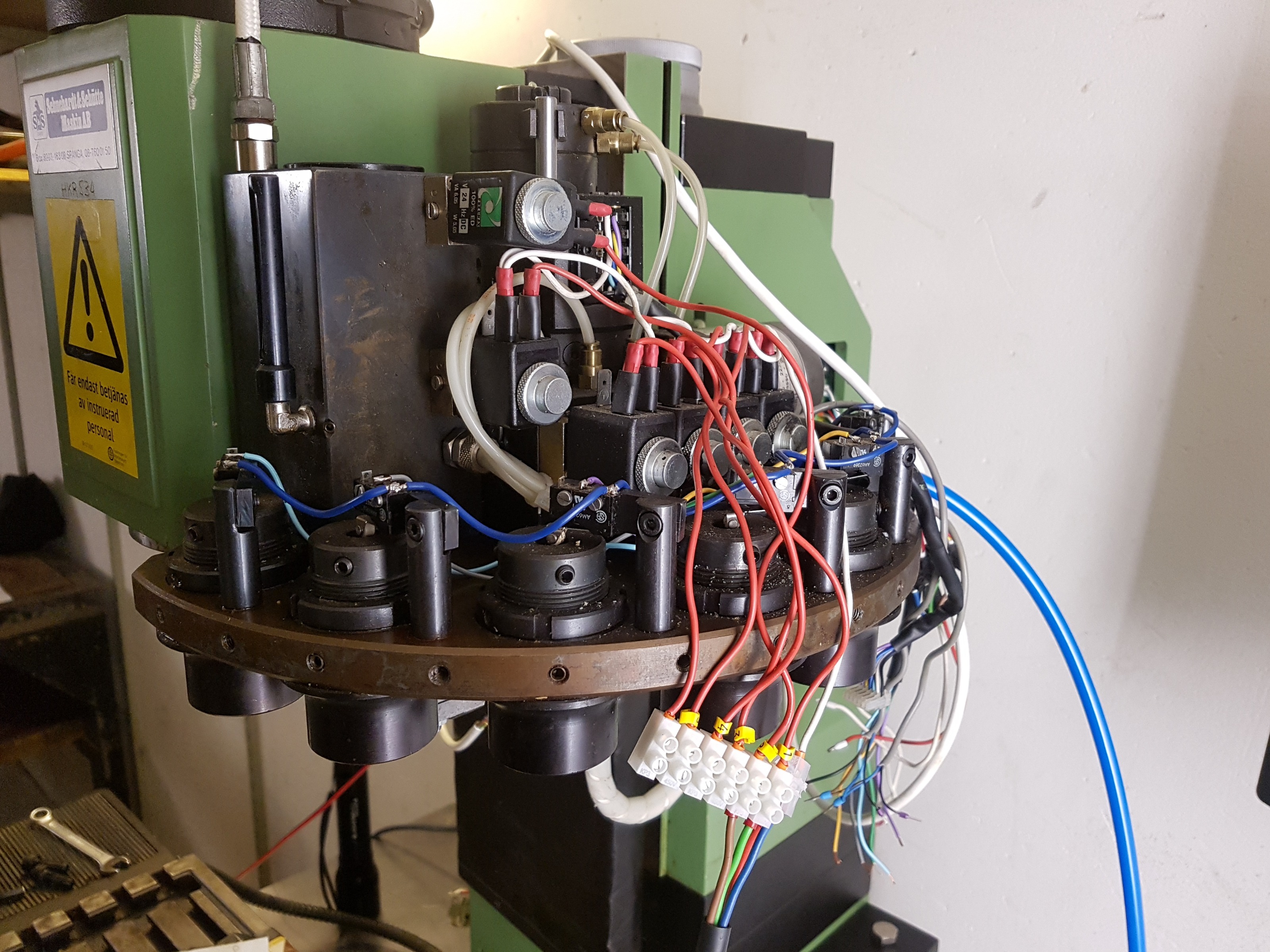
The only moving parts are the arm and its hand.

Solenoid valve EV3 to EV6 control the arm moving up/down and the hand in/out pneumatically. Proximity sensors P1-P2 tell when the arm is up/down. Switch SW12-SW13 tell the positions in/out for the hand/hook.

EV1 releases the tool holder from the spindle hydraulically. Not sure what EV2 does yet.

"Utensili" 1-6 show the position of the tool slots. Each slot has got a switch to indicate if the is a tool present, SW6-SW11.

SW1-SW5 tell the position of the tool slots when the arm is rotating.

P3 tells if there is a tool in the spindle.

A couple of photos attached. In the photos the arm is in the up position , and the arm in the in position
Last edit: 7 years 1 week ago by jonch919.

Please Log in or Create an account to join the conversation.
Time to create page: 0.447 seconds
Powered by Kunena Forum
