
- Posts: 21
- Thank you received: 1
Moving from Axis to Gmoccapy and Glade side panel problem
- G21
- Offline
- Junior Member
-

Less
More
9 years 9 months ago #86116
by G21
Moving from Axis to Gmoccapy and Glade side panel problem was created by G21
Hello everybody,
I am trying to move from Axis to Gmoccapy and I have a problem with my Glade side panel. All works fine in Axis but for some reason Gmoccapy refuses to start. The problem seems to be that during start-up the 'net' definition in my postgui.hal cause an error and the UI unloads and all stops.
I get the following error:
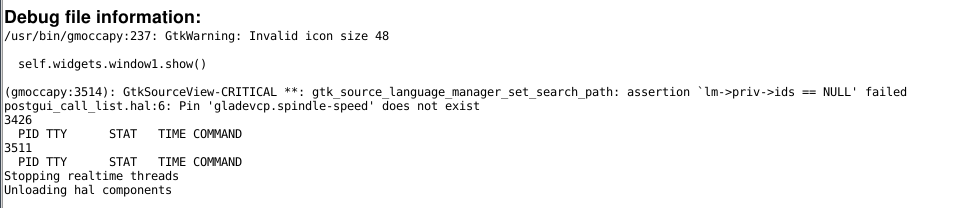
post_gui_list.hal: 6: Pin 'gladevcp.spindle-speed' does not exist
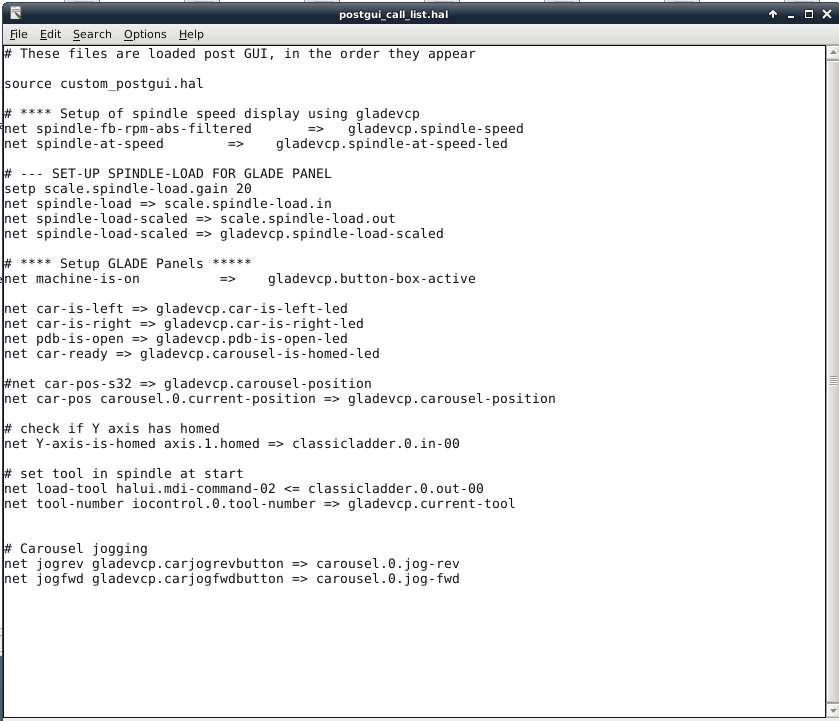
If I comment this line out, the error simply moves to the next pin definition in the postgui.hal. This all works fine in Axis but Gmoccapy stumbles on this. Attached is the screenshot from the error and the postgui.hal file.
Could anybody have a look at this and let me know how to get my sidepanel to load correctly?
Thanks in advance,
G21
I am trying to move from Axis to Gmoccapy and I have a problem with my Glade side panel. All works fine in Axis but for some reason Gmoccapy refuses to start. The problem seems to be that during start-up the 'net' definition in my postgui.hal cause an error and the UI unloads and all stops.
I get the following error:
post_gui_list.hal: 6: Pin 'gladevcp.spindle-speed' does not exist
If I comment this line out, the error simply moves to the next pin definition in the postgui.hal. This all works fine in Axis but Gmoccapy stumbles on this. Attached is the screenshot from the error and the postgui.hal file.
Could anybody have a look at this and let me know how to get my sidepanel to load correctly?
Thanks in advance,
G21
Please Log in or Create an account to join the conversation.
- rodw
- Offline
- Platinum Member
-

Less
More
- Posts: 12170
- Thank you received: 4153
9 years 9 months ago #86130
by rodw
Replied by rodw on topic Moving from Axis to Gmoccapy and Glade side panel problem
I've had similar problems with the Plasma tab moving from axis too. The gmocappy ini fle display section is probably loading a separate hal file (in my case plasma.hal) so in the main hal file, the pin does not yet exist.
I still have not solved my problem, but try putting the net command in the subsidiary file. For me that let the pin to be found but the plasma tab is now broken. It was suggested to run LCNC from the command line and watch for the errors. I have not tried that yet.
I still have not solved my problem, but try putting the net command in the subsidiary file. For me that let the pin to be found but the plasma tab is now broken. It was suggested to run LCNC from the command line and watch for the errors. I have not tried that yet.
Please Log in or Create an account to join the conversation.
- G21
- Offline
- Junior Member
-
Less
More
- Posts: 21
- Thank you received: 1
9 years 9 months ago #86132
by G21
Replied by G21 on topic Moving from Axis to Gmoccapy and Glade side panel problem
Thanks for your reply but it seems weird because I can see the GUI for a second, this means the GUI loads first and that should define all the pins right? The postgui comes after the gui and in my ini file I made sure that the main hal file is loaded first and then the postgui.hal.
Need to think about the sequence of loading all the HAL files maybe? Funny thing is that it works fine in Axis, this would mean the sequence is right isn't? Could be that Gmoccapy loads differently?
Have not tried to run from the command prompt yet, will try later maybe and see what happens there.
Lets hope that Norbert can shine a light on this for us, really want to use my new touchscreen and Gmoccapy seems perfect for this besides all the added functionality Gmoccapy has that I really want to put to use.
G21
Need to think about the sequence of loading all the HAL files maybe? Funny thing is that it works fine in Axis, this would mean the sequence is right isn't? Could be that Gmoccapy loads differently?
Have not tried to run from the command prompt yet, will try later maybe and see what happens there.
Lets hope that Norbert can shine a light on this for us, really want to use my new touchscreen and Gmoccapy seems perfect for this besides all the added functionality Gmoccapy has that I really want to put to use.
G21
Please Log in or Create an account to join the conversation.
- G21
- Offline
- Junior Member
-
Less
More
- Posts: 21
- Thank you received: 1
9 years 9 months ago #86227
by G21
Replied by G21 on topic Moving from Axis to Gmoccapy and Glade side panel problem
I tried to run from the terminal window to see what errors I got and it is exactly the same and as far as I can see it is the only error that causes Gmoccapy to shut down.
I tried to move the pin assignments from the postgui.hal from the main HAL file to see if they would load there but no luck, same problem. I put them all the way in the beginning of the main HAL file, above the I/O configuration for the Mesa cards. Same error.
How does Gmoccapy run the HAL files and when does the GUI load?
Where do I put them to load them correctly?
Attached is the terminal output.
Let me know if there is something I am missing here, really want to get this going.
G21
I tried to move the pin assignments from the postgui.hal from the main HAL file to see if they would load there but no luck, same problem. I put them all the way in the beginning of the main HAL file, above the I/O configuration for the Mesa cards. Same error.
How does Gmoccapy run the HAL files and when does the GUI load?
Where do I put them to load them correctly?
Attached is the terminal output.
Let me know if there is something I am missing here, really want to get this going.
G21
Please Log in or Create an account to join the conversation.
- rodw
- Offline
- Platinum Member
-
Less
More
- Posts: 12170
- Thank you received: 4153
9 years 9 months ago #86229
by rodw
Replied by rodw on topic Moving from Axis to Gmoccapy and Glade side panel problem
The display opening and closing is something I had too.
I see 2 errors being reported. I suspect the second one is as a result of the first.
I suspect that the path is incorrect or there is a typo somewhere
I see 2 errors being reported. I suspect the second one is as a result of the first.
Code:
**** No gmoccapy2.glade file present ****
ERROR, trying to initialize the user tabs or panaels, check for typos
Code:
postgui_call_list.hal:6: Pin 'gladevcp.spindle-speed' does not exist
Shutting down and cleaning up LinuxCNC...
Running HAL shutdown script
I suspect that the path is incorrect or there is a typo somewhere
Please Log in or Create an account to join the conversation.
- cncnoob1979
- Offline
- Platinum Member
-
Less
More
- Posts: 403
- Thank you received: 75
9 years 9 months ago - 9 years 9 months ago #86337
by cncnoob1979
Here is your error. I have the same error with my panels as well. I'm running current master too. I think there is a problem here. I'm sure Norbert will be by soon to enlighten us.
I had to comment out all of my pins [post_gui] with my VFD panel to get it to load the gladevcp panel.
This is for a custom panel you can load with gmoccapy. It is a standard error message basicaly stating it cant find the "custom" panel, its for information only. So no real error here.
EDIT: My configuration works just fine with Axis. I do have other panels that load without complaint in Gmoccapy just nothing to deal with my VFD and custom hal pins.
Replied by cncnoob1979 on topic Moving from Axis to Gmoccapy and Glade side panel problem
Code:
postgui_call_list.hal:6: Pin 'gladevcp.spindle-speed' does not exist
Here is your error. I have the same error with my panels as well. I'm running current master too. I think there is a problem here. I'm sure Norbert will be by soon to enlighten us.
I had to comment out all of my pins [post_gui] with my VFD panel to get it to load the gladevcp panel.
Code:
**** No gmoccapy2.glade file present ****
This is for a custom panel you can load with gmoccapy. It is a standard error message basicaly stating it cant find the "custom" panel, its for information only. So no real error here.
EDIT: My configuration works just fine with Axis. I do have other panels that load without complaint in Gmoccapy just nothing to deal with my VFD and custom hal pins.
Norbert Posted this in another thread. I know I had this working before so I'll need to do some research and see whats changed either in my configuration or how I loaded my panel with gmoccapy. This deals with pyvcp, not gladevcp panels. Its strange we all have the same issue.pyvcp_options.hal:7: Pin 'pyvcp.spindle-speed' does not exist
That is the error that prevents linuxcnc from starting. You used a pyvcp panel with axis, but pyvcp panel do not work with gmoccapy.
Just go to your ini and comment the corresponding hal line.
Norbert
Last edit: 9 years 9 months ago by cncnoob1979.
Please Log in or Create an account to join the conversation.
Moderators: newbynobi, HansU
Time to create page: 0.575 seconds