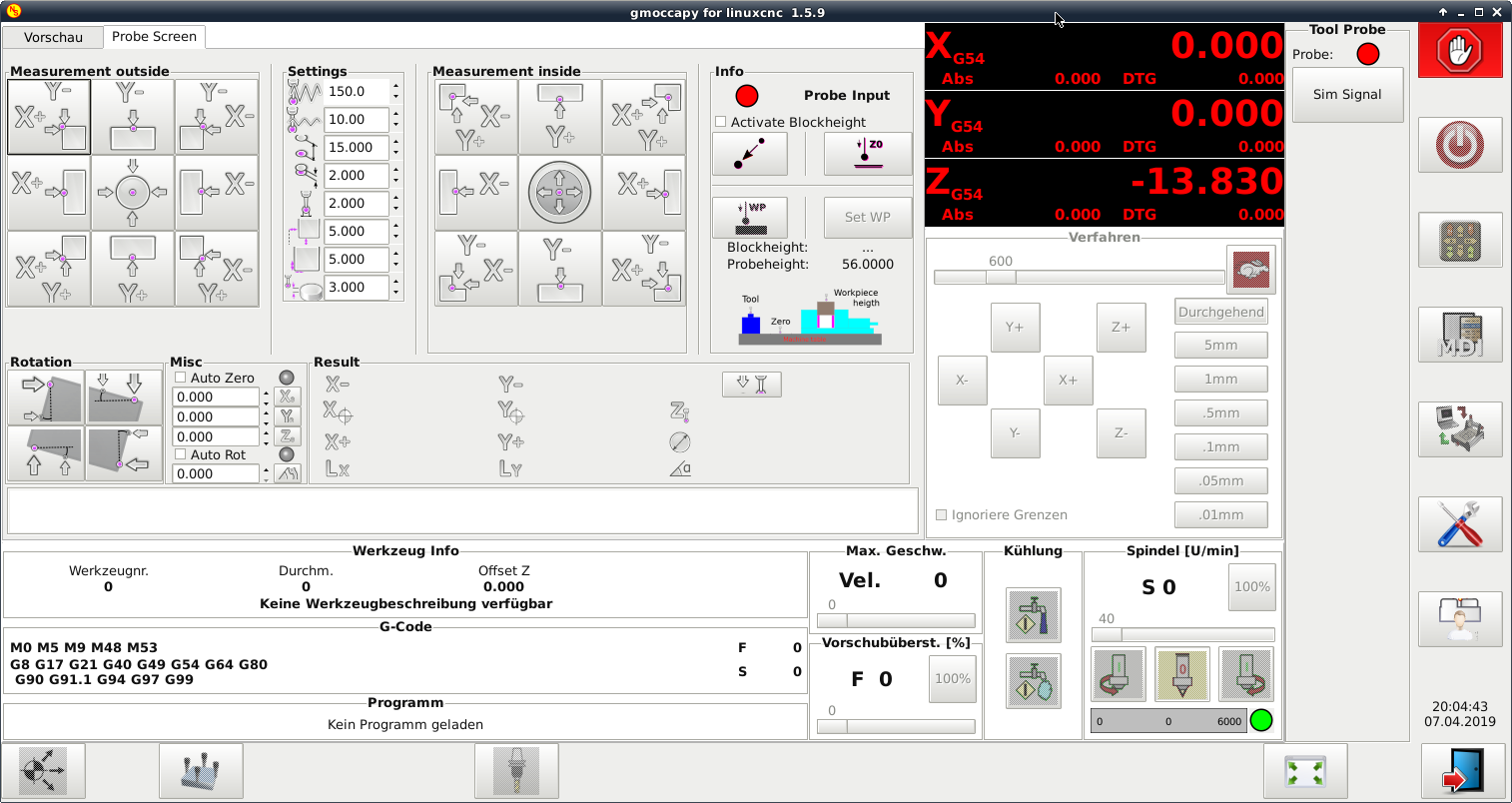
Set blockheight via python

More
7 years 6 months ago #130173 by newbynobi
Your code is strange, you read probeheight and you set it again, but you did not modify it. So it will be unchanged.

Do you issue a G43 after the tool change?
It is done automatically in the sim! But will not in your config if you changed the remap!

Norbert

Please Log in or Create an account to join the conversation.

More
7 years 6 months ago #130185 by MatthiasF1210

newbynobi wrote: Your code is strange, you read probeheight and you set it again, but you did not modify it. So it will be unchanged.

Yes I know, this is a left over from Testing. Probeheight does not change anyway.

newbynobi wrote: Do you issue a G43 after the tool change?
It is done automatically in the sim! But will not in your config if you changed the remap

Yes I think so, will check the Maschine tonight. But the Testprogramm works perfekt if I use manual Setting blockheight.

Please Log in or Create an account to join the conversation.

More
7 years 6 months ago #130307 by MatthiasF1210
Hi,

after a lot of test at the machine and reading thrue all that code, I have an Idea wath the error could be.

@newbynobi

Can it be that the tool change program uses the hal pin blockheight?

This is my only posible explaination. If I use my new script this testprogram:
Code:
% (Test File Auto Tool Measure) N10 G64 P0.015 (Setzen des Path Blending) N15 G90 G94 G17 G91.1 N20 G21 N25 G28 G91 Z0. N30 G90 (BOHREN2) N17455 M1 N17460 T200 M6 N17465 T2008 N17470 S2865 M3 N17475 G54 N17480 G0 X10. Y-10. N17485 G43 Z15. H200 N17490 G0 Z5. N17495 Z2. N17500 M0 N17590 Z15. N17595 M5 N17600 G28 G91 Z0. N17605 G90 (2D FASE1) N17610 M1 N17615 T2008 M6 N17620 T2004 N17625 S7500 M3 N17630 G54 N17635 G0 X10 Y-10 N17640 G43 Z15. H2008 N17645 G0 Z5. N17650 Z2 N17655 M0 N17720 G0 Z15. N17725 G28 G91 Z0. N17730 G90 N17735 M30 %

the machine allways stops 2mm above the table surface (with tool 200, 2008). When I use the same Testprogramm after I manually edited the Blockheigt via the gmoccapy button, everthing works fine.

While I'am writing this I found the
Code:
#<blockheight> = #<_hal[gmoccapy.blockheight]>
inside change.ngc.:ohmy: :ohmy: :evil:

As gmoccapy.blockheight is an output, I can't write it... So I have to add a workarount to change.ngc

Please Log in or Create an account to join the conversation.

More
7 years 6 months ago - 7 years 6 months ago #130433 by newbynobi
You do not need to use blockheight!
You can do everythink you like just with hal and your own remap file, in this case change.ngc.

You ngc code is IMHO a mess,
Code:
N17460 T200 M6 N17465 T2008 N17470 S2865 M3 N17475 G54 N17480 G0 X10. Y-10. N17485 G43 Z15. H200

First you change to tool 200 with T200 M6
after that you prepare tool 2008, what is OK, but why do you mix around with G43, Z values and H values

Just do you code as follows and it will be more readable:
Code:
T200 M6 G43 T2008 S2865 M3 G54 G0 X10. Y-10. Z15

G43 : without an H word uses the currently loaded tool from the last Tn M6.

Do you use wear offsets? (such large tool numbers are not common)

Norbert
Last edit: 7 years 6 months ago by newbynobi.

Please Log in or Create an account to join the conversation.

More
7 years 6 months ago #130447 by MatthiasF1210

You ngc code is IMHO a mess

Till now I am not an Expert in G-gode. I use AutodeskFusion which generates the code. To be honest, I was wondering about that as well, but it worked. Later I will take care of that....

But now everything is working as it should. I adapted the change.ngc:
Code:
o<change> sub ;(debug, in change tool_in_spindle=#<tool_in_spindle> current_pocket=#<current_pocket>) ;(debug, selected_tool=#<selected_tool> selected_pocket=#<selected_pocket>) ;otherwise after the M6 this information is gone! #<tool> = #<selected_tool> #<pocket> = #<selected_pocket> ; we must execute this only in the milltask interpreter ; or preview will break, so test for '#<_task>' which is 1 for ; the milltask interpreter and 0 in the UI's O100 if [#<_task> EQ 0] (debug, Task ist Null) O100 return [999] O100 endif ;===================================================== ; Goto Tool Changeposition from INI File ;===================================================== ;first go up G53 G0 Z[#<_ini[CHANGE_POSITION]Z>] ; then move to change position G53 G0 X[#<_ini[CHANGE_POSITION]X>] Y[#<_ini[CHANGE_POSITION]Y>] ; cancel tool offset G49 ;===================================================== ; Request Tool Change ;===================================================== ; using the code being remapped here means 'use builtin behaviour' M6 ;(debug, Refernce Change Position x=#<_ini[CHANGE_POSITION]X> y=#<_ini[CHANGE_POSITION]Y>) ;check the auto tool measurment setting from the settingspage O200 if [#<_hal[gmoccapy.toolmeasurement]> EQ 0] O200 return [3] ; indicate no tool measurement O200 endif ;===================================================== ; Goto Tool Measureposition incl. Diameteroffset ;===================================================== ;Coorection of X/Y Position by half of the tool diameter #10 = [#<_ini[TOOLSENSOR]X> + #5410/2*0.7] #11 = [#<_ini[TOOLSENSOR]Y> - #5410/2*0.7] ;(debug, New Tool Diameter x=#5410) ;(debug, New Change Position x=#10 y=#11) ;go to new position G53 G0 X[#10] Y[#11] G53 G0 Z[#<_ini[TOOLSENSOR]Z>] ;check the velocity setting O300 if [#<_hal[gmoccapy.searchvel]> LE 0] O300 return [-1] ; indicate searchvel <= 0 O300 endif ;check the velocity setting O400 if [#<_hal[gmoccapy.probevel]> LE 0] O400 return [-2] ; indicate probevel <= 0 O400 endif ;=================================================== ; start probing ;=================================================== F #<_hal[gmoccapy.searchvel]> G91 G38.2 Z #<_ini[TOOLSENSOR]MAXPROBE> G0 Z2 ; This is commented out only for sim. F #<_hal[gmoccapy.probevel]> G38.2 Z-4 ; check "G38" probe result #5070 - 1 if success, 0 if probe failed to close O500 if [#5070 EQ 0] G90 O500 return [-3] ; indicate probe contact failure to epilog O500 endif ;=================================================== ; probing finished ;=================================================== ; back to change position G90 G53 G0 Z[#<_ini[CHANGE_POSITION]Z>] #<touch_result> = #5063 ;=================================================== ; Edit by Matthias, automated blockheight ;=================================================== #<probeheight> = #<_hal[gmoccapy.probeheight]> ;#<blockheight> = #<_hal[gmoccapy.blockheight]> o1 if [EXISTS[#<_hal[probe.actautoblockheight]>]] (blockheight set auto by script) o2 if [[#<_hal[probe.actautoblockheight]>] EQ 1] o3 if [[#<_hal[probe.ps_blockheight]>] EQ -999] (debug, Error - Auto-Blockheight has not been detected. Blockheight is calculated with 0.00) #<blockheight> = 0 o3 else #<blockheight> = #<_hal[probe.ps_blockheight]> ;(debug, blockheight via script #<blockheight>) o3 endif o2 else #<blockheight> = #<_hal[gmoccapy.blockheight]> ;(debug, blockheight via gmoccapy button used #<blockheight>) o2 endif o1 else (blockheight set manually via gmoccapy button) #<blockheight> = #<_hal[gmoccapy.blockheight]> ;(debug, blockheight via gmoccapy button used #<blockheight>) o1 endif ;(DEBUG, #<touch_result> #<probeheight> #<blockheight>) ;calculation tool lenght compenation G10 L1 P#<tool> Z[#<touch_result> - #<_hal[gmoccapy.probeheight]> + #<_hal[gmoccapy.blockheight]>] G43 ; signal success be returning a value > 0: o<change> endsub [1] M2

I used probe_screen.py as basis and added functions. First I probe the z-zero and after that the blockheight and safe the value to a hal pin. If the checkbox "Activate Blockheight " is not set, the gmoccapy blockheiht is used


I added all the Files, if someone is interested....


Thanks for the help

Matthias

Please Log in or Create an account to join the conversation.

Moderators: newbynobi, HansU
Time to create page: 0.062 seconds
Powered by Kunena Forum