How to put a password on the exit button

More
2 years 2 months ago - 2 years 2 months ago #306901 by Moutomation
I don't have to use gmoccapy, the reason I use gmoccapy is because it automatically reads the g-code file when it first starts and has a file refresh button. I can use another graphical user interface. I have a file whose name doesn't change, for example CutDocument.ngc, but its content does.
I don't want the operator to select the g code file every time. Because the g code file is sent to linuxcnc over the network without changing its name.
Last edit: 2 years 2 months ago by Moutomation.

Please Log in or Create an account to join the conversation.

More
2 years 2 months ago #306970 by Aciera
Try this:

modify these line in '/bin/gmoccapy':


To this:
Code:
    # If button exit is clicked, press emergency button before closing the application     def on_btn_exit_clicked(self, widget, data=None):         # if 'Use unlock code' option is activated on the settings/hardware tab we ask for the code using the system.dialog         if self.widgets.rbt_use_unlock.get_active():             if self.dialogs.system_dialog(self):                 self.widgets.window1.destroy()         else:             self.widgets.window1.destroy()

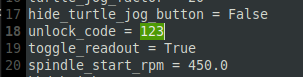
Note, standard unlock code is "123", which is displayed in the tool tip text when the mouse hovers over the settings button so you might want to change it to something else. To do that open the .pref file in the machine config folder and find the line 'unlock_code':


The following user(s) said Thank You: Moutomation

Please Log in or Create an account to join the conversation.
More
2 years 2 months ago #307013 by Moutomation
Thanks a lot, I will try

Please Log in or Create an account to join the conversation.

More
2 years 2 months ago #307055 by Moutomation
I tried it and it was exactly what I wanted. Thanks a lot

Please Log in or Create an account to join the conversation.

Moderators: newbynobi, HansU
Time to create page: 0.255 seconds
Powered by Kunena Forum
