

- Posts: 3
- Thank you received: 0
There's one in every group...
6 years 11 months ago - 6 years 11 months ago #149631
by kopcicle
There's one in every group... was created by kopcicle
...I'm the other one.
Not much of an introduction here other than I'm slowly warping my mind around a steep learning curve.
So far...
I've been using gimp to edit jpeg , export as bmp , inkscape to trace bitmap and save as svg , jscut.org to create toolpath.
Scaling issues doth vex me
The machine is a
SainSmart Genmitsu CNC Router Machine 3018-MX3, with Mach3 Control
www.amazon.com/gp/product/B07Q27RT32/ref...03_s00?ie=UTF8&psc=1
The computer is Release Linux Mint 19 Tara 64-bit Kernel Linux 4.15.0-20-generic x86_64 MATE 1.20.1 Processor: Intel® Xeon(R) CPU 5160 @ 3.00GHz × 4 Memory: 15.7 GiB Several Tb of Raid6 behind it. An old school hotrod.
So far my kludge is working.
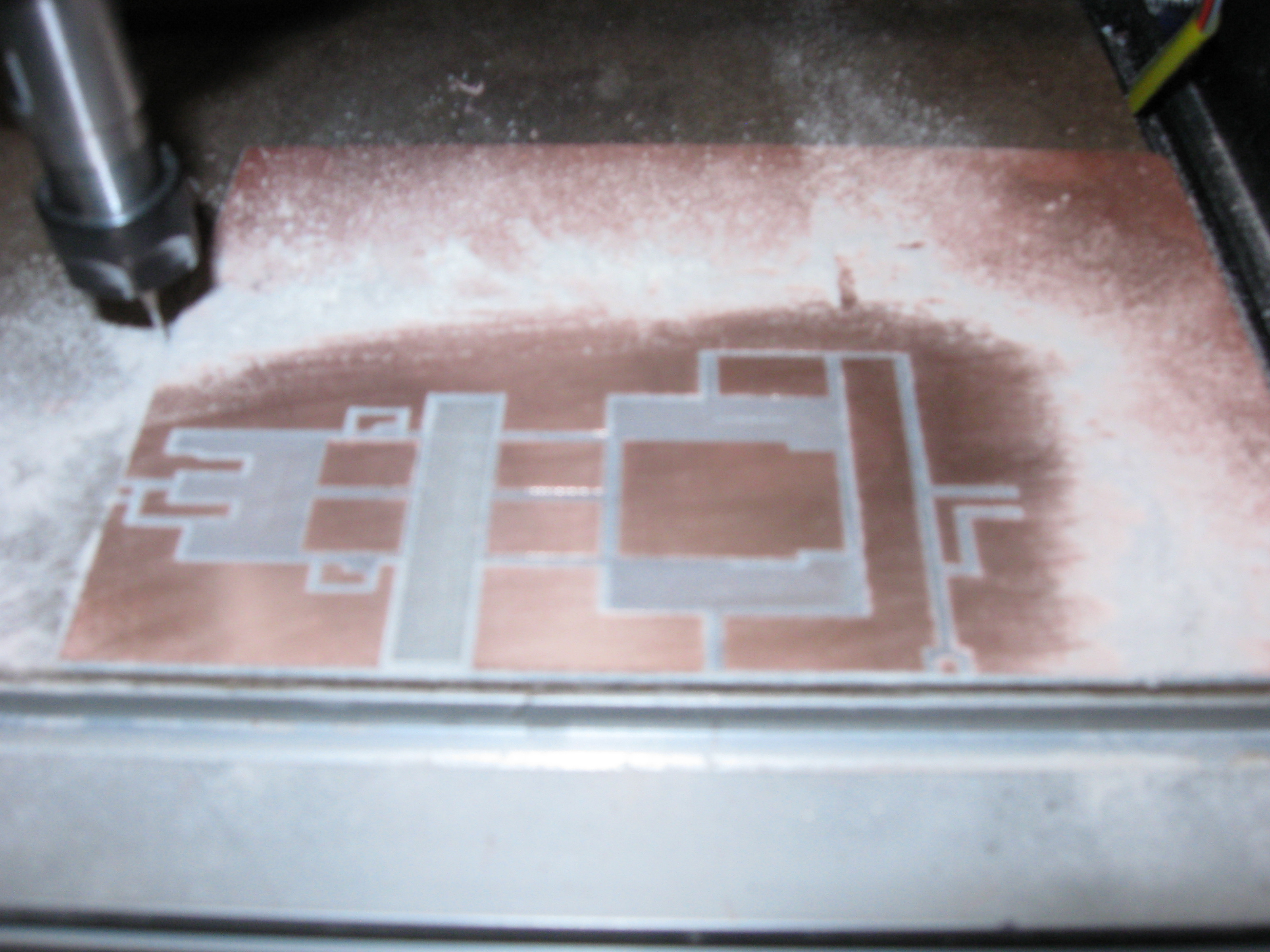
Actual dimensions are approximately 2 inch x 4.45"
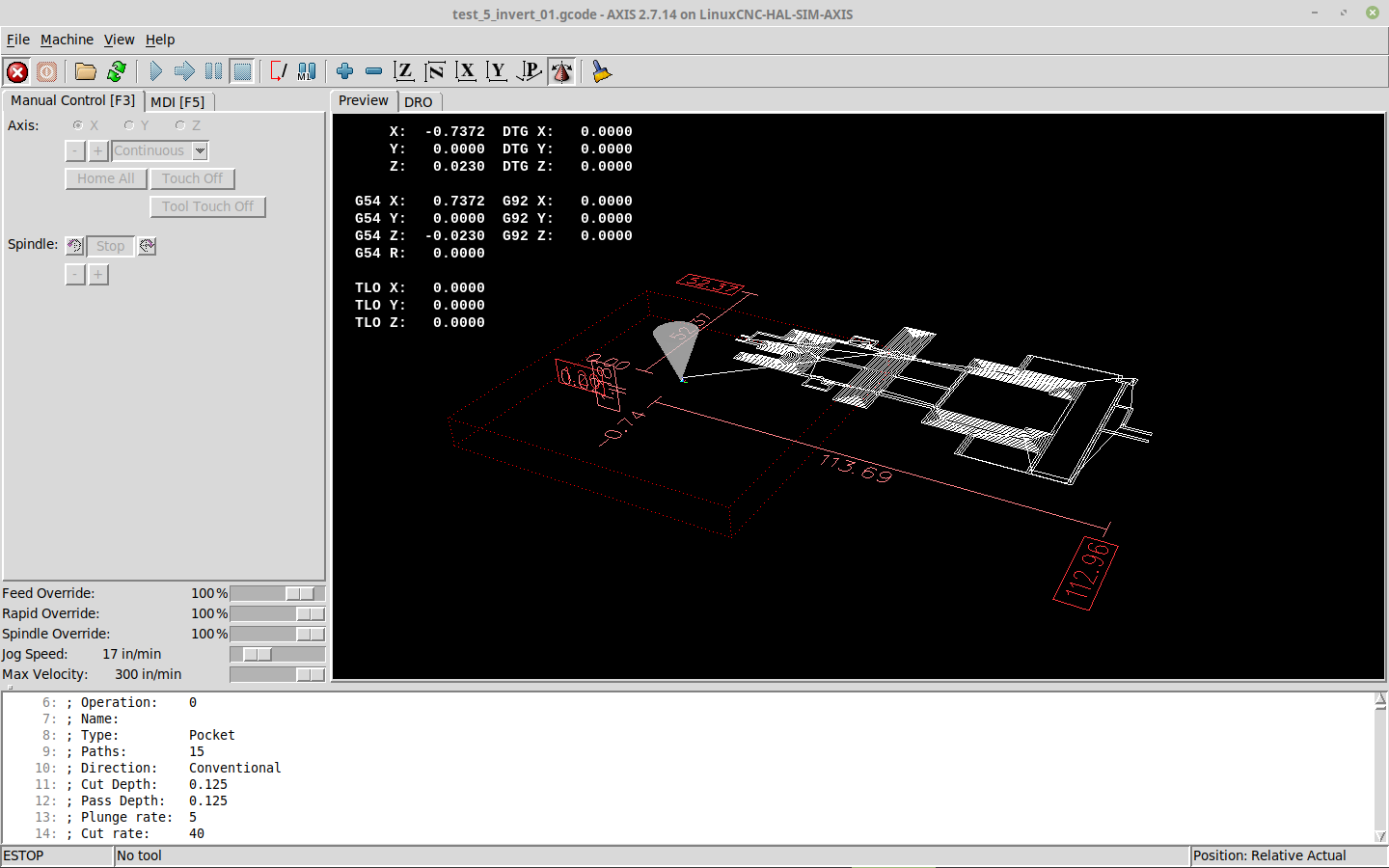
However this is what it looks like in Linuxcnc
Observations: The engraving (aggravating) points supplied were made of kimchi .
Cyful 3.175mm Shank Tungsten Steel Carbide PCB CNC End Mill Engraving Bits Milling Machine 0.8mm Cutting Dia Pack of 10 .
These worked much better
Mach3's demo limitations.
Drufel works but has some annoying omissions. No stop/pause/resume. No ability to start from line xx . The previously mentioned scaling issue. I'm confined to a M$ Win7 CF-30 Toughbook. Nothing against the Toughbook other than it has (:cough:) windows on it.
A levelling method would be helpful. Tremendous understatement.
Did I mention I dislike all things M$ ?
If anyone can make sense of this please respond with anything useful.
Not much of an introduction here other than I'm slowly warping my mind around a steep learning curve.
So far...
I've been using gimp to edit jpeg , export as bmp , inkscape to trace bitmap and save as svg , jscut.org to create toolpath.
Scaling issues doth vex me
The machine is a
SainSmart Genmitsu CNC Router Machine 3018-MX3, with Mach3 Control
www.amazon.com/gp/product/B07Q27RT32/ref...03_s00?ie=UTF8&psc=1
The computer is Release Linux Mint 19 Tara 64-bit Kernel Linux 4.15.0-20-generic x86_64 MATE 1.20.1 Processor: Intel® Xeon(R) CPU 5160 @ 3.00GHz × 4 Memory: 15.7 GiB Several Tb of Raid6 behind it. An old school hotrod.
So far my kludge is working.
Actual dimensions are approximately 2 inch x 4.45"
However this is what it looks like in Linuxcnc
Observations: The engraving (aggravating) points supplied were made of kimchi .
Cyful 3.175mm Shank Tungsten Steel Carbide PCB CNC End Mill Engraving Bits Milling Machine 0.8mm Cutting Dia Pack of 10 .
These worked much better
Mach3's demo limitations.
Drufel works but has some annoying omissions. No stop/pause/resume. No ability to start from line xx . The previously mentioned scaling issue. I'm confined to a M$ Win7 CF-30 Toughbook. Nothing against the Toughbook other than it has (:cough:) windows on it.
A levelling method would be helpful. Tremendous understatement.
Did I mention I dislike all things M$ ?
If anyone can make sense of this please respond with anything useful.
Last edit: 6 years 11 months ago by kopcicle. Reason: dimentia
Please Log in or Create an account to join the conversation.
- Mike_Eitel
- Offline
- Platinum Member
-

Less
More
- Posts: 1018
- Thank you received: 183
6 years 11 months ago #149632
by Mike_Eitel
Replied by Mike_Eitel on topic There's one in every group...
What is your problem?
Please Log in or Create an account to join the conversation.
6 years 11 months ago #149634
by kopcicle
Replied by kopcicle on topic There's one in every group...
I was afraid of that. Sorry I wasn't clear.
I really want to ditch windows. Linux seems to not see the controller correctly or completely
Product: By BlueSkyT
[1041932.787825] usb 5-2: Manufacturer: USB_HID
[1041932.787827] usb 5-2: SerialNumber: 6D7254715456
[1041932.796467] hid-generic 0003:3698:0107.0169: hiddev0,hidraw1: USB HID v1.10 Device [ USB_HID By BlueSkyT] on usb-0000:00:1d.3-2/input0
I have yet to try the live disc but so far it's been a dead end.
Although I have something that works switching between *Nix and M$ is getting old.
I really want to ditch windows. Linux seems to not see the controller correctly or completely
Product: By BlueSkyT
[1041932.787825] usb 5-2: Manufacturer: USB_HID
[1041932.787827] usb 5-2: SerialNumber: 6D7254715456
[1041932.796467] hid-generic 0003:3698:0107.0169: hiddev0,hidraw1: USB HID v1.10 Device [ USB_HID By BlueSkyT] on usb-0000:00:1d.3-2/input0
I have yet to try the live disc but so far it's been a dead end.
Although I have something that works switching between *Nix and M$ is getting old.
Please Log in or Create an account to join the conversation.
- Todd Zuercher
- Offline
- Platinum Member
-
Less
More
- Posts: 4737
- Thank you received: 1480
6 years 11 months ago - 6 years 11 months ago #149635
by Todd Zuercher
Replied by Todd Zuercher on topic There's one in every group...
It looks like your scaling is a simple mm to inches conversion, add a G21 to the beginning of your g-code file so that Linuxcnc will interpret the moves as mm instead of inches.
Inkscape is also capable of generating some G-code on its own. (with the right plug-ins added.)
And another possible option for more complicated for CAD/CAM is Freecad. (but it is more complicated to learn)
Inkscape is also capable of generating some G-code on its own. (with the right plug-ins added.)
And another possible option for more complicated for CAD/CAM is Freecad. (but it is more complicated to learn)
Last edit: 6 years 11 months ago by Todd Zuercher.
The following user(s) said Thank You: kopcicle
Please Log in or Create an account to join the conversation.
- Mike_Eitel
- Offline
- Platinum Member
-
Less
More
- Posts: 1018
- Thank you received: 183
6 years 11 months ago #149637
by Mike_Eitel
Replied by Mike_Eitel on topic There's one in every group...
Sorry, but do you try to connect via USB?
If yes, there is no way to get it working.
You must either go the cheap 'parallel' printer port way...
Or use some more sofisticated ethernet solution.
USB and linuxcnc does not fit.
Mike
If yes, there is no way to get it working.
You must either go the cheap 'parallel' printer port way...
Or use some more sofisticated ethernet solution.
USB and linuxcnc does not fit.
Mike
The following user(s) said Thank You: kopcicle
Please Log in or Create an account to join the conversation.
- Todd Zuercher
- Offline
- Platinum Member
-
Less
More
- Posts: 4737
- Thank you received: 1480
6 years 11 months ago #149638
by Todd Zuercher
Replied by Todd Zuercher on topic There's one in every group...
If your CNC is connecting to your Mach3 computer via a USB port. That will not be an option in Linuxcnc. If the machine does not have a parallel port connection option. and the drivers and everything are integrated onto a single board (like in the Amazon add photo.) you might be out of luck and have to buy new drivers that can be connected to Linuxcnc.
The following user(s) said Thank You: kopcicle
Please Log in or Create an account to join the conversation.
Time to create page: 0.221 seconds