

- Posts: 377
- Thank you received: 0
Downdraft design questions
5 years 10 months ago #193212
by txtrone
Yes, motion is running, I can move the gantry around with the keyboard using Axis gui. I still need to do some fine tuning of course, but all the directions are correct.
I have not wired my proximity sensors yet, the table still has the mechanical home and limit switches on it... and I have not bothered to wire them up since they will be replaced.
All I lack on solenoid wiring is landing on the Mesa card, I will check everything with a meter and then connect one at a time like you suggest. If I can wait on home and limits and keep working on the solenoids AND I can operate the solenoids using Axis gui, then I will get that setup first. That will be a pretty big day for me to see those blast gates in operation!
Replied by txtrone on topic Downdraft design questions
rodw wrote: I think I would get the motion side up and running if you have not already.
Then I would install the ddraft component and connect the outputs to them...
Yes, motion is running, I can move the gantry around with the keyboard using Axis gui. I still need to do some fine tuning of course, but all the directions are correct.
I have not wired my proximity sensors yet, the table still has the mechanical home and limit switches on it... and I have not bothered to wire them up since they will be replaced.
All I lack on solenoid wiring is landing on the Mesa card, I will check everything with a meter and then connect one at a time like you suggest. If I can wait on home and limits and keep working on the solenoids AND I can operate the solenoids using Axis gui, then I will get that setup first. That will be a pretty big day for me to see those blast gates in operation!
Please Log in to join the conversation.
- tommylight
-

- Online
- Administrator
-

Less
More
- Posts: 22010
- Thank you received: 3
5 years 10 months ago #193223
by tommylight
Replied by tommylight on topic Downdraft design questions
The valves are 110V ! 
What current do the valves require ?
What current do the valves require ?
Please Log in to join the conversation.
5 years 10 months ago #193228
by Aciera
Which valves ?
Replied by Aciera on topic Downdraft design questions
The valves are 110V !
Which valves ?
Please Log in to join the conversation.
- tommylight
-
- Online
- Administrator
-
Less
More
- Posts: 22010
- Thank you received: 3
5 years 10 months ago #193229
by tommylight
They are inverted.
Replied by tommylight on topic Downdraft design questions
On the drawings ..Aciera wrote:
The valves are 110V !
Which valves ?
They are inverted.
Please Log in to join the conversation.
5 years 10 months ago #193233
by txtrone
haha ... I missed that on the image I used in the schematic. I will correct it at some point.
The actual valves I am using are 24v and require 0.2A
Replied by txtrone on topic Downdraft design questions
tommylight wrote: The valves are 110V !
What current do the valves require ?
haha ... I missed that on the image I used in the schematic. I will correct it at some point.
The actual valves I am using are 24v and require 0.2A
Attachment not found
Please Log in to join the conversation.
- tommylight
-
- Online
- Administrator
-
Less
More
- Posts: 22010
- Thank you received: 3
5 years 10 months ago #193234
by tommylight
Replied by tommylight on topic Downdraft design questions
That should do just fine.
Please Log in to join the conversation.
- thefabricator03
- New Member
-

Less
More
- Thank you received: 0
5 years 10 months ago #193251
by thefabricator03
Replied by thefabricator03 on topic Downdraft design questions
What program do you use to do your schematic drawings?
Please Log in to join the conversation.
5 years 10 months ago #193314
by txtrone
DIYLC - Do It Yourself Layout Creator ... several people on a tube amp forum were using it and I find it pretty easy to work with for freeware.
bancika.github.io/diy-layout-creator/
diy-fever.com/software/diylc/
Replied by txtrone on topic Downdraft design questions
thefabricator03 wrote: What program do you use to do your schematic drawings?
DIYLC - Do It Yourself Layout Creator ... several people on a tube amp forum were using it and I find it pretty easy to work with for freeware.
bancika.github.io/diy-layout-creator/
diy-fever.com/software/diylc/
Please Log in to join the conversation.
5 years 10 months ago #193324
by txtrone
Replied by txtrone on topic Downdraft design questions
Where does this code go? Also, are these two lines of code specific to one zone? ie: will I need eight sections like this, one for each zone?rodw wrote: I generally would do it like this:
Code:net zone0 <= ddraft4x2.0.trigger-0 net zone0 => hm2_7i76e.0.7i76.0.0.output-00
Code:
net zone0 <=ddraft4x2.0.trigger-0
net zone0 => hm2_7i76e.0.7i76.0.0.output-00
I am sure this will make more sense the once I grasp the first part.rodw wrote: So if you wish to change the zone boundaries you can edit ddraft4x2.hal file to change them
Please Log in to join the conversation.
5 years 10 months ago #193332
by rodw
Replied by rodw on topic Downdraft design questions
Yes, you need 8 pins like that using the pin names from the component, like I created. zone0,zone1, .... zone7
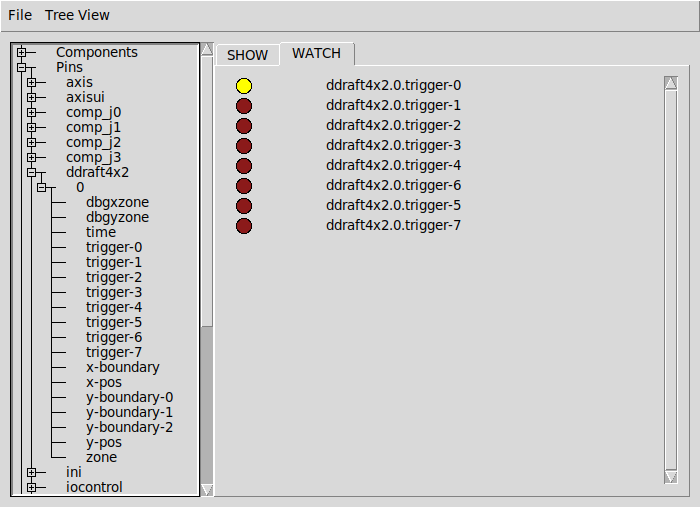
Some people will connect pins using one line but I always like to do it on two lines.
The first line creates a signal. Eg solders a wire to the downdraft output pin if it were hardware.
The second line connects the other end of the wire to something. In this case a 7i76e output pin.
You have to decide which hardware pins you are using.
Some people will connect pins using one line but I always like to do it on two lines.
The first line creates a signal. Eg solders a wire to the downdraft output pin if it were hardware.
The second line connects the other end of the wire to something. In this case a 7i76e output pin.
You have to decide which hardware pins you are using.
Please Log in to join the conversation.
Time to create page: 0.183 seconds