
- Posts: 299
- Thank you received: 57
Themes
- tuxcnc
- Topic Author
- Offline
- Elite Member
-

Less
More
2 weeks 2 days ago - 2 weeks 2 days ago #350311
by tuxcnc
Themes was created by tuxcnc
First of all, I would like to remind you about something that is obvious and should not be discussed.
A CNC machine is not a toy. Even a small desktop milling machine can destroy valuable material or injure the operator. Therefore, all important controls should be clearly visible and easy to find and use, even when the operator is surprised, tired or nervous. Aesthetic preferences are always secondary.
Now to the point.
I have never been interested in the appearance of the interfaces I used (previously Axis, now Gmoccapy). I assumed that if the author liked it and I can use it, there are more important matters. (That's why I don't know many things and I will probably try to force open doors...)
But today a serious problem arose and I had to look into it
Well, I started configuring the milling machine with xyzab_tdr_kins kinematics (five-axis with switchable mode).
And I see something like this:

This is the code M428, not M4 28 (!!!)
I started searching and found nothing. As if the authors wanted to keep it a secret... But after some time I came to some conclusions.
The default Gmoccapy setting looks like this:
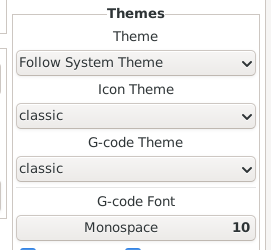
And it works like this:
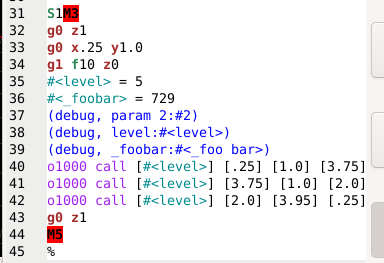
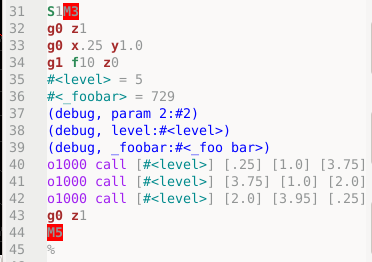
The second image is in program execution mode. Why the hell do the parameters change from black to gray, I'll probably never know, I assume the "artist" who came up with it liked it so much...
I haven't found the file responsible for this display parameters anywhere, I must have been looking in the wrong place or wrong name, but I shouldn't be looking for it at all, because it should be in the documentation.
I found the gcode.lang file, which is probably the only one existing in LinuxCNC sources. If this is indeed the case, it is also the only file on which the authors of LinuxCNC as the only ones have influence and no one will mess anything up without their consent and knowledge. And if this is the case, why is the default g-code theme set to "classic" and not "gcode"?
As for the gcode.lang file, it is far from perfect, but it is there, so it can be improved. First of all, the user can map any g- or m-code using REMAP in the ini file and this must be kept in mind when creating matching patterns.
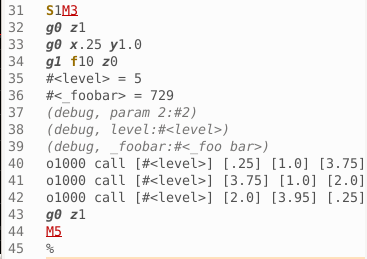
My suggestion is to work on the gcode.lang file and set it as the default one.
A CNC machine is not a toy. Even a small desktop milling machine can destroy valuable material or injure the operator. Therefore, all important controls should be clearly visible and easy to find and use, even when the operator is surprised, tired or nervous. Aesthetic preferences are always secondary.
Now to the point.
I have never been interested in the appearance of the interfaces I used (previously Axis, now Gmoccapy). I assumed that if the author liked it and I can use it, there are more important matters. (That's why I don't know many things and I will probably try to force open doors...)
But today a serious problem arose and I had to look into it
Well, I started configuring the milling machine with xyzab_tdr_kins kinematics (five-axis with switchable mode).
And I see something like this:
This is the code M428, not M4 28 (!!!)
I started searching and found nothing. As if the authors wanted to keep it a secret... But after some time I came to some conclusions.
The default Gmoccapy setting looks like this:
And it works like this:
The second image is in program execution mode. Why the hell do the parameters change from black to gray, I'll probably never know, I assume the "artist" who came up with it liked it so much...
I haven't found the file responsible for this display parameters anywhere, I must have been looking in the wrong place or wrong name, but I shouldn't be looking for it at all, because it should be in the documentation.
I found the gcode.lang file, which is probably the only one existing in LinuxCNC sources. If this is indeed the case, it is also the only file on which the authors of LinuxCNC as the only ones have influence and no one will mess anything up without their consent and knowledge. And if this is the case, why is the default g-code theme set to "classic" and not "gcode"?
As for the gcode.lang file, it is far from perfect, but it is there, so it can be improved. First of all, the user can map any g- or m-code using REMAP in the ini file and this must be kept in mind when creating matching patterns.
My suggestion is to work on the gcode.lang file and set it as the default one.
Last edit: 2 weeks 2 days ago by tuxcnc. Reason: typos
Please Log in or Create an account to join the conversation.
- tuxcnc
- Topic Author
- Offline
- Elite Member
-
Less
More
- Posts: 299
- Thank you received: 57
2 weeks 2 days ago #350312
by tuxcnc
Replied by tuxcnc on topic Themes
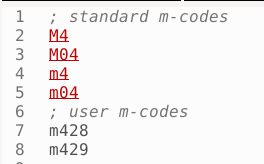
For example
instead of
More work, but better results
Code:
<context id="spindle-control" style-ref="spindle-control">
<keyword>M[345]{1}</keyword>
<keyword>M0[345]{1}</keyword>
<keyword>G9[67]</keyword>
Code:
<context id="spindle-control" style-ref="spindle-control">
<match>M0?[345]|G9[67]</match>
The following user(s) said Thank You: Surmetall
Please Log in or Create an account to join the conversation.
- HansU
- Offline
- Moderator
-

Less
More
- Posts: 731
- Thank you received: 217
1 week 6 days ago #350375
by HansU

What of the classic G-code theme do you dislike in detail?
Replied by HansU on topic Themes
I wouldn't call an incorrect syntax highlighting a serious problemBut today a serious problem arose and I had to look into it
It's because editing is disabled while the program is running.The second image is in program execution mode. Why the hell do the parameters change from black to gray,
And if this is the case, why is the default g-code theme set to "classic" and not "gcode"?
What of the classic G-code theme do you dislike in detail?
Please Log in or Create an account to join the conversation.
Moderators: newbynobi, HansU
Time to create page: 0.137 seconds