Manual Tool Change - Getting Somewhere at Last

More
5 years 2 months ago #217597 by tommylight
Replied by tommylight on topic Manual Tool Change
Image size is 1.6MB, but i am pretty sure that if something is wrong with the image ( say a virus attached to it) it will not work.
Try using a Linux PC, if it also does not work, there might be an issue with the router/firewall not allowing connections to certain ports.

Please Log in or Create an account to join the conversation.

More
5 years 2 months ago #217609 by rafferty
Replied by rafferty on topic Manual Tool Change
Same message when running on a Linux machine, normally use Mac OSX.

But by changing the extension from jpg to txt I can attach it.

Please Log in or Create an account to join the conversation.

More
5 years 2 months ago - 5 years 2 months ago #217624 by footpetaljones
Replied by footpetaljones on topic Manual Tool Change
Without a tool changer Pathpilot will stop at an M6 to ask you to change the tool. G37 will touch off the tool length on a tool setter.

It doesn't sound like you need to change anything.

Be careful assuming that Pathpilot is just the UI, there looks like there's a lot of things tweaked for whatever Tormach uses them for that you wouldn't expect.
Last edit: 5 years 2 months ago by footpetaljones.

Please Log in or Create an account to join the conversation.

More
5 years 2 months ago - 5 years 2 months ago #217641 by rafferty
Replied by rafferty on topic Manual Tool Change
Yes, spot on. Found in most recent reading, PathPilot added G37 and G37.1 in Version 2.4.0, no mention of it in the user manual I have.

After setting up Electronic Tool Setter position in the UI just need to add G37 after a M6 Tn in the code file and it should all happen.

Will check it out.

Underneath the shiny exterior it's LinuxCNC all the way. I've used PathPilot for about six years and not been bitten by anything unexpected. Always wise to proceed with caution though. I can be proven wrong on the next push of the GO button. 

 
Last edit: 5 years 2 months ago by rafferty.

Please Log in or Create an account to join the conversation.

More
5 years 2 months ago #219048 by rafferty
After a couple of days of frustration, a result of combining my old way of working coupled with how I thought it should work, I finally got somewhere today.

Just using MDI commands at the moment but I can successfully change tools and have the tips contact the workpiece at Z zero. No programmed tool changes as yet.

There is one problem remaining I don't understand.

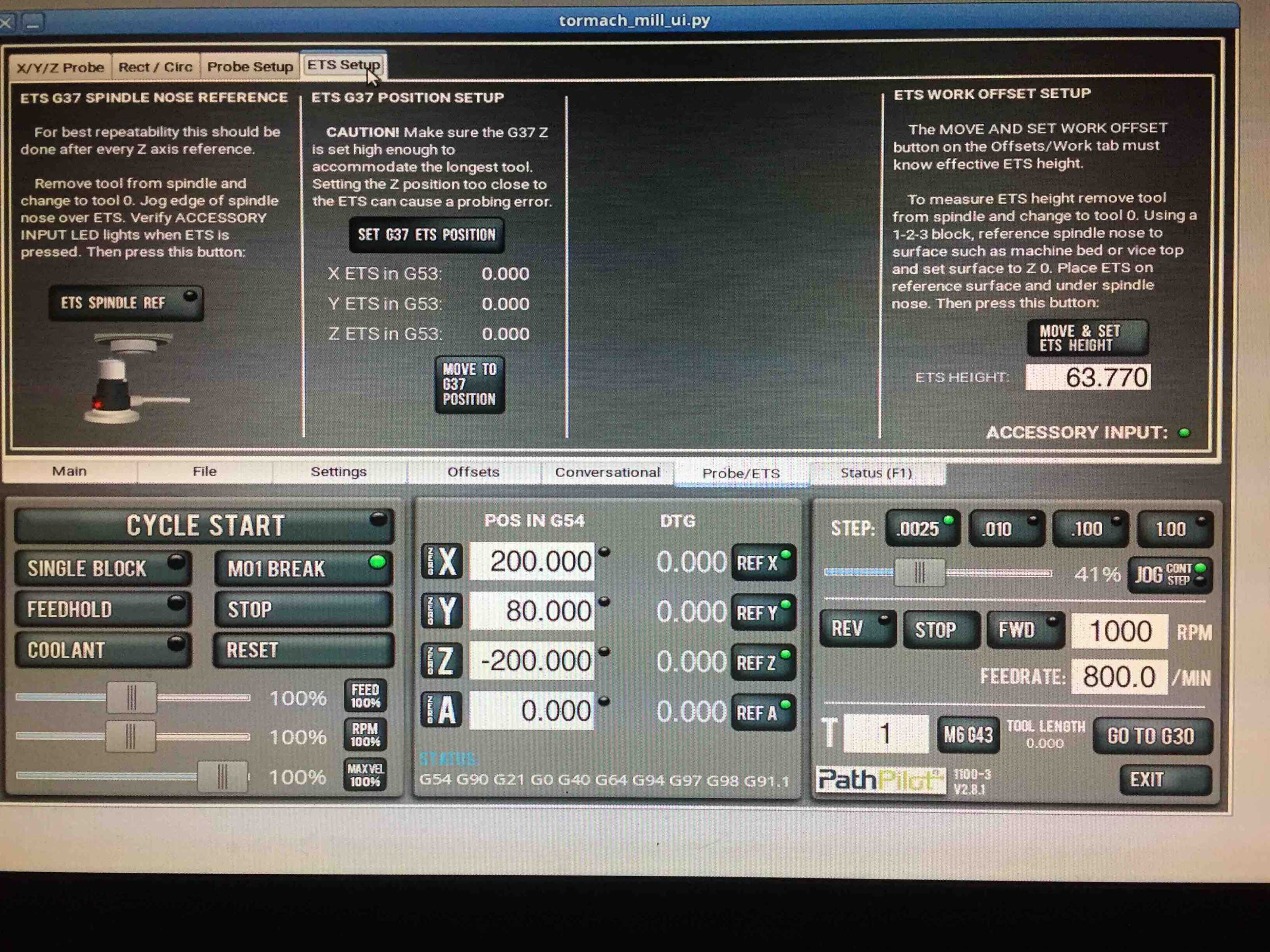
I have the tool setter on the right end of the table in a marked position, I use the "SET G37 ETS POSITION" button  to register the tool change position and  the XYZ values are set appropriately, see the posted image.  Initially I can move off this position and reliably return to it with the "MOVE TO G37 POSITION" button.

First tool change works, tool comes down on the ETS centre, all fine but the next tool change comes down about 10 mm to the left and I quickly move the ETS to match. On every subsequent tool change there is another 10mm error, the error accumulates. The ETS XYZ position numbers don't change but the "MOVE TO G37 POSITION" button goes to this new, incorrect position.

What's even stranger is when jogging the X axis I hit the MAX soft limit too early, or crash through the MIN LIMIT and hit the end stop as if something is changing the homed G53 values.

I've looked through the g370 and g371 remapped (new) o-codes that do the work and can't see anything obviously amiss.

Am I missing something basic here? Any hints as to what's is happening?

Ken.

 

Please Log in or Create an account to join the conversation.

More
5 years 1 month ago #219569 by rafferty
Not getting very far sorting this out.

Tried going back to inch mode, there's a lot of "if it's G21 multiply by 25.4" in the Tormach python. That didn't fix it.

The error is proportional to the distance X and Y have to move to get to the tool measuring position. The error is not small, if the table has to move 350mm the error is about 60mm. Affects both X and Y, and maybe Z.

The displayed X and Y DRO values say the table is at the right place but it's not. Doing G53 G0 X 0.0 hits the home switch and estops.

 It looks like something is breaking the relationship between the G53 machine co-ords and the physical table position.

How is this possible? Is there any way a bit of python or g code subroutine can do this?
  

Please Log in or Create an account to join the conversation.

Time to create page: 0.328 seconds
Powered by Kunena Forum