GUI Modification Code Snippets / Toolbox

More
3 years 5 months ago #271406 by Vmax549
For anyone interested in trying Wizards in PP here is the scripts to crate a Wizards Menu in the MDI Admin function.


##### Add to end of Admincmd ***********************


class WizardMenuCmd(AdminCmd):
def __init__(self, name, doc, uibase):
super(WizardMenuCmd, self).__init__(name, doc)
self.uibase = uibase
self._help = 'Load PathPilot Wizards.'


def activate(self, arglist):
# arglist is remaining args in case we need our own parser for that.
self.uibase._run_mdi_admin_program()


##### End of Add to AdminCMD **************************************************

##### Add The file Wizard_Menu.py to the TMC scripts folder *******************************

#!/usr/bin/env python
# coding=utf-8
#
import os
from Tkinter import *
import tkFileDialog
from tkFileDialog import askopenfilename

path = "/home/operator/gcode/wizards"

filename = tkFileDialog.askopenfilename(initialdir = ""+path,
title = "Select a Wizard File",
filetypes = (("Wizard Files","*.ppw*"),("All Files","*.py")))

os.chdir("/home/operator/gcode/wizards/")
os.system(""+filename )


##### End of add to file folder **************************************************

Please Log in or Create an account to join the conversation.
More
3 years 4 months ago - 3 years 4 months ago #272995 by gerritv
For the Wizard Menu, you also need to add:

admincmd.WizardMenuCmd(name='WIZARD_MENU', doc=True, uibase=self)
to the end of init_admin_commands in ui_common.py (around line 3896 in V2.9.4)

And the line self.uibase._run_mdi_admin_program()'
needs to read self.uibase._run_mdi_admin_program() as well as setting the Execute flag on Wizard_Menu.py

Last, any script you intend to run must have #!/usr/bin/env python at top of file. the wizrds on github won't run unless you make this change.
Thank you vmax549 for making this happen, it is very useful.
Gerrit

 
Last edit: 3 years 4 months ago by gerritv.

Please Log in or Create an account to join the conversation.

More
3 years 3 months ago #275748 by Whitebarn
Hi, where do you enter this information? Great work by the way! I've been looking for this info for a while!

Please Log in or Create an account to join the conversation.

More
3 years 3 months ago #275775 by gerritv

Please Log in or Create an account to join the conversation.

More
2 years 11 months ago - 2 years 11 months ago #284304 by Andyf97
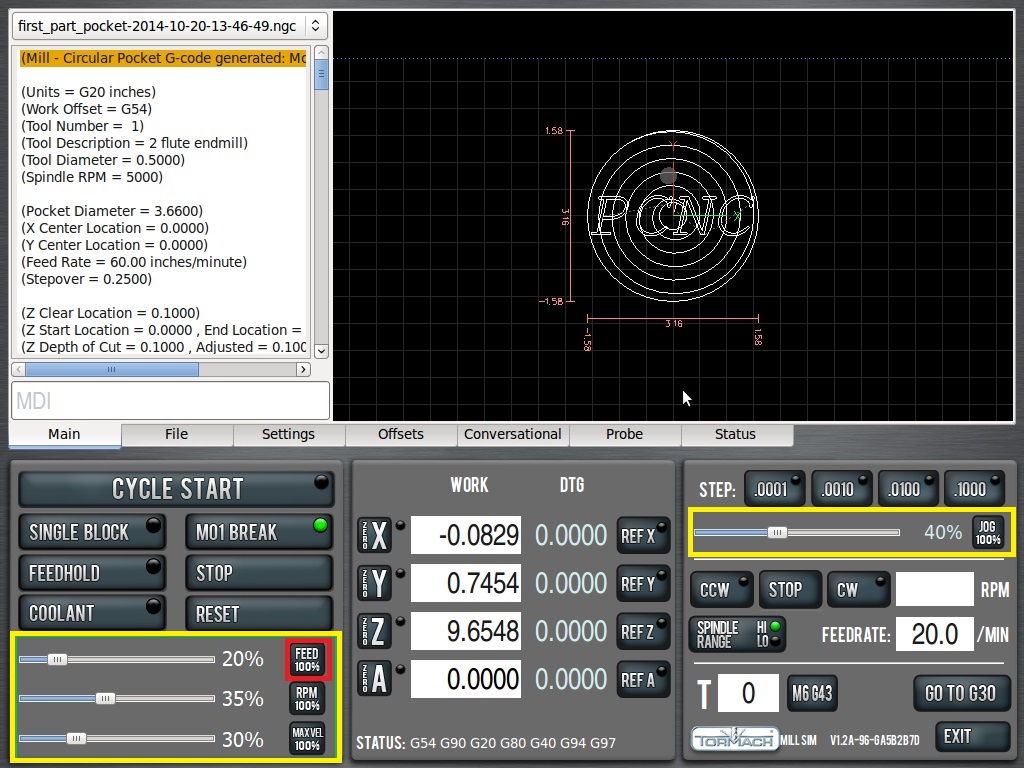
Three really useful tweaks for Pathpilot, anyone know how to do it?

You see in the attachment, faders highlighted in Yellow.

Some way to set them to 100% on the speeds and 1% jog whenever I am running a tapping job with some Gcode or system command.

Also another, if using the electronic edge finder in pathpilot, the feedrate is taken according to the last operation that took place.

Some way to set the feedrate whenever a "find edge button" is pressed. So that it is always the same regardless of other factors/settings..

Also, to stop the screen jumping to the error screen whenever an error happens.


Last edit: 2 years 11 months ago by Andyf97.

Please Log in or Create an account to join the conversation.

More
2 years 11 months ago - 2 years 11 months ago #285868 by Dorro1971
Hi all,

here's my contribution to the hotkey if it helps anyone out there.....

Code:
#Key a sets a feedrate override of 10%             if kv == gtk.keysyms.a:                 self.sliders['feedrate'].set_slider_value(10)                 return True #Key a sets a spindlee override of 10%             if kv == gtk.keysyms.a:                 self.sliders['spindle'].set_slider_value(10)                 return True #Key a sets a maxvel of 10%             if kv == gtk.keysyms.a:                 self.sliders['maxvel'].set_slider_value(10)                 return True #Key a sets a jog speed of 10%             if kv == gtk.keysyms.a:                 self.sliders['jog_speed'].adjustment.set_value(10)                 return True I hope someone finds this useful.. cheers , Ian  
Last edit: 2 years 11 months ago by Dorro1971. Reason: Can't see square brackets!
The following user(s) said Thank You: gerritv, tommylight

Please Log in or Create an account to join the conversation.

Time to create page: 0.450 seconds
Powered by Kunena Forum
