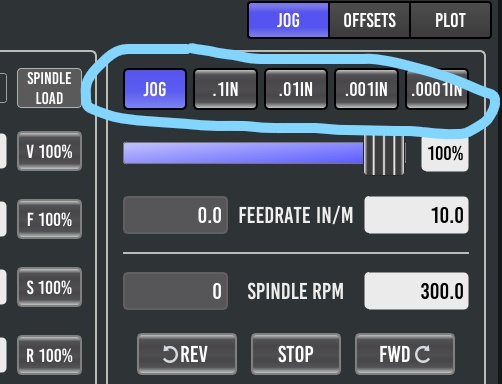
increment 4 MPG jog wheels with Basic Probe

More
1 year 2 weeks ago #336361 by laurentl38
Hello,

I'm using 4 MPG jog wheels. I don't have a physical button to change the increment.
With Axis, there's a HAL pin to get the GUI information about the jog increment.
Now, I'm transferring the configuration to Basic Probe, but I can't find the information about the increment selected in the GUI (pictured).

Is there a simple way to get the information about the increment selected in the GUI?
 

Regards

Please Log in or Create an account to join the conversation.

More
1 year 2 weeks ago #336543 by andypugh
This has been asked before on here (but don't bother looking, there was no helpful answer).

If you load the system then open a terminal and type "halcmd show pin" you will get a list of all the HAL pins. You would then need to search that list to see if any pins are of the OUTPUT type and look to be increment-related.

From a brief scan of the source code,I don't see anything, but I am not clear how QtPyVCP creates HAL pins (if it does)

Please Log in or Create an account to join the conversation.

More
1 year 2 weeks ago #336546 by laurentl38
I've already looked through the list, but I didn't find anything conclusive.
It was just in case there was something I'd missed or done wrong.
So your comment supports my analysis, but not really the right one for me. I'll have to find another solution...

Please Log in or Create an account to join the conversation.

More
1 year 2 weeks ago #336549 by andypugh
Probe Basic is written in Python, you could modify it.

Please Log in or Create an account to join the conversation.

More
1 year 2 weeks ago #336550 by laurentl38
Yes, that's a solution. I'll think about it, if I start modifying the code (I'm not very good at programming) or if I find a solution to add additional control switches (from my window, this solution seems the easiest to me)

Please Log in or Create an account to join the conversation.

More
1 year 2 weeks ago #336596 by Lcvette
the stock increment selector is a qtpyvcp linuxcnc widget. for what you are doing you might could use the user sidebar tab and make an exclusive button group using hal buttons tied to increment settings. just setup the pinBaseName for your hal pins in designer. that would allow for updating with out overwriting your changes with the stock widget.

The main issue with the on screen increment widget is how to keep it and a physical rotary switch synchronized, you could have the rotary knob sync the buttons but not the other way. you would use momentary push buttons, that would work bidirectionally as there would not be a static set switch. you could also have outputs to illuminate the momentary buttons for which increment was selected if you have enough IO. but there were so many scenarios to contend with that we ultimately decide to just leave the increment settings connected solely to the on screen jog buttons.

Please Log in or Create an account to join the conversation.

Moderators: KCJ, Lcvette
Time to create page: 0.536 seconds
Powered by Kunena Forum