
Search Results (Searched for: )
- Finngineering
15 Feb 2026 17:50
Replied by Finngineering on topic XHC WHB04B development?
I had/have very similar issues as you mention earlier today Hakan. The after the pendant disconnected once, it kept doing so every 20 s or so, just like for you. And you see the LIBUSB_ERROR_NO_DEVICE because the dongle has disconnected. However, if you again start LinuxCNC (maybe need to try a couple of times to get the timing right), the pendant will resume working just fine and the disconnects stop for the time being.
As I have said, I believe the reason for the disconnects is that the dongle is unhappy with the current situation and resets itself. And "unhappy with the current situation" is most likely because the host has not been polling its interrupt endpoint for some time (maybe half a second or so).
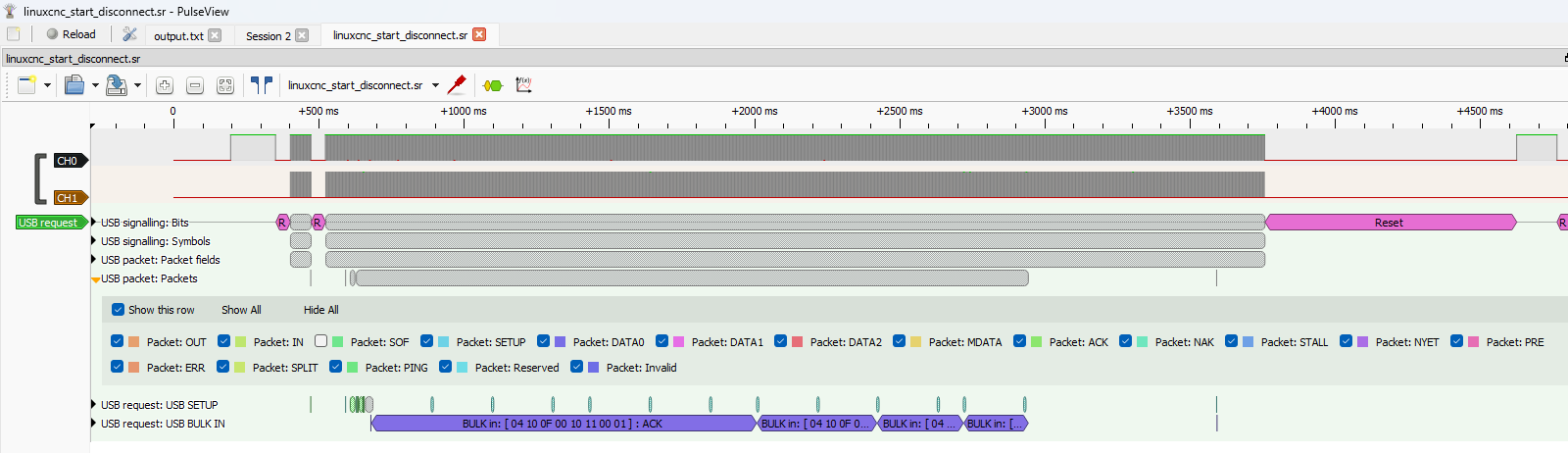
I attach here a logic analyser screenshot, capture file as well as wireshark capture from a "forced" disconnect event. For this capture, I had the dongle disconnected, LinuxCNC (sim) running a program and in the background waiting for the pendant. I then started all captures, connected the pendant, pressed the Step button (and maybe some others) on the pendant and jogged the wheel. This caused the Usb::setupAsyncTransfer assert failed.
In the screenshot you can see that from approximately 2950 ms (corresponding to wheel jogging), there are no packets until ~3600 ms (except for SOF, which I have turned off on purpose). And at 3750 ms, there is a reset on the USB bus, corresponding to the dongle "disconnecting" and the assert failed. This reset is as far as I'm concerned generated by the dongle itself, because it was unhappy with the conditions.
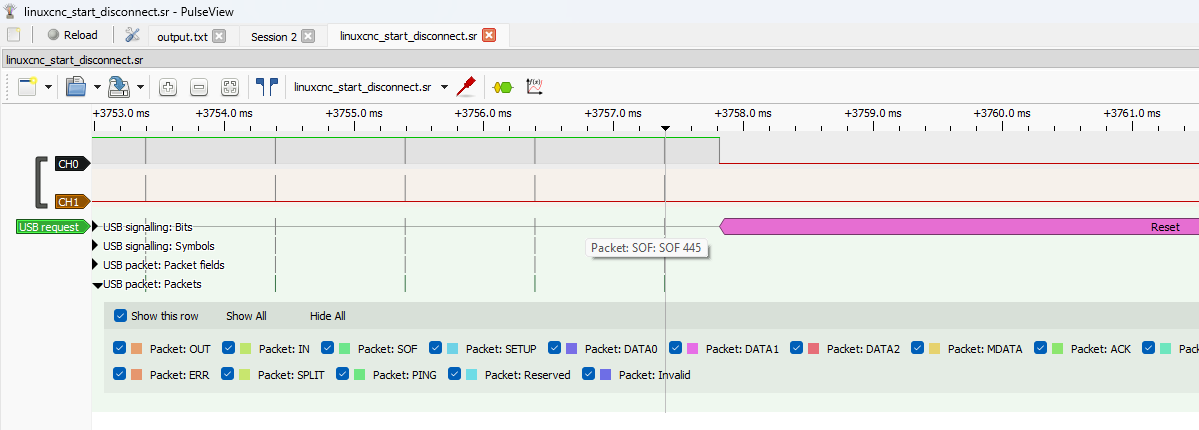
If I zoom in a little bit on the disconnect/reset event, that becomes more clear. Here I have turned the SOF packets back on, and we see that they are sent every 1 ms as expected. And then suddenly the D+ signal drops to zero, indicating a bus reset (either from the device or the host). And I see no reason why the host should generate a reset in this situation, so I say its generated by the dongle. This is consistent with repeated disconnects every 20 s already discussed.
The .sr file can be opened with PulseView and the .pcapng with Wireshark, in case anybody wants to have a look.
At least for me the pendant is anything but solid. And I do think the dongle firmware is mainly to blame. That being said, it could very well be that different drivers/hardware could mask some of the issues I experience. If only I knew what causes (all) the disconnects, I'm sure we could figure out some ways to fix it.
As I have said, I believe the reason for the disconnects is that the dongle is unhappy with the current situation and resets itself. And "unhappy with the current situation" is most likely because the host has not been polling its interrupt endpoint for some time (maybe half a second or so).
I attach here a logic analyser screenshot, capture file as well as wireshark capture from a "forced" disconnect event. For this capture, I had the dongle disconnected, LinuxCNC (sim) running a program and in the background waiting for the pendant. I then started all captures, connected the pendant, pressed the Step button (and maybe some others) on the pendant and jogged the wheel. This caused the Usb::setupAsyncTransfer assert failed.
In the screenshot you can see that from approximately 2950 ms (corresponding to wheel jogging), there are no packets until ~3600 ms (except for SOF, which I have turned off on purpose). And at 3750 ms, there is a reset on the USB bus, corresponding to the dongle "disconnecting" and the assert failed. This reset is as far as I'm concerned generated by the dongle itself, because it was unhappy with the conditions.
If I zoom in a little bit on the disconnect/reset event, that becomes more clear. Here I have turned the SOF packets back on, and we see that they are sent every 1 ms as expected. And then suddenly the D+ signal drops to zero, indicating a bus reset (either from the device or the host). And I see no reason why the host should generate a reset in this situation, so I say its generated by the dongle. This is consistent with repeated disconnects every 20 s already discussed.
The .sr file can be opened with PulseView and the .pcapng with Wireshark, in case anybody wants to have a look.
At least for me the pendant is anything but solid. And I do think the dongle firmware is mainly to blame. That being said, it could very well be that different drivers/hardware could mask some of the issues I experience. If only I knew what causes (all) the disconnects, I'm sure we could figure out some ways to fix it.
- rockabye74
15 Feb 2026 17:17
Firmware Request 6i25 + 7i77 + 7i89 was created by rockabye74
Hi, I will be retrofitting two Prototrak machines (TRL1440 LX2 Lathe, DPM5 SMX Mill) that use the Servos, Glass Scale Encoders, and Digital Handwheels with Disk Encoders and am thinking that I will require the 7i77 and 7i89 to process the Servo and Encoder Breakouts. I currently have a 6i25 from a previous build, hence the desire for the 6i25 + 7i77 + 7i89 firmware build.
Thank you so much!
Mike
Thank you so much!
Mike
- MRx
15 Feb 2026 17:15
Replied by MRx on topic XHC WHB04B development?
Under normal operation there's no disconnect of the XHC pendant. It's solid. If you power it off it will disconnect.
I heard from others that they had EMI problems with USB and the XHC pendant in the past, I'm going to operate it with a large CNC in the near future so I will see if it will hit me too.
I think you have to fix a problem on the USB layer, maybe use another system which has a native USB 2.0/ehci port. The XHCI USB ports can cause issues depending on the hardware.
By the way you can easily convert an WHB04B to 6 axis by removing a stopper with a knife which is inside the rotary switch. 6 axis are wired up even on the 4 axis versions.
I heard from others that they had EMI problems with USB and the XHC pendant in the past, I'm going to operate it with a large CNC in the near future so I will see if it will hit me too.
I think you have to fix a problem on the USB layer, maybe use another system which has a native USB 2.0/ehci port. The XHCI USB ports can cause issues depending on the hardware.
By the way you can easily convert an WHB04B to 6 axis by removing a stopper with a knife which is inside the rotary switch. 6 axis are wired up even on the 4 axis versions.
- andrax
15 Feb 2026 16:51
Replied by andrax on topic Technical questions about CIA402 and homecomp.comp on A6
I have an idea.
rodw: Can you make the bits from 0x6041 available as pins?
Then we can observe the bits during the home run.
If we know which bit is set when, the state machine could be set up accordingly.
But maybe we're overcomplicating things.
I took a look this afternoon and looked at various CIA drives. 0x6040 and 0x6041 are standardized. All CIA402-compatible drives use the same bits.
See here:
Bosh Rexroth CIA Status word
That means all we really need to do is find a suitable SCL code from Beckhoff or Siemens and rewrite it for Linuxcnc. For example, this one:
rodw: Can you make the bits from 0x6041 available as pins?
Then we can observe the bits during the home run.
If we know which bit is set when, the state machine could be set up accordingly.
But maybe we're overcomplicating things.
I took a look this afternoon and looked at various CIA drives. 0x6040 and 0x6041 are standardized. All CIA402-compatible drives use the same bits.
See here:
Bosh Rexroth CIA Status word
That means all we really need to do is find a suitable SCL code from Beckhoff or Siemens and rewrite it for Linuxcnc. For example, this one:
Code:
VAR
// PDO mapping inputs (from the drive)
wStatusword : WORD; // 0x6041
iActualMode : SINT; // 0x6060
// PDO mapping outputs (to the PLC)
wControlword : WORD; // 0x6040
iModeOfOp : SINT; // 0x6060
// Control / Monitoring
bStartHoming : BOOL; // Trigger
bHomingActive: BOOL; // Status
bHomed : BOOL; // Target reached
bError : BOOL; // Monitoring: Error
iState : INT := 0; // Step chain
// Monitoring: Timer
fbTimeout : TON;
END_VAR
// --- Read status bits from status word (0x6041) ---
// Bit 12: Homing process running / successful (depending on method)
// Bit 13: Homing error
// Bit 10: Target reached (often used during homing)
bHomingActive := (wStatusword.12); // Homing operation in progress
bHomed := (wStatusword.12) AND (wStatusword.10);
bError := (wStatusword.13); // Homing error
// --- Monitoring (timeout) ---
fbTimeout(IN := bHomingActive AND NOT bHomed, PT := T#10S);
// --- State machine for homing (CiA 402) ---
CASE iState OF
0: // Wait for start
IF bStartHoming AND NOT bError THEN
bStartHoming := FALSE;
iState := 10;
END_IF;
10: // Set mode of operation to “Homing” (6)
iModeOfOp := 6;
IF iActualMode = 6 THEN
iState := 20;
END_IF;
20: // Set drive to “Operation Enabled” (standard CiA402 state machine)
// Simple example: Set control word to 0x0F (Enable)
wControlword := 16#000F;
IF (wStatusword AND 16#006F) = 16#0027 THEN // Ready to operate
iState := 30;
END_IF;
30: // Start homing: Set bit 4 in control word (start homing procedure)
wControlword := 16#001F; // Bit 4 high, enable op
IF bHomingActive THEN
iState := 40;
END_IF;
IF fbTimeout.Q OR bError THEN iState := 999; END_IF; // Monitoring
40: // Wait for completion
IF bHomed THEN
wControlword := 16#000F; // Reset homing start bit
iState := 0;
END_IF;
IF fbTimeout.Q OR bError THEN iState := 999; END_IF; // Monitoring
999: // Error state
// Error handling: Cancel homing, set message
wControlword := 16#000F; // Stop
bError := TRUE;
IF NOT bStartHoming THEN iState := 0; bError := FALSE; END_IF;
END_CASE;
- Hakan
15 Feb 2026 16:48 - 15 Feb 2026 16:50
Replied by Hakan on topic XHC WHB04B development?
Had a session with a lot of mode shifts, auto programs, manual and mdi and not being careful when mode shifting.
Worked great, it felt like there was no problem with the xhc.
I had checked autosuspend which was set to 2. Set it to -1 and the disconnect/connects in syslog stopped.
Finished after a few hours. Checked syslog and now the xhc is just laying there doing nothing on the milling machine.
The faint light is on, that's all. And the syslog fills with new disconnect/connects. Every 10-20 seconds it happens.
autosuspend was already set to -1.
Went to the milling machine and turned off the pendant. New disconnects/connects stopped coming in syslog.
Didn't touch the usb dongle during the whole day. The pendant causes the disconnects? When idle?
Worked great, it felt like there was no problem with the xhc.
I had checked autosuspend which was set to 2. Set it to -1 and the disconnect/connects in syslog stopped.
Finished after a few hours. Checked syslog and now the xhc is just laying there doing nothing on the milling machine.
The faint light is on, that's all. And the syslog fills with new disconnect/connects. Every 10-20 seconds it happens.
autosuspend was already set to -1.
Went to the milling machine and turned off the pendant. New disconnects/connects stopped coming in syslog.
Didn't touch the usb dongle during the whole day. The pendant causes the disconnects? When idle?
- PCW
15 Feb 2026 16:30
Replied by PCW on topic Integrating a BCL-AMP capacitive sensor to LinuxCNC
That entirely depends on your scaling.
On way to check is to monitor the "plasma_voltage"
and determine the threshold for the fake Ohmic sense point.
On way to check is to monitor the "plasma_voltage"
and determine the threshold for the fake Ohmic sense point.
- Nathan40
15 Feb 2026 15:56
Replied by Nathan40 on topic Integrating a BCL-AMP capacitive sensor to LinuxCNC
Thanks for the reply.
For the 930000, fake ohmic sensing are we expecting the voltage value to around 15500.
Please let me know
For the 930000, fake ohmic sensing are we expecting the voltage value to around 15500.
Please let me know
- turbohoolik
15 Feb 2026 15:35
Replied by turbohoolik on topic Soft limits are not working all the time...
Found my problem, the problem was me!
My soft limits were further away than hard limit switches. Why I was set it up like this, I have no idea...
Thank everybody for thinking with me!
My soft limits were further away than hard limit switches. Why I was set it up like this, I have no idea...
Thank everybody for thinking with me!
- PCW
15 Feb 2026 15:15
Replied by PCW on topic Integrating a BCL-AMP capacitive sensor to LinuxCNC
If you do not, you will have a huge offset that would have to be compensated
by using a similar setpoint. If you use the 22900 offset, you will now have
a 0 to 1000 active range ( if scale = 1)
by using a similar setpoint. If you use the 22900 offset, you will now have
a 0 to 1000 active range ( if scale = 1)
- tommylight
-

15 Feb 2026 14:44
Replied by tommylight on topic socket raw Eth.
That was me, i did check and it was the same post, and at the time the post here was not deleted.
Sorry for the inconvenience.
Sorry for the inconvenience.
- Marcos DC
15 Feb 2026 14:12
Replied by Marcos DC on topic Technical questions about CIA402 and homecomp.comp on A6
Good point about the homing bits being mode-specific / poorly documented. I initially mentioned bit12 as an example, assuming we’re aiming for a generic solution, but that’s clearly not something we can rely on.
I think the right approach is to keep the core logic generic (state machine + timeouts + progress watchdog), and make the actual homing status (done/active/error) configurable per drive, e.g. via masks on 0x6041.
While internal homing runs, keeping pos_cmd slaved to pos_fb still seems necessary to avoid the jump when control is handed back.
With that, A6 becomes just one mapping, not a special case baked into the algorithm.
I think the right approach is to keep the core logic generic (state machine + timeouts + progress watchdog), and make the actual homing status (done/active/error) configurable per drive, e.g. via masks on 0x6041.
While internal homing runs, keeping pos_cmd slaved to pos_fb still seems necessary to avoid the jump when control is handed back.
With that, A6 becomes just one mapping, not a special case baked into the algorithm.
- MRx
15 Feb 2026 13:38
Replied by MRx on topic XHC WHB04B development?
Disconnects might be caused by multiple reasons.
a) poor xhci support for that system - try to connect the pendant to a USB 2.0 port
b) check if USB autosuspend is disabled (as root)
cat >/sys/module/usbcore/parameters/autosuspend
echo -1 >/sys/module/usbcore/parameters/autosuspend
c) if connected to a USB hub - don't do that, connect it directly
d) EMI issues, check if there's a pattern that can trigger this, check if a relay is able to disconnect it somehow; I had HDMI displays resetting due to issues with relays a decade ago (eg. missing flyback diodes)
I worked on the XHC pendant some years ago to fix some issues, I never had disconnect issues with it.
a) poor xhci support for that system - try to connect the pendant to a USB 2.0 port
b) check if USB autosuspend is disabled (as root)
cat >/sys/module/usbcore/parameters/autosuspend
echo -1 >/sys/module/usbcore/parameters/autosuspend
c) if connected to a USB hub - don't do that, connect it directly
d) EMI issues, check if there's a pattern that can trigger this, check if a relay is able to disconnect it somehow; I had HDMI displays resetting due to issues with relays a decade ago (eg. missing flyback diodes)
I worked on the XHC pendant some years ago to fix some issues, I never had disconnect issues with it.
- Aciera
15 Feb 2026 13:30
Replied by Aciera on topic socket raw Eth.
The issue was that you have posted the same question in two different topics. That is called 'Double posting' and is against forum rules and why I removed the post here.
Unfortunately somebody else seems to have worked on removing the other topic at the same time.
Unfortunately somebody else seems to have worked on removing the other topic at the same time.
- Mr. Mass
15 Feb 2026 13:02
Replied by Mr. Mass on topic Control panel
Thank you. This is an industrial keyboard from SYNTEK, model SK4-MB. It is made on a single board, but electrically there are two keyboards. The upper part with letters and numbers is a standard PS/2 (I had to figure out how to remap it). The lower part is a matrix keyboard combined with LEDs. Connecting and configuring it was the most time-consuming part of the job.
- Looby
15 Feb 2026 13:00
Replied by Looby on topic Electrical Contactors/Relay Help?
I feel like Im taking crazy pills... I swear Ive read that 2 dozen times in the past few days. I THINK whats happened is I have been making an assumption on some things that I shouldnt have. I have seen that inrush current on inductive loads can be 5-10x the constant running amps and assumed that I needed to have a contactor that was rated for THAT amount. WOW I feel like a huge mental burden has been lifted as I have been stressing over this for a week. Ive bought all the stuff for this CNC project and then hit this and was worried my plan wasnt possible and I had wasted a bunch of time and money.
About a quarter the way down this states
"As a result, the motor attempts to draw the locked-rotor current (LRA), which is typically 6 to 8 times greater than the full-load current. If this high inrush current is not quickly reduced, the motor windings will overheat and may eventually burn out."
www.electricaltechnology.org/2025/06/siz...ctor-controller.html
Under the AC3
"The most common category, AC3, governs contactors for squirrel-cage induction motors, which constitute 70% of industrial motor applications812. These motors exhibit high inrush currents (5–7× rated current) during startup but stabilize during running."
viox.com/electrical-standards-for-contac...lization-categories/
The below are just amazon listings and are specific to solid state relays
At the bottom of the page under the wiring diagram this relay states
"How to choose correctly:
STEP 1: Choose a correct type Current of Equipment/Ratio = Current of SSR PS: The Ratio depend on the kind of your loading equipment. Resistive load :70%, Inductive load:20%,Capacitive load:10%."
www.amazon.com/CGELE-SSR-80DD-3-32VDC-5-...astic/dp/B09HRX922Z/
This one states the
"Step 2: Choose the Correct Current
For resistive loads:SSR current = 2 x operating current of the load (heating equipment, etc.)
For inductive loads:SSR current = 6 x operating current of the load (motor, etc.)
For capacitive loads:SSR current = 10 X the operating current of the load (capacitance, etc.)"
www.amazon.com/LCLCTC-Solid-Output-24-48...iator/dp/B0BVFP7YB2/
About a quarter the way down this states
"As a result, the motor attempts to draw the locked-rotor current (LRA), which is typically 6 to 8 times greater than the full-load current. If this high inrush current is not quickly reduced, the motor windings will overheat and may eventually burn out."
www.electricaltechnology.org/2025/06/siz...ctor-controller.html
Under the AC3
"The most common category, AC3, governs contactors for squirrel-cage induction motors, which constitute 70% of industrial motor applications812. These motors exhibit high inrush currents (5–7× rated current) during startup but stabilize during running."
viox.com/electrical-standards-for-contac...lization-categories/
The below are just amazon listings and are specific to solid state relays
At the bottom of the page under the wiring diagram this relay states
"How to choose correctly:
STEP 1: Choose a correct type Current of Equipment/Ratio = Current of SSR PS: The Ratio depend on the kind of your loading equipment. Resistive load :70%, Inductive load:20%,Capacitive load:10%."
www.amazon.com/CGELE-SSR-80DD-3-32VDC-5-...astic/dp/B09HRX922Z/
This one states the
"Step 2: Choose the Correct Current
For resistive loads:SSR current = 2 x operating current of the load (heating equipment, etc.)
For inductive loads:SSR current = 6 x operating current of the load (motor, etc.)
For capacitive loads:SSR current = 10 X the operating current of the load (capacitance, etc.)"
www.amazon.com/LCLCTC-Solid-Output-24-48...iator/dp/B0BVFP7YB2/
Time to create page: 0.656 seconds